![CRM + Microsoft 365 Integration: 2027 Guide [Graph API]](https://www.codesoltech.com/wp-content/uploads/2026/10/CRM-Microsoft-365-Integration.webp)
CRM and Microsoft 365 integration connects a CRM to Outlook, Calendar, Teams, and SharePoint through the Microsoft Graph API. Exchange Web Services (EWS) shuts down in April 2027, so every CRM connector must run on Graph. Graph syncs mail, meetings, contacts, and files in near real time.
CRM and Microsoft 365 integration exchanges contacts, emails, meetings, and files between a CRM and Outlook, Teams, and SharePoint. The integration runs on Microsoft Graph, a REST API at graph.microsoft.com.
Microsoft reports more than 450 million paid commercial Microsoft 365 seats, so most CRM buyers already own half of the integration. The 2027 change is technical: Exchange Web Services (EWS) is fully disabled in April 2027.
What Does CRM and Microsoft 365 Integration Include
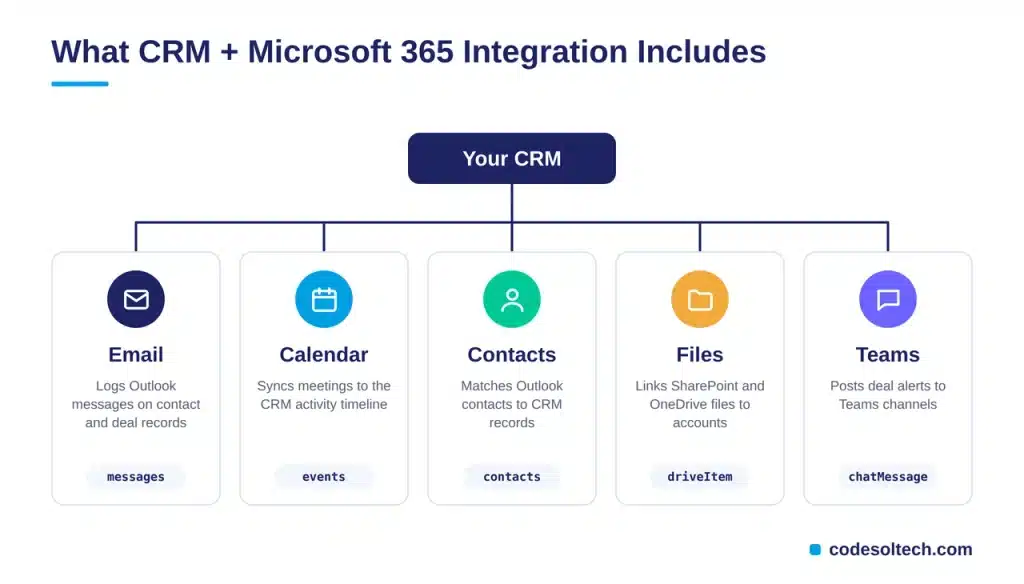
A complete integration synchronizes 5 data types between the CRM and Microsoft 365. Each type maps to a Microsoft Graph resource.
- Email: logs inbound and outbound Outlook messages against CRM contact and deal records.
- Calendar: syncs Outlook meetings to the CRM activity timeline.
- Contacts: matches Outlook personal contacts to CRM contact records.
- Files: links SharePoint and OneDrive documents to accounts and opportunities.
- Teams: posts deal alerts and record updates to Teams channels.
Salesforce’s State of Sales report (5th edition, 2023) found that reps spend 28% of their week selling. Deal management and data entry consume most of the remainder.
The same report found that 66% of reps feel overwhelmed by the number of tools. An integration moves CRM data into Outlook and Teams, so reps open fewer apps per deal.
For the data-sync fundamentals behind this setup, read our guide to CRM integration architecture.
Why Does EWS Retirement Matter for CRM Integration in 2027
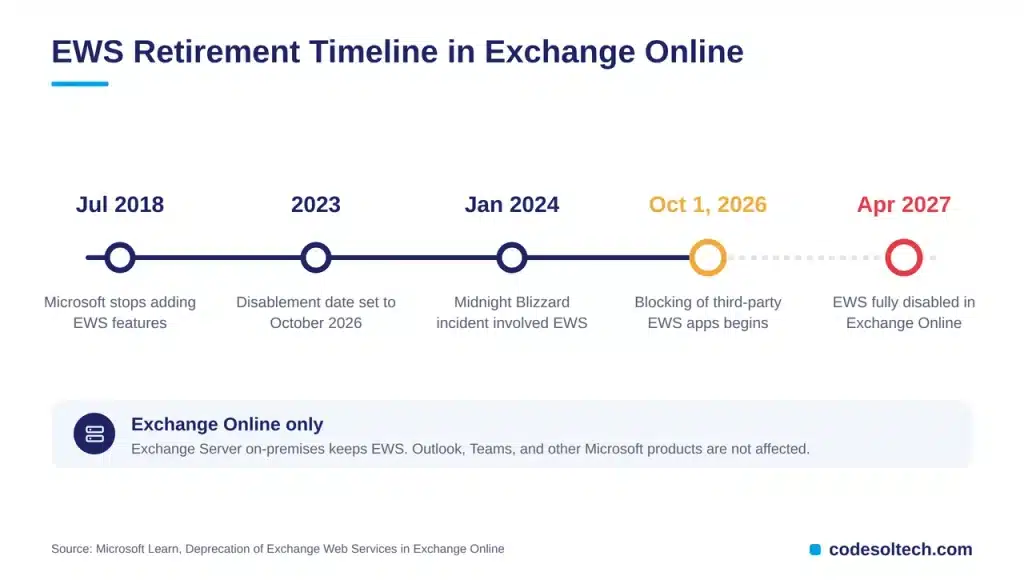
EWS retirement breaks every CRM connector that still calls Exchange Web Services. Microsoft began blocking EWS requests from non-Microsoft apps to Exchange Online on October 1, 2026.
Microsoft set the date in 2023 and widened the scope after the January 2024 Midnight Blizzard security incident, which involved EWS. The change applies to Exchange Online only, and Exchange Server on-premises keeps EWS.
Which CRM Connectors Are at Risk
Any integration that reads or writes Outlook data through EWS carries the risk. Microsoft also removes EWS dependencies from its own products, including Dynamics 365.
- Legacy CRM email sync modules built on the EWS Managed API
- Custom scripts that call EWS SOAP endpoints directly
- Middleware that polls mailboxes through EWS
- Workflows that depend on public folders or group mailbox folders
Microsoft lists 13 EWS-to-Graph parity gaps with Q3 and Q4 CY2026 delivery targets. Three capabilities never reach Graph: generic public folder CRUD, generic Microsoft 365 Group mailbox CRUD, and Discovery Mailbox access.
How Do You Detect EWS Usage in Your Tenant
Microsoft provides 3 detection tools: EWS Usage Reports in the Microsoft 365 admin center, the EWS Usage Reporting tool, and the EWS Analyzer for source code. Run the usage report first to list every app that calls EWS.
Microsoft Graph: The Connection Layer for 2027
Microsoft Graph exposes mail, calendar, contacts, files, and Teams through one endpoint, graph.microsoft.com. Microsoft Entra ID issues OAuth 2.0 access tokens for every call.
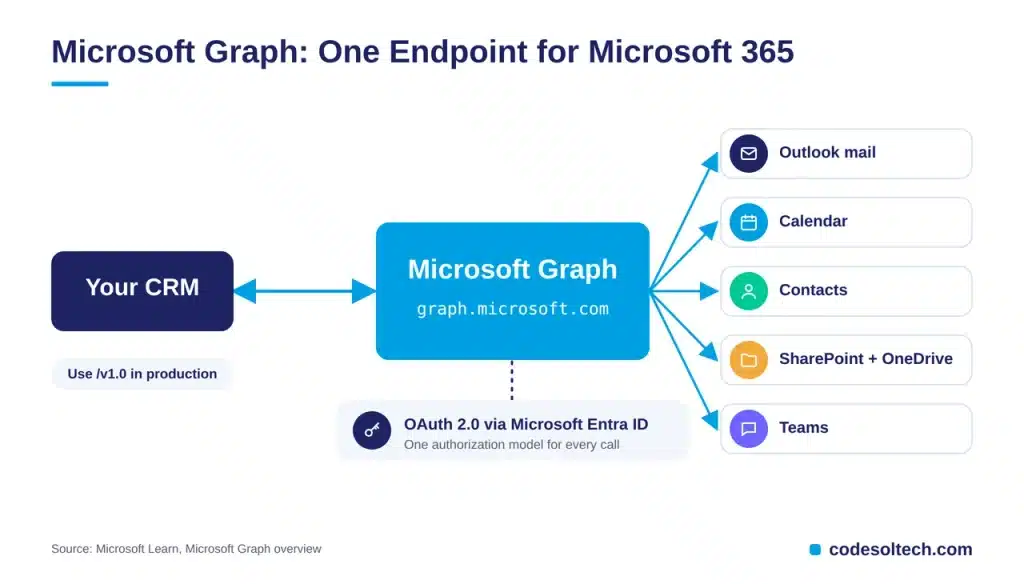
Mail lives at /v1.0/me/messages and calendar at /v1.0/me/calendar. The /beta endpoint carries preview APIs that are subject to change, so production CRM builds target /v1.0.
Delegated vs Application Permissions
Delegated permissions act as the signed-in user and reach only that user’s mailbox. Application permissions act as the app itself and reach every mailbox in the tenant unless an administrator restricts the scope.
Use delegated permissions for rep-level email logging. Reserve application permissions for back-office jobs, and request read-only scopes first.
3 CRM and Microsoft 365 Integration Methods Compared
Every integration falls into one of 3 methods. The method decides who maintains the Graph calls.
| Method | Best for | Who maintains it | Control level |
|---|---|---|---|
| Native CRM connector | Email and calendar sync with no code | CRM vendor | Limited to vendor-supported fields |
| Low-code (Power Automate) | Rule-based alerts, such as new-deal posts in Teams | Your admin | Limited to available connector actions |
| Custom Graph API build | Custom CRMs, complex field mapping, multi-tenant products | Your developers or partner | Full control over mapping, retries, and permission scope |
Field Mapping Rules for Any Method
Field mapping decides sync quality more than the connector choice. Three rules keep the data clean across all 3 methods.
- Match contacts on primary email address, never on display name.
- Define one system of record for each field, and write to the other system only from that source.
- Log every failed write with the Graph error code for replay.
Custom CRM systems use the third method. CodeSol builds custom CRM development projects with Graph-based Microsoft 365 sync from the first release.
How Do Graph Webhooks Keep CRM Records Current
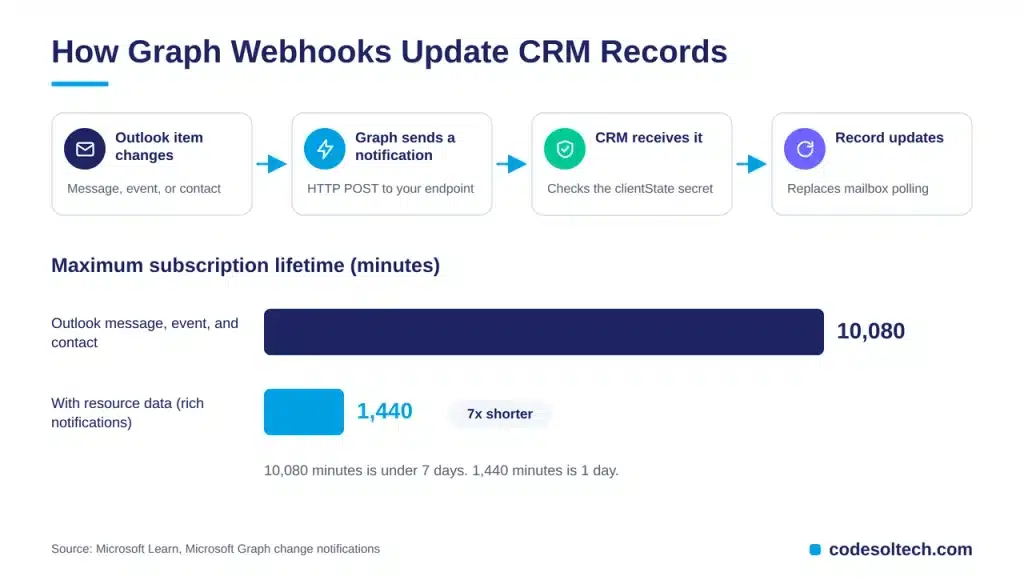
Graph change notifications send an HTTP POST to a CRM endpoint whenever an Outlook message, event, or contact changes. The CRM updates the matching record on receipt, which replaces scheduled mailbox polling.
Subscription Lifetimes
Microsoft sets a maximum lifetime of 10,080 minutes for Outlook message, event, and contact subscriptions, which is under 7 days. Subscriptions that include resource data expire after 1,440 minutes, which is 1 day.
Graph sends 3 lifecycle notification types: reauthorizationRequired, subscriptionRemoved, and missed. A production sync service handles all 3 and renews every subscription before expiry.
Delta Queries as the Recovery Path
Delta queries return only the items that changed since the last sync token. The CRM runs a delta query after a missed notification to restore a consistent record state.
Throttling Limits That Shape CRM Sync Design
Microsoft Graph limits Outlook traffic to 10,000 API requests per 10 minutes and 4 concurrent requests for each app and mailbox pair. Uploads cap at 150 MB per 5 minutes.
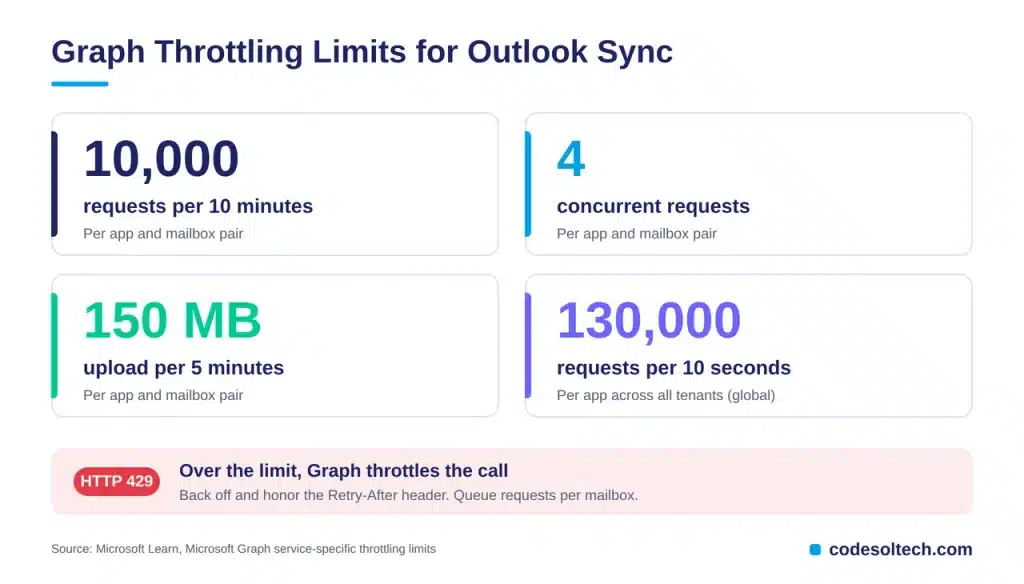
A global limit of 130,000 requests per 10 seconds applies to each app across all tenants. Throttled calls return HTTP status 429.
- Select only mapped fields with the $select parameter.
- Cap each mailbox at 4 simultaneous calls.
- Back off on every 429 response and honor the Retry-After header.
- Run webhooks first and delta queries second to cut read volume.
Teams and SharePoint Integration Patterns
Teams and SharePoint extend the CRM beyond email and calendar. Both services connect through the same Graph endpoint and the same Entra ID app registration.
Teams Deal Alerts
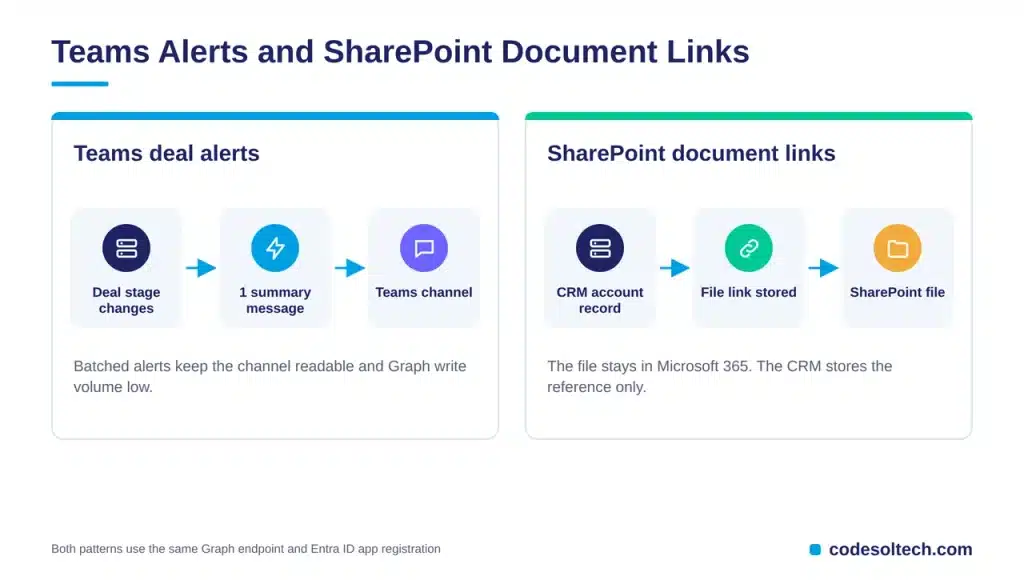
A CRM posts a message to a Teams channel when a deal changes stage. The message carries the deal name, owner, and value, so the sales team reacts without opening the CRM.
The CRM batches alerts into 1 summary message per stage change. This keeps the channel readable and keeps Graph write volume low.
SharePoint Document Linking
A CRM stores a link to each SharePoint or OneDrive file on the account record. The file stays in Microsoft 365, and the CRM stores only the reference and the permission context.
This pattern keeps 1 source of truth for every proposal, contract, and quote. Our guide to CRM document management covers the folder structure.
Security Checks Before Go-Live
Microsoft tightened EWS because of a nation-state attack, so security review is part of the integration scope. Each check below closes a specific exposure.
- Token storage: encrypt refresh tokens at rest and rotate client secrets on a fixed schedule.
- Admin consent: record which administrator approved each permission and when.
- Scope audit: list every granted scope per app and remove unused ones each quarter.
- Webhook validation: compare the clientState secret on every notification request.
These 4 checks keep the integration inside least-privilege boundaries after launch.
6-Step Migration Checklist for 2027
This sequence moves a CRM from EWS to Graph without a sync gap.
- Run the EWS Usage Report and list every app that calls EWS.
- Map each EWS operation to its Graph equivalent with Microsoft’s EWS-to-Graph mapping.
- Register a Microsoft Entra ID app with least-privilege scopes.
- Replace polling with change notification subscriptions and lifecycle handlers.
- Load-test the sync service against the 10,000-requests-per-10-minutes mailbox limit.
- Cut over each connector and decommission the EWS code path.
5 Common Integration Failures and Fixes
Five failure patterns cause most broken Microsoft 365 syncs. Each has a direct fix.
- Expired subscriptions: notifications stop after 7 days. Schedule renewals before the expiry timestamp.
- 429 throttling storms: parallel bulk reads exceed the 4-request limit. Queue requests per mailbox.
- Over-scoped permissions: application permissions expose every mailbox. Restrict the scope or switch to delegated access.
- Duplicate contacts: unmatched email addresses create second records. Deduplicate on email before every write.
- Folder gaps: Graph offers no generic public folder CRUD. Move that data to SharePoint or a shared mailbox.
Clean data prevents the duplicate-contact failure. Our guides on CRM data quality and CRM data migration cover the cleanup steps.
Final Words
CRM and Microsoft 365 integration now depends on Microsoft Graph. EWS blocking began October 1, 2026, and the full shutdown arrives in April 2027.
Audit EWS usage, map each call to Graph, and run webhooks with lifecycle handling. Teams that migrate now keep email, calendar, and file data flowing without a sync gap.
Ready to move your CRM off EWS? Book a free CRM integration audit with CodeSolTech and get a Graph migration plan for your Microsoft 365 tenant.
You May Like
CRM and QuickBooks Integration: Step-by-Step Guide
AI CRM Automation Workflows: 7 Types, Setup & Metrics
Thanks for Reading, Stay connected with Us 🙂