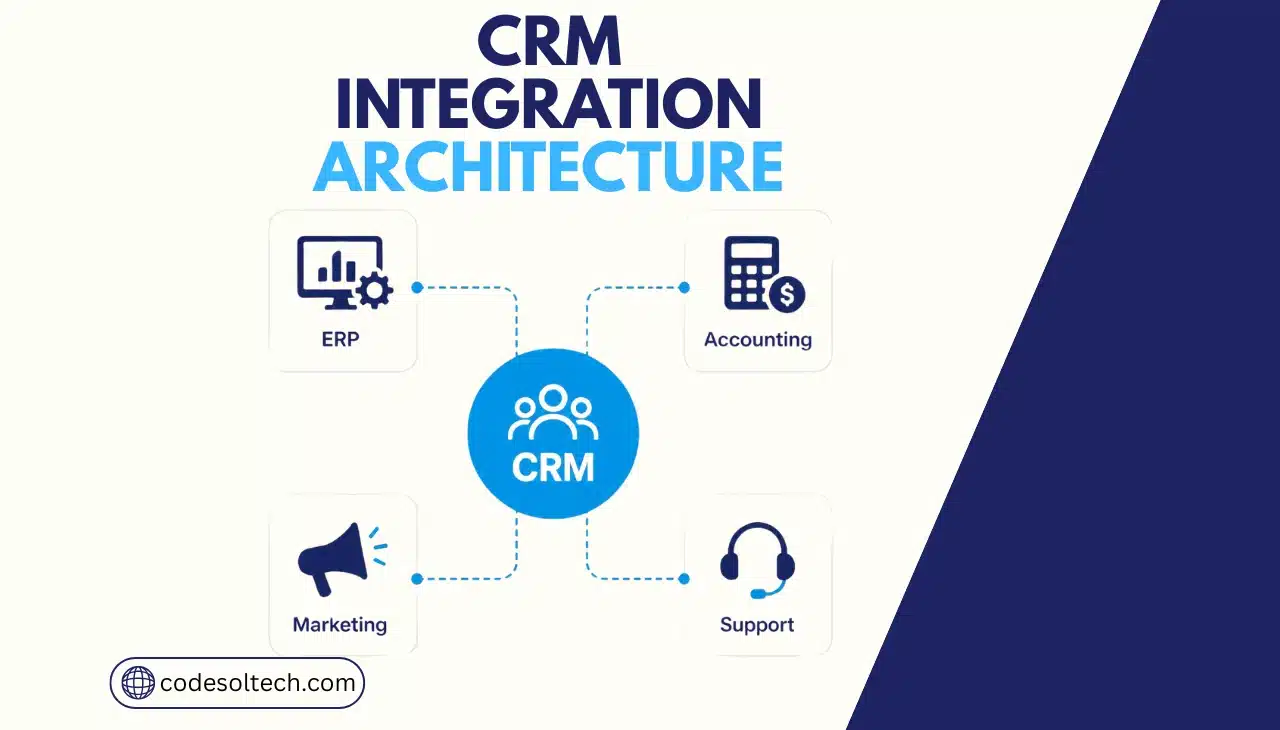
CRM integration architecture is the technical framework that connects a CRM system to ERP, accounting, marketing, and support platforms so customer, financial, and operational data stay synchronized in real time. It relies on APIs, middleware, and event triggers to move data between systems without manual re-entry.
The architecture determines how fast, accurate, and reliable that data flow is.
Four system categories connect to a CRM in a typical mid-market or enterprise deployment:
- ERP systems — inventory, production, order fulfillment, and supply chain data
- Accounting software — invoicing, payment status, tax records, and credit terms
- Marketing automation platforms — campaign data, lead scoring, and email engagement
- Support and helpdesk systems — tickets, SLAs, and customer service history
Each connection type carries its own architecture pattern, its own data model, and its own failure risk. Treating all four as one generic “integration” produces brittle systems that break during scale.
CodeSol Technologies designs CRM integration architecture around the specific data behavior of each connected system, not a single template applied everywhere.
Why CRM Integration Architecture Fails Without a Deliberate Design
Gartner reports that poor data quality costs organizations an average of $12.9 million per year in wasted resources and missed opportunities.
Disconnected systems are the primary source of that cost. When a CRM, ERP, and accounting platform each hold a different version of the same customer record, every department acts on outdated information.
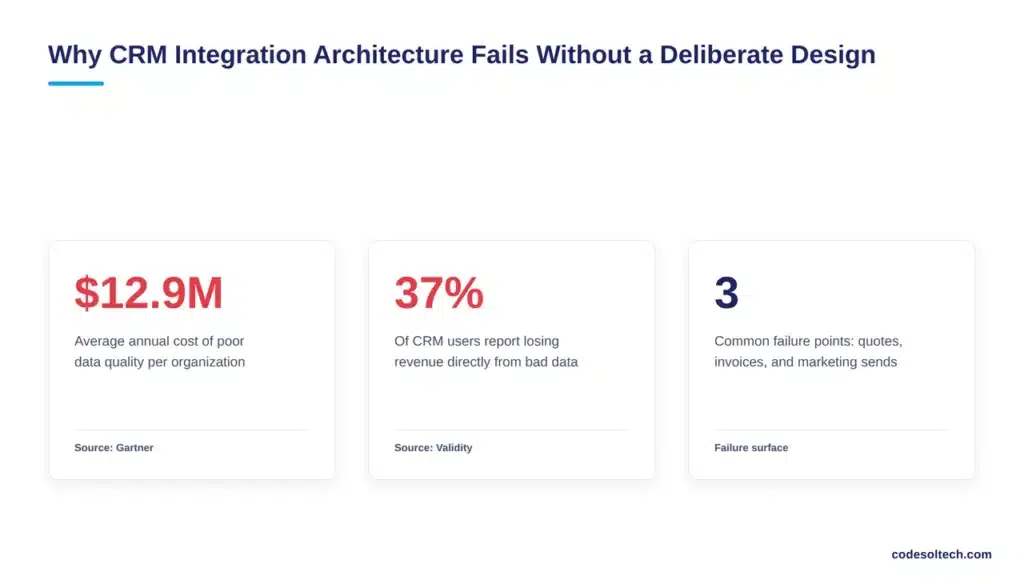
Validity’s State of CRM Data Management report found that 37% of CRM users lose revenue directly due to poor data quality. The report also found that a majority of CRM users believe less than half of their organization’s CRM data is accurate and complete.
Unmanaged integration architecture is a direct contributor to this decay, since every unmapped field and every unmonitored sync job introduces a new point of drift between systems.
Three consequences follow a poorly designed integration architecture:
- Sales quotes reference stock levels that no longer match the warehouse
- Finance approves invoices for accounts that support has already flagged as disputed
- Marketing emails leads who converted to customers three weeks earlier
A deliberate architecture prevents these failures by defining which system owns each field and how conflicts resolve before they reach a user.
Core Components of a CRM Integration Architecture
Six components form the structure of any CRM integration architecture, regardless of which systems it connects:
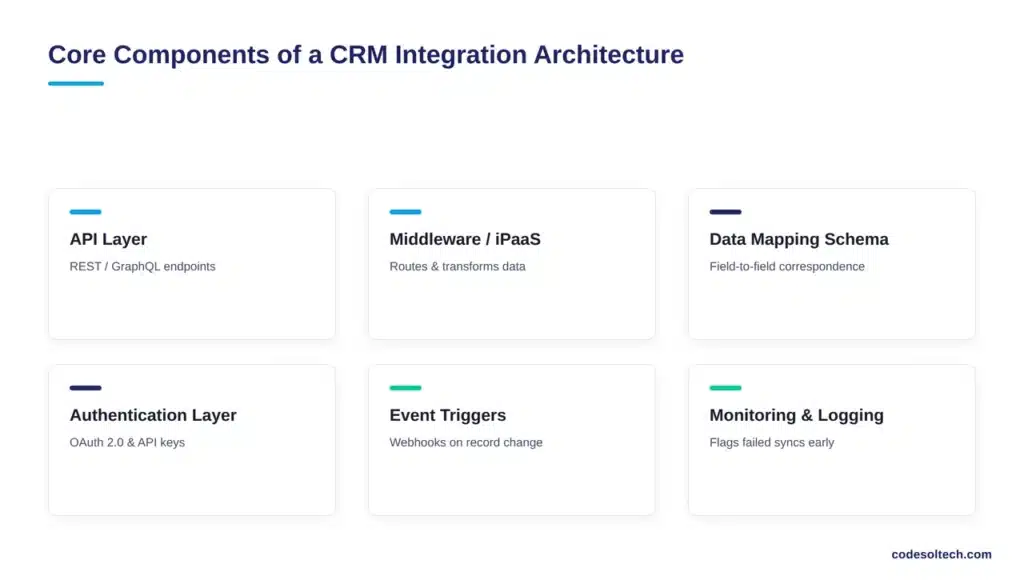
- API layer — REST or GraphQL endpoints that expose CRM and connected-system data
- Middleware or iPaaS platform — the orchestration layer that routes, transforms, and queues data between systems
- Data mapping schema — the field-to-field correspondence between CRM objects and external records
- Authentication layer — OAuth 2.0 tokens or API keys that authorize each system-to-system connection
- Event triggers and webhooks — the rules that fire a sync when a record changes state
- Monitoring and logging — the layer that flags failed syncs, duplicate records, and latency spikes before they reach production data
Enterprises that build integrations without a monitoring layer discover data errors only after a customer or auditor reports them.
Workflow automation built on top of this architecture depends entirely on the reliability of these six components, since automated actions execute on whatever data the sync layer delivers.
Integration Architecture Patterns: Real-Time, Batch, and Event-Driven
Four architecture patterns cover nearly every CRM integration scenario. Each pattern fits a different data urgency and system capability.
| Pattern | How It Works | Best Fit | Main Constraint |
|---|---|---|---|
| Real-time API | CRM and target system exchange data instantly through direct API calls | Order creation, credit checks, inventory checks | API rate limits under high volume |
| Event-driven (webhooks) | A system change triggers a webhook that pushes data to the connected platform | Payment status updates, ticket creation, lead capture | Requires reliable retry logic on failed deliveries |
| Batch synchronization | Data transfers on a fixed schedule, such as nightly or hourly | Large datasets, legacy ERP systems, reporting exports | Data can be hours out of date between runs |
| Message queue | Systems publish and consume data through a queue, decoupling sender and receiver | High-volume, multi-system environments | Higher setup complexity than direct API calls |
Most production architectures combine two or three patterns. Order creation typically runs on real-time API calls, while historical financial reconciliation runs on nightly batch jobs.
Selecting one pattern for an entire integration project produces either unnecessary API load or unacceptable data latency, depending on which pattern is forced onto the wrong use case.
Connecting CRM to ERP Systems
CRM-to-ERP integration synchronizes accounts, sales orders, inventory levels, and fulfillment status. The CRM initiates the transaction; the ERP executes it.
A closed opportunity in the CRM triggers a sales order in the ERP, which then returns an order number, a delivery date, and a fulfillment status back to the CRM record.
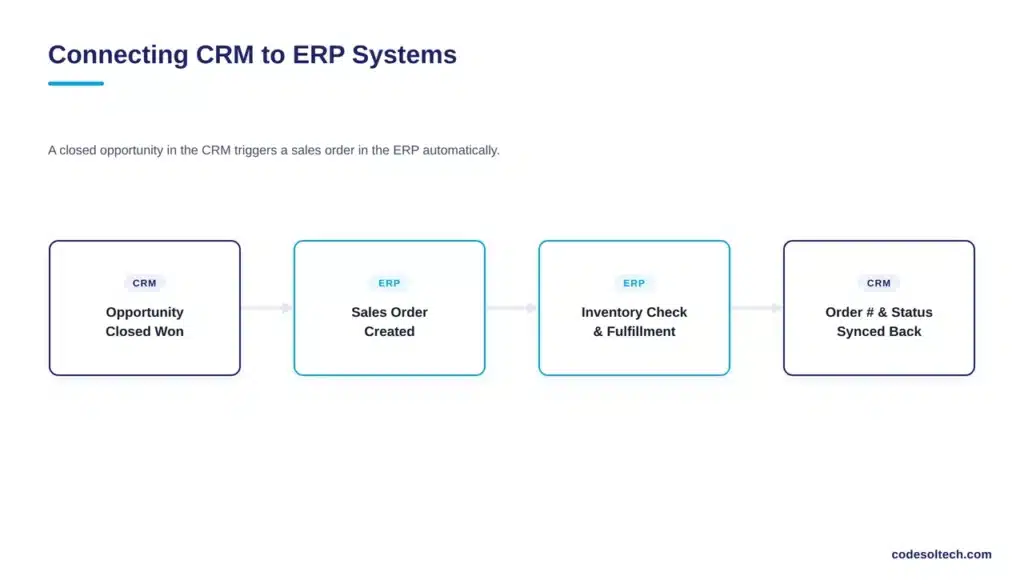
Field ownership must be explicit in this connection. The CRM owns opportunity and pipeline data. The ERP owns inventory, pricing rules, and production schedules.
Syncing every field bidirectionally without ownership rules causes overwrite conflicts, where a sales rep’s manual price override in the CRM gets silently replaced by the ERP’s standard price list during the next sync cycle.
CodeSol Technologies builds ERP integration architecture with field-level ownership rules defined before the first sync job runs, which prevents this class of conflict from reaching production data.
Connecting CRM to Accounting Software
CRM-to-accounting integration synchronizes invoices, payment status, credit limits, and outstanding balances. This connection protects revenue directly: a sales rep who quotes a customer with an unresolved billing dispute risks closing a deal the finance team will not fulfill.
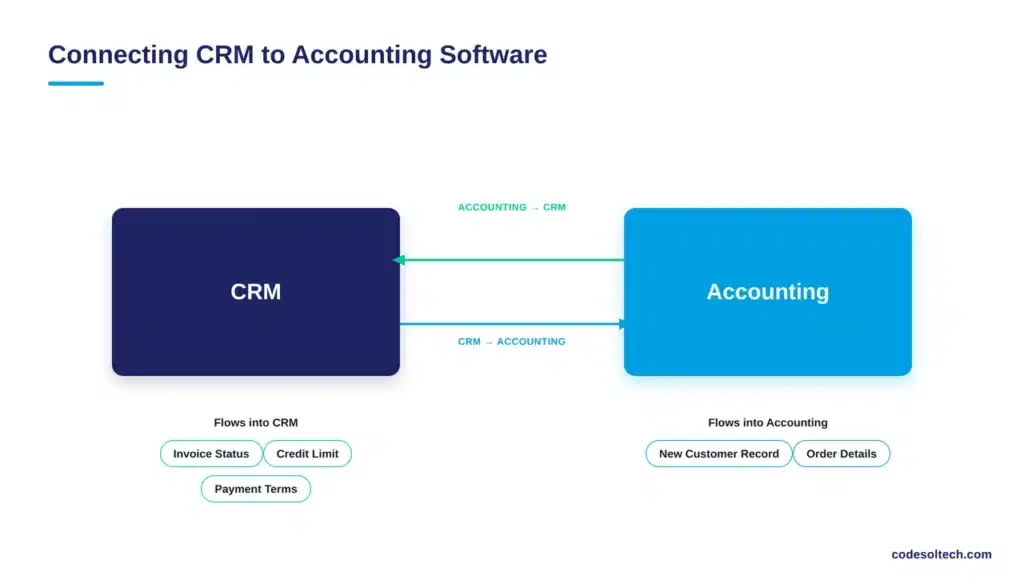
The integration typically flows in one primary direction: accounting status flows into the CRM, while the CRM pushes new customer and order records into accounting.
Real-time or near-real-time sync is standard here, since billing holds and credit limit changes affect active sales conversations within hours, not days.
Common synchronized fields include invoice status, payment terms, credit limit, outstanding balance, and tax jurisdiction.
Errors in this connection produce compliance risk, not just operational friction, since invoicing and tax records fall under financial audit requirements.
Connecting CRM to Marketing Automation Platforms
CRM-to-marketing integration synchronizes lead records, campaign engagement, and lifecycle stage. Marketing automation platforms generate and score leads; the CRM converts qualified leads into pipeline opportunities.
Without integration, marketing continues emailing contacts who already became paying customers, which damages both deliverability and customer experience.
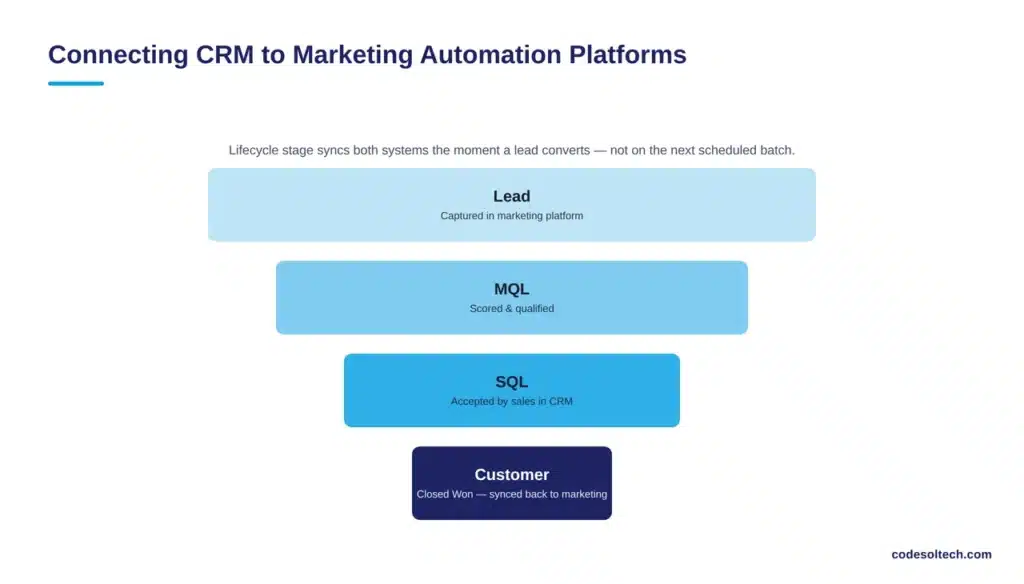
Lifecycle stage is the critical shared field in this connection. A lead’s stage must update in both systems the moment a sales rep converts it, or marketing automation keeps nurturing a contact that sales has already closed.
Event-driven architecture, triggered by CRM status changes, handles this synchronization more reliably than scheduled batch jobs, since lifecycle transitions happen unpredictably throughout the day.
Connecting CRM to Customer Support Systems
CRM-to-support integration synchronizes tickets, SLA status, and service history alongside the customer’s sales and billing record.
A support agent handling an escalation needs visibility into the account’s contract terms, renewal date, and payment status without switching to a separate system.
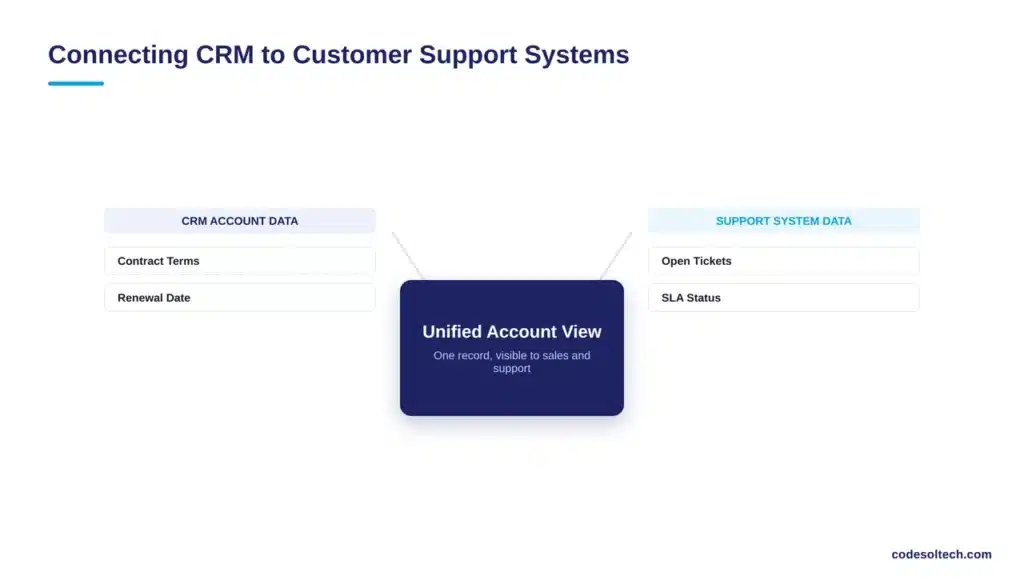
This connection reduces resolution time by eliminating cross-department lookups. It also feeds account health data back into the CRM, so sales and account management teams see open tickets and SLA breaches before a renewal conversation, not after a customer churns.
How Long Does CRM Integration Architecture Take to Implement?
A single-system integration, such as connecting a CRM to one accounting platform through a native connector, takes 4 to 8 weeks.
A multi-system architecture connecting ERP, accounting, marketing, and support simultaneously takes 3 to 9 months, depending on the number of custom field mappings and legacy system constraints.
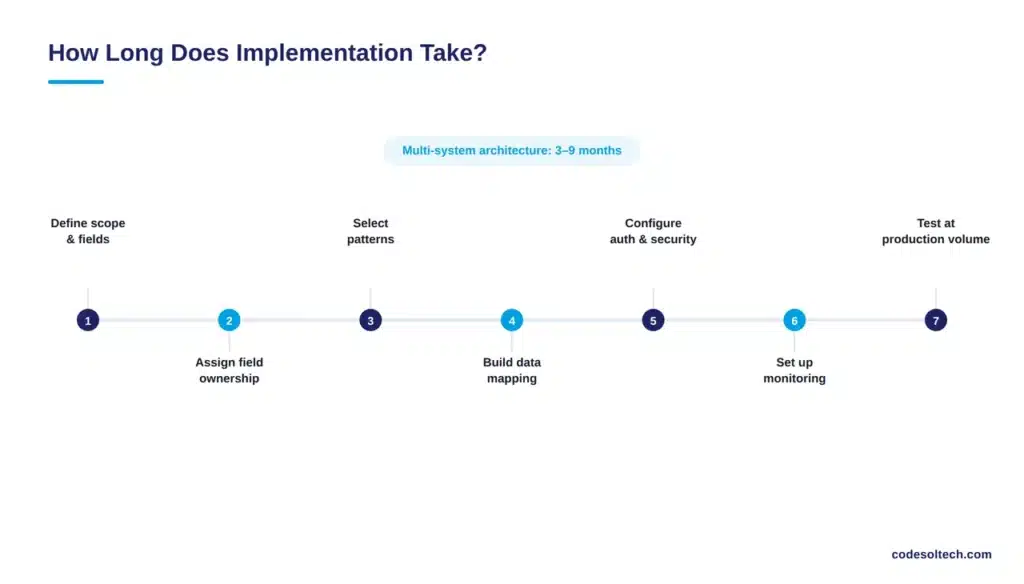
Implementation follows seven stages:
- Define which systems connect and which fields synchronize
- Assign field-level ownership across all connected systems
- Select the architecture pattern for each connection (real-time, batch, or event-driven)
- Build the data mapping schema and transformation rules
- Configure authentication and security controls
- Implement monitoring and error alerting
- Test with production-volume data before go-live
Skipping stage seven is the most common cause of post-launch failures. Integrations that pass testing with sample datasets of 100 records frequently fail under production volumes of 50,000 records, where API rate limits and duplicate-detection logic behave differently.
What Are the Risks of Poor CRM Integration Architecture?
Four risks account for most CRM integration failures:
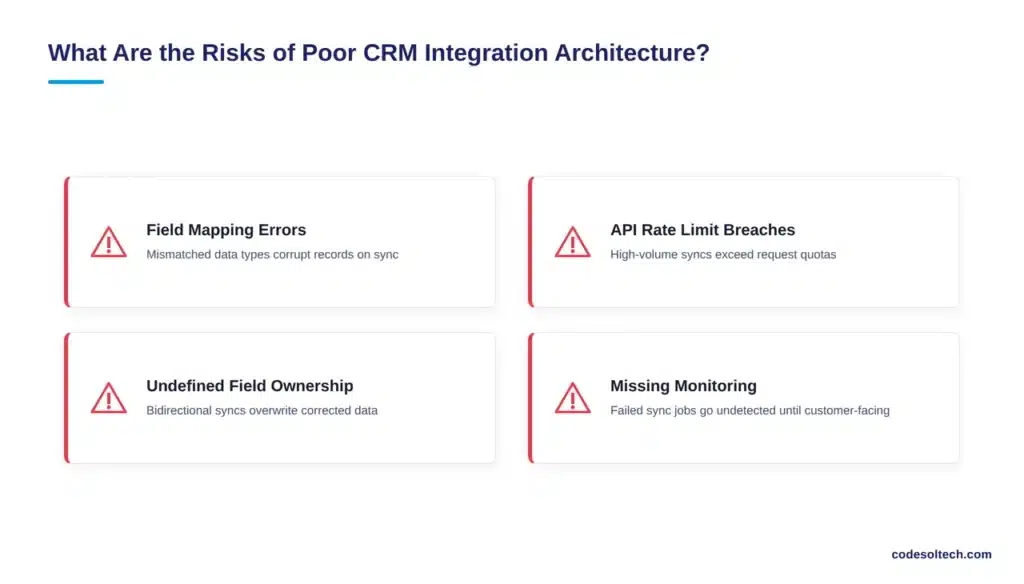
- Field mapping errors — mismatched data types or picklist values that corrupt records on sync
- API rate limit breaches — high-volume real-time syncs that exceed the connected system’s request quota
- Undefined field ownership — bidirectional syncs that overwrite manually corrected data
- Missing monitoring — failed sync jobs that go undetected until a customer-facing error surfaces
Each risk is preventable at the architecture stage. None of them are preventable after the integration reaches production without a rebuild.
Businesses that treat architecture design as a fixed cost rather than an ongoing discipline experience the highest rate of post-launch failure, since connected systems change their APIs, data models, and rate limits independently of the CRM.
FAQs
What is CRM integration architecture?
CRM integration architecture is the technical framework of APIs, middleware, data mapping, and monitoring that connects a CRM system to ERP, accounting, marketing, and support platforms for synchronized data.
Does CRM integration architecture require custom development?
Native connectors handle standard field synchronization between major platforms. Custom development becomes necessary when field mapping, business logic, or data volume exceeds what a native connector supports.
What is the difference between real-time and batch integration?
Real-time integration synchronizes data instantly through direct API calls. Batch integration synchronizes data on a fixed schedule, such as nightly, which introduces latency but reduces API load.
Which system should own customer data in a CRM integration?
The CRM typically owns relationship and pipeline data. The ERP or accounting system typically owns financial and inventory data. Field-level ownership rules, not a single system-wide owner, prevent sync conflicts.
Final Words
CRM integration architecture is not a one-time setup. It is a system that requires ownership rules, monitoring, and pattern selection matched to each connected platform.
Businesses that design this architecture deliberately avoid the $12.9 million average cost of poor data quality that Gartner attributes to disconnected systems.
Build a CRM Integration Architecture That Doesn’t Break at Scale
CodeSol Technologies designs and implements CRM integration architecture connecting ERP, accounting, marketing, and support systems with field-level ownership rules and monitoring built in from day one.
![AI Customer Segmentation in CRM [Proven Data + 6-Step Setup]](https://www.codesoltech.com/wp-content/uploads/2026/09/AI-Customer-Segmentation.webp)
![AI Meeting Notes & Call Summaries in CRM [6-Step Plan]](https://www.codesoltech.com/wp-content/uploads/2026/09/AI-Meeting-Notes-.webp)