It connects a Shopify store to a CRM system. Customer profiles, orders, and abandoned checkouts sync automatically. The CRM becomes the single record of every buyer. Sales, marketing, and support teams then act on the same live data without manual exports.
Think of Shopify as your cash register and the CRM as your memory. Shopify records every sale. The CRM remembers who bought, what they bought, and when to contact them next.
Without a connection, your team copies data between two systems by hand. Copy errors, stale records, and missed follow-ups follow.
This guide covers what syncs, which method fits, how Shopify API limits shape the build, and how to deploy in 6 steps.
Every figure below links to a primary source: Shopify developer documentation, the Baymard Institute, or Salesforce research.
What Does a CRM + Shopify Integration Sync
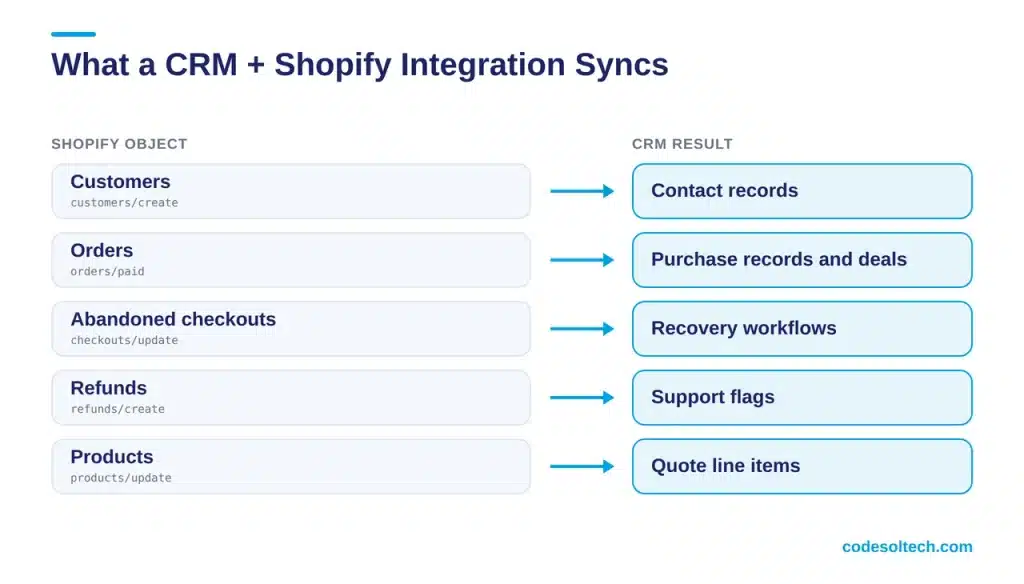
A complete integration syncs 5 Shopify objects into CRM records. Each object maps to a CRM entity and a Shopify webhook topic.
- Customers:
customers/createandcustomers/updatepopulate CRM contacts. - Orders:
orders/createandorders/paidcreate purchase records or deals. - Abandoned checkouts:
checkouts/createandcheckouts/updatefeed recovery workflows. - Refunds:
refunds/createflags at-risk accounts for support. - Products:
products/updatekeeps quote and line-item data current.
Customer Records
Shopify assigns every customer a numeric ID. The CRM stores that ID as an external key and uses email as the secondary match field.
This pairing prevents duplicate contacts when a buyer checks out as a guest first and registers later.
Orders and Revenue Data
Each order carries line items, discounts, a shipping address, and a payment status. The CRM attaches this payload to the contact timeline.
Sales staff then read lifetime value and last purchase date without opening Shopify.
Abandoned Checkouts
A checkout event that includes an email address becomes a CRM trigger. The CRM starts a recovery sequence by email or SMS.
The sequence stops when orders/paid arrives for the same email.
Why Does a Shopify Store Need a CRM
A Shopify store needs a CRM because Shopify tracks transactions, not relationships. The CRM adds segmentation, follow-up tasks, and cross-channel history on top of order data.
Four published figures show the gap:
- The Baymard Institute averages a 70.22% cart abandonment rate across 50 studies.
- Baymard also reports that 18% of US shoppers abandoned a checkout because the site forced account creation.
- Salesforce reports that 79% of customers expect consistent interactions across departments.
- The same Salesforce report finds that 55% of customers feel they talk to separate departments, not one company.
Shoppers leave, and stores lack a record that brings them back. A CRM fed by Shopify closes that gap with one profile per buyer.
What Does the CRM Do With Shopify Data
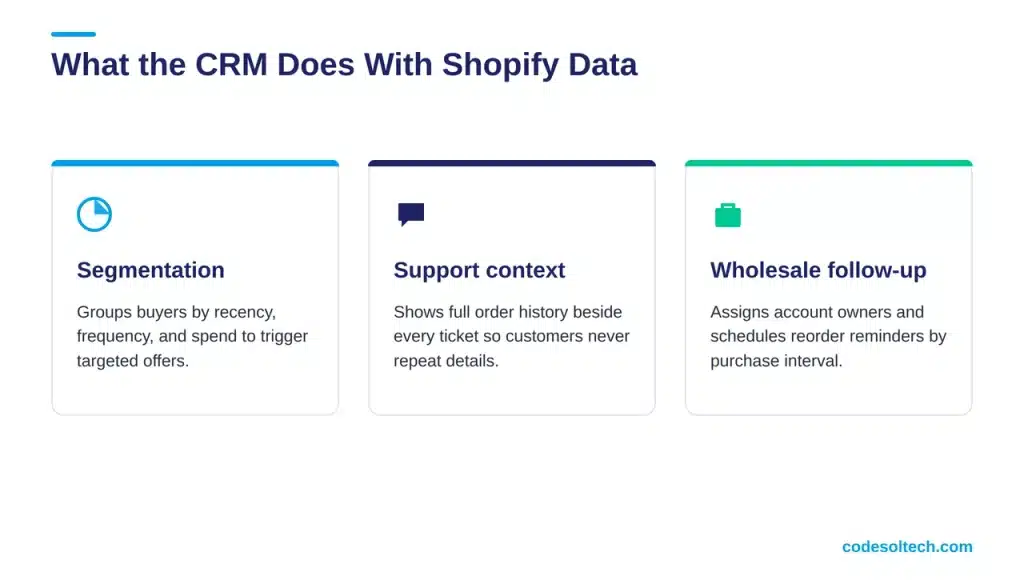
The CRM converts raw Shopify events into actions. Segmentation, task creation, and support context all start from synced order data.
Segmentation by Purchase Behavior
The CRM groups buyers by recency, frequency, and spend. A segment such as “3 or more orders in 90 days” triggers a loyalty offer.
Shopify alone filters customers, but it does not assign follow-up owners or track outreach history.
Support Context for Every Ticket
A support agent opens a ticket and sees the full order history beside it. The agent confirms the refund status without asking the customer to repeat details.
This directly addresses the repeat-yourself problem that 56% of customers report in the Salesforce research.
Sales Follow-Up for B2B and Wholesale Orders
Wholesale buyers place large, repeat orders. The CRM assigns each account an owner and schedules reorder reminders based on purchase intervals.
Three Methods to Connect a CRM to Shopify
Three methods connect a CRM to Shopify: a native connector, a middleware platform, and a custom API build. Data volume, customization depth, and maintenance ownership decide the choice.
| Method | How It Works | Control | Maintained By | Best For |
|---|---|---|---|---|
| Native connector | Prebuilt app from the CRM vendor | Standard fields only | CRM vendor | Simple sync needs |
| Middleware (iPaaS) | Zapier, Make, or a similar platform sits between both systems | Field mapping and branching | Your team | 2 to 3 connected tools |
| Custom API build | Developers code against the Admin GraphQL API and webhooks | Full control of objects and logic | Developer or agency | High-volume, multi-system stores |
Native Connector
A native connector installs from the Shopify App Store or the CRM marketplace. It maps standard fields in minutes and receives vendor updates automatically.
It fails when your store uses custom metafields or order tags the connector ignores.
Middleware Platform
Middleware platforms route Shopify events to the CRM through visual workflows. They handle conditional logic, such as tagging VIP buyers above a spend threshold.
Task-based pricing grows with order volume, so cost scales with your store.
Custom API Build
A custom build subscribes to webhooks and writes to the CRM through its API. It supports multi-store setups, ERP links, and custom objects.
Our custom CRM development and ecommerce development teams build this architecture for stores that outgrow connectors.
How Do Shopify API Limits Affect CRM Sync
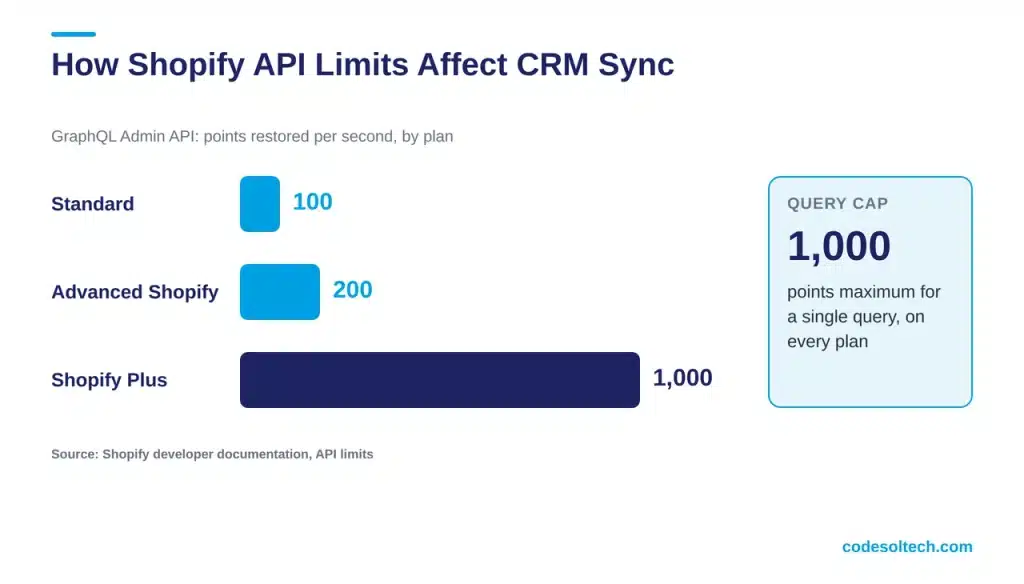
Shopify limits API access by calculated query cost, not request count. Standard plans restore 100 points per second, Advanced plans 200, and Shopify Plus 1,000.
A single query never exceeds 1,000 points, regardless of plan. A sync job that ignores cost receives throttling errors and drops records.
GraphQL Replaces REST
Shopify classified the REST Admin API as legacy on October 1, 2024. Since April 1, 2025, new public apps must use the GraphQL Admin API exclusively.
Every new CRM connector therefore starts on GraphQL.
Backfill With Bulk Operations
Run the historical order import as a bulk operation, which avoids single-query limits. Run live changes through webhooks.
This split keeps the live sync inside the point budget.
How Do Webhooks Keep the CRM in Real Time
Webhooks push each Shopify event to your CRM endpoint as the event occurs. This removes polling and cuts API cost.
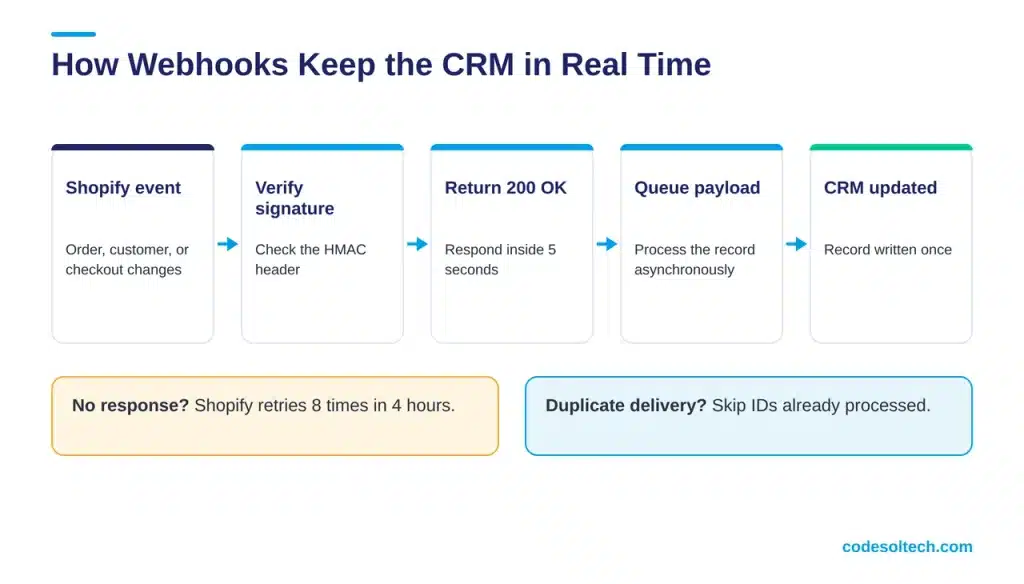
Shopify documents 3 delivery rules for HTTPS endpoints: signature verification, a 5-second response window, and duplicate handling.
Verify the Signature
Each HTTPS delivery carries a base64 HMAC in the X-Shopify-Hmac-SHA256 header. Shopify generates it from your app client secret and the raw request body.
Reject any delivery where the signatures differ.
Respond Inside 5 Seconds
Shopify waits 5 seconds for a response. With no response, it retries 8 times over the next 4 hours.
Queue the payload, return 200 OK, and process the record asynchronously.
Deduplicate Deliveries
Shopify delivers the same webhook more than once after a timeout or retry. Store each delivery ID in the CRM sync log.
Skip any ID already processed. This prevents duplicate orders in the CRM.
Data Mapping and Privacy Compliance
Data mapping defines which Shopify field fills which CRM field. A mapping sheet written before development prevents rework after launch.
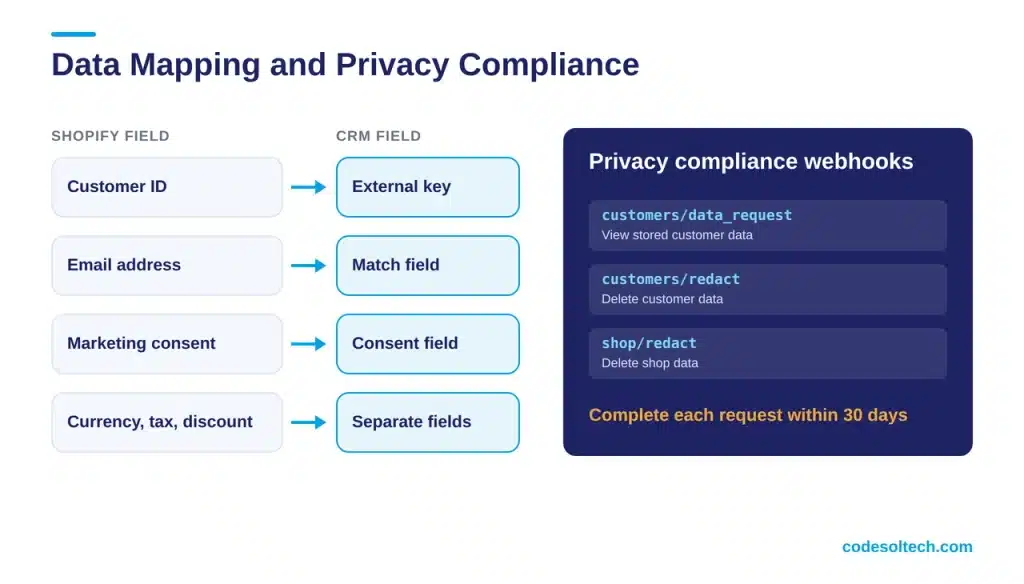
- Store the Shopify customer ID as the external key.
- Lowercase and trim email addresses before matching.
- Sync marketing consent status as its own CRM field.
- Store order currency, tax, and discount values in separate fields.
Shopify requires every App Store app to subscribe to 3 compliance webhooks: customers/data_request, customers/redact, and shop/redact. Apps complete each request within 30 days.
Apply the same 30-day standard to CRM records in custom integrations. GDPR and CPRA deletion rules cover CRM data as well as Shopify data.
Common Integration Failures and Their Fixes
Four failure patterns cause most broken CRM + Shopify syncs. Each has a direct fix at the architecture level.
- Duplicate contacts: Match on the Shopify customer ID first and email second.
- Missing orders: Add a nightly reconciliation job that compares Shopify order counts with CRM records.
- Throttled sync jobs: Read the query cost in each GraphQL response and pace requests to the restore rate.
- Stale tokens: Monitor Admin API access token validity and alert on 401 responses.
Why Reconciliation Jobs Matter
Shopify stops retrying a failed webhook after 8 attempts. A nightly reconciliation job catches the events that exhaust their retries.
Shopify itself recommends building a reconciliation job when you cannot afford to miss webhooks.
Test Before Launch
Place test orders for each scenario: guest checkout, registered checkout, partial refund, full refund, and cancellation. Confirm each event lands in the CRM once.
Six Steps to Deploy CRM + Shopify Integration
- Audit your Shopify fields, metafields, and tags.
- Choose the method: native, middleware, or custom.
- Write the field mapping sheet.
- Subscribe to webhooks and verify the HMAC signature.
- Backfill historical orders with a bulk operation.
- Test 20 sample orders, including refunds and guest checkouts.
Final Words
CRM + Shopify integration turns order data into customer relationships. Webhooks deliver events in real time. GraphQL keeps sync jobs inside API limits.
A written mapping sheet keeps records clean. Reconciliation jobs catch missed events.
Choose the method that matches your order volume, then test every checkout scenario before launch.
Ready to connect your store?
You May Like
Related guides in this series: CRM + QuickBooks integration, CRM + Microsoft 365 integration, and CRM + Google Workspace integration.
Thanks for reading. Stay connected to get regular updates 🙂