![CRM and Stripe Integration Guide [5 Steps + 7 Webhooks]](https://www.codesoltech.com/wp-content/uploads/2026/10/CRM-and-Stripe-Integration.webp)
CRM and Stripe integration connects Stripe payment events to CRM contact and deal records through webhooks and the Stripe API. It syncs customers, invoices, subscriptions, and refunds automatically. The connection removes manual data entry and gives sales and support teams one verified view of every customer’s payment status.
CRM and Stripe Integration Defined
CRM and Stripe integration is a data connection that writes Stripe payment events to CRM contact, company, and deal records. Stripe holds the source of truth for money movement. The CRM holds the source of truth for customer relationships.
The connection runs in 2 directions. Stripe pushes events to the CRM through webhooks. The CRM pushes customer data to Stripe through the Stripe API, which creates Customer objects and attaches CRM record IDs.
Five Stripe entities drive the integration:
- Customer: the Stripe record that represents one buyer.
- Checkout Session: the hosted payment page that completes a purchase.
- Subscription: the recurring billing agreement tied to a Customer.
- Invoice: the billing document that Stripe generates for each billing cycle.
- Webhook endpoint: the HTTPS URL that receives Stripe events.
Related integrations follow the same architecture. See the guides on CRM and Shopify integration, CRM and WooCommerce integration, and CRM and QuickBooks integration.
Why Does a CRM Need Stripe Data
A CRM needs Stripe data because payment status decides the next sales, support, or renewal action. Without it, reps work from outdated records and ask customers questions the payment system already answers.
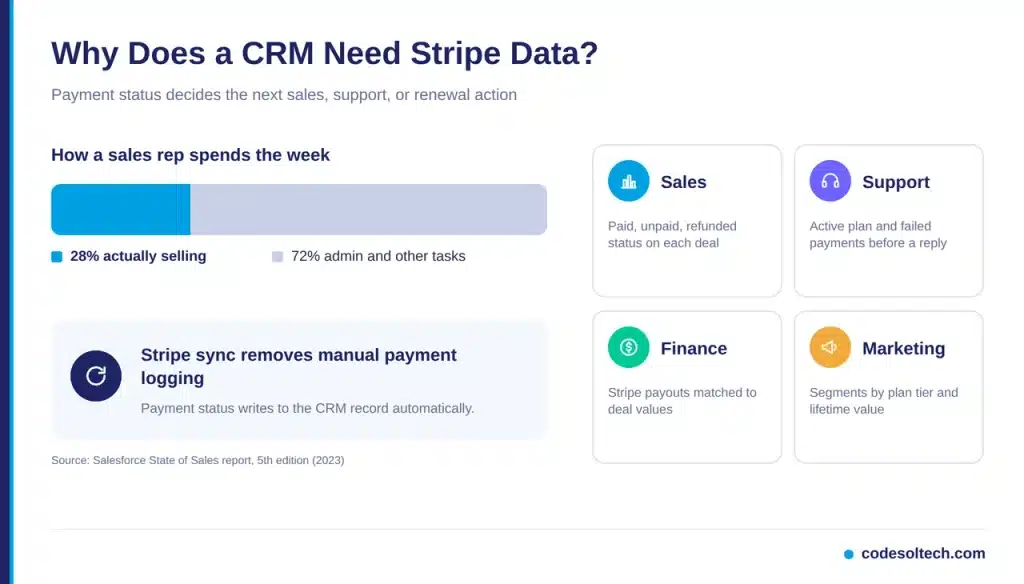
Salesforce’s State of Sales report (5th edition) found that reps spend 28% of their week selling. Deal management and data entry consume the majority of the remaining time. Manual payment logging adds directly to that load.
Which Teams Gain From Synced Payment Data?
Four teams gain immediate value from a Stripe-connected CRM:
- Sales: sees paid, unpaid, and refunded status on every deal.
- Support: sees the active plan, last invoice, and failed payments before replying.
- Finance: reconciles Stripe payouts against CRM deal values.
- Marketing: segments customers by plan tier and lifetime value.
Which Stripe Objects Map to CRM Records
Stripe Customers map to CRM contacts, Subscriptions map to deals or custom subscription records, and Invoices map to payment records linked to those deals. Each mapping needs a stable match key.
| Stripe Object | CRM Record | Direction | Match Key |
|---|---|---|---|
| Customer | Contact or company | Two-way | CRM ID in Stripe metadata |
| Checkout Session | Closed-won deal | Stripe to CRM | client_reference_id |
| Subscription | Subscription record | Stripe to CRM | Subscription ID (sub_) |
| Invoice | Payment record | Stripe to CRM | Invoice ID (in_) |
| Refund | Deal note and amount adjustment | Stripe to CRM | Charge ID (ch_) |
| Dispute | Support ticket | Stripe to CRM | Dispute ID (dp_) |
Store the CRM record ID in the Stripe Customer metadata field. Store the Stripe Customer ID (cus_) in a custom CRM field. Email matching creates duplicates when one buyer uses 2 addresses, and ID matching prevents that.
Which Custom CRM Fields Does Stripe Need?
Five custom CRM fields carry the payment context:
- Stripe Customer ID: the cus_ identifier used for every match.
- Plan name: the active Stripe Price or product.
- Subscription status: active, past_due, canceled, or trialing.
- Monthly recurring revenue: the normalized monthly value of the plan.
- Last payment date: the timestamp of the most recent paid invoice.
These fields let reps filter, report, and trigger automations without opening the Stripe Dashboard.
Three Integration Methods Compared
Three methods connect Stripe to a CRM: marketplace connectors, middleware platforms, and custom API integrations. The right method depends on object complexity, event volume, and workflow depth.
| Method | Typical Build Time | Control | Best For |
|---|---|---|---|
| Marketplace connector | 1 to 4 hours | Low | Standard contact and invoice sync |
| Middleware (Zapier, Make) | 1 to 3 days | Medium | Multi-step workflows without code |
| Custom API integration | 2 to 6 weeks | Full | Custom objects, high volume, strict compliance |
Marketplace connectors sync a fixed set of fields. Middleware platforms add conditional logic but charge per task. Custom integrations execute exactly the logic your sales process requires, and custom CRM development delivers that level of control.
Volume decides the method for growing businesses. A store that processes 50 payments per day fits a connector. A platform that processes 5,000 events per day needs queued, custom handlers.
How Do You Connect Stripe to a CRM
You connect Stripe to a CRM in 5 steps: create restricted API keys, register a webhook endpoint, map fields, build the event handler, and test in a sandbox.
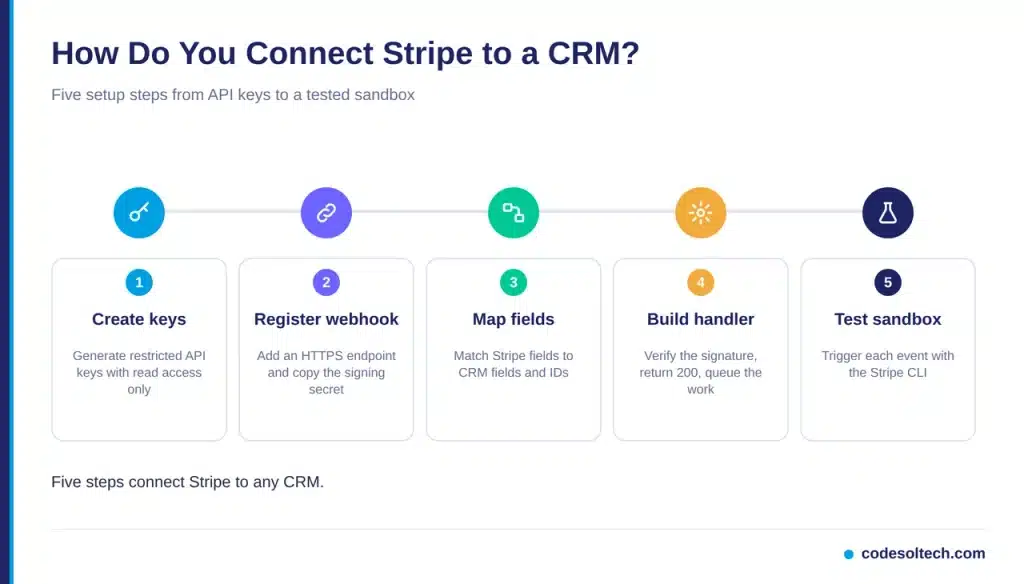
- Create restricted API keys. Generate a restricted key in the Stripe Dashboard with read access to the objects you sync. Store the key in a server-side secrets manager.
- Register a webhook endpoint. Add an HTTPS URL under Developers, then Webhooks. Select the 7 events listed below and copy the whsec_ signing secret.
- Map fields. Define which Stripe fields write to which CRM fields. Add custom CRM fields for the Stripe Customer ID, plan name, and subscription status.
- Build the event handler. Verify the signature, return a 200 response immediately, and push the event to a queue. Process the CRM update from the queue.
- Test in a sandbox. Run
stripe listen --forward-to localhost:3000/webhookwith the Stripe CLI. Trigger each of the 7 events and confirm the CRM record updates.
Which 7 Webhook Events Does the Integration Need?
Seven Stripe events cover the full payment lifecycle:
- checkout.session.completed: marks the deal closed-won.
- invoice.paid: logs the payment and updates the renewal date.
- invoice.payment_failed: creates a recovery task for the account owner.
- customer.subscription.updated: updates the plan tier on the contact.
- customer.subscription.deleted: flags the account as churned.
- charge.refunded: records the refund amount on the deal.
- charge.dispute.created: opens a high-priority support ticket.
How Does Failed Payment Recovery Work in the CRM?
The invoice.payment_failed event starts the recovery workflow. The handler sets the subscription status to past_due and creates a task for the account owner. Stripe Smart Retries and automatic emails run in parallel with the CRM task.
The invoice.paid event closes the task and restores the active status. The CRM timeline then shows the full failure and recovery sequence.
Idempotency and Retry Handling
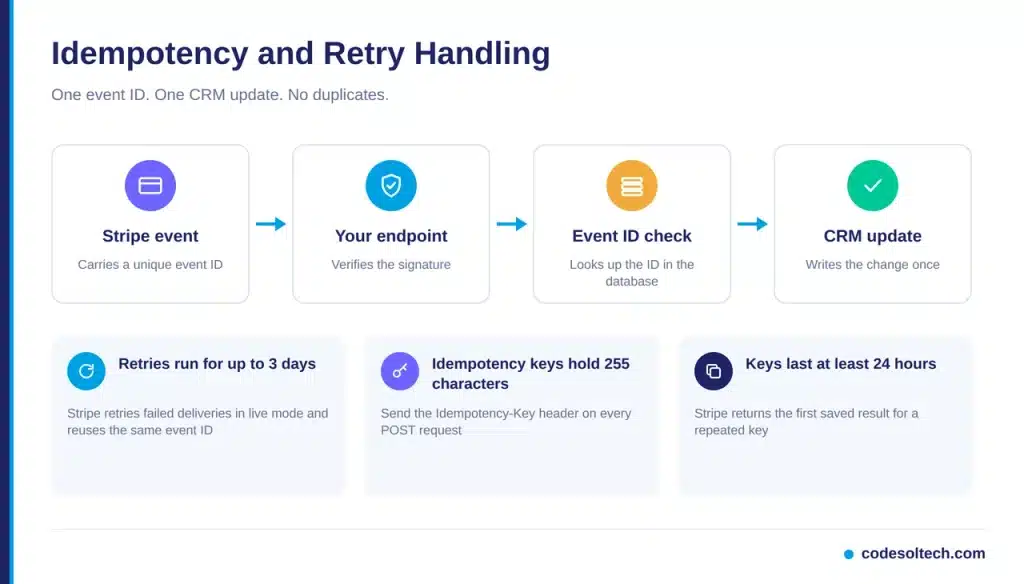
Stripe retries undelivered webhook events for up to 3 days in live mode, according to the Stripe webhook endpoint documentation. A retry carries the same event ID as the original delivery. The handler stores processed event IDs and skips repeats.
Signature verification needs the raw request body. The Stripe documentation notes that Express applies express.json() first and parses the body, which breaks verification. Register the webhook route before the JSON middleware.
Outbound API calls need idempotency as well. Stripe accepts an Idempotency-Key header on every POST request, and keys reach 255 characters. Stripe prunes keys once they are at least 24 hours old, per the Stripe idempotency documentation.
What Rules Does a Reliable Handler Follow?
- Verify the Stripe-Signature header before reading any payload field.
- Return a 2xx response in under 5 seconds and queue the heavy work.
- Record each event ID in a database table with a unique constraint.
- Fetch the current object from the Stripe API before writing, because event order is not guaranteed.
Security and PCI DSS Scope
Your PCI DSS scope depends on how the integration collects card data. Stripe Checkout and Elements qualify for SAQ A, the lowest-burden questionnaire, because card inputs load in an iframe served from Stripe’s domain.
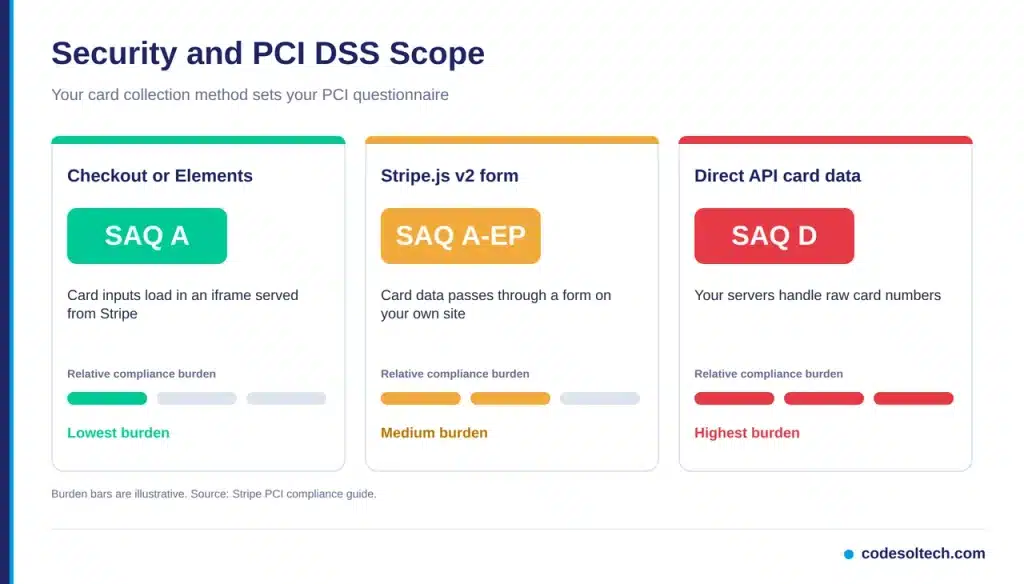
Direct API card handling requires SAQ D, per the Stripe PCI compliance guide. Stripe.js v2 on a self-hosted form requires SAQ A-EP.
The CRM never stores card numbers. It stores Stripe IDs, card brand, and only the last 4 digits. Four controls protect the connection:
- Restrict API keys to the minimum object permissions.
- Accept webhook requests only from Stripe’s published IP addresses.
- Rotate the webhook signing secret every 90 days.
- Limit CRM field access on payment data by user role.
Common Failures and Fixes
Four failures cause most broken Stripe and CRM syncs:
- Duplicate contacts: match on the Stripe Customer ID and the CRM ID, not on email.
- Signature errors: pass the unparsed raw body to the verification function.
- Out-of-order updates: read the latest object state from the API before each write.
- Missed events after downtime: replay events from the Stripe Dashboard, which returns events from the last 30 days.
A clean data model prevents most of these issues. The article on CRM integration architecture explains the sync patterns in detail.
Frequently Asked Questions
Is Stripe a CRM?
No. Stripe stores Customer objects and billing history. It provides no deal pipelines, tasks, or sales sequences.
Does the CRM store card numbers?
No. The CRM stores Stripe IDs, card brand, and the last 4 digits. Stripe holds the full card data.
How long does a custom integration take?
A custom Stripe and CRM integration takes 2 to 6 weeks. Custom objects, multi-currency billing, and refund workflows push the timeline toward 6 weeks.
Final Words
CRM and Stripe integration turns payment events into customer context. Webhooks deliver the events. Idempotency keys block duplicates. Checkout keeps card data out of your CRM. Each step removes manual entry and gives your team accurate revenue data.
Start with the 7 webhook events, match records by ID, and test in a sandbox before going live.
Need a Stripe-connected CRM built around your sales process? Talk to the CodeSolTech team and get a scoped integration plan.