![CRM Knowledge Base Integration: [Types + 5-Step Setup]](https://www.codesoltech.com/wp-content/uploads/2026/09/CRM-Knowledge-Base-Integration-Definition-Types-and-Setup-Steps.webp)
CRM knowledge base integration connects a company’s knowledge base software directly to its CRM platform through APIs or native connectors. Support agents view knowledge articles inside the customer record instead of switching browser tabs. Salesforce reports that 61% of customers prefer self-service, and AI-assisted systems resolved 30% of service cases in 2025.
The integration synchronizes data between both systems in real time. An agent opens a customer ticket in the CRM, and the connected knowledge base surfaces matching articles automatically.
This removes 3 manual steps from a support workflow: opening a separate tab, searching the knowledge base, and copying the answer back into the CRM.
The term overlaps with help desk software integration and knowledge management system (KMS) integration. Vendors use these terms interchangeably, though a KMS typically covers internal documentation, not just customer-facing articles.
Signs Your Business Needs CRM Knowledge Base Integration
5 operational symptoms point to a missing or broken knowledge base integration.
- Agents toggle between 3 or more tabs to answer a single customer question.
- Repeat tickets ask questions already answered in an existing article that customers never find.
- New agent ramp-up exceeds 30 days because knowledge lives in senior staff rather than in documentation.
- Self-service portal traffic is low despite having published articles, usually because the portal content is outdated.
- Chatbot answers are inconsistent with what a live agent says on the same topic.
A business showing 2 or more of these symptoms has a measurable integration gap, not a training problem.
Why CRM Knowledge Base Integration Reduces Support Costs
Unintegrated systems force agents to search for answers manually. The McKinsey Global Institute found that interaction workers spend 19% of the average workweek searching for and gathering information.
Applied to customer support, that percentage translates into slower first-response times and higher case-handling costs per ticket.
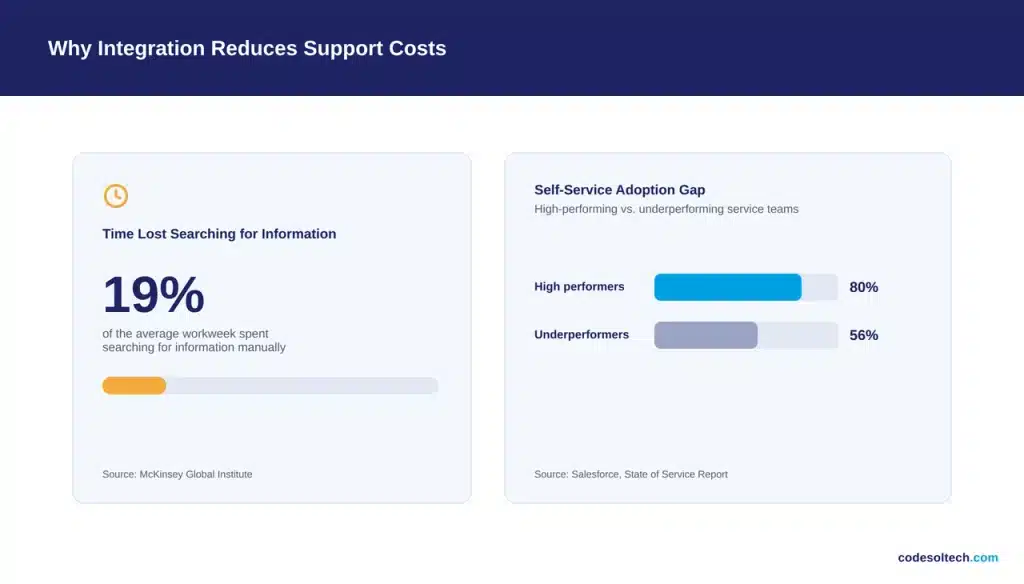
Salesforce’s State of Service research links self-service capability directly to performance tier. 80% of high-performing service organizations provide a self-service solution, compared to 56% of underperforming organizations.
A connected knowledge base is the infrastructure that makes self-service possible. Customers search articles through a portal that pulls the same content agents see inside the CRM.
Benefits of CRM Knowledge Base Integration
A connected knowledge base changes 5 measurable outcomes inside a support operation.
- Faster first-response time: Agents pull the correct article inside the CRM record instead of searching a separate system.
- Higher case deflection: Customers resolve simple issues through a self-service portal, so fewer tickets reach an agent.
- Consistent answers: Every agent and every AI agent draws from the same source content, removing conflicting responses.
- Lower onboarding time: New agents rely on structured articles instead of memorizing product knowledge from senior staff.
- AI-ready infrastructure: Chatbots and AI agents query the same knowledge base through the CRM’s API, without a separate content system.
These outcomes compound. A support team that resolves cases faster also frees capacity for the complex tickets that self-service cannot handle.
How Does CRM Knowledge Base Integration Work
The integration works through 1 of 3 technical methods: native connectors, middleware platforms, or custom API development.
A native connector uses a pre-built link supplied by the CRM vendor or knowledge base vendor. Data syncs automatically once an administrator authenticates both accounts.
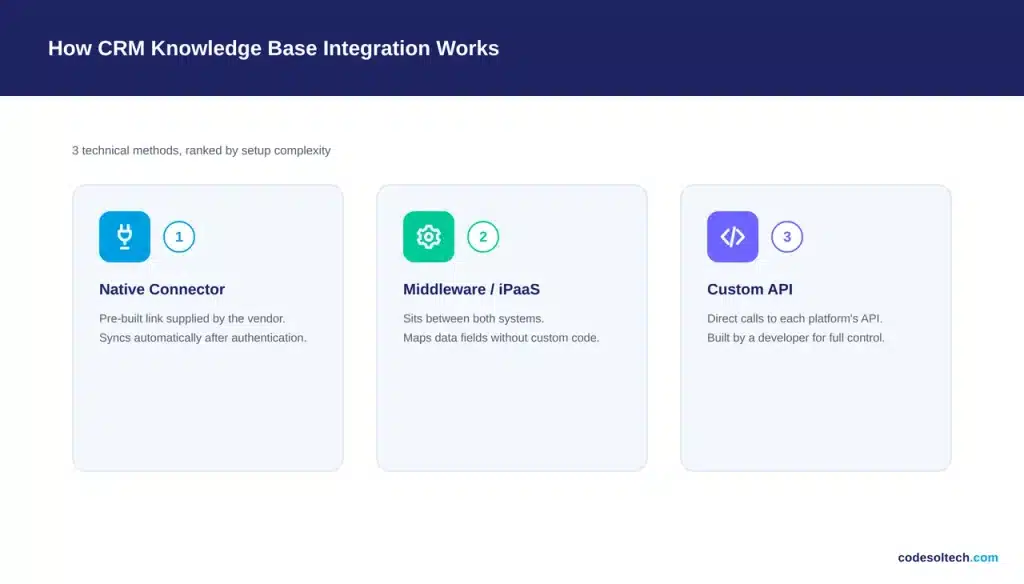
A middleware platform (also called an iPaaS, or integration platform as a service) sits between the 2 systems and maps data fields without custom code.
A custom API integration uses direct calls to each platform’s REST API. A developer writes code that pushes and pulls data on a defined schedule.
This method syncs knowledge articles, case data, and metadata in real time, without relying on a vendor’s pre-built connector.
Types of CRM Knowledge Base Integration
Each integration method fits a different combination of budget, technical resources, and customization requirements.
- Native integration: Built into the CRM platform (example: Salesforce Knowledge inside Service Cloud). No development work required.
- Middleware integration: Uses a connector platform to link a third-party knowledge base to the CRM. Supports systems without a native connector.
- Custom API integration: Built by a development team for CRMs with specific data structures or compliance requirements.
CRM Knowledge Base Integration Methods Compared
| Integration Method | Setup Time | Development Cost | Customization Level |
|---|---|---|---|
| Native connector | 1 to 2 days | Low | Limited to vendor settings |
| Middleware / iPaaS | 1 to 3 weeks | Moderate | Field-level mapping |
| Custom API | 4 to 12 weeks | High | Full control over data flow |
Steps to Integrate a Knowledge Base With Your CRM
A CRM knowledge base integration project follows 5 stages, regardless of the method selected.
- Audit existing content. Identify duplicate, outdated, or conflicting knowledge articles before migration.
- Select the integration method. Match native, middleware, or custom API to the budget and CRM platform in use.
- Map data fields. Define how article categories, tags, and permissions correspond between the 2 systems.
- Configure authentication. Set up single sign-on (SSO) or API keys so both platforms exchange data securely.
- Test and deploy. Run the integration in a sandbox environment before pushing it to production agents.
Each stage depends on the previous one. Skipping the content audit in stage 1 forces a second cleanup pass after stage 5, which doubles the project timeline.
A typical mid-sized support team completes all 5 stages in 2 to 6 weeks, depending on the integration method and the volume of existing knowledge articles.
Teams running a CRM data migration should complete that migration before starting knowledge base integration. Migrating dirty data into a newly connected system duplicates the cleanup work later.
Does Knowledge Base Integration Improve Customer Service
Yes. Integration removes the search step from every support interaction, shortening resolution time and increasing the number of cases an agent handles per shift.
Salesforce’s research shows AI-connected knowledge systems resolved 30% of service cases in 2025, a figure the report projects will reach 50% by 2027.
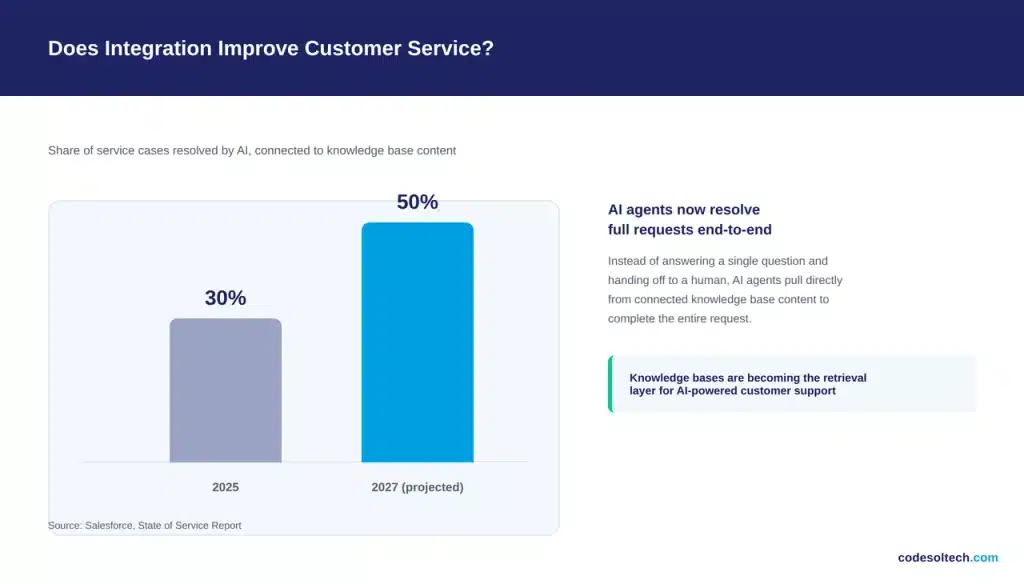
Knowledge bases also function as the content layer for AI agents and chatbots. A chatbot without a connected knowledge base cannot answer questions beyond a fixed script.
Companies that unify support data see measurable gains elsewhere too. Salesforce found that 80% of service reps believe better access to other departments’ data would improve their work.
Common CRM Knowledge Base Integration Mistakes
4 mistakes account for most failed or underperforming integration projects.
- Skipping the content audit: Migrating outdated articles creates incorrect answers inside the CRM.
- Ignoring field mapping: Mismatched categories break search relevance for agents and customers.
- No permission structure: Internal-only articles become visible on the public self-service portal.
- No maintenance plan: Knowledge articles decay without a scheduled review cycle, typically every 90 days.
Integration architecture decisions made early affect every downstream workflow. Review a full CRM integration architecture plan before selecting a knowledge base vendor.
Support tickets and knowledge articles share the same underlying data structure in most modern platforms. A parallel CRM ticketing system integration project often runs alongside knowledge base work.
CRM Knowledge Base Integration and Data Security
Knowledge base integration moves data between 2 systems, which creates 2 sets of access permissions to manage instead of 1.
Internal-only articles (pricing exceptions, escalation scripts, security procedures) require a permission layer separate from customer-facing content.
3 controls prevent permission errors during integration:
- Role-based access control: Restrict article visibility by agent role, department, or seniority level.
- Field-level encryption: Encrypt sensitive fields synced between the knowledge base and the CRM.
- Audit logging: Record every article view and edit for compliance reviews in regulated industries.
Industries with compliance requirements, including healthcare and financial services, should confirm the integration method meets HIPAA or SOC 2 standards before deployment.
FAQs
What CRM platforms support native knowledge base integration?
Salesforce, HubSpot, Zendesk, and Microsoft Dynamics 365 each ship a native knowledge base module inside their service product line.
How long does CRM knowledge base integration take?
A native connector deploys in 1 to 2 days. A custom API build takes 4 to 12 weeks, depending on data volume and field complexity.
Does knowledge base integration require a developer?
A native connector does not. Middleware integration requires light configuration. Custom API integration requires a developer for the full project.
Can a CRM knowledge base integration work with an AI chatbot?
Yes. AI chatbots and AI agents query the connected knowledge base through the CRM’s API to generate answers, instead of relying on a fixed, pre-written script.
What happens to old knowledge base articles during integration?
Outdated articles should be archived or rewritten during the content audit stage, before migration. Migrating incorrect content produces incorrect answers inside the CRM.
Final Words
CRM knowledge base integration is not an optional add-on. It is the infrastructure behind self-service, AI agents, and faster case resolution.
Start with a content audit, pick the integration method that matches your CRM and budget, and map your data fields before deployment.
Ready to connect your knowledge base to your CRM?
Talk to CodeSolTech’s CRM integration team and get a setup plan built around your existing platform.
You May Like
Fixing CRM Contact Deduplication [Causes & Fixes Guide]
CRM Reminder & Notification Systems: Never Miss Follow-Up Again
![Fixing CRM Contact Deduplication [Causes & Fixes Guide]](https://www.codesoltech.com/wp-content/uploads/2026/09/Fixing-CRM-Contact-Deduplication-Causes-Fixes-Guide.webp)