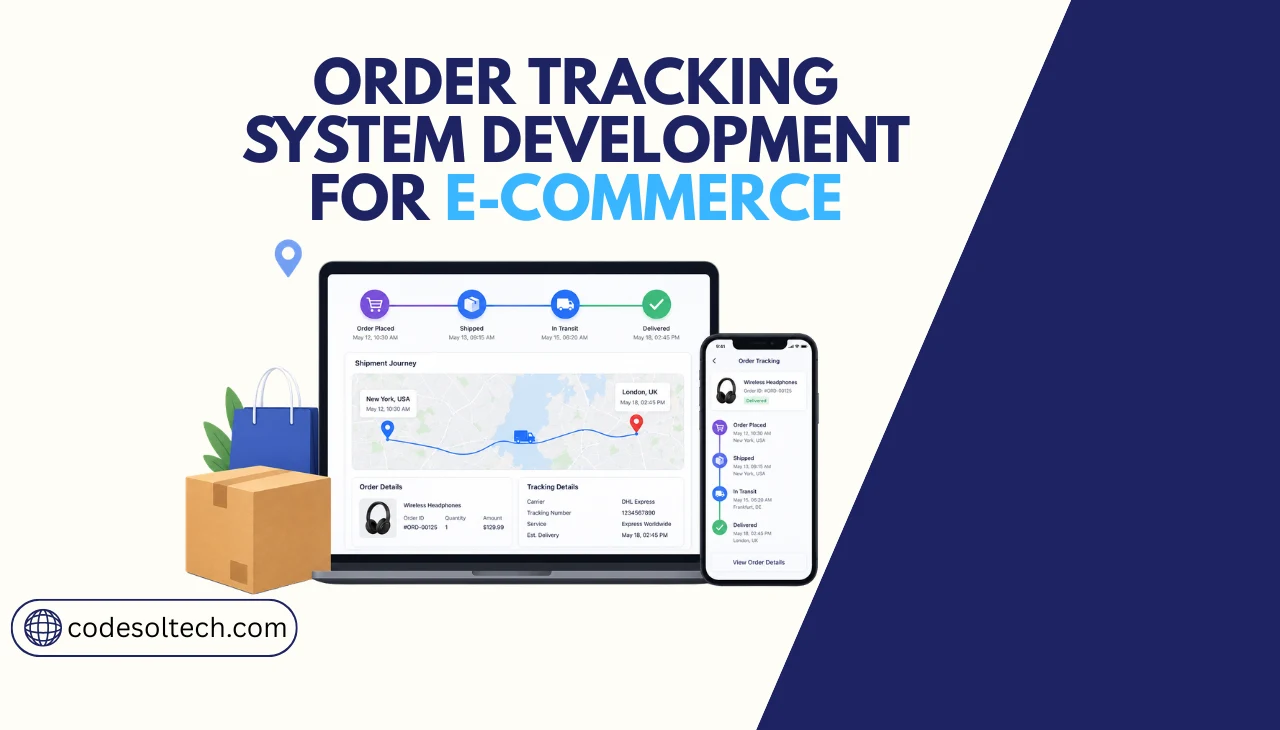
An ecommerce order tracking system connects your order management system (OMS) to carrier APIs, processes real-time shipment status updates via webhooks, and delivers those updates to customers through a branded tracking page and automated SMS/email notifications. It reduces “Where is my order?” (WISMO) support tickets by 40–60% when implemented correctly.
An order tracking system is the software layer between your ecommerce platform, carrier networks, and customers. It captures shipment status events from carriers like FedEx, UPS, USPS, and DHL, normalizes those events into a unified data model, and pushes updates to customers in real time.
Without this system, support teams handle WISMO queries manually at a repeatable, automatable cost.
Ecommerce stores that deploy a dedicated tracking system reduce customer support contact rates by 35–50%, according to post-purchase experience data from Narvar. The core business case is straightforward: every automated status update removes one inbound support ticket.
Core Architecture of an Ecommerce Order Tracking System
A production-grade order tracking system consists of 4 core layers: data ingestion, event normalization, notification dispatch, and customer-facing display. Each layer operates independently, so failures in one layer do not break the entire pipeline.
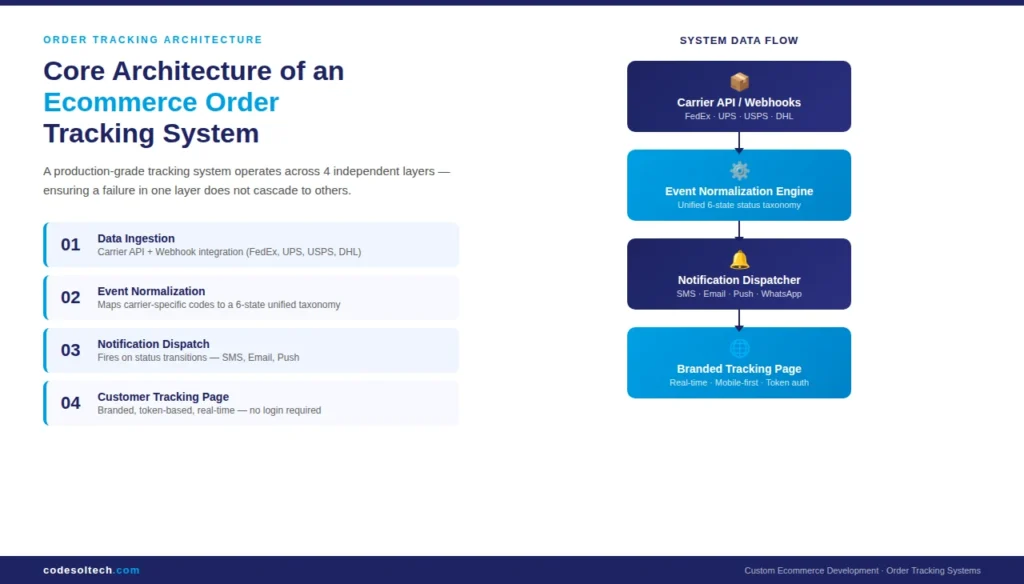
Layer 1 — Data Ingestion: Carrier API and Webhook Integration
Carrier tracking data reaches your system through 2 mechanisms: polling (your server queries the carrier API on a schedule) and webhooks (the carrier pushes events to your endpoint in real time).
Webhook-based ingestion delivers updates 3–8 minutes faster than polling and is the correct architecture for customer-facing applications.
The 4 major carrier APIs your system integrates with are:
- FedEx Track API — REST-based, supports webhook subscriptions per tracking number
- UPS Tracking API — OAuth 2.0 authentication, event-level granularity per shipment
- USPS Web Tools API — XML-based; a newer RESTful API is available under USPS APIs (2023)
- DHL Shipment Tracking API — REST/JSON, supports multi-carrier tracking through a single endpoint
For stores shipping with 5 or more carriers, an aggregator layer (such as EasyPost or ShipEngine) normalizes all carrier responses into a single schema. This reduces integration time from 6–8 weeks to 1–2 weeks per carrier.
Layer 2 — Event Normalization
Each carrier uses its own status codes. FedEx uses codes like OD (out for delivery), UPS uses I (in transit), and USPS uses 01 (delivered). Your normalization layer maps all carrier-specific codes to a unified status taxonomy. A standard taxonomy includes 6 status states:
- Order Confirmed
- Shipped / Label Created
- In Transit
- Out for Delivery
- Delivered
- Exception / Delay
The normalization layer stores the original carrier event alongside the mapped status. This preserves data integrity for customer service lookup and dispute resolution.
Layer 3 — Notification Dispatch
The notification engine fires on status transitions, not on every carrier ping. A status transition from “In Transit” to “Out for Delivery” triggers an SMS and email simultaneously. Firing on every carrier ping, which can occur 10–20 times per shipment, produces notification fatigue and increases unsubscribe rates.
Transactional notification channels in order of open rate performance:
- SMS — 98% open rate, average read time under 3 minutes (TCPA compliance required in the US)
- Email — 45–65% open rate for post-purchase transactional emails (Klaviyo benchmark, 2023)
- Push notification — 40–60% open rate for mobile app users
- WhatsApp — effective for international orders in regions with low email adoption
Layer 4 — Customer-Facing Tracking Page
The branded tracking page is the highest-traffic post-purchase touchpoint. Customers check order status an average of 3.5 times per shipment (Narvar Consumer Report, 2022).
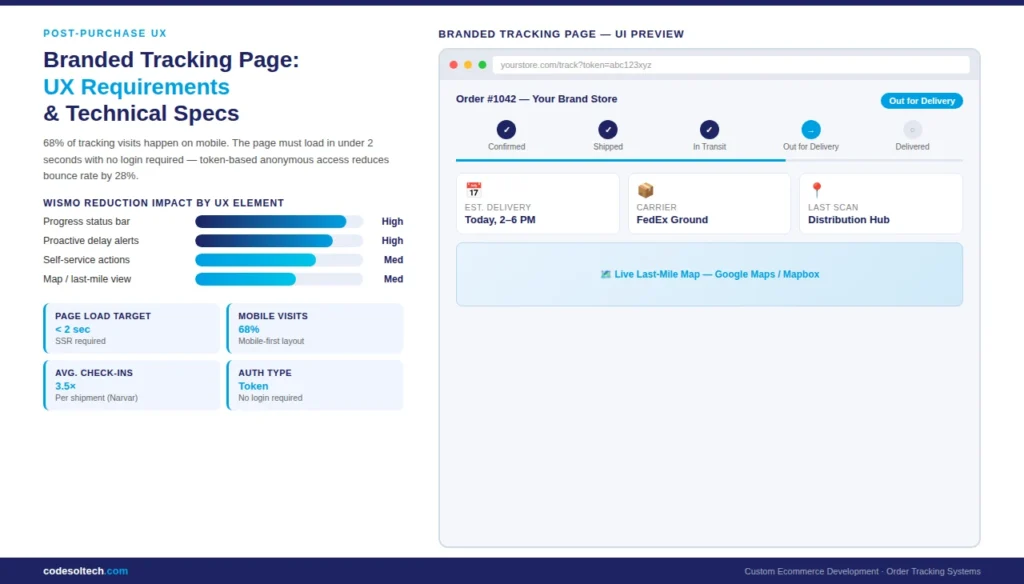
The page must load in under 2 seconds and display the current status without requiring a login. Login-gated tracking pages increase bounce rate by 28% compared to token-based anonymous access.
What Data Does an Order Tracking System Store and Process?
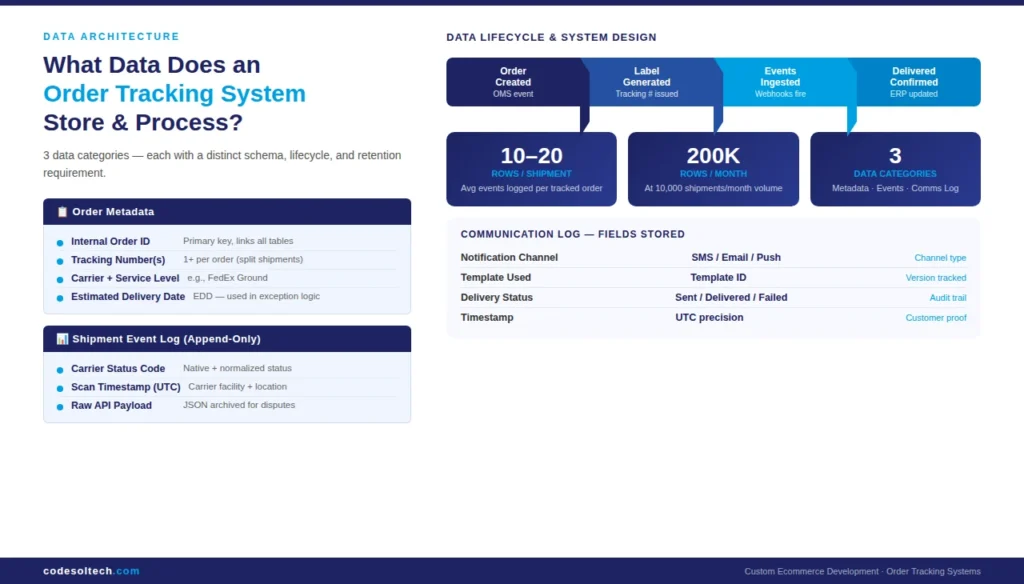
An order tracking system stores 3 categories of data: order metadata, shipment events, and customer communication logs. Each category has a distinct data lifecycle and retention requirement.
Order Metadata Schema
The order metadata table stores the link between your internal order ID and the carrier tracking number. This join is the foundation of every tracking lookup. A minimal order metadata record includes:
- Internal order ID
- Customer ID and contact details
- Carrier name and service level (e.g., FedEx Ground, UPS Next Day Air)
- Tracking number(s) — one order can generate multiple tracking numbers for split shipments
- Estimated delivery date (EDD)
- Destination address (used for last-mile routing logic)
Shipment Event Log
The shipment event log is append-only. Each carrier update creates a new row rather than overwriting the previous status. This design supports full audit trails, carrier dispute resolution, and machine learning models that predict delivery delays.
Each event record stores:
- Timestamp (UTC) of the carrier scan
- Carrier-native status code and description
- Normalized status (from your taxonomy)
- Location of scan (city, state, facility code)
- Raw carrier API payload (JSON, archived)
Communication Log
The communication log records every notification sent: channel (SMS/email), template used, delivery status (sent, delivered, failed), and timestamp. This log supports customer service lookups (“We sent you an SMS at 2:14 PM”) and deliverability analysis for notification optimization.
OMS and ERP Integration: How Order Tracking Connects to Your Backend
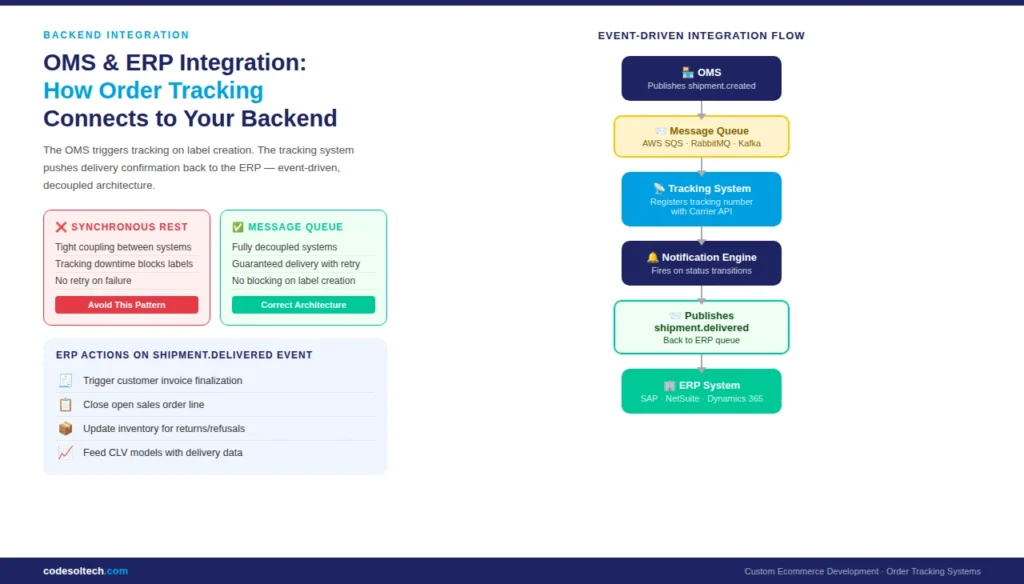
An order tracking system does not operate in isolation. It receives order creation events from an order management system (OMS) and can push delivery confirmation events back to an ERP for invoice reconciliation and inventory updates.
OMS Integration Pattern
The OMS triggers a tracking system event when a fulfillment label is generated. The correct integration pattern is event-driven: the OMS publishes a shipment.created Event to a message queue (RabbitMQ, AWS SQS, or Kafka), and the tracking system consumes that event to register the tracking number with the carrier API.
Synchronous REST API calls between OMS and tracking system create tight coupling. If the tracking system is temporarily unavailable, synchronous calls fail and block label generation.
A message queue decouples the two systems and guarantees event delivery via retry logic.
ERP Integration for Delivery Confirmation
When the tracking system records a “Delivered” event, it publishes a shipment.delivered event. The ERP consumes this event to:
- Trigger customer invoice finalization
- Close the open sales order line
- Update inventory records for returned or refused deliveries
- Feed delivery data into customer lifetime value (CLV) models
For custom ERP integrations, custom web development is required to build the connector layer between your tracking system and proprietary ERP schemas. Off-the-shelf connectors exist for SAP, Oracle NetSuite, and Microsoft Dynamics 365.
Branded Tracking Page Development: UX Requirements and Technical Specifications
The branded tracking page serves 2 functions simultaneously: it answers the customer’s delivery question and it creates a post-purchase marketing touchpoint.
Stores that embed product recommendations on tracking pages generate 5–10% additional revenue per page visit (Klaviyo, 2022).
Technical Requirements for the Tracking Page
A production tracking page requires:
- Token-based access — unique URL with an encrypted token so customers access their order without logging in
- Server-side rendering (SSR) — ensures the page content is crawlable and loads before JavaScript executes
- Real-time status polling or WebSocket — polling interval of 60–120 seconds is sufficient for most carriers; WebSocket is appropriate for same-day delivery visibility
- Mobile-first layout — 68% of post-purchase tracking visits occur on mobile (Narvar, 2022)
- Map integration — Google Maps or Mapbox API renders last-mile delivery progress for out-for-delivery status
- Estimated delivery window — display a specific 2–4 hour delivery window when carrier data supports it
UX Elements That Reduce WISMO Contacts
The 3 UX elements with the highest impact on WISMO reduction are:
- A progress bar showing the shipment stage (Confirmed → Shipped → In Transit → Delivered)
- Proactive exception messaging — when a delay occurs, display the reason and revised EDD before the customer contacts support
- Self-service actions — allow customers to redirect delivery, schedule redelivery, or initiate a return directly from the tracking page
How Long Does It Take to Develop a Custom Order Tracking System?
A custom order tracking system takes 8–16 weeks to develop depending on the number of carrier integrations, the complexity of OMS/ERP connections, and the scope of customer-facing features. The table below breaks down development phases:
| Phase | Scope | Duration |
|---|---|---|
| Phase 1 — Architecture & API setup | Carrier API credentials, webhook endpoints, database schema | 1–2 weeks |
| Phase 2 — Data ingestion & normalization | Webhook listeners, event log, status mapping | 2–3 weeks |
| Phase 3 — OMS/ERP integration | Message queue setup, event publishing/consuming | 2–4 weeks |
| Phase 4 — Notification engine | SMS (Twilio), email (SendGrid/Klaviyo), template logic | 1–2 weeks |
| Phase 5 — Branded tracking page | UI development, token auth, map integration | 2–3 weeks |
| Phase 6 — QA, load testing, staging deployment | End-to-end test with live carrier sandboxes | 1–2 weeks |
Stores using Shopify or WooCommerce can reduce Phase 3 time by 50% by leveraging platform webhooks for order events instead of building a custom OMS connector.
Custom ecommerce development accelerates this process when your team builds the tracking system alongside your storefront from the start.
Proactive Exception Handling: Managing Delays and Failed Deliveries
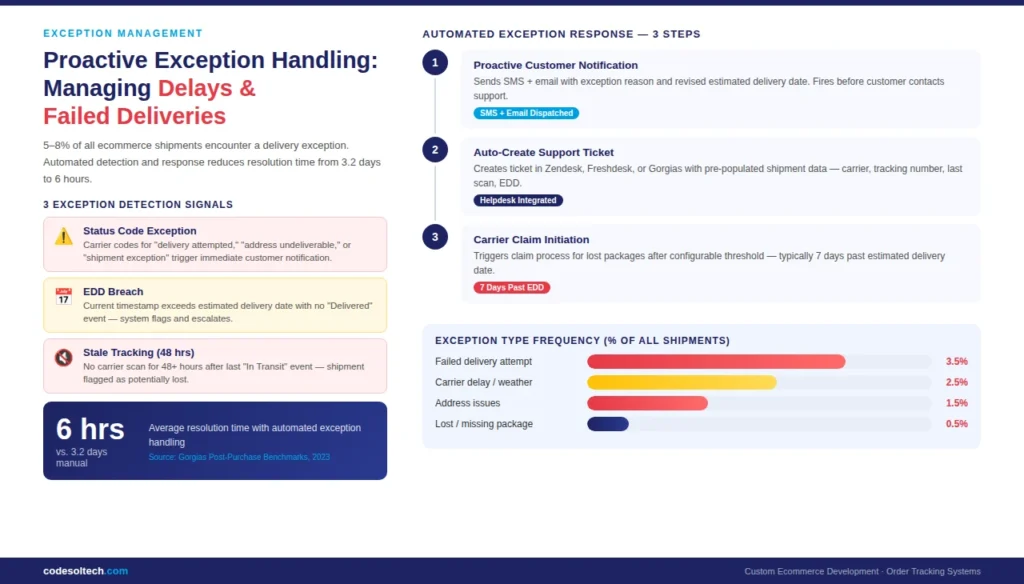
Delivery exceptions carrier delays, failed delivery attempts, incorrect addresses, and lost packages affect 5–8% of all ecommerce shipments (UPS, 2023). An order tracking system handles exceptions proactively through automated detection and customer notification rather than waiting for a support ticket.
Exception Detection Logic
The exception detection layer monitors 3 signals:
- Status code exceptions — carrier codes for “delivery attempted,” “address undeliverable,” or “shipment exception” trigger immediate customer notification
- EDD breach — when the current timestamp exceeds the estimated delivery date without a “Delivered” event, the system flags the shipment and triggers an escalation workflow
- Stale tracking — when no carrier scan event arrives for more than 48 hours after the last “In Transit” event, the system flags the shipment as potentially lost
Automated Exception Response
When the exception detection layer flags a shipment, the automated response workflow executes 3 steps in sequence:
- Send proactive customer notification with the exception reason and the revised EDD
- Create a support ticket in your helpdesk (Zendesk, Freshdesk, Gorgias) with pre-populated shipment data
- Trigger carrier claim initiation for lost packages after a configurable threshold (typically 7 days past EDD)
Automated exception handling reduces average resolution time from 3.2 days (manual) to 6 hours (automated), based on post-purchase operations benchmarks from Gorgias (2023).
Build vs. Buy: Custom Order Tracking System vs. SaaS Platforms
SaaS tracking platforms (AfterShip, Narvar, Route) deliver a functional system in days. Custom-built systems take 8–16 weeks. The correct choice depends on 3 factors: data ownership requirements, integration complexity, and long-term cost structure.
When to Build Custom
Build a custom order tracking system when:
- Your brand requires full control over the tracking page UI and customer data (DTC brands, regulated industries)
- You process more than 10,000 shipments per month SaaS per-shipment pricing exceeds custom development ROI at this volume
- Your OMS or ERP uses a proprietary schema that SaaS connectors do not support
- You need to embed tracking data into a native mobile app without a third-party iframe
When to Use SaaS
Use a SaaS tracking platform when:
- Monthly shipment volume is under 5,000, and the growth rate is under 20% per month
- Your ecommerce platform is Shopify or BigCommerce and native integrations are sufficient
- Development resources are constrained and time-to-market is under 30 days
SaaS platforms charge $0.03–$0.15 per tracked shipment. At 10,000 shipments per month, SaaS cost is $3,000–$18,000 per year. A custom system amortizes development cost over 2–3 years and eliminates per-shipment fees.
For high-volume operations, web application development for a custom tracking system delivers a lower total cost of ownership within 18–24 months.
Technology Stack for Order Tracking System Development
A production order tracking system uses a specific combination of backend services, databases, and third-party APIs. The stack below represents a proven architecture for systems handling 1,000–100,000 shipments per month.
Recommended Technology Stack
- Backend runtime — Node.js (Express) or Python (FastAPI) for webhook listeners and API endpoints
- Message queue — AWS SQS or RabbitMQ for decoupled event processing between OMS and tracking system
- Primary database — PostgreSQL for relational order and event data; indexed on tracking number and order ID
- Cache layer — Redis for tracking page status caching; reduces database reads by 70–80% for repeat visitors
- Carrier aggregator — EasyPost or ShipEngine for multi-carrier normalization (optional for 1–2 carrier setups)
- SMS gateway — Twilio (global coverage, TCPA-compliant opt-out handling)
- Email service — SendGrid or Klaviyo for transactional tracking emails
- Map rendering — Google Maps JavaScript API or Mapbox GL JS for last-mile visualization
- Hosting — AWS (ECS or Lambda for webhook processors), Vercel or Next.js for tracking page frontend
Database Indexing Strategy
The shipment event log table grows at 10–20 rows per shipment. For a store processing 10,000 monthly shipments, this generates 100,000–200,000 new rows per month. Compound indexes on (tracking_number, created_at DESC) and (order_id, status) Maintain sub-100ms query performance at this scale. Partition the table by month when the cumulative row count exceeds 5 million.
Final Words
An order tracking system is not a nice-to-have feature; it is core infrastructure for any ecommerce operation with more than 1,000 monthly shipments.
The architecture is well-defined: webhook ingestion, event normalization, notification dispatch, and a branded tracking page. The build-vs-buy decision comes down to shipment volume and integration complexity.
At CodeSol Technologies, we develop custom order-tracking systems that integrate with your existing OMS, ERP, and carrier accounts.
Contact our team to scope your tracking system requirements.

![Electrician CRM: Win More Jobs [Faster Estimates Guide]](https://www.codesoltech.com/wp-content/uploads/2026/10/Crm-for-an-electricians-business.webp)