A CRM for insurance agencies is software that centralizes policyholder records, automates renewal reminders, and tracks leads from first contact to bound policy. It replaces spreadsheets and email threads with one system that stores policy documents, flags renewal dates, and scores leads by conversion likelihood.
Agencies use it to cut policy lapses, speed up quote-to-bind time, and track every client interaction in one place.
The system connects three functions that typically run separately in small and mid-size agencies:
- Policy administration — stores active policies, coverage details, and carrier information per client
- Renewal management — triggers reminders before expiration dates and flags at-risk accounts
- Lead management — captures prospects, scores them, and routes them to the right agent
Agencies that run these three functions through separate tools lose data at every handoff. A CRM removes the handoff by keeping one record per client across the full relationship.
How CRM Software Manages Insurance Policies
A CRM manages policies by storing structured records instead of scanned PDFs in a shared folder. Each policy record links to a client profile, a carrier, an effective date, a renewal date, and a document file. The agent searches by any of these fields instead of opening folders manually.
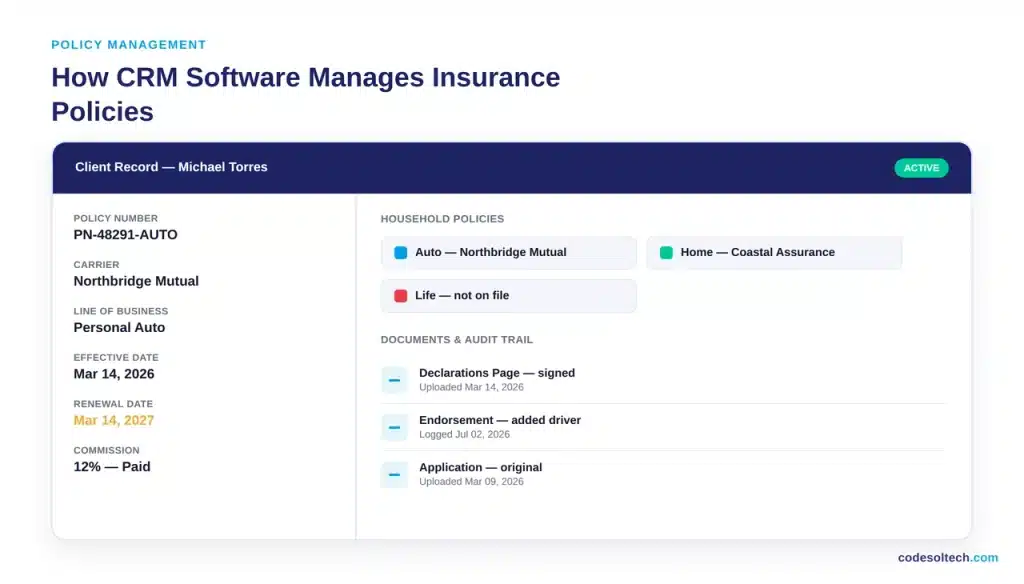
Core policy-management functions include:
- Centralized document storage — declarations pages, endorsements, and applications attached to the client record
- Multi-policy household view — every auto, home, life, and commercial policy tied to one client visible on a single screen
- Carrier and line-of-business tagging — policies filtered by carrier, product type, or premium size for reporting
- Audit trail — a timestamped log of every change made to a policy record, required for E&O compliance
- Commission tracking — commission percentage and payout status recorded against each bound policy
Multi-policy visibility drives cross-sell. An agent who sees a client’s auto policy without a home policy attached can flag the gap and quote it directly from the same screen.
Why Do Renewal Reminders Reduce Policy Lapses
Renewal reminders reduce policy lapses because they convert a passive expiration date into an active task assigned to an agent before the client can shop elsewhere.
Without automated reminders, renewal tracking depends on an agent remembering an expiration date manually a process that fails at scale once an agency manages more than a few hundred policies.
Renewal risk is measurable, not theoretical. According to J.D. Power’s 2025 U.S. Insurance Shopping Study, 57% of auto insurance customers actively shopped for a new policy within the past year, the highest shopping rate recorded in the study’s 19-year history. J.D. Power’s 2025 U.S.
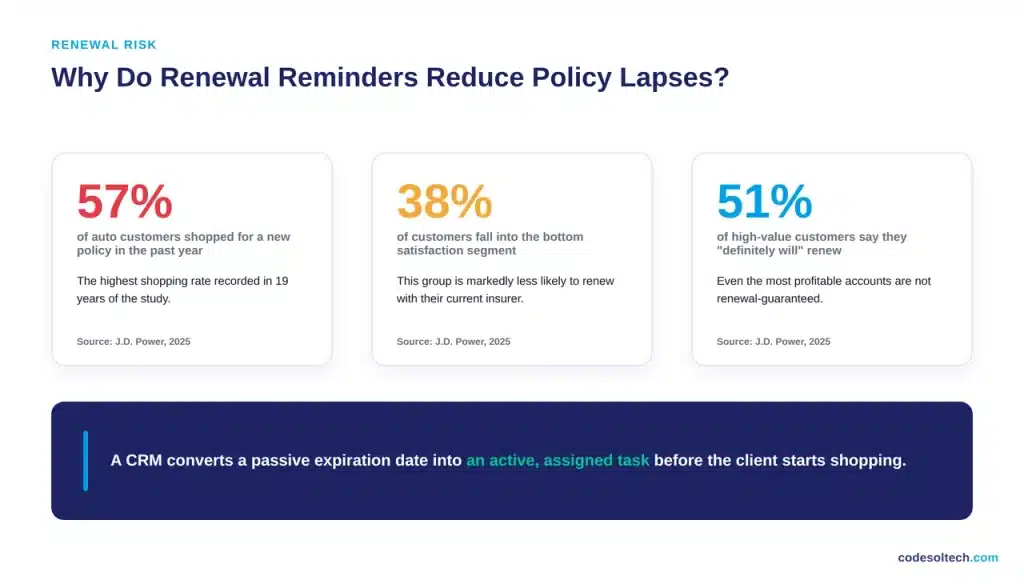
Auto Insurance Study also found that customers in the bottom satisfaction segment are markedly less likely to renew, and even high-lifetime-value customers show only a 51% “definitely will renew” rate.
A CRM addresses this directly through:
- Automated renewal alerts — sent to the agent 60, 30, and 15 days before expiration
- Client-facing reminders — automated email or SMS sent to the policyholder ahead of the renewal date
- Retention task assignment — a follow-up call or review task auto-created for policies flagged as at-risk
- Lapse reporting — a dashboard view of all policies expiring in the next 30, 60, and 90 days
The 2026 U.S. Auto Insurance Study adds a channel-consistency finding relevant to renewal workflows: customers forced to switch channels to resolve a single inquiry report a measurable drop in satisfaction and renewal likelihood, while agents resolve 91% of cross-channel inquiries once they are engaged directly.
A CRM that routes renewal conversations to the same agent handling the account keeps the interaction in one channel.
Lead Management: From First Contact to Bound Policy
Insurance lead management is the process of capturing a prospect, qualifying them, and converting them into a bound policy. A CRM structures this as a pipeline with defined stages, not a loose list of names.
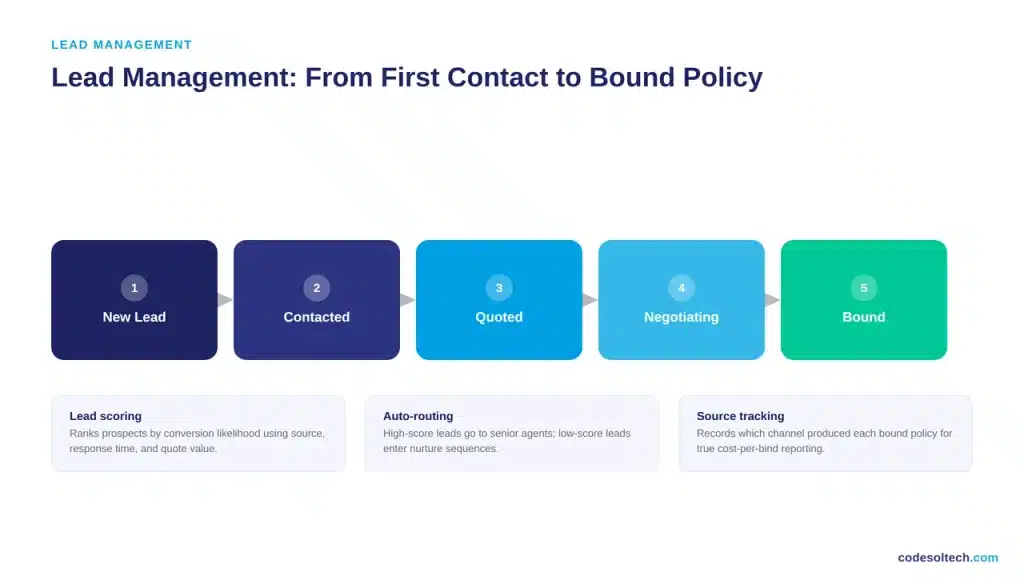
A standard insurance lead pipeline includes five stages:
- New lead — captured from a web form, referral, or call and logged automatically
- Contacted — first outreach attempted and logged with a timestamp
- Quoted — a quote generated and attached to the lead record
- Negotiating — follow-up on price, coverage, or timing objections
- Bound — the policy is issued and the lead converts to a client record
Lead scoring ranks prospects by conversion likelihood using factors such as source, response time, and quote value. Agencies route high-score leads to senior agents and low-score leads into automated nurture sequences.
This routing logic prevents a $50 policy inquiry and a $50,000 commercial account from competing for the same agent’s next available slot.
Lead source tracking closes the loop on marketing spend. A CRM records which channel referral, paid search, or a carrier portal produced each bound policy, which lets an agency compare the actual cost per bound policy across channels instead of cost per lead.
Core CRM Features Insurance Agencies Need
An insurance CRM needs eight core capabilities to cover policy, renewal, and lead workflows in one system:
- Policy and coverage tracking — structured fields for policy number, carrier, line of business, and limits
- Renewal automation — scheduled reminders and retention tasks tied to expiration dates
- Lead capture and scoring — web forms, call logging, and a ranked pipeline view
- Commission tracking — payout percentage and status recorded per policy
- Document management — declarations pages and applications stored against the client record
- Compliance audit trail — a change log required for state E&O and privacy regulations
- Carrier and AMS integration — a data connection to the agency management system and carrier portals
- Reporting dashboards — production by agent, retention rate, and pipeline value in one view
Agencies running multiple carriers should confirm integration support before selecting a platform. A CRM that requires manual re-entry of carrier data defeats the purpose of centralizing records. This is the point where a CRM integration layer connects the CRM to the agency management system and carrier download feeds.
What Return Do Insurance Agencies Get From CRM Software?
Insurance agencies that adopt CRM and digital advisory tools report sales force productivity gains of 5% to 20%, according to McKinsey & Company.
McKinsey’s research on digital advisory tools in life insurance documents one carrier that deployed digital tools across a 14,000-agent network and recorded sustained productivity growth alongside a 30-point improvement in customer experience scores, as agents spent less time on administrative tasks and connected with more active customers per day.
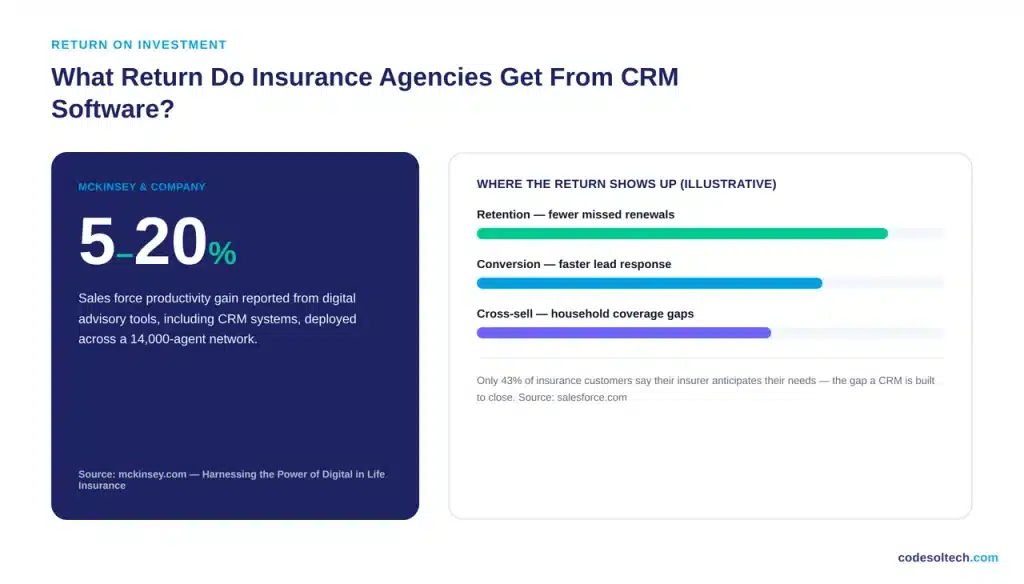
The return shows up in three measurable areas:
- Retention — automated renewal tracking reduces the number of policies that lapse from missed follow-up
- Conversion — lead scoring and faster response times raise the quote-to-bind rate
- Cross-sell — multi-policy household visibility surfaces coverage gaps agents can quote immediately
Customer expectation data explains why this matters commercially. Salesforce reports that only 43% of insurance customers say their insurer anticipates their needs, a gap a CRM narrows by surfacing renewal dates, coverage gaps, and life events an agent can act on proactively instead of reactively.
How to Choose the Right Insurance CRM
Selecting an insurance CRM requires matching the platform to agency size, product lines, and existing systems rather than choosing the highest-rated generic option. Four criteria narrow the decision:
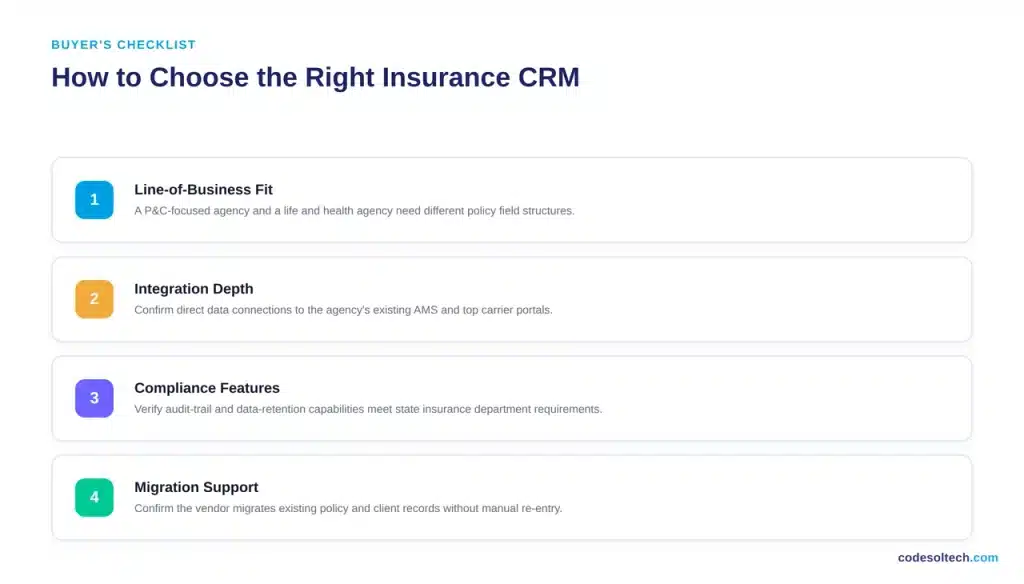
- Line-of-business fit — a P&C-focused agency and a life and health agency need different policy field structures
- Integration depth — confirm direct data connections to the agency’s existing AMS and top carrier portals
- Compliance features — verify audit-trail and data-retention capabilities meet state insurance department requirements
- Migration support — confirm the vendor migrates existing policy and client records without manual re-entry
Agencies replacing spreadsheets or a legacy AMS-only setup should scope the build as a project, not a software purchase.
This typically involves a custom CRM development engagement to map existing data fields, or a purpose-built insurance CRM development track that configures policy, renewal, and lead workflows around the agency’s specific product mix.
Renewal and lead-routing logic often also benefits from a dedicated workflow automation layer that triggers tasks without manual agent intervention.
Frequently Asked Questions
Does a CRM replace an agency management system (AMS)?
No. An AMS handles carrier transactions, billing, and policy issuance. A CRM handles the client relationship, renewal tracking, and lead pipeline. Most agencies run both, connected through an integration layer.
How long does it take to implement an insurance CRM?
Implementation timelines range from four to twelve weeks depending on data volume, the number of carrier integrations required, and whether the agency migrates historical policy records.
Can a small independent agency justify CRM software?
Agencies managing more than a few hundred active policies generally reach the point where manual renewal tracking produces missed deadlines. That threshold is the practical justification point, independent of agency revenue size.
Final Words
A CRM turns renewal dates and lead follow-ups from memory-dependent tasks into scheduled, tracked actions. That shift directly affects retention and conversion, the two metrics that determine agency revenue growth. Agencies losing renewals are rarely losing on price; they’re losing on follow-up.
Ready to map your agency’s policy, renewal, and lead workflow into one system?


![Electrician CRM: Win More Jobs [Faster Estimates Guide]](https://www.codesoltech.com/wp-content/uploads/2026/10/Crm-for-an-electricians-business.webp)