
![Conversational AI in CRM: Stop Typing, Start Talking [2026]](https://www.codesoltech.com/wp-content/uploads/2026/10/Conversational-AI-in-CRM-Stop-Typing-Start-Talking-2026.webp)
Conversational AI in CRM is software that understands natural language, reads and writes customer records, and completes tasks through chat or voice. It qualifies leads, books meetings, answers support questions, and updates contact fields without manual data entry. It runs on natural language understanding, a dialog manager, and CRM APIs.
Think of it as a team member who never logs off and never forgets to update the record. Every conversation ends with clean data in the CRM.
A rule-based chatbot follows a fixed decision tree. Conversational AI identifies the intent behind a message, keeps context across turns, and calls the CRM to act on it.
The table below compares the two technologies across 5 attributes.
| Attribute | Rule-Based Chatbot | Conversational AI |
|---|---|---|
| Language handling | Fixed keywords and buttons | Intent and entity recognition |
| Context memory | Single turn | Multi-turn conversation state |
| CRM access | None or read-only | Read and write through APIs |
| Human handoff | Manual link or form | Triggered by sentiment or intent |
| Maintenance | Edit the decision tree | Update training data and knowledge base |
Teams that only need scripted answers still use chatbot integration. Teams that need record updates and context need conversational AI.
Core Components of a Conversational AI Layer
A production deployment contains 4 components. Each component owns one job in the request flow.
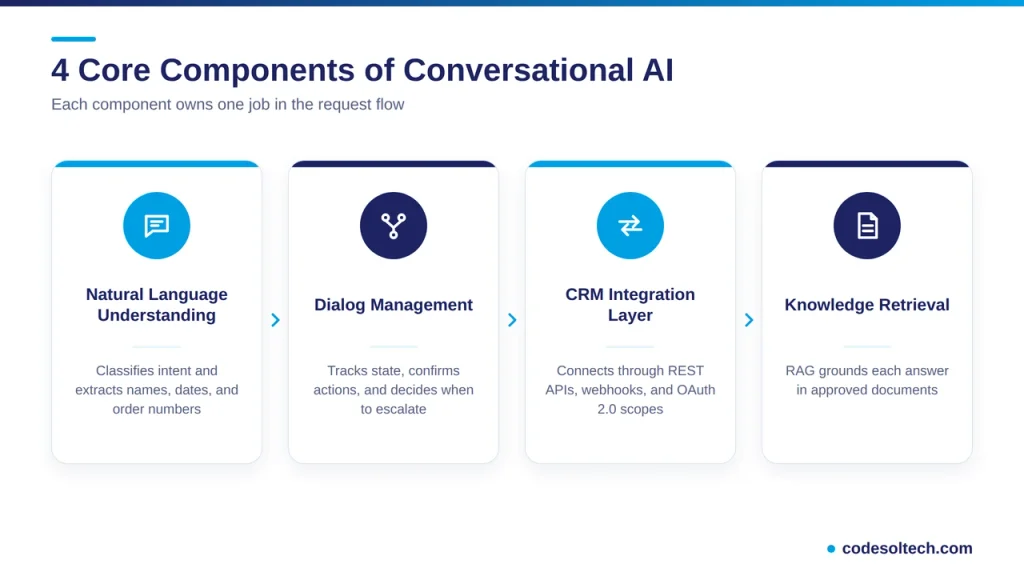
Natural Language Understanding
Natural language understanding (NLU) classifies the user’s intent and extracts entities such as names, dates, order numbers, and product names.
The message “move my demo to Friday” returns the intent reschedule_meeting and the date entity Friday.
Dialog Management
The dialog manager tracks conversation state. It asks for missing fields, confirms actions before writing to the CRM, and decides when to escalate to a human.
CRM Integration Layer
The integration layer connects the assistant to the CRM through REST APIs and webhooks. OAuth 2.0 scopes restrict the assistant to the objects and fields it needs.
A planned integration layer replaces brittle point-to-point connections. Our guide to CRM integration architecture covers the design patterns.
Knowledge Retrieval
Retrieval-augmented generation (RAG) grounds each answer in approved documents such as pricing sheets, policy pages, and help articles. The model retrieves the relevant passage first, then writes the reply from that passage.
Grounding reduces invented answers because the model cites a source document instead of recalling facts from training data.
How Does Conversational AI Connect to a CRM
Conversational AI connects to a CRM through authenticated API calls and event webhooks. The assistant reads records to personalize replies and writes records to log outcomes.
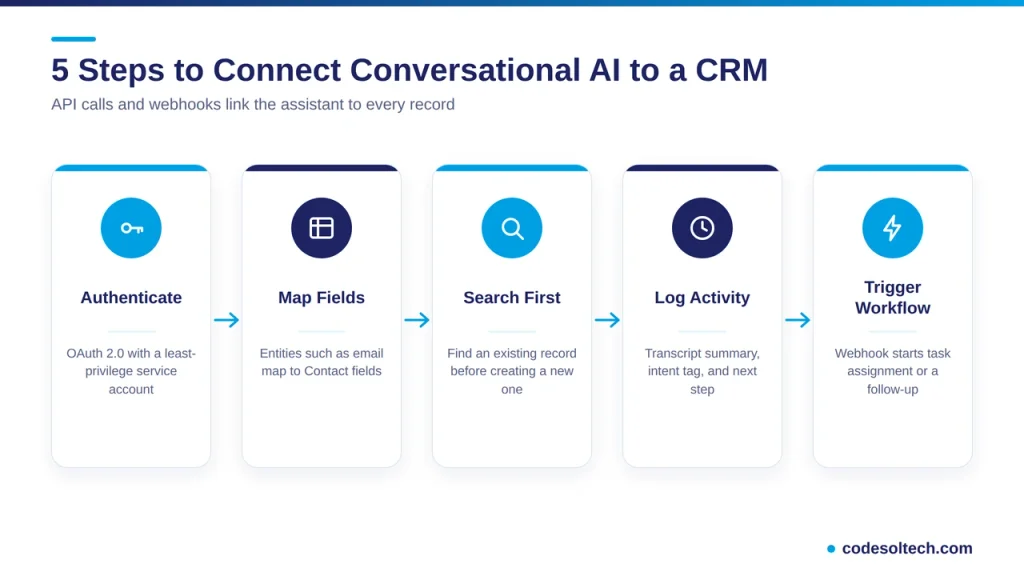
The integration follows 5 steps.
- Authenticate the assistant with OAuth 2.0 and a least-privilege service account.
- Map conversation entities to CRM fields, such as email to the Contact email field.
- Call the search endpoint to find an existing record before creating a new one.
- Write the transcript summary, intent tag, and next step to the activity timeline.
- Fire a webhook that triggers workflow automation, such as task assignment or a follow-up sequence.
Step 3 prevents duplicate records, a core data quality risk in AI-assisted lead capture. Our article on CRM data quality explains the cleanup rules.
Messaging channels follow the same pattern. See CRM SMS integration for the channel-specific setup.
Channels Supported by Conversational AI in CRM
Conversational AI covers 3 channel types. Each channel writes to the same customer timeline.
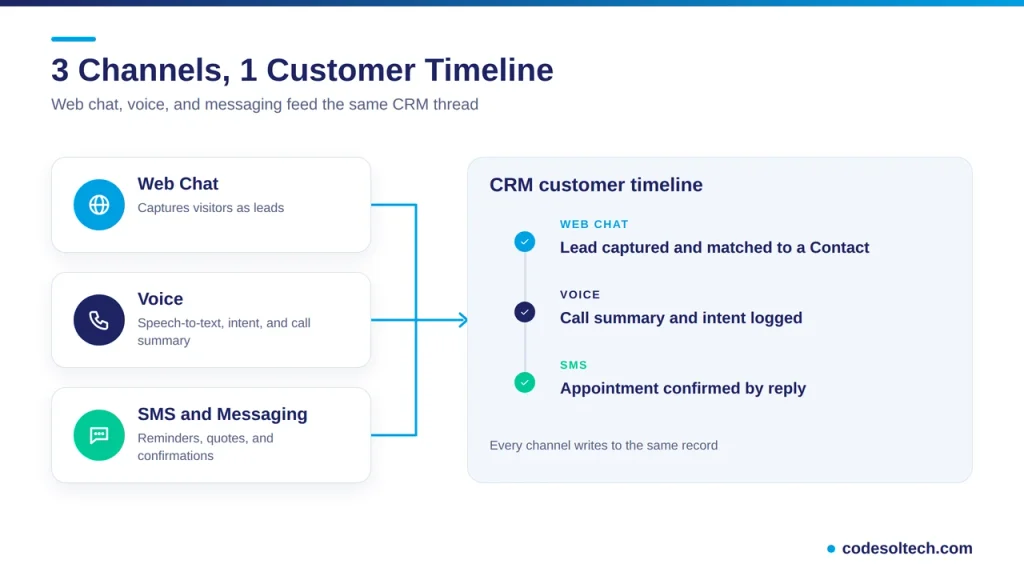
Web Chat
Web chat captures anonymous visitors and converts them into identified leads. The assistant asks for an email address, then matches it against existing Contact records.
Voice
Voice assistants transcribe calls with speech-to-text, extract intent, and log a summary to the CRM. Sales reps also dictate call notes instead of typing them.
SMS and Messaging Apps
SMS and messaging apps deliver reminders, quote follow-ups, and appointment confirmations. Replies return to the same conversation thread inside the CRM.
Conversational AI Use Cases Across the Customer Lifecycle
Conversational AI supports 4 lifecycle stages inside a CRM.
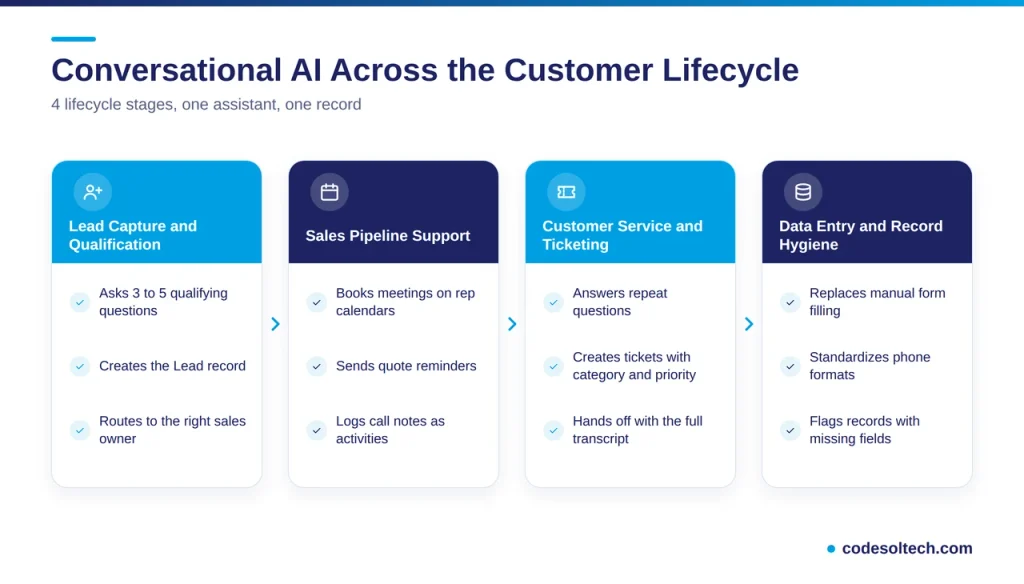
Lead Capture and Qualification
The assistant greets website visitors, asks 3 to 5 qualifying questions, and creates a Lead record with the answers. Typical qualification fields include budget range, timeline, company size, and service type.
A lead score updates in real time. The routing rule then assigns the lead to the correct sales owner.
Sales Pipeline Support
The assistant books meetings against rep calendars, sends quote reminders, and logs call notes as activities. Reps query the CRM in plain language, such as “show open deals above $10,000 closing this month.”
Customer Service and Ticketing
The assistant answers repeat questions, creates a ticket with the correct category and priority, and passes the full transcript to the human agent. The customer never repeats the issue.
Review CRM ticketing systems for the category and priority fields that the assistant populates.
Data Entry and Record Hygiene
Chat and voice inputs replace manual form filling. The assistant standardizes phone formats, tags intents, and flags records with missing fields.
A typical conversation updates 4 record types:
- Lead or Contact fields
- Activity timeline entries
- Opportunity stage
- Support case status
Conversational AI Adoption Data from Gartner and Salesforce
Primary research shows steady adoption and clear cost drivers. The 3 data points below come from Gartner and Salesforce publications.
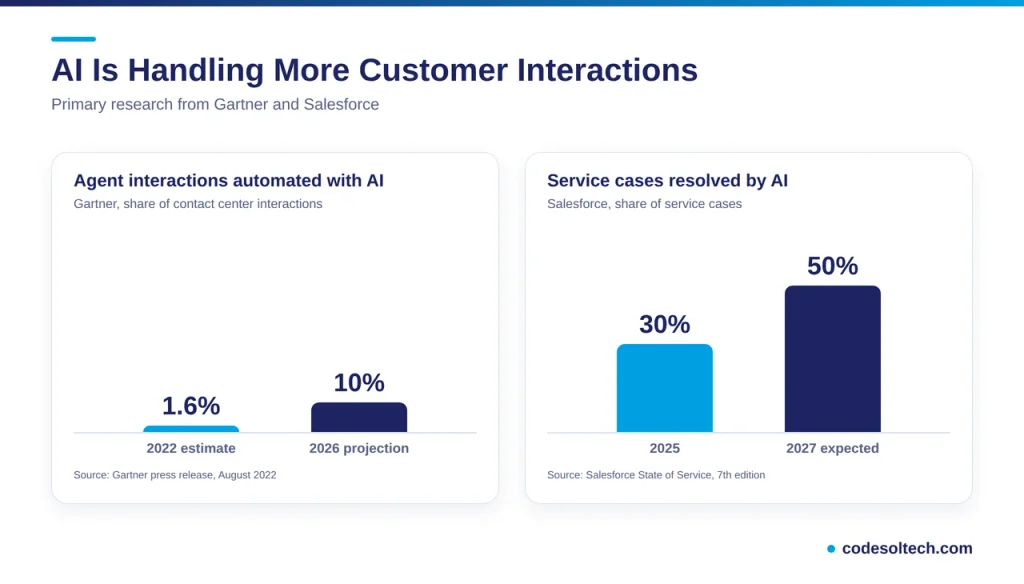
Labor Cost and Automation Share
Gartner projected in 2022 that conversational AI in contact centers would reduce agent labor costs by $80 billion in 2026. Labor represents up to 95% of contact center costs, according to Gartner.
Gartner estimated that 1.6% of agent interactions were automated with AI at the time of the forecast. It projected 1 in 10 interactions by 2026.
AI Case Resolution
Salesforce surveyed 6,500 service professionals for its seventh State of Service report. The report states that AI is expected to resolve 50% of service cases by 2027, up from 30% in 2025.
Integration Cost
Gartner estimated integration pricing at $1,000 to $1,500 per conversational AI agent, with some organizations reporting up to $2,000. Gartner added that built capabilities require continuous support, updates, and maintenance.
Those figures come from a 2022 forecast aimed at large contact centers. Small and mid-size businesses scope cost by channel count and CRM complexity.
Does Conversational AI Replace Human Agents
No. Conversational AI handles repeatable requests and routes complex or emotional cases to humans.
Customer attitudes support this design. A Gartner survey of 5,728 customers in December 2023 found that 64% prefer companies not use AI in customer service.
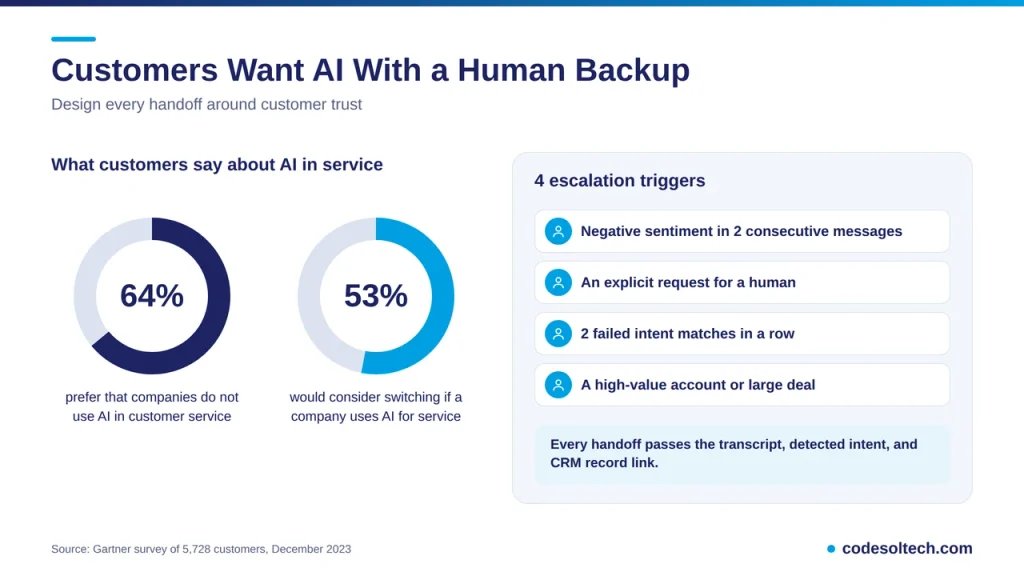
The same survey found that 53% of customers would consider switching to a competitor if they learned a company would use AI for customer service. Difficulty reaching a person ranked as the top concern.
A reliable handoff protects trust. Configure 4 escalation triggers:
- Negative sentiment in 2 consecutive messages
- An explicit request for a human
- 2 failed intent matches in a row
- A high-value account or a deal above a set threshold
The handoff passes the transcript, the detected intent, and a link to the CRM record. The human agent starts with full context.
Common Failure Points in Conversational AI Deployments
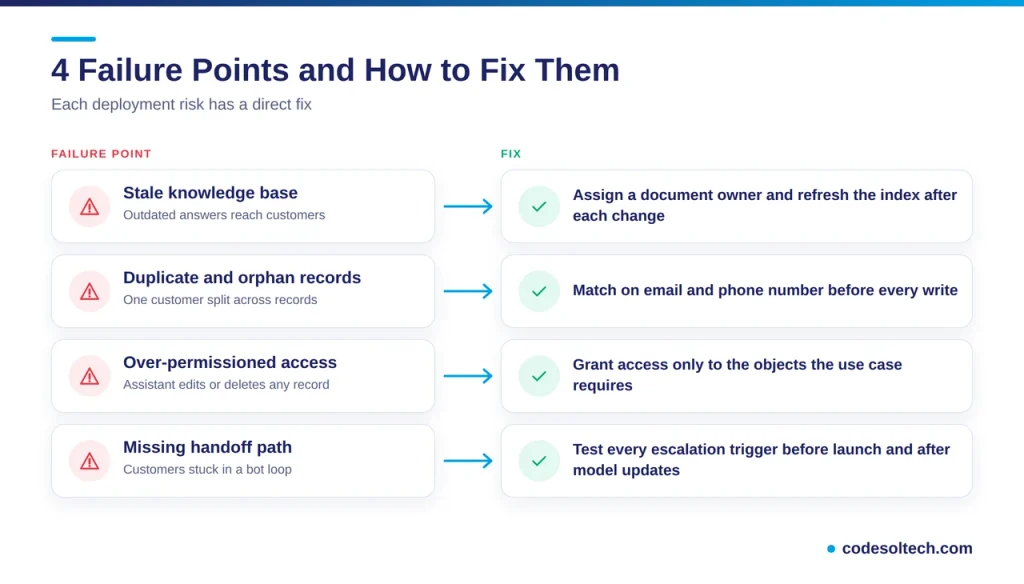
Four failure points account for most broken deployments. Each one has a direct fix.
Stale Knowledge Base
An outdated pricing sheet produces outdated answers. Assign an owner to every source document and refresh the index after each change.
Duplicate and Orphan Records
Skipping the search-before-create step splits one customer into 2 or more records. Match on email and phone number before every write.
Over-Permissioned Access
An assistant with admin API scopes edits or deletes any record. Grant read and write access only to the objects the use case requires.
Missing Handoff Path
A bot without an escalation route traps customers in a loop. Test every escalation trigger before launch and after each model update.
Deployment Checklist for Conversational AI in CRM
Start With 3 Use Cases
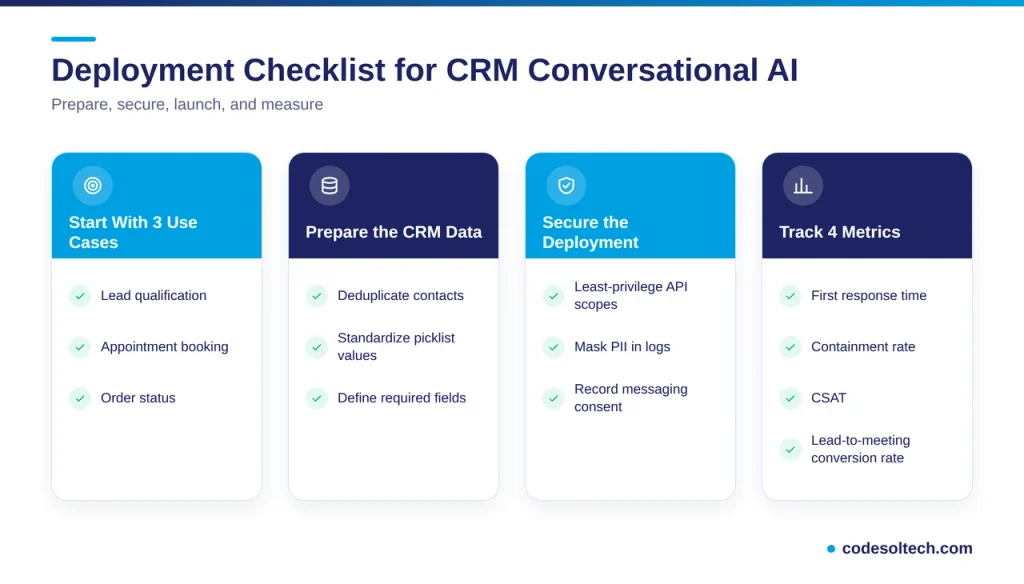
Select 3 high-volume, low-risk use cases such as lead qualification, appointment booking, and order status. Narrowing the scope raises answer accuracy and shortens testing.
Prepare the CRM Data
Deduplicate contacts, standardize picklist values, and define required fields before launch. The assistant inherits every flaw in the underlying data.
Track 4 Metrics
- First response time
- Containment rate, the share of conversations resolved without a human
- Customer satisfaction score (CSAT)
- Lead-to-meeting conversion rate
Secure the Deployment
Apply least-privilege API scopes, mask personally identifiable information in logs, and record consent for every messaging channel. Review transcripts every quarter for accuracy and policy compliance.
Choose the Build Path
Off-the-shelf assistants cover standard CRM objects. Custom objects, legacy databases, and industry workflows require a purpose-built integration.
Teams without in-house engineers hire a custom CRM development partner to build the integration layer. The assistant then triggers workflow automation directly from conversation outcomes.
Final Words
Conversational AI turns a CRM from a database into an assistant. It captures leads, updates records, and resolves routine requests around the clock.
Accuracy depends on clean data, grounded answers, and a fast human handoff. Start with 3 use cases, measure 4 metrics, and expand from there.
Every expansion builds on measured results.
Ready to add conversational AI to your CRM? Talk to the CodeSolTech CRM team and get a scoped integration plan for your first 3 use cases.
You May Like
AI Sales Forecasting in CRM: How Machine Learning Predicts Revenue
AI Customer Segmentation in CRM [Proven Data + 6-Step Setup]
![AI Customer Segmentation in CRM [Proven Data + 6-Step Setup]](https://www.codesoltech.com/wp-content/uploads/2026/09/AI-Customer-Segmentation.webp)