![AI Meeting Notes & Call Summaries in CRM [6-Step Plan]](https://www.codesoltech.com/wp-content/uploads/2026/09/AI-Meeting-Notes-.webp)
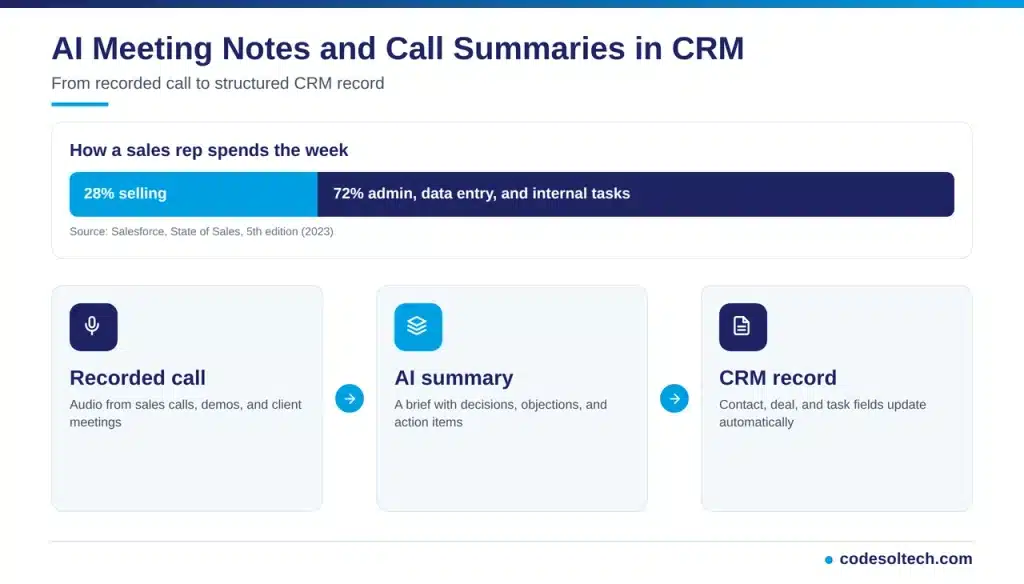
AI meeting notes and call summaries in a CRM record sales calls, convert speech to text, extract action items, and write the results into contact, deal, and account records automatically. This process removes manual note entry, keeps CRM data current, and gives reps more time to sell.
A CRM (customer relationship management) system stores these outputs against contact, account, and deal records. The integration replaces the manual notes field that reps fill in after each call.
The need is measurable. The Salesforce State of Sales report finds that reps spend 28% of their week selling. The other 72% goes to data entry, deal management, and internal tasks.
The same report shows that 69% of sales professionals say selling is harder than before. Automated note capture returns time to the 28% who produce revenue.
How AI Call Summaries Work Inside a CRM
An AI call summary pipeline converts audio into structured CRM data in 5 stages.
- Capture: The tool records the call or joins the video meeting through a calendar connection.
- Transcription: Speech recognition converts audio into text and labels each speaker through speaker diarization.
- Analysis: Natural language processing (NLP) detects topics, objections, competitor mentions, and commitments.
- Summarization: A large language model (LLM) writes a short brief and a list of action items.
- Sync: The CRM connector maps the output to contact, deal, and task fields through an API.
Automatic speech recognition powers stage 2. It converts spoken language into machine-readable text.
McKinsey describes voice-to-CRM tools that translate discussions into structured data points. These points include competitor references, product needs, objections, and follow-up commitments.
Data AI Note-Takers Write to CRM Records
A well-configured integration writes 7 data types to the CRM.
- Call summary: a 3- to 5-sentence brief attached to the activity timeline.
- Action items: tasks with an owner and a due date.
- Deal signals: budget, decision maker, timeline, and competitor mentions.
- Sentiment: a positive, neutral, or negative label for the conversation.
- Contact updates: new stakeholder names, titles, and email addresses.
- Full transcript: a searchable text record of the call.
- Next meeting date: a calendar entry linked to the deal.
Deal signals feed forecasting reports, and sentiment labels feed coaching dashboards. Each field turns a conversation into a reportable data point.
Field mapping decides the quality of the output. Unmapped output lands in a generic notes field and loses reporting value.
AI-written fields follow the same governance rules as manual entries. Read the guide on CRM data quality to set validation rules before you turn on sync.
Benefits of AI Meeting Notes in a CRM
McKinsey estimates that generative AI increases sales productivity by 3 to 5 percent of current global sales expenditures. Meeting summarization is a low-complexity use case, and McKinsey notes that leading organizations buy ready-made tools for summarizing meeting transcripts.
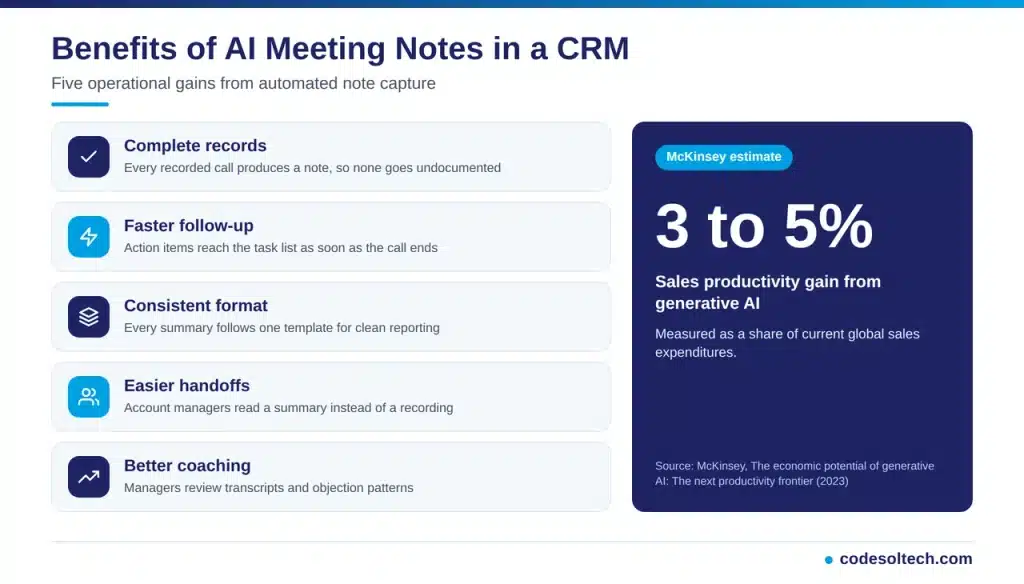
The operational benefits fall into 5 groups.
- Complete records: Every recorded call produces a note, so no call goes undocumented.
- Faster follow-up: Action items reach the task list as soon as the call ends.
- Consistent format: Every summary follows one template, which supports clean reporting.
- Easier handoffs: Account managers read a summary instead of replaying a recording.
- Better coaching: Managers review transcripts and objection patterns across reps.
AI Notes vs Manual Notes
AI notes outperform manual notes on coverage, consistency, and searchability. Manual notes retain one advantage: a rep adds private judgment that a transcript does not capture.
| Factor | Manual Notes | AI Notes |
|---|---|---|
| Entry method | Typed by the rep after the call | Generated automatically after the call |
| Coverage | Depends on rep discipline | Every recorded call |
| Detail level | Limited to rep memory | Full transcript plus summary |
| Format | Varies by rep | Template driven |
| Searchability | Keyword search on short notes | Keyword search across transcripts |
Which Features Matter When You Choose an AI Note-Taker
Choosing an AI note-taker for your CRM requires more than checking whether it can record and summarize meetings.
The right tool should fit into your existing sales workflow, transfer useful information into the correct CRM fields, and protect sensitive customer and business data. The following features are especially important when evaluating an AI note-taking solution.

Two-Way CRM Sync
Two-way CRM synchronization allows the AI note-taker to both read relevant deal context and write meeting information back into the CRM through its API. This creates a connected workflow instead of leaving meeting notes in a separate application.
For example, the tool may use existing account or opportunity information to provide context before a meeting and then update the corresponding CRM record with the meeting summary, action items, or follow-up tasks afterward.
Custom Field Mapping
A useful AI note-taker should be able to map meeting information to the specific fields in your CRM rather than placing everything into a single notes field.
Custom mapping can send information such as customer requirements, objections, next steps, purchase timelines, or deal updates to their appropriate locations. This keeps CRM records structured and makes the captured information easier to search, report on, and automate.
Speaker Labeling
Accurate speaker identification is important when a meeting includes multiple participants. Speaker labeling separates the sales representative’s comments from those of customers, prospects, and other participants.
This makes the resulting transcript and summary easier to review and helps the AI determine who made a particular statement. It is particularly useful for identifying customer requirements, questions, objections, and commitments.
Custom Vocabulary
Generic speech-recognition systems may struggle with product names, technical terminology, company names, or industry-specific language. A custom vocabulary feature allows the system to recognize terms that are specific to your business.
Adding frequently used product names, services, acronyms, and industry terminology can improve transcript accuracy and reduce the amount of manual correction required after each meeting.
Consent Controls
Recording customer conversations requires clear consent practices. An AI note-taker should provide controls for announcing that a meeting is being recorded and documenting the participant’s consent where required by your workflow and applicable rules.
Consent information should be handled consistently so your team knows whether a meeting was recorded appropriately. The system should also make it clear when recording or transcription is active.
Role-Based Access
Meeting transcripts and recordings can contain sensitive customer information, pricing discussions, business plans, and other confidential data. Role-based access controls help ensure that only authorized users can view or manage this information.
When evaluating a tool, check whether permissions can be configured according to roles, teams, or other access requirements. Limiting unnecessary access reduces the risk of sensitive meeting data being exposed to users who do not need it.
Off-the-shelf tools cover standard fields. A custom build covers proprietary fields, industry workflows, and private hosting. See custom CRM development for the architecture options.
Where AI Call Summaries Fit Across CRM Workflows
AI note capture serves 5 CRM workflows beyond the sales discovery call.
- Discovery calls: The summary records pain points, budget, and decision-makers for qualification.
- Demos: The summary logs feature requests and objections against the deal.
- Support escalations: The summary attaches the issue, the resolution, and the promised follow-up to the ticket.
- Client onboarding: The summary lists setup tasks and assigns each one to an owner.
- Quarterly account reviews: The summary tracks renewal risks and expansion topics.
Each workflow needs its own summary template. A discovery template captures qualification data, while a support template captures issue and resolution data.
Service businesses follow the same pattern. A roofing, HVAC, or law firm CRM stores consultation and site visit notes on the job or matter record.
Is Recording Calls With AI Legal
Recording is legal when the required parties consent. Federal wiretap law (18 U.S.C. § 2511) permits recording when at least 1 party consents. States including California and Florida require consent from all parties.
The GDPR classifies a recorded voice as personal data. Teams in the European Union need a lawful basis, a stated purpose, and a retention limit for every recording.
Apply these 4 controls to every deployment.
- Announce recording at the start of each call.
- Store the consent status on the contact record.
- Set a retention period for audio and transcripts.
- Restrict transcript access by user role.
Common Mistakes When Deploying AI Note Capture
The 5 mistakes below reduce the value of an AI note-taker.
- Skipping field mapping: Summaries land in one notes box, and reports cannot filter them.
- Ignoring consent: Recordings without a consent flag create compliance exposure.
- Using one template for every call: Generic summaries omit the fields each team needs.
- Trusting output without review: Unchecked summaries write transcription errors into deal records.
- Skipping rep training: Reps who distrust the tool keep typing manual notes in parallel.
Assign one owner for template quality. That owner reviews summaries weekly and updates prompts and field rules.
How to Implement AI Meeting Notes in Your CRM in 6 Steps
Implementing AI meeting notes in your CRM does not have to be a complex process. The goal is to create a reliable workflow where meeting conversations are captured, summarized, and converted into useful CRM data without adding extra work for sales teams.
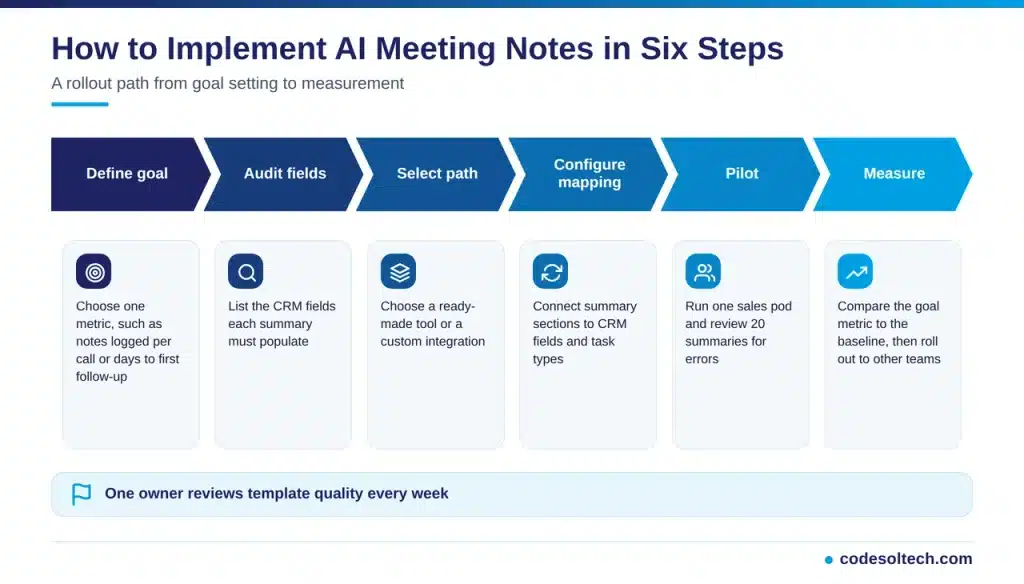
1. Define the Goal
Start by identifying what you want AI meeting notes to improve. Avoid trying to measure too many outcomes at once. Choose a specific metric that can be compared before and after implementation.
For example, you could track the number of sales calls with completed notes, the average time between a meeting and the first follow-up, or the percentage of meetings that result in a logged CRM activity. A clear goal gives your team a baseline and helps determine whether the new workflow is delivering measurable value.
2. Audit Your CRM Fields
Before connecting an AI meeting-notes system, review the information your CRM currently stores after meetings. Identify the fields that should be populated from meeting summaries.
These may include meeting outcomes, customer needs, objections, next steps, follow-up dates, deal updates, or action items. Removing unnecessary fields and defining exactly where each piece of information belongs will make the integration more consistent and reduce manual cleanup.
3. Select the Right Build Path
Next, decide whether you need a ready-made AI meeting-notes solution or a custom integration. A ready-made tool may be suitable if your CRM and sales workflow are relatively standard and you want to get started quickly.
A custom integration can make more sense when your CRM has specialized fields, unique sales processes, or specific automation requirements. Consider the level of customization, integration effort, security requirements, and ongoing maintenance before choosing an approach.
4. Configure CRM Mapping and Templates
Once you have selected your solution, define how information from each meeting summary should flow into the CRM. Map important summary sections to the appropriate CRM fields, records, activities, and task types.
You should also create consistent summary templates. For example, a template might separate customer requirements, objections, decisions, action items, and next steps. Clear mapping and templates help ensure that AI-generated notes are structured consistently instead of creating different formats for every meeting.
5. Pilot the Workflow With One Team
Do not immediately deploy the workflow across the entire organization. Start with a small sales team or one sales pod and use the pilot to identify problems before a wider rollout.
Review a sample of around 20 meeting summaries and check whether important details are captured accurately, whether information is being assigned to the correct CRM fields, and whether tasks or follow-ups are created correctly. This review can also reveal cases where the AI misunderstands terminology, speakers, customer requirements, or meeting outcomes.
6. Measure Results and Expand
After the pilot, compare your chosen metric with the baseline you established before implementation. Look for measurable changes in areas such as CRM note completion, follow-up speed, data consistency, or sales-rep time spent on administrative tasks.
If the workflow performs reliably, refine the templates and mappings based on what you learned during the pilot. You can then gradually introduce AI meeting notes to additional teams while continuing to monitor accuracy and business outcomes.
A successful implementation is not simply about connecting an AI tool to a CRM. It is about creating a dependable process that turns meeting conversations into accurate, actionable CRM information with minimal manual effort.
Action items from the summary feed the task list. Pair the setup with CRM task tracking so every commitment has an owner.
Integration architecture determines how reliably data moves between systems. Review CRM integration architecture before you connect a transcription service.
Metrics That Measure AI Note Capture Results
Track 6 metrics against a pre-launch baseline.
- Note coverage: the percentage of calls with a logged summary.
- Time to follow-up: the hours between call end and the first follow-up task.
- Field completion rate: the percentage of deals with populated qualification fields.
- Task completion rate: the percentage of AI-generated action items closed on time.
- Rep adoption: the number of reps who use the tool each week.
- Summary edit rate: the percentage of summaries a rep corrects.
Review these metrics every 30 days. A rising edit rate signals a template or vocabulary problem.
FAQs
Do AI meeting notes replace manual CRM data entry?
AI notes replace routine note entry. Reps still verify the summary and add private context, such as relationship history.
How accurate are AI call summaries?
Accuracy depends on audio quality, speaker accents, and domain vocabulary. A custom vocabulary and a clean audio source raise transcript quality.
Does AI note capture connect with SMS and email records?
Yes. A unified activity timeline stores calls, emails, and texts on one contact. See CRM SMS integration for the messaging layer.
Final Words
AI meeting notes and call summaries turn every call into structured CRM data. Reps regain selling time, and managers gain complete records.
Map your fields first, secure recording consent, and pilot with one team. Track note coverage and follow-up speed against your baseline.
Then expand the workflow across the sales floor.
Ready to automate call notes in your CRM? Talk to the CodeSolTech team and get a custom AI note-taking integration scoped for your workflow.
You May Like
AI Email Generation in CRM: Save 12 Hrs/Week
AI Sales Assistants for Small Business: What They Actually Do
Predictive Sales Analytics in CRM: How AI Forecasts Revenue
Thanks for Reading, Stay Connected With 🙂
![AI Customer Segmentation in CRM [Proven Data + 6-Step Setup]](https://www.codesoltech.com/wp-content/uploads/2026/09/AI-Customer-Segmentation.webp)