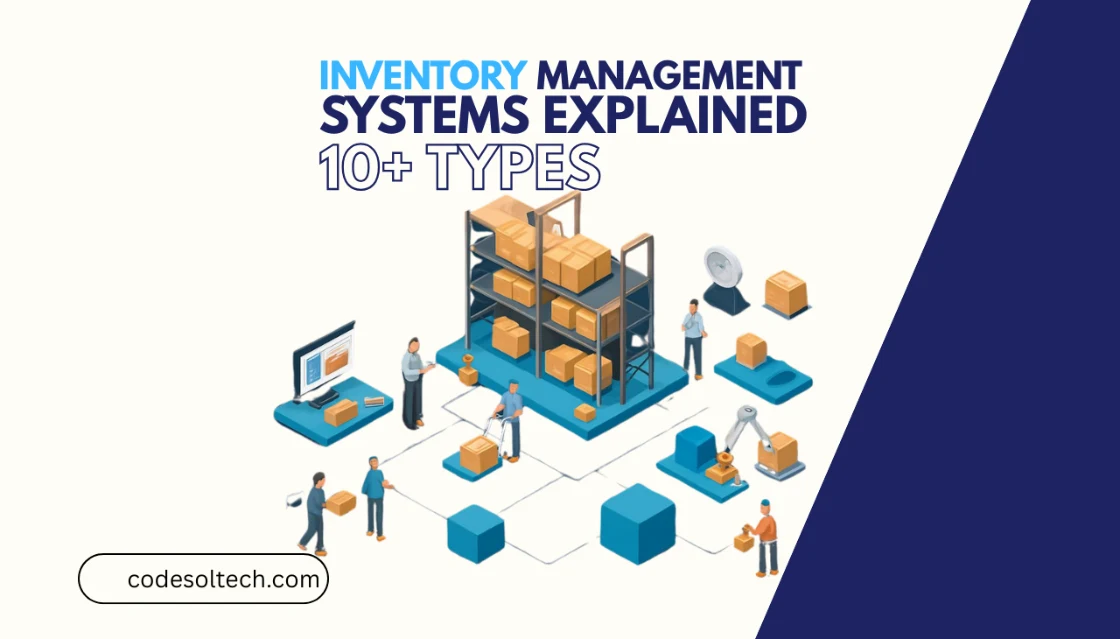
An inventory management system (IMS) is the process and software a business uses to track goods across its entire supply chain from purchase order and warehousing through to final sale. A well-implemented IMS eliminates stockouts, reduces carrying costs, and gives operations teams accurate, real-time stock data without manual counting.
This guide covers the 10 types of inventory management systems, how stock control and warehousing connect to each type, and how real-time sync makes modern IMS essential for growing businesses.
What Is an Inventory Management System?
An inventory management system is a structured method, either manual, software-based, or fully automated, that records every stock movement: receipts, transfers, sales, returns, and write-offs. The system assigns each SKU (Stock Keeping Unit) a unique identifier and updates its quantity and location whenever it moves.
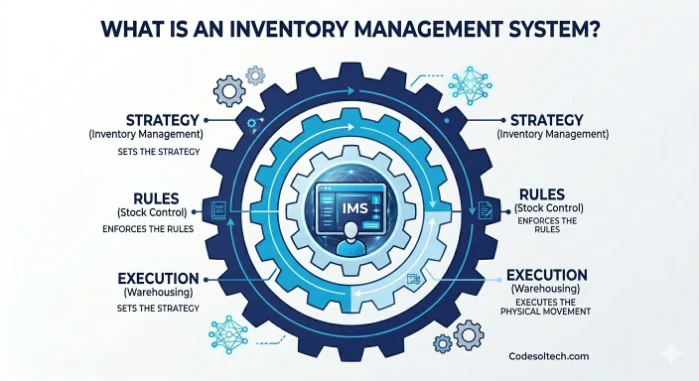
IMS operates at the intersection of inventory management, stock control, and warehousing. These three functions are distinct but interdependent. Inventory management sets the strategy; stock control enforces the rules; warehousing executes the physical movement.
According to a Wikipedia overview of inventory management software, the earliest computerized inventory systems emerged in the 1960s as mainframe-based batch processing tools. Today, cloud-based IMS platforms process transactions in milliseconds and sync across multiple warehouses simultaneously.
How Does an Inventory Management System Work?
An IMS works by assigning a unique identifier, typically a barcode, QR code, or RFID tag to every product or batch. When a product moves (received, picked, shipped, or returned), the system records the event and updates the central stock database instantly.
This process eliminates the need for periodic manual stock counts as the primary source of truth.
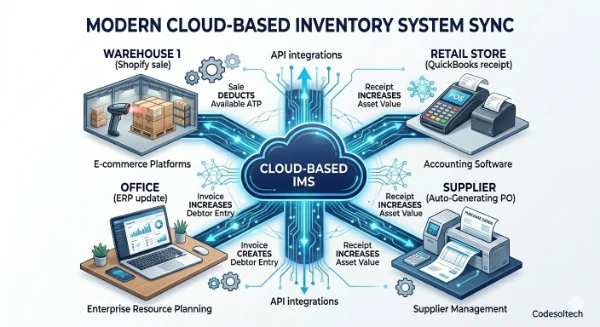
Modern cloud-based inventory systems connect to e-commerce platforms, accounting software, and warehouse management systems (WMS) through API integrations.
This connection creates a two-way data sync: a sale on Shopify immediately reduces the available quantity in the IMS, and a purchase order receipt immediately increases it.
The 6-Step IMS Process
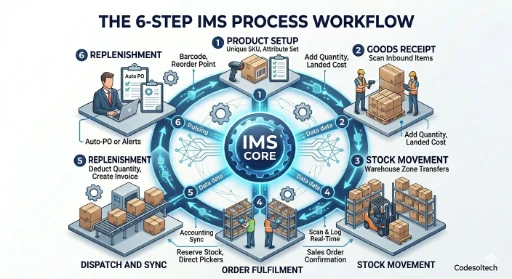
- Product Setup: Each item receives a unique SKU, barcode, and attribute set (dimensions, weight, cost price, reorder point).
- Goods Receipt: Warehouse staff scan inbound items; the IMS adds quantities to the correct location and updates landed cost records.
- Stock Movement: Transfers between warehouse zones or between facilities are scanned and logged in real time.
- Order Fulfilment: When a sales order is confirmed, the IMS reserves (allocates) the required stock and directs pickers to the correct bin location.
- Dispatch and Sync: When goods leave the warehouse, the IMS deducts the quantity and triggers invoice creation in the connected accounting system.
- Replenishment: When stock falls below the pre-set reorder point, the IMS generates a purchase order automatically or alerts the purchasing team.
What Are the 10 Types of Inventory Management Systems?
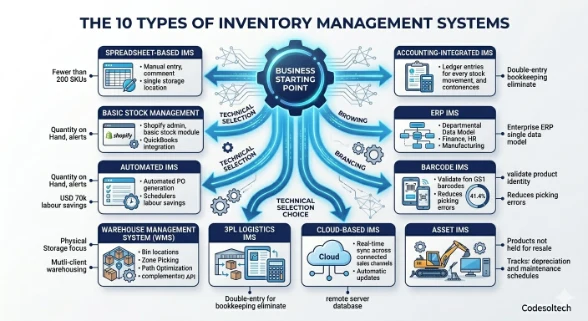
Inventory management systems are divided into 10 primary types based on their technology, scope, and target user. The right system depends on business size, number of SKUs, warehouse complexity, and integration requirements.
1. Spreadsheet-Based IMS
A spreadsheet-based IMS uses tools such as Microsoft Excel or Google Sheets to record stock movements manually. This approach costs nothing beyond software licences already in use and suits businesses with fewer than 200 SKUs and a single storage location.
Spreadsheets break down when two users edit simultaneously, introducing data conflicts that corrupt stock accuracy.
2. Basic Stock Management System
E-commerce platforms such as Shopify and accounting tools such as QuickBooks include basic stock control modules. These systems track quantity on hand and generate low-stock alerts but lack production management, batch tracking, and multi-warehouse logic. They serve as the entry point between spreadsheets and dedicated IMS software.
3. Automated Inventory Management System
An automated IMS uses rules-based logic to execute actions without human input: auto-generating purchase orders at reorder points, updating reports on a schedule, and sending low-stock alerts by email or SMS.
Automation reduces data entry errors by removing the manual step from routine transactions. Retailers with more than 60,000 SKUs reduce annual manual stock-audit labour costs by over USD 70,000 after deploying an automated IMS.
4. Warehouse Management System (WMS)
A Warehouse Management System focuses on physical storage operations: bin location management, put-away logic, wave picking, and packing accuracy. A WMS tracks where stock lives inside a facility, not just how much exists in total. WMS and IMS are complementary systems; large operations deploy both and integrate them via API.
- Bin and zone location tracking
- Pick-path optimization (zone picking, wave picking, batch picking)
- Labour management and task interleaving
- Cross-docking and slotting optimization
5. Third-Party Logistics (3PL) IMS
A 3PL IMS manages inventory across a fulfilment centre that serves multiple client businesses simultaneously. The system must separate each client’s stock, apply client-specific fulfilment rules, and generate client-facing reports. 3PL platforms include Mintsoft and ShipBob, which natively support multi-client warehousing with separate billing per client.
6. Accounting-Integrated IMS
An accounting-integrated IMS connects stock movements directly to financial ledgers. Every goods receipt creates a creditor entry; every sale creates a debtor entry and adjusts the inventory asset account. This integration eliminates double-entry bookkeeping and ensures that the balance sheet always reflects the current cost value of stock on hand.
7. ERP Inventory Management System
An Enterprise Resource Planning (ERP) system incorporates inventory management as one module within a broader business platform covering finance, HR, manufacturing, and supply chain. ERP systems, including NetSuite, SAP S/4HANA, and Oracle Cloud ERP, suit large enterprises that require a single data model across all departments.
ERP implementation costs range from USD 10,000 to USD 40,000+ for mid-market deployments, excluding ongoing subscription fees.
8. Barcode Inventory Management System
A barcode IMS uses printed GS1 barcodes or QR codes scanned by mobile devices or fixed scanners to record every stock movement. Barcode scanning reduces picking errors by validating product identity at each stage of the fulfilment process.
A National Library of Medicine study found that barcode-based medication administration systems reduced administration errors by 41.4%, a figure that translates directly to retail and distribution barcode scanning accuracy gains.
9. Cloud-Based Inventory Management System
A cloud-based IMS stores all stock data on remote servers accessed via a web browser or mobile app. Because data lives in the cloud, every authorized user across multiple warehouses, offices, or countries views the same real-time stock figures simultaneously.
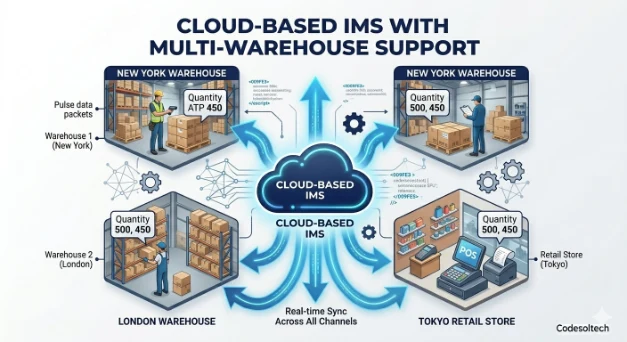
Cloud IMS eliminates the need for on-premise server infrastructure and delivers automatic software updates without IT intervention.
- Access from any device with an internet connection
- Real-time sync across all connected sales channels and warehouses
- API-first architecture for integrations with e-commerce, accounting, and CRM tools
- Automatic backups and enterprise-grade data security
10. Asset Inventory Management System
An asset IMS tracks physical assets the business uses to operate machinery, vehicles, tools, and IT equipment, rather than products held for resale. Asset tracking records depreciation, maintenance schedules, and physical location.
This type of IMS is distinct from product-focused systems and is deployed by facilities management, construction, and field service businesses.
Periodic vs. Perpetual Inventory Systems
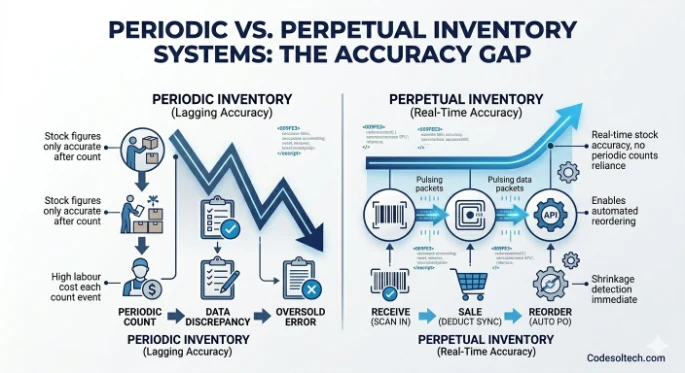
Every inventory management system operates on one of two core methodologies: periodic or perpetual. The choice between them determines how often stock figures are accurate and how much labour stock counts require.
Periodic Inventory System
A periodic inventory system updates stock counts at scheduled intervals, typically every 3 to 6 months, through a physical stock take. Between counts, the system does not track individual transactions in real time.
The periodic inventory method suits very small businesses with a limited number of SKUs and low transaction volumes where real-time accuracy is not operationally critical.
- Low software cost (often managed via spreadsheet)
- Stock figures are only accurate immediately after a count
- High labour cost at each count event
- No real-time visibility between count cycles
Perpetual Inventory System
A perpetual inventory system records every stock transaction as it happens, keeping the quantity on hand current at all times. Point-of-sale systems, barcode scanners, and e-commerce integrations feed data into the perpetual system continuously.
This methodology is the standard for any business with more than 500 active SKUs, multiple sales channels, or more than one warehouse location.
- Real-time stock accuracy without reliance on periodic counts
- Immediate detection of shrinkage, damage, or data discrepancies
- Enables automated reordering at precise reorder points
- Requires barcode scanning or RFID infrastructure to function correctly
Verdict: Perpetual inventory systems outperform periodic systems for businesses with growing SKU counts, multi-channel sales, or multi-warehouse operations. The real-time data they produce directly supports demand forecasting and smarter purchasing decisions.
What Is Stock Control and How Does It Differ from Inventory Management?
Stock control is the operational execution of inventory rules: enforcing minimum stock levels, triggering reorders, managing expiry dates, and preventing shrinkage. Inventory management is the broader strategic discipline that includes stock control, demand planning, supplier management, and financial reconciliation.
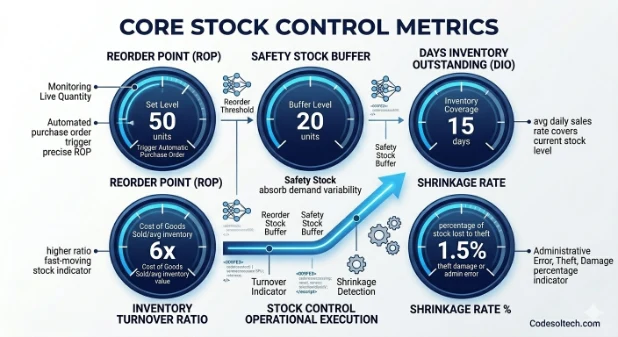
In practice, stock control operates within an IMS by enforcing the rules that the inventory manager defines.
A stock controller sets a reorder point of 50 units for Product A; the IMS monitors the live quantity and triggers the purchase order automatically when the count reaches 50.
This relationship means stock control accuracy depends entirely on the quality of the IMS feeding it data.
Core Stock Control Metrics and IMS Tracks
- Reorder Point (ROP): The quantity at which a new purchase order is generated automatically.
- Safety Stock: The buffer quantity held above the ROP to absorb demand variability.
- Days of Inventory Outstanding (DIO): The number of days the current stock level covers at the average daily sales rate.
- Inventory Turnover Ratio: Cost of Goods Sold divided by average inventory value. A higher ratio indicates faster-moving stock.
- Shrinkage Rate: The percentage of stock lost to theft, damage, or administrative error.
Warehousing and Inventory Management: How They Connect
Warehousing is the physical infrastructure in which inventory is stored, organized, and fulfilled. Inventory management is the data layer that records what is in that infrastructure and where. The two disciplines connect through a shared identifier: the bin or location code assigned to every storage position in the warehouse.
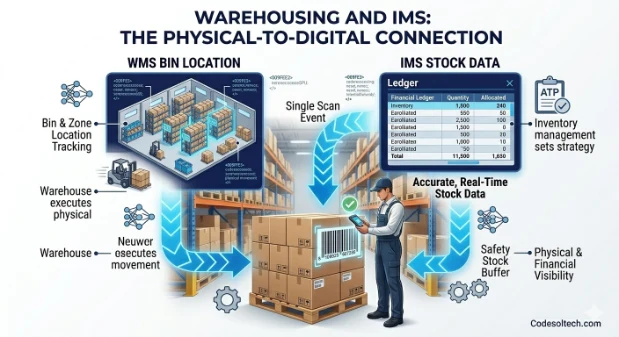
When an IMS integrates with a WMS, every inbound pallet scan updates both systems simultaneously. The IMS records a quantity increase for the receiving location; the WMS records the specific bin where the pallet is stored.
This dual-system approach gives operations managers both financial and physical visibility from a single scanning event.
Warehousing Processes Controlled by an IMS
- Receiving: Inbound goods are scanned against an open purchase order; the IMS validates quantity and product identity before updating stock levels.
- Put-Away: The IMS assigns storage locations based on product velocity, weight, and hazard classification.
- Pick and Pack: The IMS generates a pick list ordered by bin location to minimize travel time in the warehouse.
- Cycle Counting: Instead of full stock takes, the IMS schedules rolling counts of high-velocity or high-value SKUs to maintain accuracy.
- Dispatch: The IMS confirms shipped quantities, generates dispatch notes, and triggers real-time sync with connected sales channels.
Real-Time Sync: The Core Mechanism of a Modern IMS
Real-time sync is the bi-directional, instant exchange of inventory data between an IMS and connected platforms’ e-commerce stores, accounting software, marketplace channels, and WMS tools. Sync eliminates the lag between a sale event and a stock update, which prevents overselling and the customer service failures that follow.
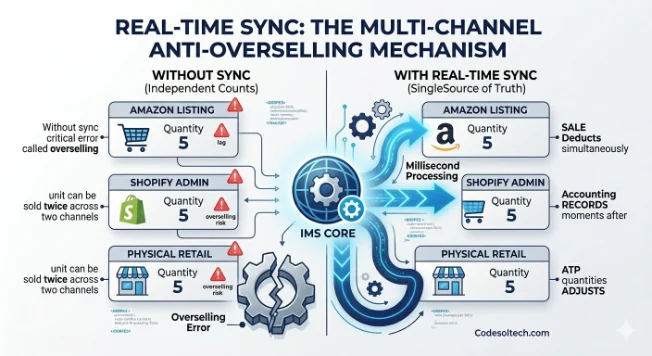
A business selling on Amazon, its own WooCommerce store, and a physical retail location simultaneously requires sync to maintain a single accurate quantity across all 3 channels.
Without sync, each channel holds an independent stock count, and the same unit can be sold twice across two channels — a critical error called overselling.
What Does Real-Time Sync Do in an IMS?
- Deducts sold quantities from all connected channels simultaneously when one sale is processed
- Updates accounting records with the cost of goods sold at the moment of dispatch
- Adjusts available-to-promise (ATP) quantities across all warehouses in real time
- Triggers automated purchase orders when stock falls below the reorder threshold
- Syncs supplier lead times and pricing from integrated procurement platforms
Cloud-based IMS platforms use webhook-driven or API-polled sync at intervals as short as 30 seconds. Enterprise ERP systems execute sync in real time through event-driven architecture, where every database transaction immediately propagates to all subscribed modules.
Key Features of an Inventory Management System
An IMS is evaluated by 7 functional areas. Businesses should prioritize features that eliminate their highest-cost operational inefficiencies rather than selecting the platform with the longest feature list.
- Real-Time Stock Tracking: Displays current quantity on hand, quantity allocated to open orders, and quantity available for new orders for every SKU, across every location.
- Purchase Order Management: Generates, sends, and tracks purchase orders from creation through goods receipt, and matches received quantities against the original order.
- Multi-Warehouse Support: Manages stock levels, transfers, and fulfilment rules across 2 or more physical storage locations from a single dashboard.
- Barcode and RFID Scanning: Connects mobile scanning hardware to the IMS to eliminate manual data entry at every stock movement point.
- Demand Forecasting: Analyses 12 to 24 months of historical sales data to project future demand by SKU, season, and sales channel.
- Batch and Serial Number Tracking: Records the batch or serial number of every unit for compliance, recall management, and warranty purposes.
- Inventory Reporting and Analytics: Generates reports on turnover rate, slow-moving stock, supplier performance, and margin per SKU.
How Much Does an Inventory Management System Cost?
The average cost of a cloud-based IMS is USD 175 per user licence per month, based on analysis of over 70 software providers listed on Capterra. This figure excludes one-time set-up fees, which average USD 789, and ongoing customer support contracts, which average USD 80 per month.
Enterprise ERP systems with embedded inventory modules carry implementation costs between USD 10,000 and USD 40,000 for mid-market deployments. These costs reflect data migration, configuration, staff training, and integration development with existing systems.
IMS Cost Factors
- Number of user licences: Most SaaS IMS platforms charge per seat; adding warehouse staff and office users increases the monthly cost linearly.
- Number of integrated platforms: Connecting accounting, e-commerce, and logistics systems adds integration fees or requires third-party middleware.
- Number of warehouses: Multi-location support is often gated behind higher pricing tiers.
- Transaction volume: Some platforms charge per order processed or per API call, making high-volume operations more expensive month over month.
- Support tier: Dedicated onboarding, priority support, and custom training packages increase the total cost of ownership.
When Does a Business Need to Upgrade Its Inventory Management System?
A business needs to upgrade its IMS when its current system produces inaccurate stock data, cannot scale to its transaction volume, or lacks the integrations its sales channels require. The cost of operating with an inadequate IMS, through stockouts, overselling, and manual rework, consistently exceeds the cost of upgrading to a dedicated platform.
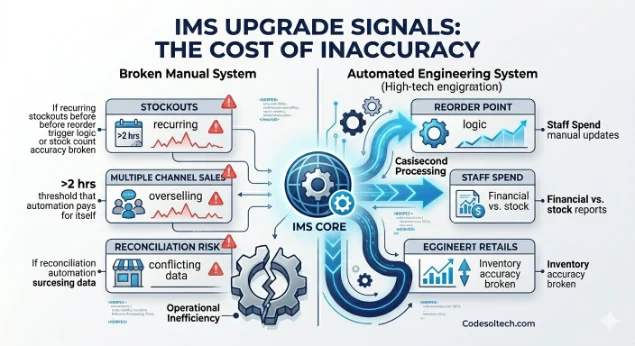
4 Signals That Indicate an IMS Upgrade Is Needed
- Stockouts are recurring: If the business regularly runs out of stock before the reorder is triggered, the reorder point logic or the stock count accuracy in the current system is broken.
- Staff spend more than 2 hours per day on manual inventory updates: This volume of manual entry is the threshold at which automation pays for itself within 12 months.
- The business sells on 2 or more channels: Managing stock across multiple channels without real-time sync produces overselling within weeks.
- Financial reports and stock reports show different inventory values: This discrepancy signals that stock movements are not being recorded in both systems simultaneously — a reconciliation risk that affects financial reporting accuracy.
Final Words
An inventory management system is not optional for any business that holds physical stock. It is the operational foundation that connects warehousing to sales, stock control to financial reporting, and supplier lead times to customer delivery promises.
Choosing the right IMS type, whether a cloud-based perpetual system, a barcode-driven platform, or an ERP module, determines how accurately a business can serve its customers and manage its costs.
Take Control of Your Inventory Today
Ready to move from spreadsheets to a system that tracks every unit in real time? Talk to our team about the right inventory management system for your business size and industry.