
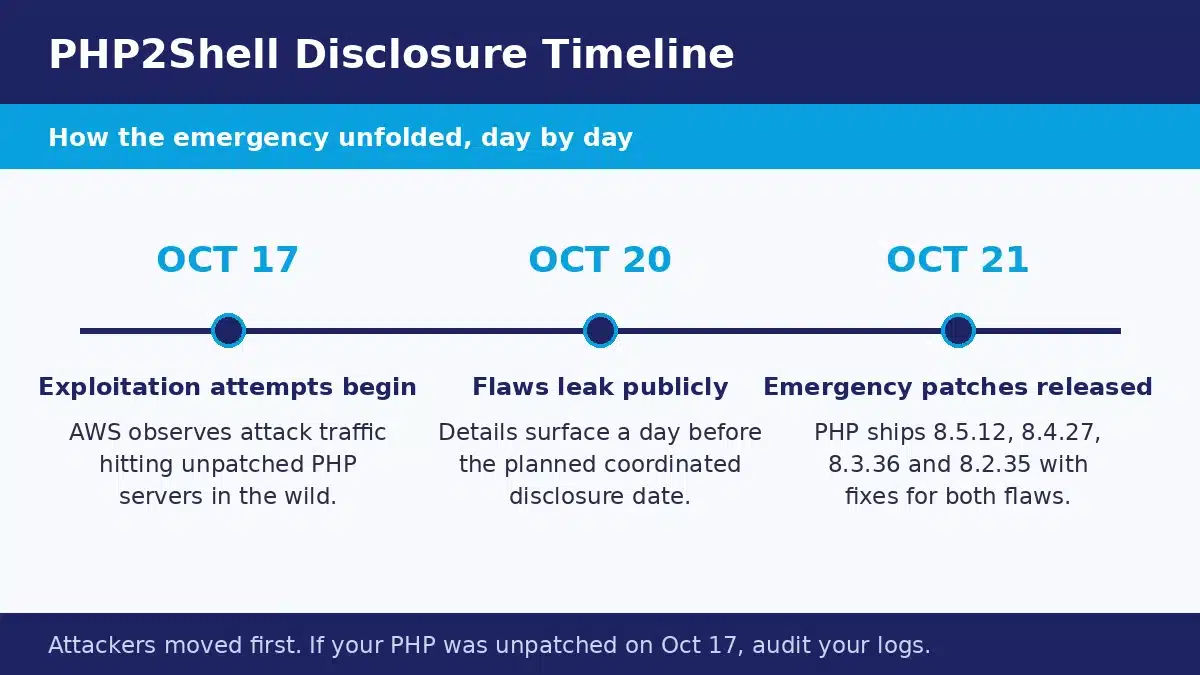
On October 20, 2026, details of two critical vulnerabilities in PHP leaked online a day before their planned disclosure. The PHP security team moved fast and shipped emergency patches on October 21, but the head start mattered. AWS reported exploitation attempts dating back to October 17, and by the time the fixes landed, security firm watchTowr was already seeing active attacks in the wild.
The flaw pair, nicknamed PHP2Shell, is not a bug in WordPress, a plugin, or any single application. It sits in the PHP runtime itself, the engine that powers a huge share of the web, including WordPress, Drupal, Joomla, and Magento sites. Both vulnerabilities are rated 9.2 out of 10 for severity, and neither requires an attacker to log in. If your website runs on PHP, this guide walks you through exactly what happened, how to check your version, how to patch, and how to confirm nobody got in first.
What Is PHP2Shell?
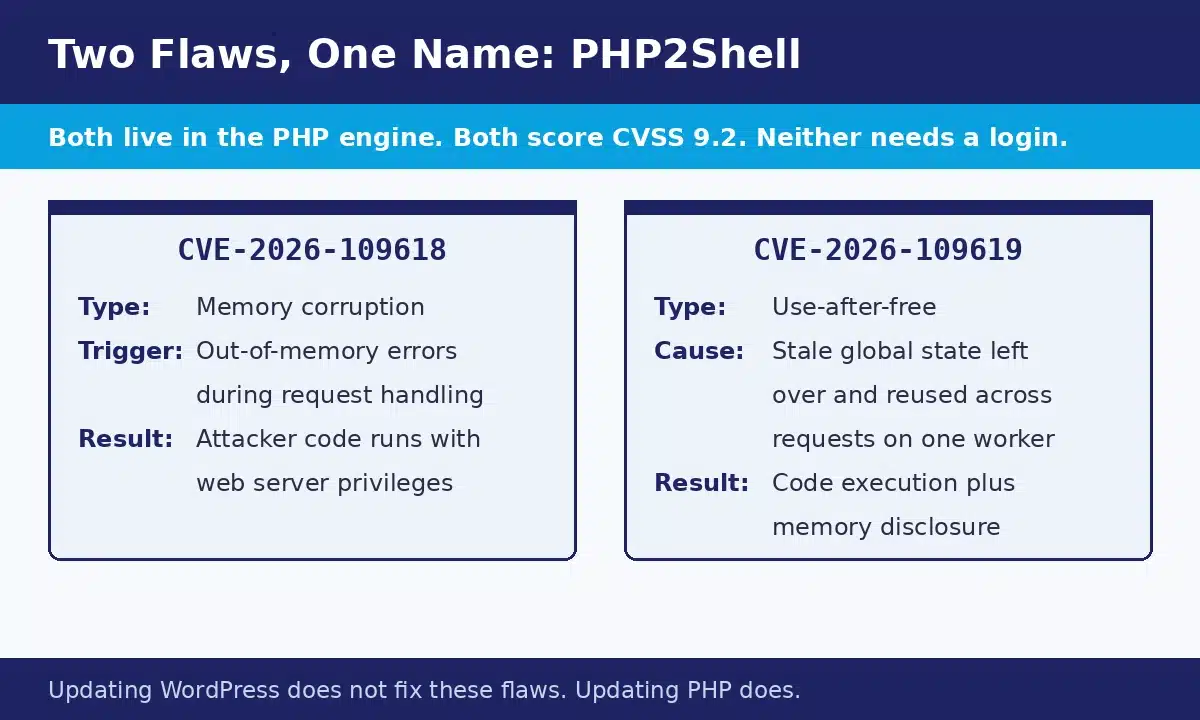
PHP2Shell is the collective name for two vulnerabilities, CVE-2026-109618 and CVE-2026-109619. Both allow unauthenticated remote code execution, which means an attacker anywhere on the internet can run code on a vulnerable server without a username, a password, or any interaction from a site visitor. The flaws were discovered by researchers at Calif, Wiz, and OpenAI working with the PHP security team, and they affect the core of PHP rather than any code you or your developers wrote.
CVE-2026-109618: Corruption Through Memory Exhaustion
The first flaw lives in how PHP handles requests that end abnormally, including requests that run out of memory while being processed, such as parsing uploaded form data. When that happens, PHP can leave its memory in a corrupted state. An attacker who crafts the right request can turn that corruption into remote code execution, running commands with the same privileges as the web worker account that serves your site. That is enough to upload a web shell, read configuration files, and take over the website.
CVE-2026-109619: Stale State and Use-After-Free
The second flaw involves stale global state. PHP workers are long-running processes that handle many requests one after another. CVE-2026-109619 lets one request leave corrupted state behind that a later request on the same worker can exploit, producing a heap use-after-free condition. The result is again remote code execution with the worker’s privileges, plus a risk of memory disclosure. That second part is easy to overlook: process memory can hold passwords, session tokens, and API keys, so an attacker may be able to read secrets directly out of the server even before gaining full control.
Both flaws are rated CVSS 9.2 under scoring version 4.0. To put that in plain terms, this is about as serious as a web vulnerability gets, and the patch should be treated as an emergency rather than routine maintenance.
Who Is Affected?
Every PHP installation that serves web requests is in scope, whatever the application on top of it. That includes all the common ways PHP is deployed:
- PHP-FPM, the standard setup behind most Nginx and many Apache servers
- Apache with mod_php, which the PHP team rates as the highest risk, because an exploit can trigger before any application code runs
- php-cgi, still common on shared hosting
- FrankenPHP and LiteSpeed servers
If your site runs WordPress, Drupal, Joomla, Magento, or a custom PHP application, its security currently depends on the PHP version underneath it, not on how well the application itself is maintained. A fully updated WordPress site on an unpatched PHP version is still exposed.
The oldest installations face the hardest problem. A Shodan scan counted roughly 884,000 internet-facing hosts still reporting PHP 8.1 or older, out of about 1.5 million hosts reporting any PHP version at all. As the patching section below explains, those older branches receive no official fix, so a large number of sites need a real upgrade rather than a quick patch.
How to Check Your PHP Version
Before anything else, find out exactly which PHP version your site is running. There are five practical ways to do it, and the first two cover most site owners.
1. WordPress Site Health
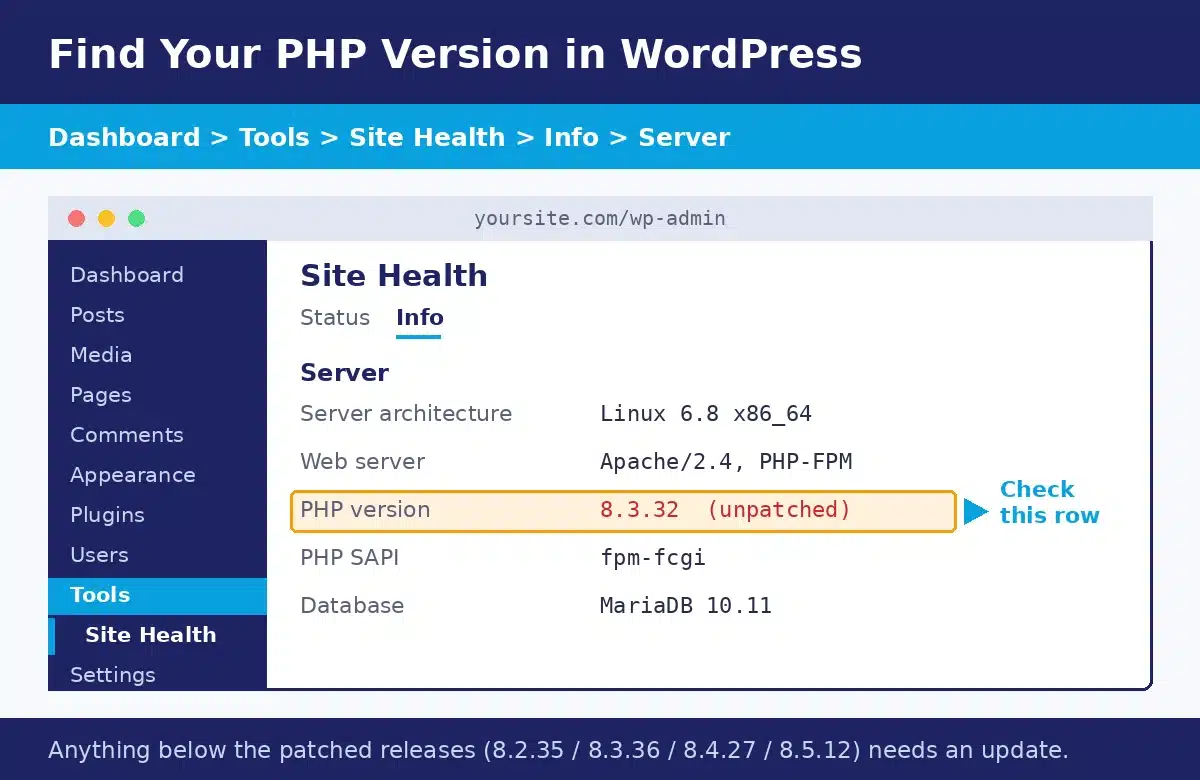
If your site runs WordPress, log in to the dashboard and go to Tools, then Site Health, then the Info tab. Open the Server section and you will see the PHP version listed. This is the fastest check and needs no technical access.
2. The Command Line
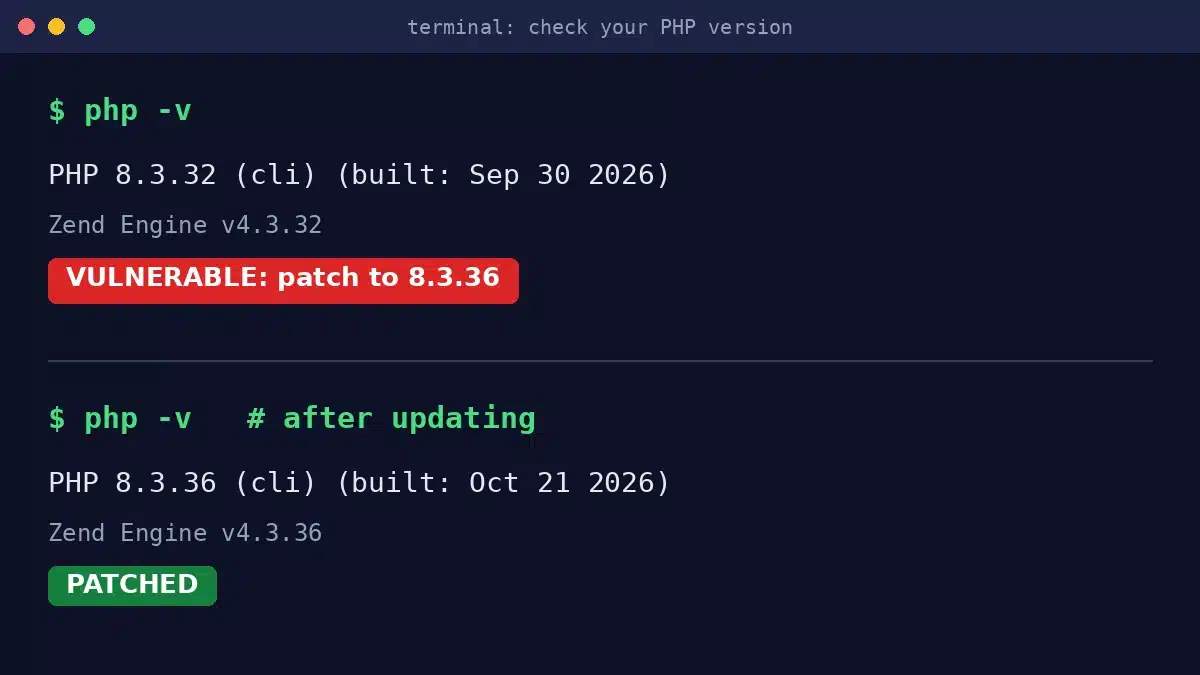
If you have SSH access to your server, one command tells you the version the command line runs:
php -vOne caution: the command line PHP and the web server PHP can be different installations. Confirm the web-facing version through Site Health or your hosting panel as well, because that is the one attackers can reach.
3. Your Hosting Control Panel
Shared and managed hosting panels show the PHP version per site or per account. In cPanel, look for MultiPHP Manager or Select PHP Version. Other panels place it under PHP settings for the domain. This view also matters later, because it is usually where you change the version.
4. A Temporary phpinfo File
A file containing a single phpinfo() call will print the exact version and configuration the web server uses. Treat this as a last resort and handle it carefully: the output reveals detailed server information, so create the file, read the version, and delete the file immediately. Never leave a phpinfo file sitting on a live site.
5. Server Response Headers
Some servers announce their version in an X-Powered-By response header, which you can see with a curl request or your browser’s developer tools. Many well-configured servers hide this header, so treat it as a bonus check rather than a reliable source of truth.
How to Patch, Step by Step
The complete fix is an updated PHP. The patched releases published on October 21, 2026 are PHP 8.5.12, 8.4.27, 8.3.36, and 8.2.35. Find your current branch in the table, then follow the route that matches your hosting.
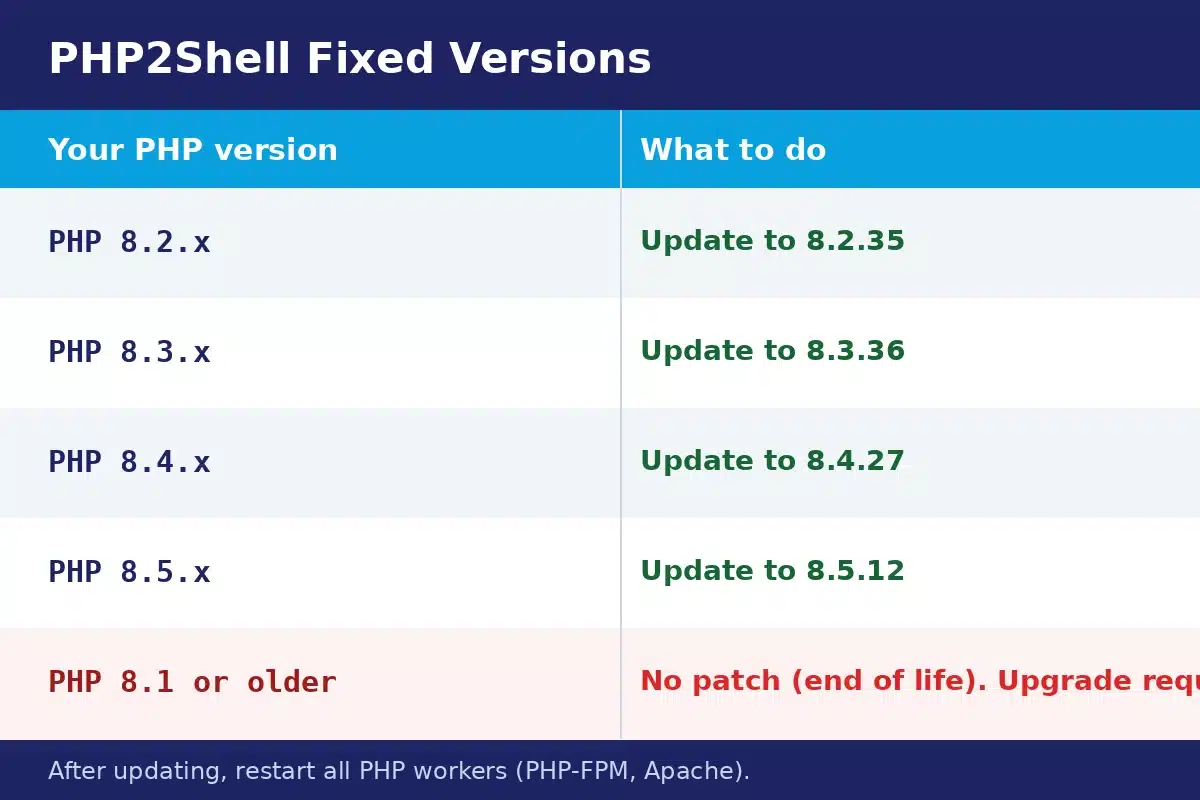
Whatever route you take, start with a full backup of your site files and database. PHP updates are routine, but a backup turns any surprise into a short detour instead of an outage.
Shared Hosting
Open the PHP version selector in your control panel and check which builds your host offers. If a patched build such as 8.3.36 is available in the same branch you already run, select it, save, and then verify the change in WordPress Site Health. If the panel only offers unpatched builds, open a support ticket and ask when the PHP2Shell fixes will be available. Reputable hosts moved quickly on this one, and a vague answer is a warning sign.
VPS and Dedicated Servers
Update PHP through your package manager, then restart the services that run it. On Debian or Ubuntu based systems that usually means an apt update and upgrade of the PHP packages; on RHEL based systems, use dnf. Then restart PHP-FPM and, if you run mod_php, Apache:
sudo apt update && sudo apt upgrade php8.3-fpm
sudo systemctl restart php8.3-fpm
sudo systemctl restart apache2
Adjust the version number and service names to your setup. The restart step is not optional. PHP workers are long-running processes, so until they restart, they keep executing the old vulnerable code even though the new version is installed on disk.
Docker and Containers
Update your base image to a tag that carries the patched release, rebuild the image, and redeploy the containers. Old containers keep running the old PHP until they are replaced, so verify the version inside a running container after deployment, not just in your Dockerfile.
Managed Hosting
Managed WordPress and application hosts patch the platform for you, but confirm it happened. Check the version in Site Health a day after the announcement, and if it still shows an unpatched build, ask support directly. You want a specific patched version number in their answer, not a general reassurance.
Still on PHP 8.1 or Older?
This is the uncomfortable part. PHP 8.1 and every branch before it are end of life, and they receive no official patch for PHP2Shell. The PHP team did provide minimal source backports for PHP 7.4, 8.0, and 8.1 to help people who build PHP from source, and some Linux distributions and long-term support vendors backport fixes for their own packages. Unless you are certain your vendor has shipped a verified backport, assume your version stays vulnerable.
The real fix is an upgrade to a supported branch, meaning PHP 8.2 or newer, at or above the patched releases listed above. The upgrade pays off in speed as well as safety: our PHP 8.x performance benchmarks show the supported branches running far ahead of the end-of-life ones. Treat it as a small project rather than a switch flip: test your site on the new version in a staging environment, check that your theme and plugins support it, and schedule the move as soon as you can. Every day on an end-of-life branch is a day with no safety net for the next emergency, not just this one.
If You Cannot Patch Today: Temporary Mitigations
Sometimes the patch has to wait a few hours or days, for a host, a vendor, or a change window. These steps reduce your exposure in the meantime. None of them replaces the patch.
- Put the site behind Cloudflare and keep its WAF enabled. Cloudflare switched on default firewall rules that block known PHP2Shell payloads, which stops the exploit attempts circulating right now. Attackers adapt payloads over time, so this buys time rather than immunity.
- Update everything else. Keep WordPress core, plugins, and themes current. It does not fix PHP2Shell, but it removes the other doors an attacker might walk through while they are probing your site.
- Tighten file uploads. One of the two flaws abuses request handling around uploaded data, so make sure your applications validate file types strictly and never execute uploaded files as code.
- Restrict admin access. Limit dashboard logins by IP where practical and make sure every admin account uses a strong, unique password with two-factor authentication.
After Patching: Check Whether Anyone Got In
Patching closes the door, but exploitation attempts began around October 17, several days before the public disclosure. That means a site that was vulnerable could have been probed or compromised before anyone knew to look. Spend twenty minutes on these checks after you patch. The same audit habit catches quieter problems too, as our roundup of cloud security gaps attackers love shows.
- Review your logs. Scan web server access and error logs from October 17 onward for unusual requests, especially strange POST requests, requests that triggered memory errors, and traffic from unfamiliar locations hitting upload or form endpoints.
- Audit admin users. In WordPress, open the Users screen and confirm every administrator account belongs to a real person on your team. Unknown admin accounts are one of the most common signs of a breach.
- Look for unknown files and scheduled tasks. Check your uploads folder and web root for PHP files you do not recognize, and review cron jobs and WordPress scheduled events for entries nobody on your team created.
- Verify core files. WordPress Site Health and security plugins can compare your core files against the official release and flag unexpected changes.
If anything looks off, treat it as a potential incident: change all admin passwords, rotate your WordPress salts and any API keys the site uses, and bring in professional help for a cleanup before you declare the site safe. The memory disclosure side of CVE-2026-109619 is another reason to rotate credentials if you find evidence of exploitation, since secrets may have been read directly from the server.
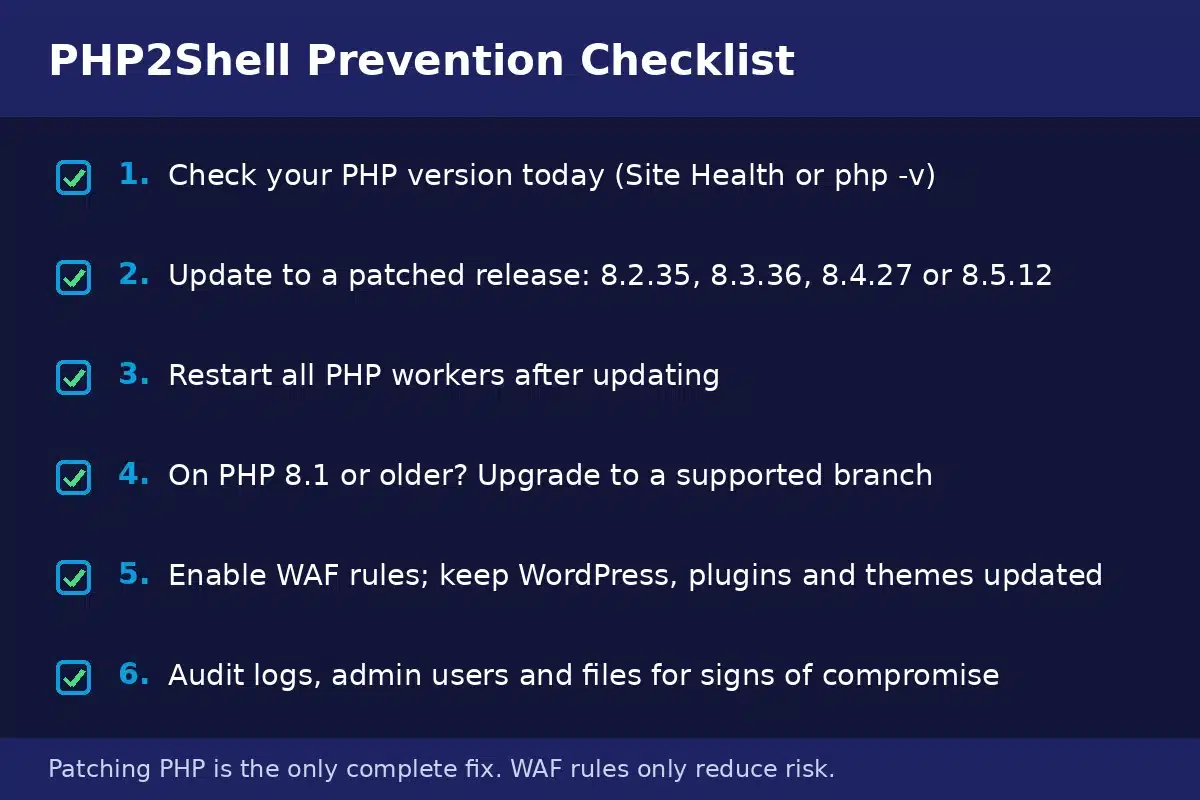
PHP2Shell Prevention Checklist
- Check your PHP version today using Site Health or php -v
- Update to a patched release: 8.2.35, 8.3.36, 8.4.27, or 8.5.12
- Restart all PHP workers after updating, including PHP-FPM and Apache
- If you are on PHP 8.1 or older, upgrade to a supported branch
- Enable WAF rules and keep WordPress, plugins, and themes updated
- Audit logs, admin users, and files for signs of compromise
Frequently Asked Questions
Is WordPress itself vulnerable to PHP2Shell?
Not directly. PHP2Shell is a flaw in the PHP runtime, not in WordPress code. But WordPress runs on PHP, so a WordPress site on a vulnerable PHP version is exposed through the layer underneath it. The same applies to Drupal, Joomla, Magento, and custom PHP applications.
Does updating WordPress fix PHP2Shell?
No. WordPress updates cannot change the PHP engine your server runs. Keeping WordPress updated is still important for general security, but the only complete fix for PHP2Shell is updating PHP itself to 8.2.35, 8.3.36, 8.4.27, or 8.5.12 and restarting the PHP workers.
My site is behind Cloudflare. Am I safe?
Safer, not safe. Cloudflare enabled default WAF rules that block the known PHP2Shell payloads, which stops the attacks circulating today. Attackers routinely reshape payloads to slip past firewall rules, so the WAF is a strong temporary shield, not a fix. Patch PHP as soon as you can.
What if my host only offers PHP 8.1?
Ask your host, in writing, when a supported and patched PHP branch will be available. PHP 8.1 is end of life and receives no official PHP2Shell patch, so staying on it means staying exposed. If your host cannot give you a near-term date, moving to a host that maintains current PHP versions is the safer business decision.
Do I really need to restart anything after updating PHP?
Yes. PHP runs as long-lived worker processes, and those processes keep using the code they loaded at startup. Installing a patched version without restarting PHP-FPM or Apache leaves the vulnerable code running. Restart the services, then verify the new version through your site rather than trusting the package manager.
Could my site have been hacked before the patch existed?
It is possible. AWS observed exploitation attempts from October 17, before the October 21 disclosure. That is why the post-patch checks matter: review logs, confirm every admin user is legitimate, look for unknown files and cron jobs, and rotate credentials if anything looks suspicious.
Final Words
PHP2Shell is a rare kind of vulnerability: it lives in the foundation under your website, it needs no login, and attackers were already probing for it before the fix existed. The response is straightforward even if it is urgent. Check your PHP version today, move to a patched release, restart your PHP workers, and give your logs and admin users a careful look.
If you would rather not work through server versions and log files yourself, the CodeSol team can help. We handle website security audits, PHP and WordPress updates, and ongoing maintenance for business sites, so emergencies like this one become a handled task instead of a crisis. Contact Us and we will check your site’s exposure and patch it properly.

![How Much Does Custom CRM Development Cost [2026 Update]](https://www.codesoltech.com/wp-content/uploads/2026/10/Custom-CRM-Development-Cost-.webp)
![4 Quiet Cloud Security Gaps Attackers Love [Fix Them Now]](https://www.codesoltech.com/wp-content/uploads/2026/10/Cloud-Security-Gaps-.webp)