![4 Quiet Cloud Security Gaps Attackers Love [Fix Them Now]](https://www.codesoltech.com/wp-content/uploads/2026/10/Cloud-Security-Gaps-.webp)
Small gaps in routine cloud operations can expose data, interrupt work, and raise recovery costs. The obvious risks often receive plenty of attention, while quieter problems build in the background.
A setting changes without approval, an update waits too long or a forgotten device keeps connecting with old credentials.
These vulnerabilities are manageable when teams know where to look. The following four areas deserve a regular place in cloud security reviews, even if systems appear to be working normally.
1. Configuration Drifts in Cloud Environments
Configuration drift occurs when a cloud resource gradually moves away from its approved setup. A developer might open a storage bucket for temporary testing, or an administrator may change access permissions during troubleshooting and forget to reverse them.
SaaS platforms face similar configuration drift concerns.
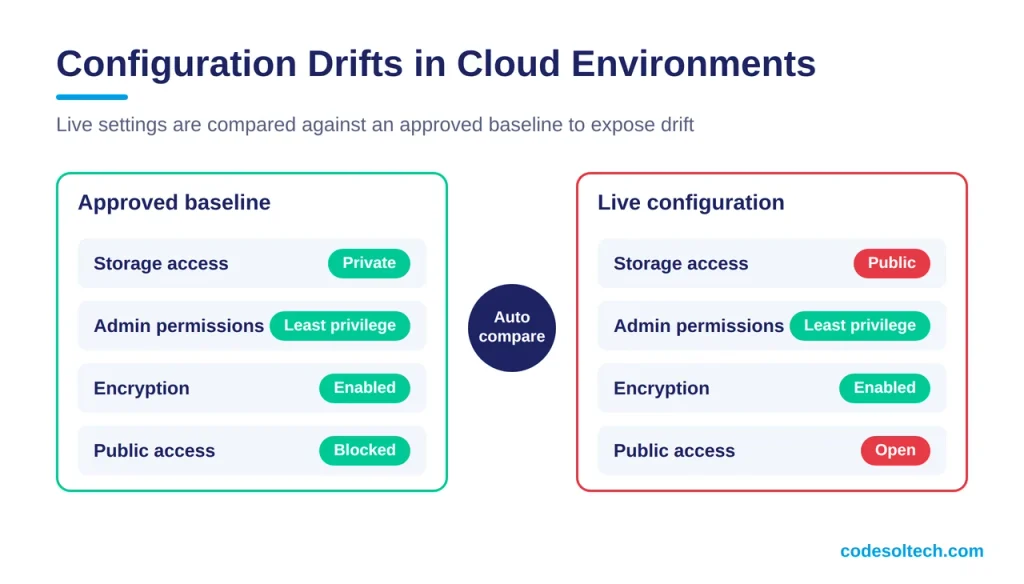
Create a secure baseline for each service and compare live settings against it automatically. Reviews should cover identity permissions, public access rules and encryption settings.
A practical guide to common cloud misconfigurations can help teams prioritize their checks. Businesses without dedicated internal specialists may also use managed IT support services for proactive monitoring, maintenance and security protection.
What Causes Configuration Drift in Cloud Environments
Configuration drift starts with manual changes made outside the approved deployment pipeline. Console edits, emergency troubleshooting and temporary test access are the 3 most common sources.
Infrastructure as code (IaC) tools such as Terraform and AWS CloudFormation store the approved state. Any manual edit creates a measurable difference from that state.
Settings That Drift Most Often
Four setting groups need the closest attention:
- Storage access policies, including public bucket rules
- Identity and access management (IAM) roles and permissions
- Security group and firewall rules
- Encryption and logging settings
Each group controls direct access to data, so one unreviewed change creates exposure.
Automated Drift Detection With CSPM and Policy Engines
Cloud security posture management (CSPM) tools compare live resources against a baseline on a fixed schedule. Native services such as AWS Config and Azure Policy run the same comparison inside each platform.
Use the CIS Benchmarks as the baseline source. Run scans after every change and once every 24 hours.
Drift Remediation Through the Deployment Pipeline
Remediate drift by redeploying the approved template instead of editing the console again. A pipeline fix keeps every change recorded and repeatable.
Grant exceptions with a named owner and an expiry date. Block repeat drift with policy rules that deny public storage access. Teams that need hands-on help can use managed IT services for continuous configuration checks.
2. Delayed Security Patches on Core Machines
Cloud providers secure their underlying infrastructure, but customers often remain responsible for operating systems, applications and virtual machines.
A critical patch can sit in a queue because a server supports an important process and no one wants to risk downtime. That delay creates a predictable opening for attackers who know which flaws have been publicly disclosed.
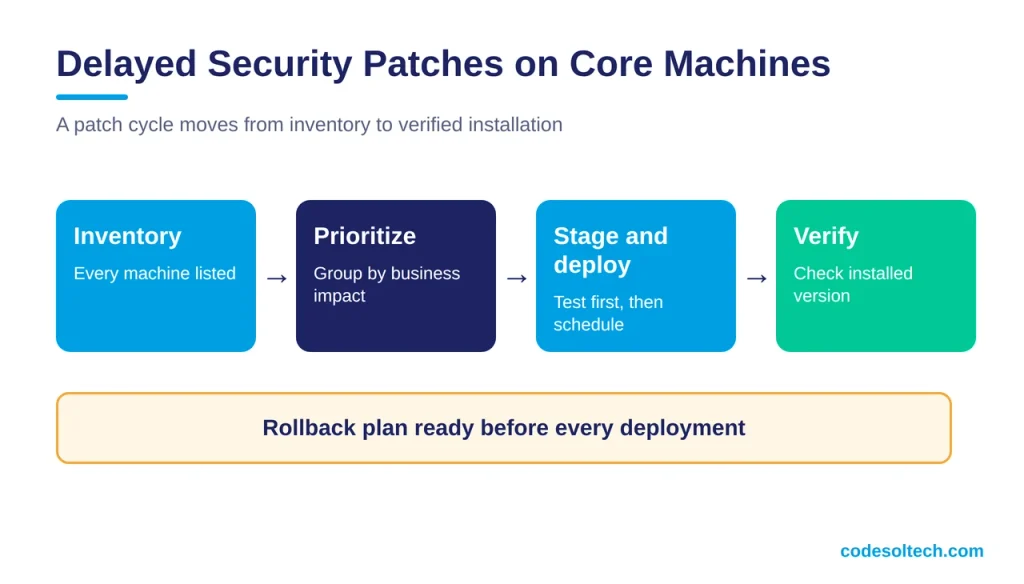
Group machines by business impact and set patch deadlines for each risk level. Test high-priority updates in a staging environment, then schedule deployment with a clear rollback plan. Keep an accurate asset inventory too.
An update process can’t protect a machine that no longer appears in the management console. After deployment, verify the installed version instead of relying solely on a successful task notification.
Who Is Responsible for Patching in Cloud Environments
The customer patches the guest operating system, applications and container images under the shared responsibility model. The provider patches the physical hosts and the hypervisor.
Responsibility shifts by service type. Infrastructure as a Service (IaaS) leaves the most patching with the customer, and Software as a Service (SaaS) leaves the least.
Patch Deadlines by Risk Level
CISA Binding Operational Directive 22-01 requires federal agencies to remediate newer known exploited vulnerabilities within 2 weeks. It allows 6 months for CVEs assigned before 2021. Read the full directive on the CISA website.
Adopt a 3-tier schedule built on that model:
- Known exploited and internet-facing flaws: 14 days
- High severity flaws on internal systems: 30 days
- Medium and low severity flaws: 90 days
Staging Tests and Rollback Plans
A staging environment mirrors production in operating system version, patch level and configuration. Test each high-priority update there before deployment.
Take a snapshot of every virtual machine before patching. Define the rollback trigger, such as a failed health check, before the change window opens.
Patch Verification Beyond Task Success Messages
A successful deployment task confirms delivery, not installation. Query the installed version through the endpoint management console or a vulnerability scanner.
Compare the result against the asset inventory. Any machine missing from the report enters the next patch cycle as an exception.
3. Gaps in Continuous System Oversight
A dashboard that no one reviews provides little protection. Cloud logs may show repeated failed sign-ins, unusual data transfers or a service account operating outside normal hours, yet these signals can disappear among thousands of routine events.
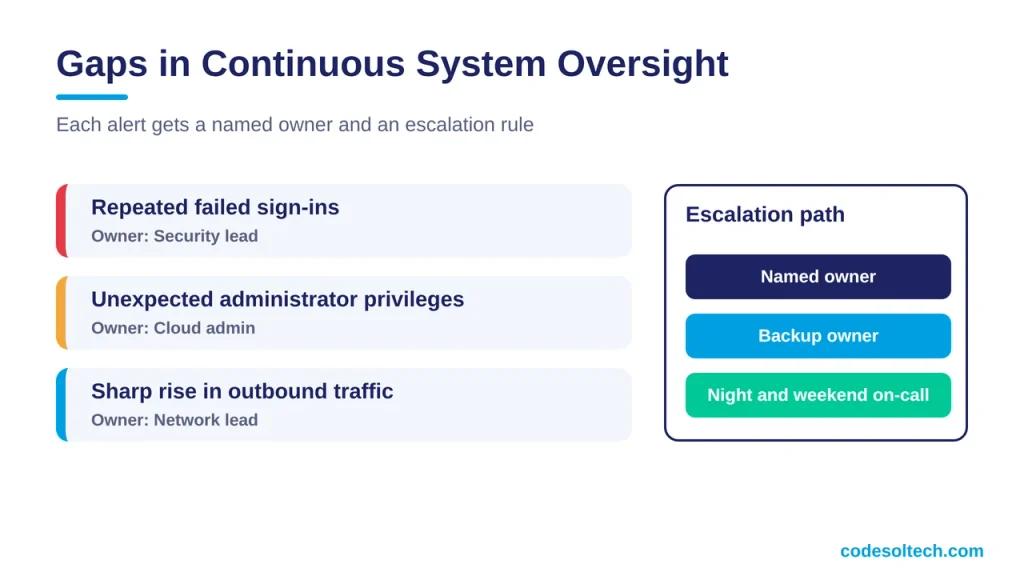
Define which alerts require an immediate response and assign a named owner to each one. Useful starting points include repeated authentication failures, unexpected administrator privileges and sharp increases in outbound traffic.
Set escalation rules for nights and weekends, then test them with a controlled alert.
Monitoring also works best when business systems share reliable information. Disconnected systems can create operational bottlenecks that slow investigations because staff must collect records from several tools before they can understand what happened.
The Cost of Slow Detection
IBM’s 2025 Cost of a Data Breach Report sets the global average breach cost at USD 4.44 million. The average breach lifecycle runs 241 days, split into 181 days to identify and 60 days to contain.
Continuous monitoring targets the 181-day identification phase directly. Source: IBM Cost of a Data Breach Report 2025.
Which Alerts Need a Named Owner?
Five alert types need a named owner and an immediate response path:
- Repeated failed sign-ins
- New administrator role assignments
- Sharp increases in outbound traffic
- Disabled logging or deleted log stores
- Service account activity outside normal hours
Centralized Logging and SIEM Correlation
A security information and event management (SIEM) platform collects AWS CloudTrail, Azure Activity Log and Microsoft Entra ID sign-in logs in one place. Correlation rules link events across those sources.
Store logs in a separate account. An attacker with administrator rights then cannot delete the evidence.
4. Unmonitored Peripheral Devices
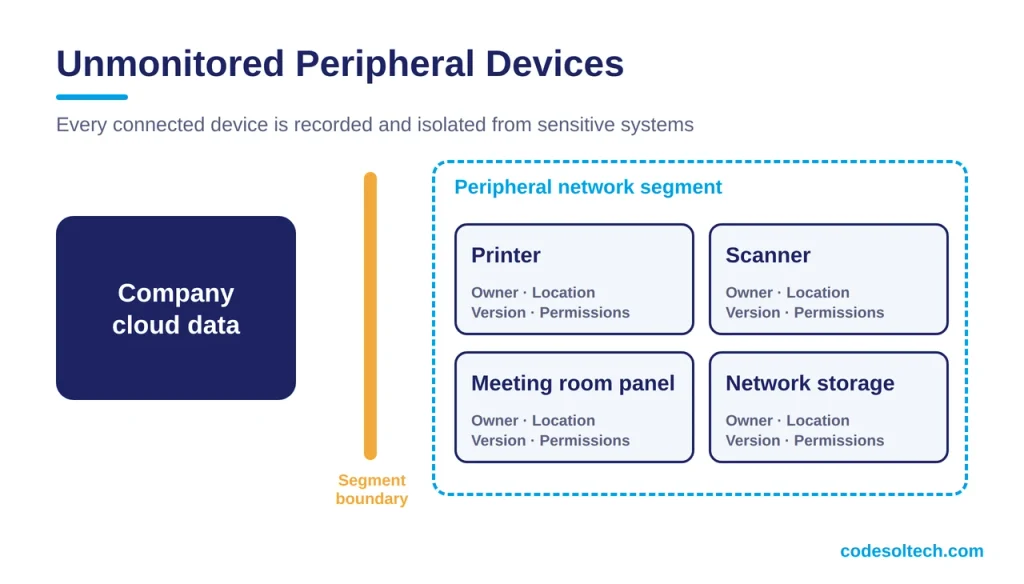
Printers, scanners, meeting room panels and network storage units may connect to cloud services without appearing in the main device inventory. These peripheral devices can retain default passwords, outdated software or access tokens belonging to former employees.
One neglected scanner, for example, might continue sending files to an old cloud folder long after a department changes its workflow.
Record every connected device with its owner, location, software version, and cloud permissions. Place peripheral equipment on a separate network segment where practical and disable services the business doesn’t use.
Teams should also change default credentials, remove stale accounts, and review device logs during normal security checks. When equipment reaches the end of support, replace it or isolate it from sensitive systems.
Cloud security improves when ordinary maintenance becomes visible and accountable. A useful review should leave you with specific answers: who owns each setting, when each machine was patched, which alerts were tested and which devices still connect to company data.
Any blank field points directly to the next operational risk that needs attention.
Why Peripheral Devices Create Cloud Risk
Printers, scanners and network storage units run embedded firmware that receives updates less often than servers. They ship with default administrator credentials and store scan-to-cloud connections as access tokens.
A token tied to a former employee keeps working until an administrator revokes it.
Device Inventory Fields That Close the Visibility Gap
Record 6 fields for every connected device:
- Owner
- Location
- Firmware version
- Cloud permissions
- Last review date
- Support end date
A blank field identifies the next device to review.
Network Segmentation and Credential Hygiene
Place peripheral devices on a dedicated VLAN with deny-by-default outbound rules. Allow only the cloud endpoints each device requires.
Change default passwords, revoke stale tokens and disable unused services such as Telnet and SMBv1. Our network security services cover segmentation setup.
End-of-Support Replacement Policy
A device without vendor firmware updates receives no fixes for new vulnerabilities. Replace it or isolate it from sensitive systems.
Track the support end date in the inventory. Set a review reminder 6 months before that date.
Final Words
Cloud security improves when ordinary maintenance becomes visible and accountable. Configuration baselines, patch deadlines, owned alerts and a complete device inventory remove the 4 gaps covered above.
Review each area every quarter. Any blank field in your records marks the next risk to fix.
Assign an owner, set a deadline and test the control.
Ready to close these gaps? Contact CodeSolTech and secure your cloud environment today.