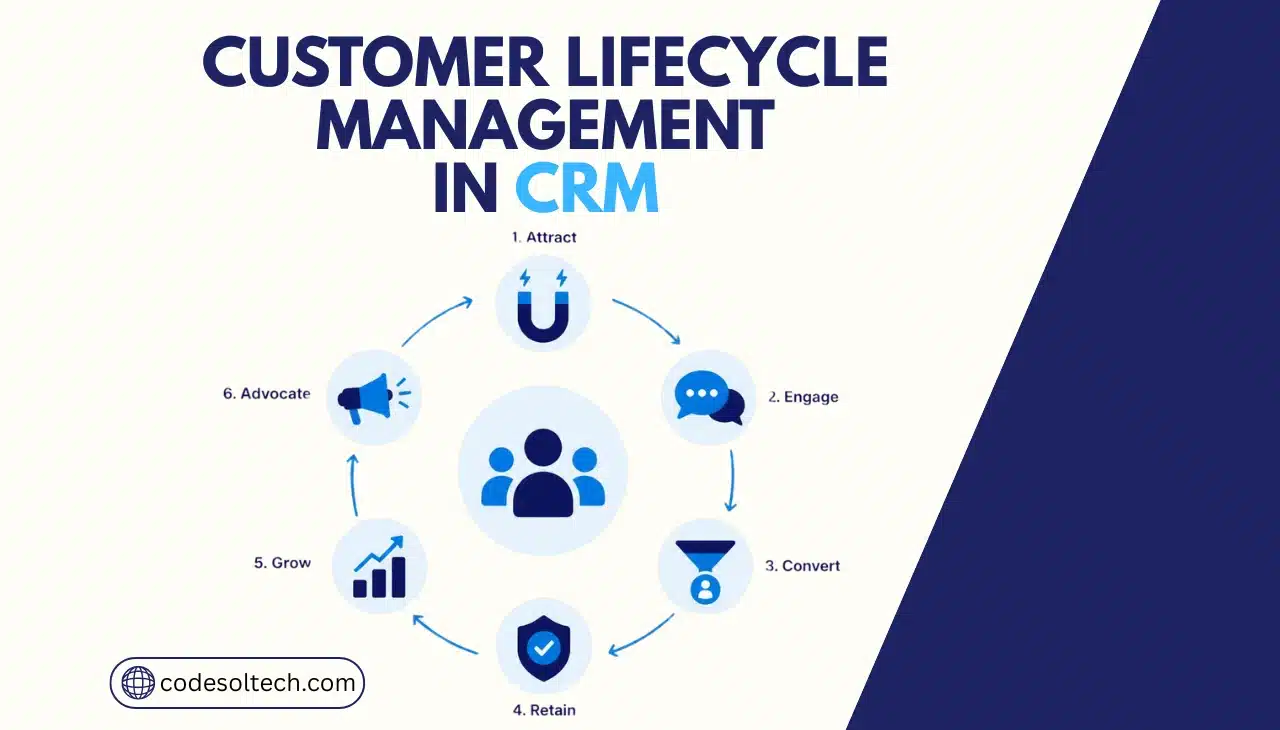
Customer lifecycle management (CLM) inside a CRM is the process of tracking a customer through six operational stages: capture, qualification, conversion, onboarding, retention, and advocacy.
The CRM stores stage-specific data and triggers automated workflows at each transition, which removes manual handoffs between sales, support, and marketing teams.
Customer lifecycle management is not a marketing philosophy. It is an operational structure built inside the CRM database.
Every contact record carries a lifecycle stage field, and that field determines which automation fires, which team owns the next action, and which data gets captured next.
Businesses that treat CLM as a data model, not a slogan, convert more leads and retain more customers than those that manage the lifecycle through spreadsheets and inbox folders.
This article breaks down the six stages of the CRM lifecycle, the automation logic that moves customers between them, the formula for calculating customer lifetime value, and the technology stack required to run the entire process without manual data entry.
What Is Customer Lifecycle Management in a CRM?
CLM differs from a sales pipeline in one specific way: a pipeline tracks a single deal from open to closed. CLM tracks the entire relationship, including the years before a deal opens and the years after it closes.
A contact can exit a closed-won deal and immediately re-enter the lifecycle at the retention stage, where a completely different set of rules, owners, and metrics apply.
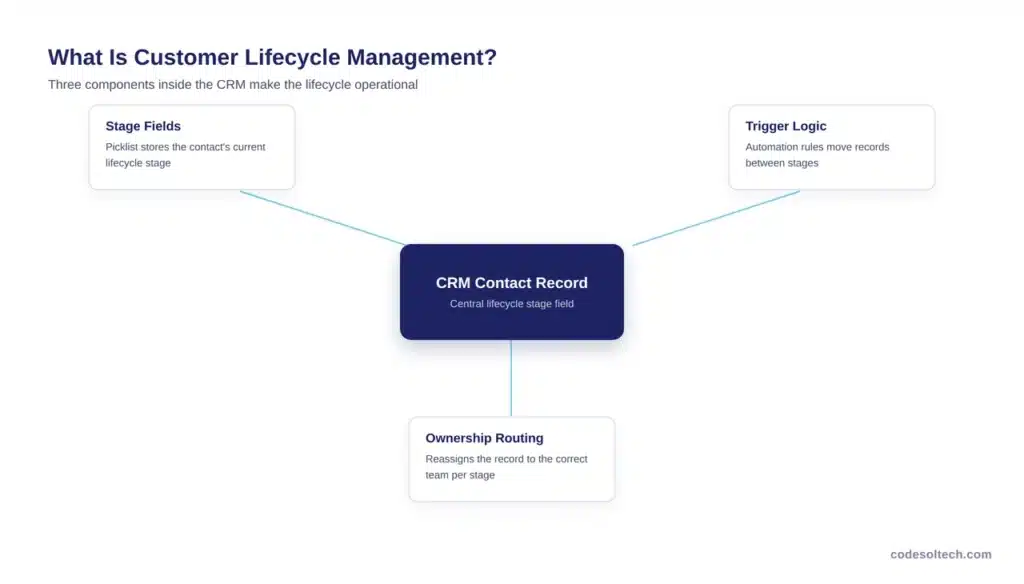
Three components make CLM function inside a CRM:
- Stage fields — a picklist or status field on the contact or account record that stores the current lifecycle stage
- Trigger logic — automation rules that move a record between stages based on defined conditions (form fill, deal close, support ticket, renewal date)
- Ownership routing — rules that reassign the record to the correct team (marketing, sales, customer success) as the stage changes
Without these three components configured correctly, a CRM stores contact data but does not manage the lifecycle. This is the gap that CRM integration work is built to close.
The 6 Stages of Customer Lifecycle Management
The customer lifecycle within a modern CRM comprises six distinct stages. Most public frameworks compress onboarding into “acquisition” and treat expansion as a footnote inside “retention.”
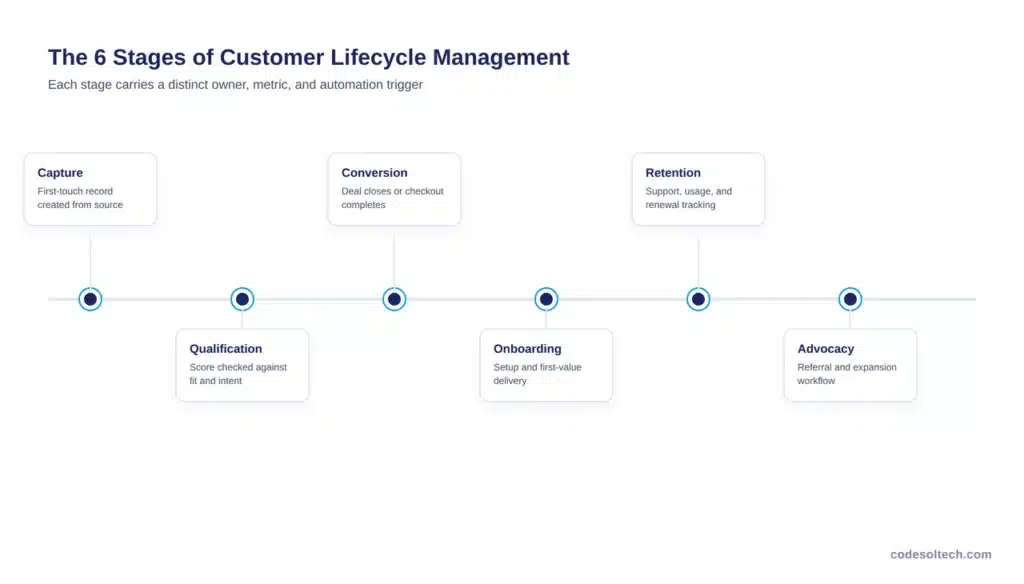
Splitting these out gives each stage a distinct owner, a distinct metric, and a distinct automation trigger, which is what makes the model operational instead of descriptive.
1. Capture
Capture is the stage where a business records a prospect’s contact details for the first time. The source can be a web form, a chatbot conversation, an event scan, or an inbound call.
The CRM creates a new lead record, assigns a source field, and timestamps the first touch. Businesses that fail to capture the source field later in the lifecycle lose the ability to calculate acquisition cost by channel.
2. Qualification
Qualification is the stage where the CRM scores a lead against demographic fit and behavioral signals to determine buying intent.
Gartner reports that companies with high conversion rates use an average of four scoring criteria, combining firmographic fit with behavioral signals such as content engagement and site visits.
Leads that clear the score threshold route to sales automatically; leads below it remain in nurture sequences.
3. Conversion
Conversion is the stage where a qualified lead becomes a paying customer through a signed contract or completed checkout. The CRM tracks this stage through defined pipeline steps, each with exit criteria such as “proposal sent” or “payment confirmed.”
Businesses running ecommerce or subscription models connect this stage directly to a payment gateway integration so that a completed transaction fires the stage-change trigger automatically, without a rep manually updating the record.
4. Onboarding
Onboarding is the stage where a new customer receives setup, training, and first-value delivery before the retention clock starts. This stage is distinct from conversion because the success metric changes from “deal closed” to “product adopted.”
A CRM that treats onboarding as part of conversion loses the ability to measure time-to-first-value, which is one of the strongest predictors of renewal.
5. Retention
Retention is the stage where the business maintains the account through support, renewals, and account reviews. The CRM tracks product usage, ticket volume, and renewal dates on the account record, and triggers renewal sequences a fixed number of days before contract end.
This stage generates the highest data volume in the entire lifecycle and is the stage most damaged by poor data quality.
6. Advocacy
Advocacy is the stage where a retained customer generates referrals, case studies, or expansion revenue. The CRM tags accounts that meet defined health-score thresholds as advocacy-eligible and routes them to a referral or testimonial workflow.
Businesses that skip this stage as a formal step leave expansion revenue and referral pipeline undocumented and unmanaged.
How CRM Automation Moves Customers Through Each Lifecycle Stage
CRM automation moves a customer between lifecycle stages by executing a trigger-condition-action sequence configured inside the platform’s workflow engine.
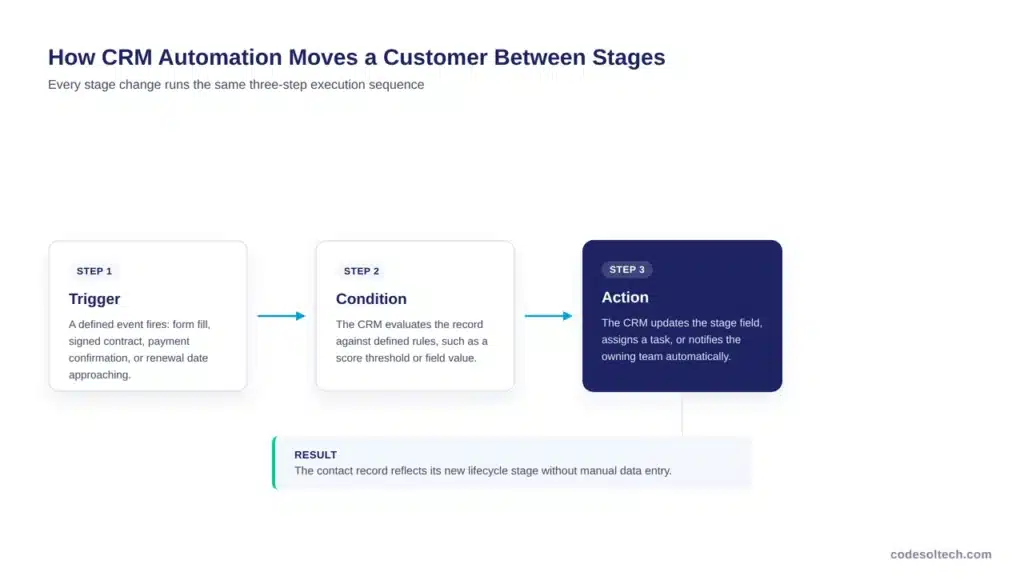
A trigger fires on a defined event, the CRM evaluates a condition against the record, and it executes an action such as updating the stage field, assigning a task, or sending a notification.
This removes the need for a human to manually reclassify every contact.
The table below maps each lifecycle stage to its typical automation trigger and the team that owns the resulting action.
| Lifecycle Stage | Automation Trigger | CRM Action | Owning Team |
|---|---|---|---|
| Capture | Form submission or chatbot handoff | Create lead, tag source | Marketing |
| Qualification | Score exceeds threshold | Route to sales, assign owner | Sales Development |
| Conversion | Contract signed or payment confirmed | Update stage, create account | Sales |
| Onboarding | Account created | Assign onboarding tasks, start timer | Customer Success |
| Retention | Renewal date minus 60 days | Trigger renewal sequence | Account Management |
| Advocacy | Health score above threshold | Route to referral workflow | Marketing / CS |
Businesses that build this trigger logic through native CRM automation alone tend to hit limits when a stage change needs to update data outside the CRM, such as an inventory system or a support ticketing tool.
This is where workflow automation extends the CRM’s native rules across the full software stack, so a single stage change updates every connected system in one execution.
How Do You Calculate Customer Lifetime Value in a CRM?
Customer lifetime value (CLV) is calculated by multiplying average purchase value by purchase frequency and customer lifespan, then subtracting customer acquisition cost. The formula is:
CLV = (Average Purchase Value × Purchase Frequency × Customer Lifespan) − Customer Acquisition Cost
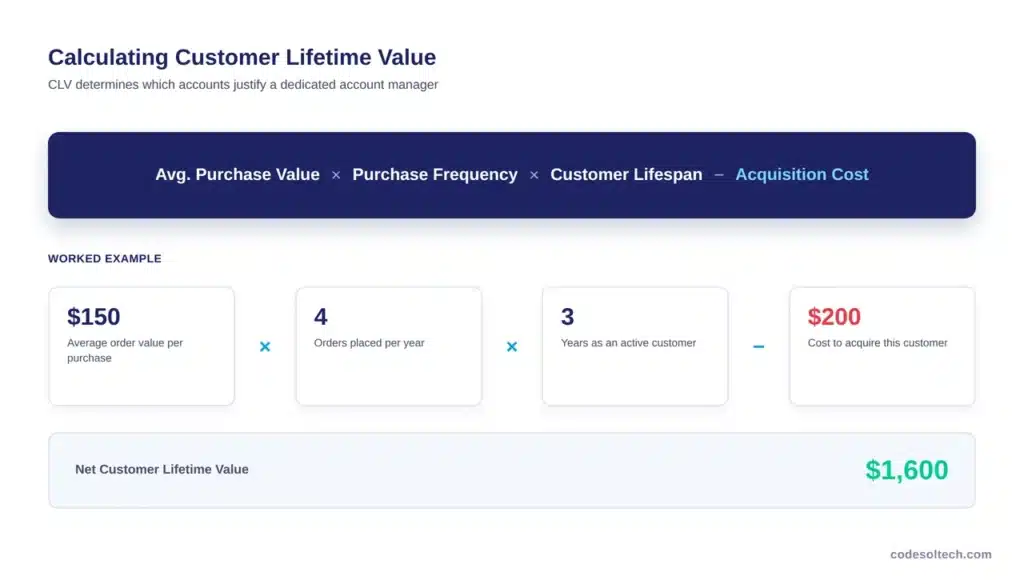
A worked example: a customer spends $150 per order, orders 4 times per year, and stays a customer for 3 years. That produces a gross value of $1,800 (150 × 4 × 3). If the acquisition cost was $200, the net CLV is $1,600.
A CRM automates this calculation by pulling three fields directly from stored records instead of a manual spreadsheet:
- Average purchase value — calculated from closed-won opportunity amounts or completed order records
- Purchase frequency — calculated from the count of orders or renewals per account per year
- Customer lifespan — calculated from account creation date to churn date, or the current date for active accounts
Personalizing outreach based on CLV segments produces a measurable return. McKinsey reports that personalization lifts revenue by 5 to 15 percent, reduces customer acquisition costs by as much as 50 percent, and increases marketing ROI by 10 to 30 percent.
A CRM that segments accounts by CLV can route the highest-value segment to a dedicated account manager and the lowest-value segment to automated nurture, instead of applying one outreach model to every account regardless of value.
KPIs That Track Each Stage of the Customer Lifecycle
Each lifecycle stage requires a distinct metric because a single “conversion rate” number hides where the pipeline actually leaks. The table below lists the primary KPI for each stage and the CRM report that produces it.
| Stage | Primary KPI | CRM Report |
|---|---|---|
| Capture | Cost per lead by source | Lead source attribution |
| Qualification | Lead-to-opportunity conversion rate | Lead scoring funnel |
| Conversion | Win rate and sales cycle length | Pipeline velocity report |
| Onboarding | Time to first value | Onboarding task completion report |
| Retention | Net revenue retention | Churn and renewal dashboard |
| Advocacy | Referral-sourced pipeline | Referral attribution report |
Companies that manage their revenue process around this kind of unified, stage-by-stage view outperform those that don’t.
Forrester found that customer-obsessed companies, defined as those that center their revenue process on a unified view of the customer, grow revenue 28 percent faster, achieve 33 percent higher profitability growth, and reach 43 percent better customer retention than companies that don’t.
The Technology Stack That Supports Customer Lifecycle Management
Customer lifecycle management requires eight connected system categories. A CRM alone stores the contact record, but it cannot execute the full lifecycle without integration into the systems that generate and consume lifecycle data.
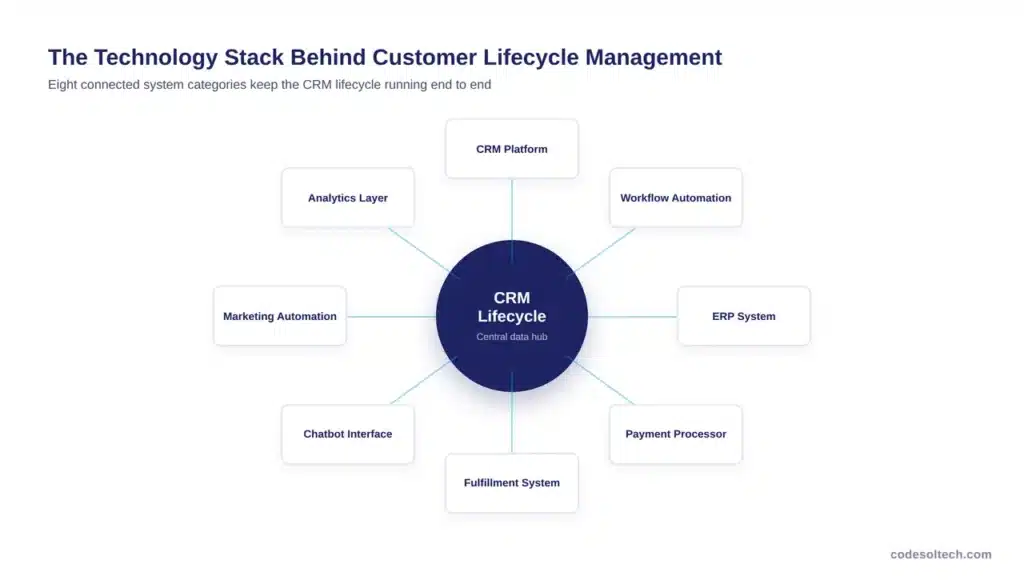
- CRM platform — the central record for contacts, accounts, and lifecycle stage fields, connected through CRM integration
- Workflow automation engine — executes the trigger-condition-action logic that moves records between stages, built through workflow automation
- ERP system — supplies order history, inventory, and billing data to the CRM through ERP integration
- Payment processor — confirms transactions that trigger the conversion stage, connected through payment gateway integration
- Fulfillment system — updates order status data that feeds onboarding and retention triggers, connected through fulfillment automation
- Chatbot or conversational interface — captures leads at the top of the funnel and hands qualified conversations to the CRM through chatbot integration
- Marketing automation platform — executes nurture sequences for leads below the qualification threshold
- Analytics and reporting layer — surfaces the stage-by-stage KPIs listed in the table above
Gartner projects that end-user spending on CRM will grow at a 15.1 percent compound annual rate through 2027, and that 89 percent of large enterprises in North America will have adopted CRM software by 2027, up from 80 percent in 2023.
As adoption grows, the businesses that separate themselves are not the ones that own a CRM license, but the ones that connect it to the other seven categories listed above.
Custom-built connections, developed through custom software development, close the gaps that off-the-shelf integrations leave open, particularly around ERP and fulfillment data that off-the-shelf connectors handle inconsistently.
5 Data Quality Mistakes That Break Customer Lifecycle Management
Lifecycle automation fails silently when the underlying CRM data is inaccurate, and the business only notices after revenue is already lost.
Validity’s State of CRM Data Management report found that 37 percent of CRM users report losing revenue as a direct consequence of poor data quality, and 76 percent report that less than half of their organization’s CRM data is accurate and complete.
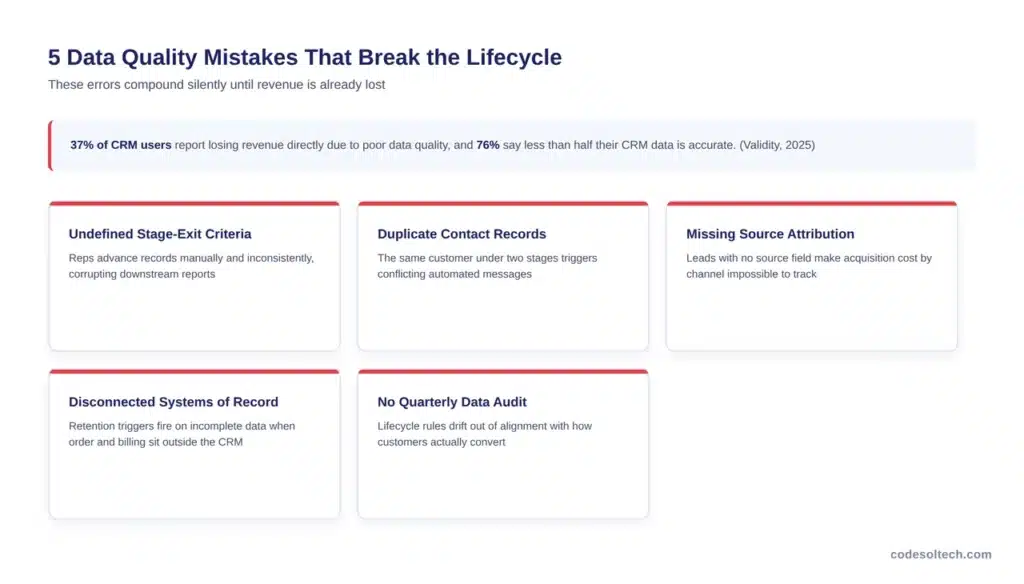
- Undefined stage-exit criteria — stages that lack a measurable exit condition (such as “proposal sent” or “payment confirmed”) let reps advance records manually and inconsistently, which corrupts every downstream report
- Duplicate contact records — the same customer captured twice under different lifecycle stages sends conflicting automated communications and skews retention metrics
- Missing source attribution — leads created without a source field make it impossible to calculate acquisition cost by channel at the capture stage
- Disconnected systems of record — when order, billing, and support data live outside the CRM, retention triggers fire on incomplete information
- No quarterly data audit — lifecycle rules built once and never reviewed against actual close rates drift out of alignment with how customers really convert
FAQs
What is the difference between customer lifecycle management and a sales pipeline?
A sales pipeline tracks a single deal from open to closed. Customer lifecycle management tracks the full relationship, including the years before a deal opens and the years after it closes, across six stages: capture, qualification, conversion, onboarding, retention, and advocacy.
How many stages does the CRM customer lifecycle have?
The CRM customer lifecycle has six stages: capture, qualification, conversion, onboarding, retention, and advocacy. Each stage has a distinct owner, metric, and automation trigger inside the CRM.
What triggers a lifecycle stage change in a CRM?
A lifecycle stage change is triggered by a defined event such as a form submission, a lead score crossing a threshold, a contract signature, a payment confirmation, or a renewal date approaching. The CRM’s workflow engine evaluates the trigger and updates the stage field automatically.
Can customer lifecycle management run without integrating the CRM to other systems?
Customer lifecycle management can run inside the CRM alone for the qualification and conversion stages, but the onboarding, retention, and advocacy stages require data from ERP, payment, fulfillment, and support systems. Without integration, those later stages rely on manual data entry, which increases the error rate documented in CRM data quality research.
What is a good customer lifetime value to acquisition cost ratio?
A CLV to customer acquisition cost ratio of 3:1 or higher is considered financially sustainable, meaning a business generates at least three dollars of lifetime value for every dollar spent acquiring the customer. Ratios below 3:1 signal that acquisition spend is not being recovered efficiently.
Final Words
Customer lifecycle management works when the CRM is built to move data, not just store it. Six stages, clear exit criteria, and connected systems turn a contact database into a revenue engine. The businesses that skip integration keep manually pushing records forward, one at a time.
Ready to connect your CRM to the systems that actually run your lifecycle? Talk to CodeSol Technologies about building the automation layer between your CRM, ERP, and payment systems.
![Conversational AI in CRM: Stop Typing, Start Talking [2026]](https://www.codesoltech.com/wp-content/uploads/2026/10/Conversational-AI-in-CRM-Stop-Typing-Start-Talking-2026.webp)