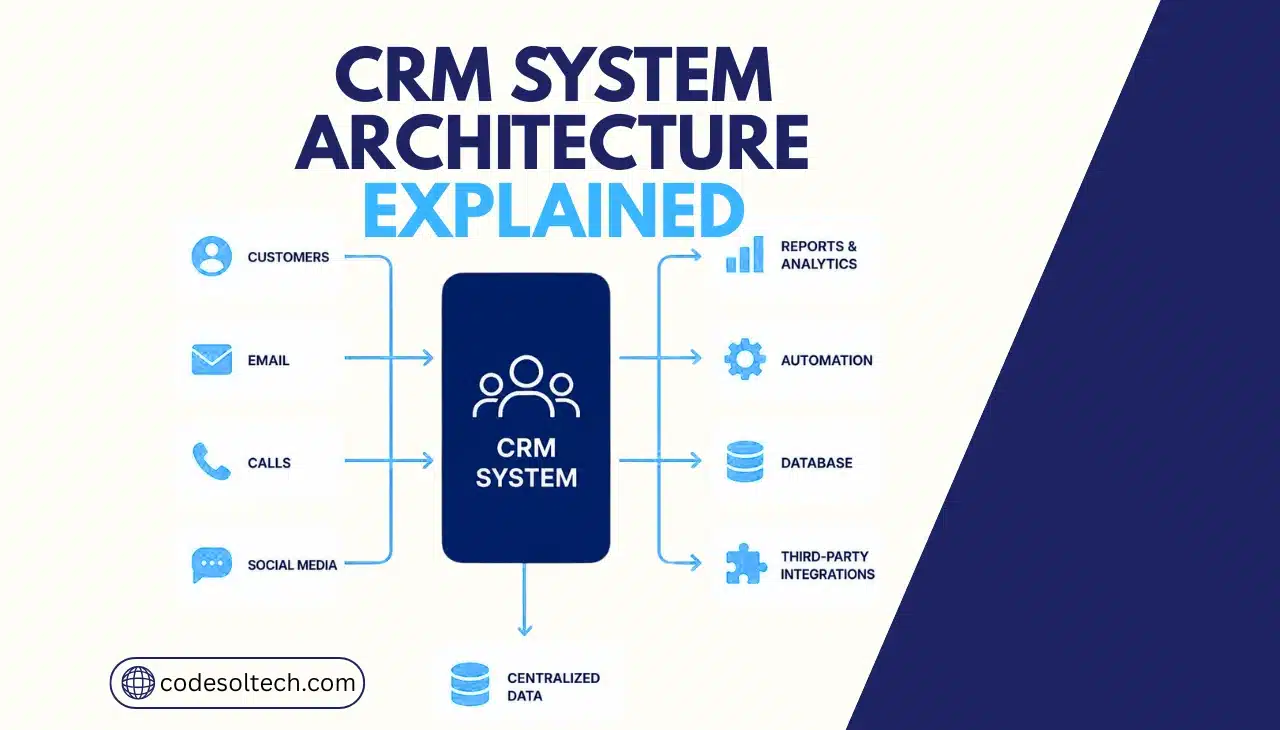
CRM system architecture is the technical framework that defines how a customer relationship management platform stores, processes, secures, and displays customer data. It consists of five layers: database, application, integration, presentation, and security.
These layers determine how fast a CRM performs, how well it scales, and how easily it connects to tools like ERP, payment gateways, and chatbots.
What Is CRM System Architecture?
CRM system architecture is the structural design that organizes how a CRM platform handles data, business logic, and user interaction. Each layer performs a distinct function.
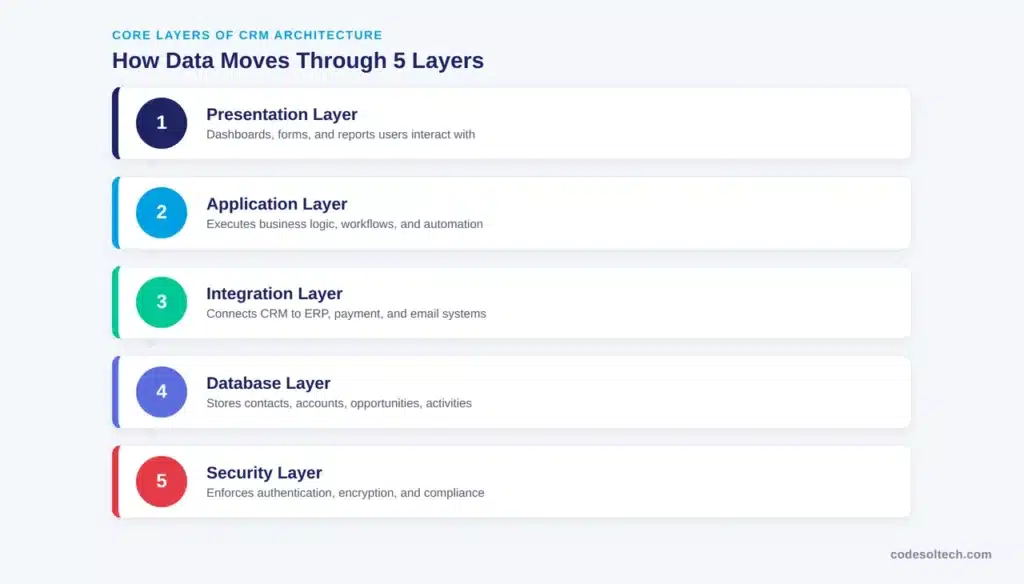
The database layer stores records, the application layer executes business rules, the integration layer connects external systems, the presentation layer renders the interface, and the security layer enforces access control.
The global CRM software market reached $73.40 billion in 2024 and is projected to hit $163.16 billion by 2030, growing at a CAGR of 14.6%, according to Grand View Research.
Cloud-based deployment accounted for 58.2% of that market in 2024, and large enterprises held 59.9% of total revenue share.
This shift toward cloud deployment directly changes how architecture decisions get made cloud CRMs run on multi-tenant infrastructure, while on-premise CRMs run on dedicated servers.
| Layer | Primary Function | Example Technology |
|---|---|---|
| Database Layer | Stores customer records, contacts, transactions | PostgreSQL, MySQL, Oracle DB |
| Application Layer | Executes business logic and workflow automation | Apex, Node.js, .NET |
| Integration Layer | Connects CRM to ERP, email, payment systems | REST API, webhooks, iPaaS |
| Presentation Layer | Renders dashboards, forms, and reports | React, Angular, Lightning |
| Security Layer | Enforces authentication, encryption, compliance | OAuth 2.0, TLS, RBAC |
What Are the Core Layers of a CRM Architecture?
A CRM system architecture separates concerns into five layers so that a failure or update in one layer does not break the others. Each layer communicates with the layer above and below it through defined interfaces, not direct database access.
Database Layer
The database layer stores every customer record: contacts, accounts, opportunities, activities, and transaction history. Modern CRM databases use a relational model with foreign-key relationships linking these entities together. A contact belongs to an account; an opportunity links to a contact and an account; an activity logs against any of the three.
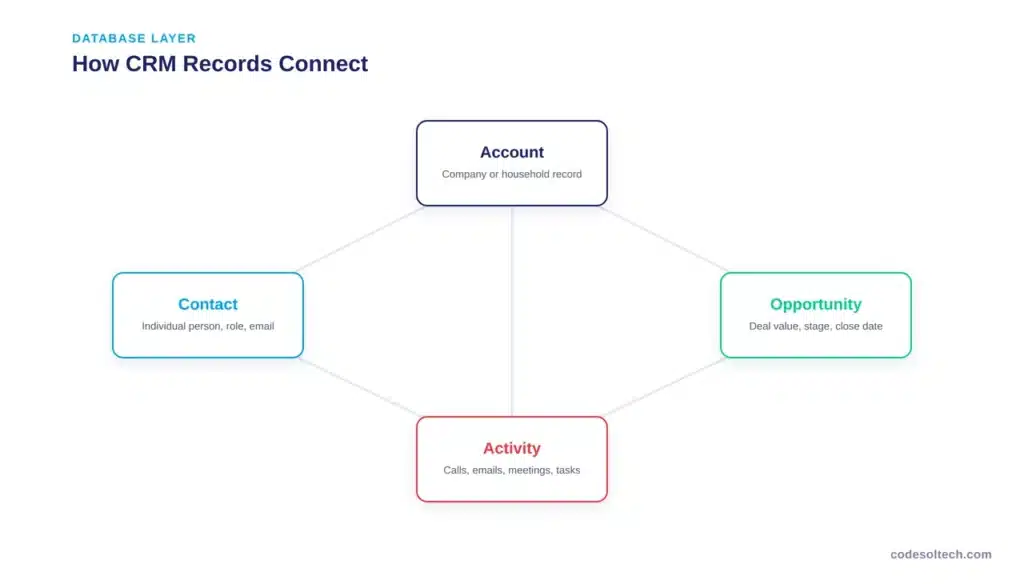
- Contacts: individual people, including name, email, phone, and role
- Accounts: companies or households that group related contacts
- Opportunities: active deals with a value, stage, and close date
- Activities: calls, emails, meetings, and tasks tied to a record
- Custom objects: business-specific entities like warranties, subscriptions, or tickets
This layer must index high-traffic fields (email, account ID, deal stage) to keep query response times low as record volume grows into the millions.
Application Layer
The application layer executes the business logic that turns stored data into automated action: lead scoring, workflow triggers, pipeline stage transitions, and approval rules. Salesforce runs this logic through Apex on a multi-tenant platform where a single shared database schema stores tenant-specific metadata and data, according to Salesforce’s official architecture documentation.
This layer configures three types of automation:
- Trigger-based rules that fire when a record is created or updated
- Scheduled jobs that run on a time interval, such as nightly data cleanup
- Approval workflows that route records through defined sign-off stages
Integration Layer
The integration layer connects the CRM to external systems: ERP platforms, payment gateways, email marketing tools, and chatbots. It exposes this connectivity through three primary methods.
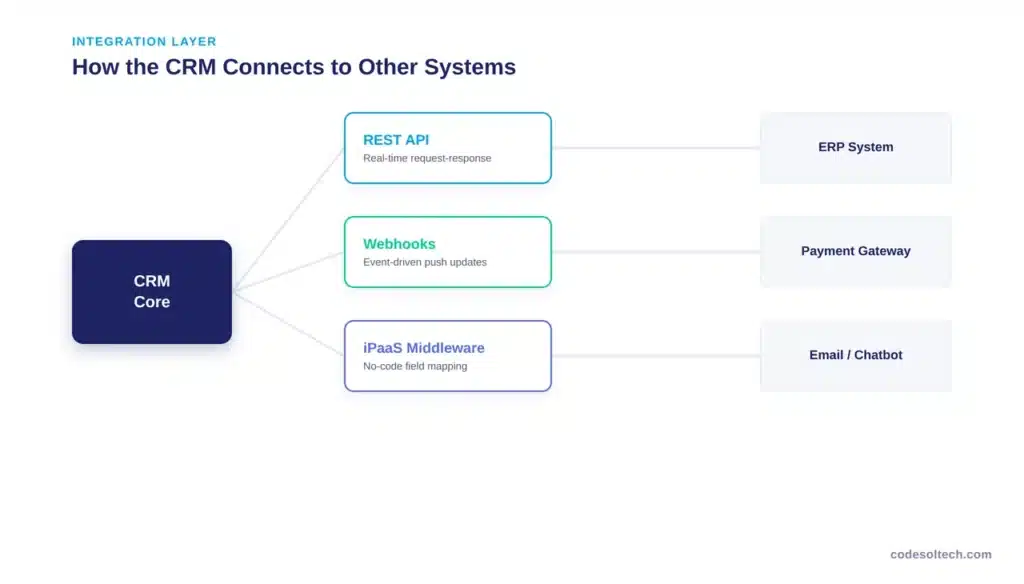
- REST API: synchronous request-response calls for real-time data exchange
- Webhooks: event-driven push notifications that fire when a record changes
- iPaaS middleware: a connector layer (e.g., MuleSoft, Zapier, Workato) that maps fields between systems without custom code
Salesforce’s REST API architecture documents authentication through OAuth 2.0, where a third-party application receives a scoped access token instead of the user’s login credentials, per Salesforce Developer documentation.
This pattern is the industry standard: it lets a CRM-to-ERP integration or a payment gateway integration exchange data without exposing user passwords to the connected system.
Presentation Layer
The presentation layer converts stored data into dashboards, reports, and forms that sales, marketing, and support teams interact with directly. This layer runs independently of the database layer, which means a company can redesign its interface without touching the underlying data model.
Security and Compliance Layer
The security layer enforces three controls across every other layer: authentication (verifying identity), authorization (defining what an authenticated user can access), and encryption (protecting data in transit and at rest).
Compliance requirements GDPR in the EU, CCPA in California dictate how long customer data can be retained and how it must be deleted on request.
What Are the Different CRM Architecture Models?
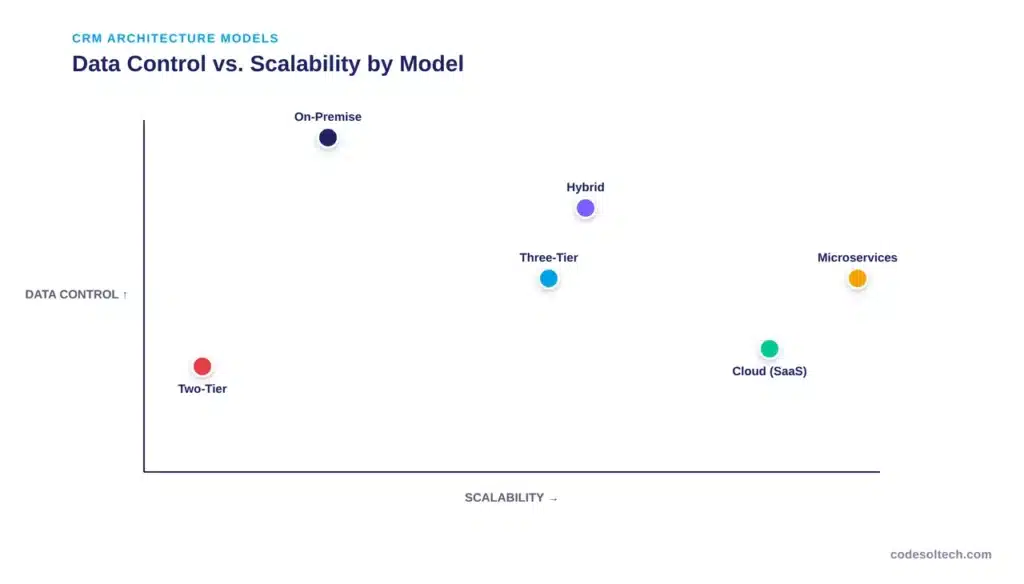
CRM architecture models define where the layers physically run and how the client connects to them. The right model depends on data sensitivity, budget, and how many concurrent users the system must support.
| Model | How It Works | Best For | Key Limitation |
|---|---|---|---|
| Two-Tier | Client connects directly to the database | Very small teams, single-user tools | No scalability, weak security |
| Three-Tier | Presentation, application, and database run as separate layers | Mid-size to large businesses | Higher setup complexity |
| Cloud / Multi-Tenant SaaS | Vendor hosts shared infrastructure across multiple customers | Businesses wanting fast deployment, low upfront cost | Less infrastructure control |
| On-Premise | Company hosts the CRM on its own servers | Regulated industries needing full data control | High maintenance and hardware cost |
| Hybrid | Sensitive data stays on-premise; other functions run in the cloud | Businesses balancing compliance with scalability | Requires careful integration design |
| Microservices-Based | Each function (contacts, billing, messaging) runs as an independent service | Large enterprises with complex, evolving workflows | Requires mature DevOps practices |
Two-Tier Architecture
In a two-tier model, the client application connects directly to the database with no application layer in between. This model works for single-user tools but breaks down once multiple users need concurrent access, because every business rule has to be duplicated inside the client instead of centralized.
Three-Tier Architecture
The three-tier model separates presentation, application, and database into distinct layers, with the application layer mediating every request. This is the most widely deployed CRM architecture model because it isolates business logic from the interface, which lets a company update the UI or swap the database without rebuilding the entire system.
Cloud-Based (Multi-Tenant) Architecture
Cloud CRM architecture hosts the database, application, and integration layers on the vendor’s infrastructure, shared across multiple customer organizations, or “tenants.”
Salesforce’s platform documentation describes this as a single shared multitenant database with a single schema that stores tenant-specific metadata and data, keeping each tenant’s records isolated despite sharing infrastructure, per Salesforce’s architecture fundamentals guide.
Grand View Research reports this model held 58.2% of the CRM deployment market in 2024, driven by lower upfront cost and remote accessibility.
On-Premise Architecture
On-premise CRM architecture runs entirely on servers the company owns and controls. This model gives an organization full authority over data location and security configuration, which matters for industries like finance and healthcare with strict regulatory requirements. The tradeoff is direct responsibility for hardware, patching, and uptime.
Hybrid Architecture
A hybrid model splits the architecture: sensitive data (financial records, personal identifiers) stays on local servers, while less-sensitive functions like marketing automation or reporting run in the cloud. This model requires an integration layer that can synchronize data across both environments without creating conflicts.
Microservices-Based Architecture
Modern enterprise CRMs increasingly break the application layer into independent microservices: one service handles contact management, another handles billing, another handles messaging.
Each microservice deploys, scales, and fails independently. This model supports faster feature releases because a team can update the billing service without redeploying the entire CRM. Still, it demands mature DevOps practices to manage service-to-service communication and monitoring.
How Should You Choose the Right CRM Architecture?
Choosing a CRM architecture model depends on three factors: data sensitivity, user concurrency, and integration scope.
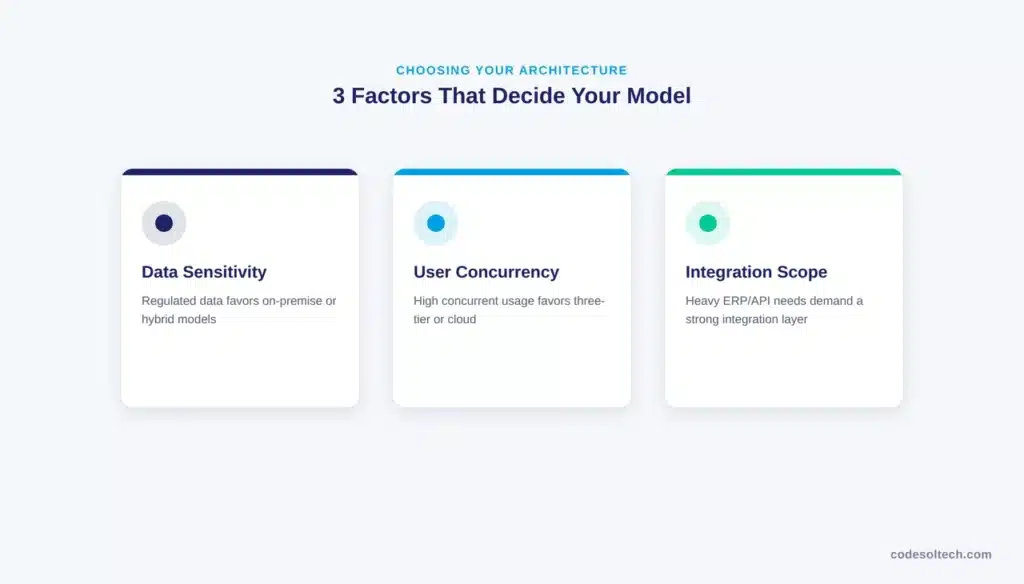
- Data sensitivity: regulated industries lean toward on-premise or hybrid models to keep sensitive records under direct control
- User concurrency: high concurrent usage favors three-tier or cloud architectures over two-tier setups
- Integration scope: businesses connecting a CRM to ERP, workflow automation, and chatbot integration platforms need a robust integration layer with REST API and webhook support
A business running a lean sales team with no compliance mandate typically gets the fastest ROI from cloud architecture.
A business handling regulated financial or health data typically needs a hybrid or on-premises architecture, paired with a custom software development partner who can design the integration layer to meet specific compliance requirements.
Final Words
CRM architecture is not a single system it’s five coordinated layers, each with a specific job. Getting the database, application, integration, presentation, and security layers right determines whether a CRM scales cleanly or turns into a maintenance burden.
The deployment model you choose (cloud, on-premise, or hybrid) should follow your data and compliance needs, not the other way around.
Need a CRM architecture built around your business, not a generic template?
Contact CodeSol Technologies to design a CRM integration strategy that connects cleanly to your ERP, payment, and automation systems.
![CRM Knowledge Base Integration: [Types + 5-Step Setup]](https://www.codesoltech.com/wp-content/uploads/2026/09/CRM-Knowledge-Base-Integration-Definition-Types-and-Setup-Steps.webp)
![Fixing CRM Contact Deduplication [Causes & Fixes Guide]](https://www.codesoltech.com/wp-content/uploads/2026/09/Fixing-CRM-Contact-Deduplication-Causes-Fixes-Guide.webp)