
A CRM for plumbing businesses is a software system that logs every service request, tracks technician schedules, stores job and equipment history, and automates follow-up communication after each visit. Plumbing companies use CRM systems to replace scattered phone logs, whiteboards, and spreadsheets with one record per customer.
That record follows the customer from first call to repeat maintenance visit, which is the mechanism that converts single-job callers into long-term accounts.
These four functions solve a specific operational problem in plumbing businesses: technicians work in the field, not at a desk, and dispatchers cannot manually track hundreds of active and past customers with accuracy.
The CRM becomes the single source of truth that both roles read from and write to in real time.
How Does a Plumbing CRM Track Service Requests
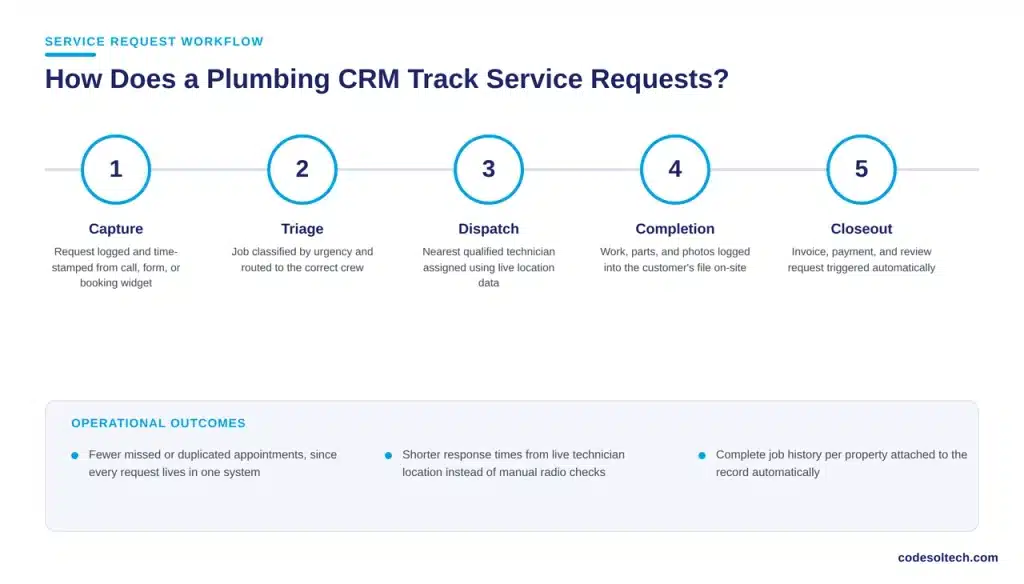
A plumbing CRM tracks a service request through five stages: capture, triage, dispatch, completion, and closeout. The system captures the request from a phone call, website form, or booking widget and time-stamps it automatically.
Triage classifies the job by urgency, such as an emergency leak versus routine drain cleaning, and routes it accordingly.
Dispatch assigns a technician using real-time location and calendar data, then sends the customer an automated confirmation with an arrival window. Completion logs the work performed, parts used, and photos taken on-site directly into the customer’s file.
Closeout triggers the invoice, payment collection, and a review request, closing the loop without a dispatcher re-entering data by hand.
This stage-by-stage structure gives plumbing business owners three operational outcomes:
- Fewer missed or duplicated appointments, because every request exists in one system instead of a notebook or a group text
- Shorter response times, because dispatch uses live technician location instead of a manual radio check
- Complete job history per property, because completion data attaches to the customer record instead of a paper invoice pad
Core CRM Features Plumbing Businesses Need
Not every CRM built for general sales teams fits a plumbing operation. Plumbing businesses need field-service-specific features, not a generic contact database. The following capabilities separate a functional plumbing CRM from a repurposed sales tool:
- Technician dispatch and GPS routing — assigns the nearest qualified technician and calculates drive time automatically
- Job and equipment history — stores water heater age, pipe material, and past repairs per property address
- Quote and invoice generation — builds itemized estimates on-site and converts approved quotes into invoices without re-entry
- Maintenance plan automation — schedules recurring inspection visits and bills subscription customers on a fixed cycle
- Two-way SMS and email — sends appointment reminders and receives customer replies inside the same job record
- Review request automation — triggers a review link after a technician marks a job complete
- Integration with accounting software — syncs invoices and payments with platforms such as QuickBooks to eliminate duplicate bookkeeping
Plumbing businesses that build a custom CRM configure these modules around their own dispatch logic and service territory, rather than adapting their operation to fit a generic template.
A custom CRM and client portal connect these features directly to a company’s existing calendar, accounting, and marketing tools instead of forcing a rebuild around a fixed vendor structure.
CRM vs. Spreadsheets vs. Generic Field Service Software
| Capability | Spreadsheets / Paper | Generic Field Service App | Custom Plumbing CRM |
|---|---|---|---|
| Job and property history | Manual, prone to loss | Present but generic | Built around plumbing-specific data fields |
| Technician dispatch | Phone or radio only | Standard routing | Routing tuned to service area and crew skill |
| Follow-up automation | None | Basic reminders | Maintenance plans, review requests, seasonal offers |
| Accounting integration | None | Limited or paid add-on | Direct sync with existing accounting stack |
| Ownership of data and workflow | Full ownership, no structure | Vendor-controlled, fixed workflow | Company-controlled, workflow matches operations |
How Does a CRM Turn One-Time Callers Into Repeat Customers?
A CRM converts one-time callers into repeat customers through three mechanisms: scheduled maintenance reminders, service history recall, and post-job review capture.
Scheduled reminders contact the customer before a water heater’s expected failure window or before a seasonal inspection is due, prompting a booking before a competitor’s ad does.
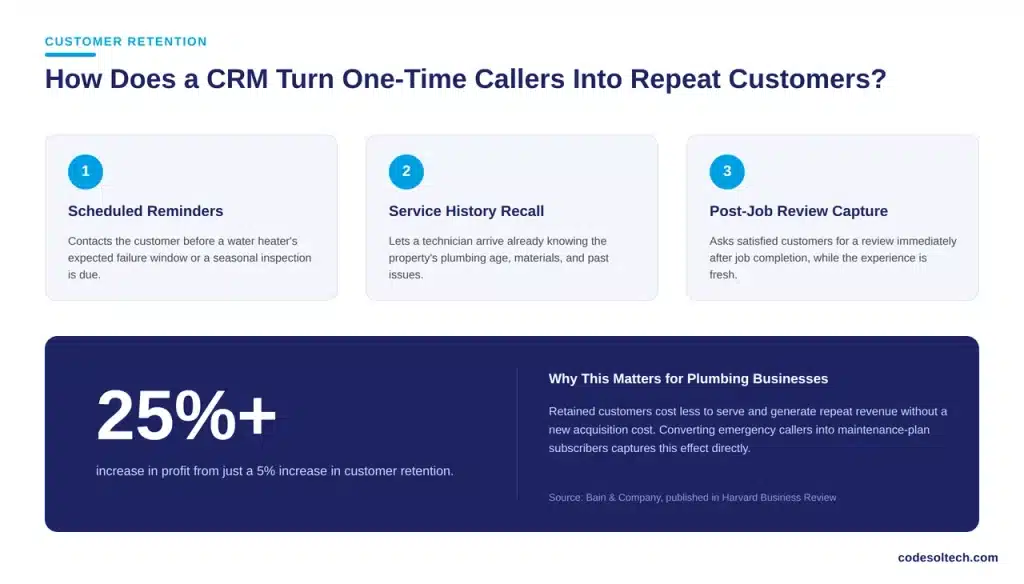
Service history recall lets a technician arrive already knowing the property’s plumbing age, materials, and past issues, which shortens the visit and raises first-visit resolution.
Post-job review capture asks satisfied customers for a review immediately after job completion, while the experience is fresh, instead of relying on the customer to remember later.
Combined, these three mechanisms shift the plumbing business’s revenue mix from one-time emergency calls toward a base of recurring maintenance accounts.
Customer retention carries a direct profit impact that applies to plumbing businesses as much as any other service company.
Bain & Company’s research, published in the Harvard Business Review, found that a 5 percent increase in customer retention increases profit by more than 25 percent, because retained customers cost less to serve and generate repeat revenue without a new acquisition cost.
A plumbing business that converts a portion of its emergency-call customers into maintenance-plan subscribers captures this effect directly, since each renewed contract adds revenue without an equivalent marketing spend.
Field Service and CRM Adoption Is Accelerating in the Trades
Plumbing companies are not adopting CRM and field service software in isolation. Grand View Research values the global field service management market at $6.1 billion in 2025, projecting growth to $13.8 billion by 2033 at an 11.0 percent compound annual growth rate.

This growth reflects a broader shift among HVAC, electrical, and plumbing contractors away from paper-based dispatch and toward centralized digital systems that connect scheduling, customer data, and billing in one platform.
This shift changes the competitive baseline for plumbing businesses. A company still dispatching from a whiteboard now competes against local rivals who respond faster, quote more accurately, and follow up automatically.
The gap compounds over each service cycle, because CRM-equipped competitors retain a larger share of the customers they already acquired.
Implementing a CRM in a Plumbing Business
Plumbing businesses implement a CRM in four phases: audit, configuration, migration, and rollout. The audit phase maps current dispatch, invoicing, and follow-up steps to identify which manual processes the CRM will replace.
Configuration builds the job stages, service territories, and pricing templates specific to the company’s trade mix, whether that includes drain cleaning, water heater replacement, or repipe work.
Migration transfers existing customer records, past job history, and open estimates into the new system without data loss. Rollout trains dispatchers and technicians on the mobile and desktop interfaces before the company retires its old tracking method.
A phased rollout, run alongside the existing system for one full billing cycle, reduces the risk of missed jobs during the transition.
Plumbing businesses evaluating this process alongside other workflow automation upgrades typically sequence the CRM first, since dispatch and customer data form the foundation that automation, online booking, and marketing tools build on afterward.
FAQs
Does a small plumbing business need a CRM, or is it only for large companies?
A small plumbing business benefits from a CRM at any size once it manages more than a handful of active jobs per week, because manual tracking error rates rise directly with job volume. A one-truck operation gains fewer scheduling benefits than a ten-truck company, but it gains the same retention benefit from automated maintenance reminders and review requests.
How long does it take to implement a CRM for a plumbing company?
A custom-configured CRM for a plumbing company typically moves from audit to full rollout across four to eight weeks, depending on the number of technicians, existing data volume, and required accounting integrations. Off-the-shelf generic tools install faster but require the company to adapt its workflow to the software’s fixed structure.
Can a plumbing CRM integrate with existing accounting software?
A properly configured plumbing CRM integrates with accounting platforms such as QuickBooks to sync invoices, payments, and expense records automatically, removing the need for a bookkeeper to re-enter job data by hand.
Final Words
A plumbing CRM replaces fragmented tracking with one system that follows a customer from first call to repeat maintenance visit. It shortens response times, gives technicians full job history on arrival, and automates the follow-ups that turn emergency callers into subscribers.
For plumbing businesses competing on speed and reliability, this system is now a baseline requirement, not an upgrade.
Talk to CodeSol Technologies about a custom plumbing CRM built around your service territory, crew size, and existing accounting tools.



