
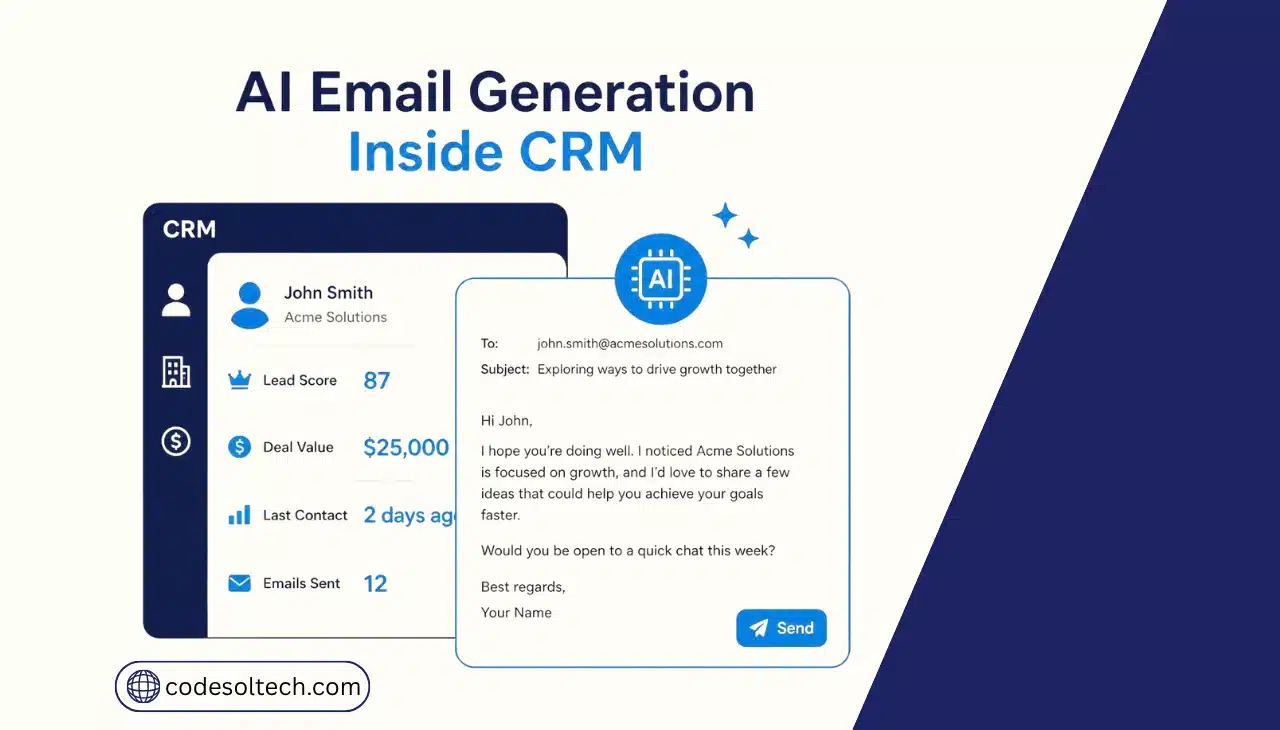
AI email generation in a CRM drafts, personalizes, and sends emails directly from customer records. The CRM feeds contact history, deal stage, and behavior data into a generative AI model.
The model returns a ready-to-send draft in seconds, so reps don’t start from a blank page.
A large language model then generates subject lines and body text that match those fields. The rep reviews, edits, or approves the draft before it sends.
This differs from older mail-merge tools. Mail merge inserts a name into a fixed template. AI email generation writes new sentences around the customer’s actual situation.
Most CRMs route the draft through a review step before it reaches a customer’s inbox. That step is configurable by email type and deal size.
CRM platforms apply this feature to 5 core email types:
- Cold outreach and prospecting emails
- Follow-up and nurture sequences
- Renewal and win-back emails
- Meeting recap and next-step summaries
- Support ticket and service responses
How Does AI Email Generation Work Inside a CRM
AI email generation runs through 4 stages inside a CRM. Each stage moves data from the record to the inbox.
- Data ingestion. The CRM pulls contact fields, deal stage, and interaction history from the record.
- Prompt construction. The system merges that data into a prompt template with defined tone and length rules.
- Generation. An LLM, such as Salesforce Einstein, HubSpot Breeze, or Microsoft Copilot, drafts the email body.
- Review and send. A rep edits the draft, or the CRM sends it automatically above a set confidence threshold.
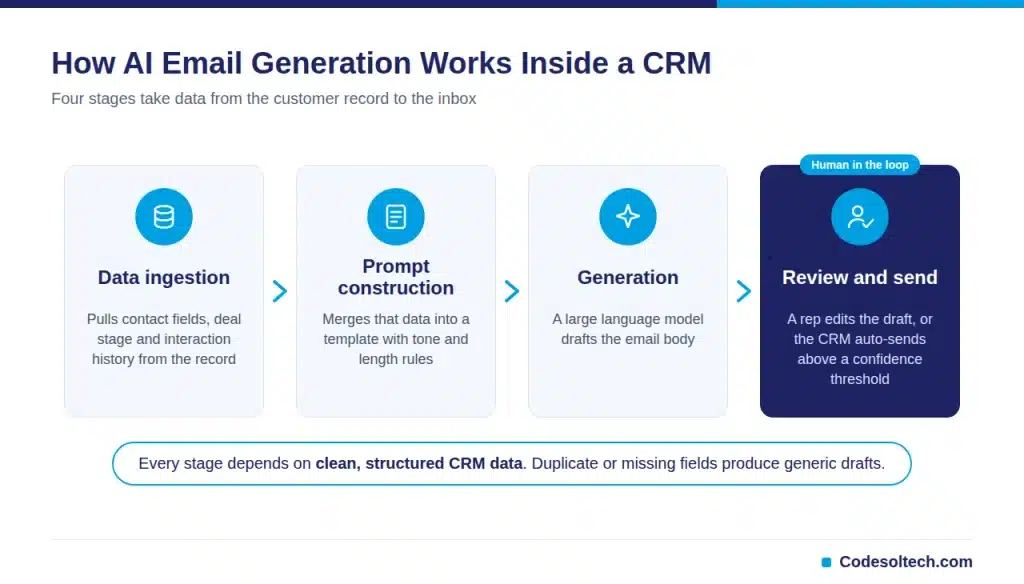
This pipeline depends on clean, structured CRM data. Incomplete or duplicate fields produce generic or inaccurate drafts, regardless of how strong the underlying model is.
What Data Powers AI Email Personalization?
The model can only personalize with fields the CRM actually stores. Richer records produce sharper emails.
- Deal stage and pipeline position
- Past purchase or subscription history
- Website and product engagement signals
- Support ticket history and resolution status
- Job title, industry, and company size
Which AI Models Power CRM Email Generation
CRM vendors license or build on 3 categories of language models. Each category trades off cost, speed, and customization.
- Proprietary in-house models. Salesforce Einstein and Zoho Zia run on vendor-trained models tuned to CRM data structures.
- Licensed foundation models. Microsoft Copilot for Sales runs on OpenAI’s GPT models through Azure.
- Model-agnostic connectors. Some CRMs let admins connect Claude, Gemini, or GPT directly through an API key.
Why AI Email Generation Matters for Sales Teams
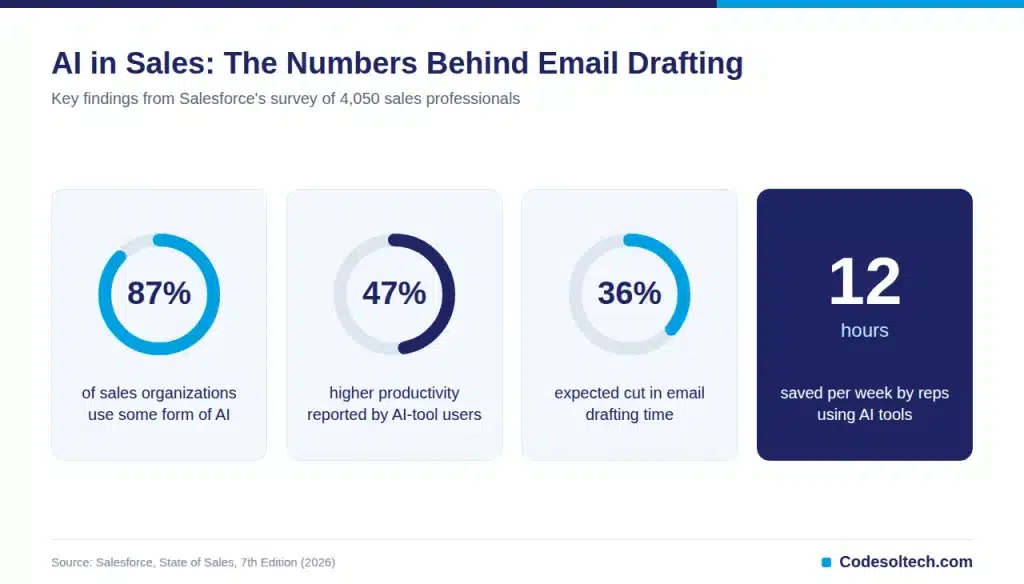
Salesforce surveyed 4,050 sales professionals for its 2026 State of Sales report. The data shows AI email drafting is now a mainstream sales function, not an experiment.
- 87% of sales organizations use some form of AI, including email drafting
- Sellers expect fully deployed AI agents to cut email drafting time by 36%
- Reps using AI tools save an average of 12 hours per week
- AI-tool users report 47% higher productivity than non-users
McKinsey’s research on generative AI in sales estimates that a fifth of current sales-team functions can be automated. Email drafting sits inside that automatable fifth.
Time saved on drafting does not disappear. Sales leaders redirect it toward live customer conversations and pipeline review, where a rep’s judgment still outperforms a model.
A mid-sized sales team of 10 reps saving 12 hours weekly recovers 120 hours of selling time every week. Over a full quarter, that is roughly 1,560 hours redirected back into active selling.
Customer service teams see a parallel effect. Support reps using AI-generated first-draft responses close routine tickets faster, since the reply no longer starts from a blank screen and only needs a final check.
Comparing Native AI Email Tools Across Major CRMs
Most major CRM vendors now build AI email generation into the core platform. Coverage and personalization depth vary by vendor.
Choosing a tool usually comes down to the CRM a team already runs. Switching CRM platforms purely for an AI email feature rarely justifies the migration cost.
| CRM Platform | AI Email Feature | Personalization Source | Human Review Step |
|---|---|---|---|
| Salesforce | Einstein Generative Email | Data Cloud + deal record | Optional, configurable |
| HubSpot | Breeze Copilot | Contact and deal properties | Draft-first by default |
| Microsoft Dynamics 365 | Copilot for Sales | CRM record + Outlook thread | Draft-first by default |
| Zoho CRM | Zia Email Generation | Module fields and lead score | Optional, configurable |
Draft-first defaults exist for a reason. Vendors that route every AI draft past a human reviewer report fewer factual errors in sent emails.
Best Practices for Rolling Out AI Email Generation
Teams that get consistent results follow the same 6 operating habits. Most of these habits cost nothing beyond a fixed weekly review cadence.
- Keep prompt templates short and specific to one email type at a time
- Lock pricing and contract language out of free-form AI generation
- Review the first 50 AI drafts manually before raising the auto-send threshold
- Refresh CRM fields on a fixed weekly or biweekly cadence
- Track reply rate by template, not just by rep
- Retrain or adjust prompts when reply rate drops for 2 consecutive weeks
What Are the Limitations of AI Email Generation in CRM
AI email generation is not a fully autonomous replacement for a sales rep. It carries 5 operational risks.
- Data quality dependency. Missing or outdated CRM fields produce vague, generic drafts.
- Factual hallucination. The model can state incorrect pricing, dates, or product details.
- Compliance exposure. Generated emails must still meet CAN-SPAM and GDPR consent rules.
- Voice drift. Unreviewed AI drafts can diverge from established brand tone over time.
- Over-personalization. Referencing too much behavioral data in one email can read as intrusive.
Teams that skip human review on high-stakes emails carry direct compliance and reputation risk. A single inaccurate pricing line can cost a deal.
Pricing and contract terms belong in a controlled document, not a freeform AI draft. Pair AI email output with a structured proposal and quote management process for anything involving numbers.
How to Implement AI Email Generation in Your CRM
Rolling out AI email generation follows a fixed 6-step sequence.
- Audit CRM data quality before enabling any AI drafting feature.
- Select an AI email tool native to your existing CRM platform.
- Build prompt templates for each of your 5 core email types.
- Set a human-review threshold for cold outreach and pricing emails.
- A/B test subject lines and track reply rate weekly.
- Monitor deliverability scores after AI adoption, since send volume often rises.
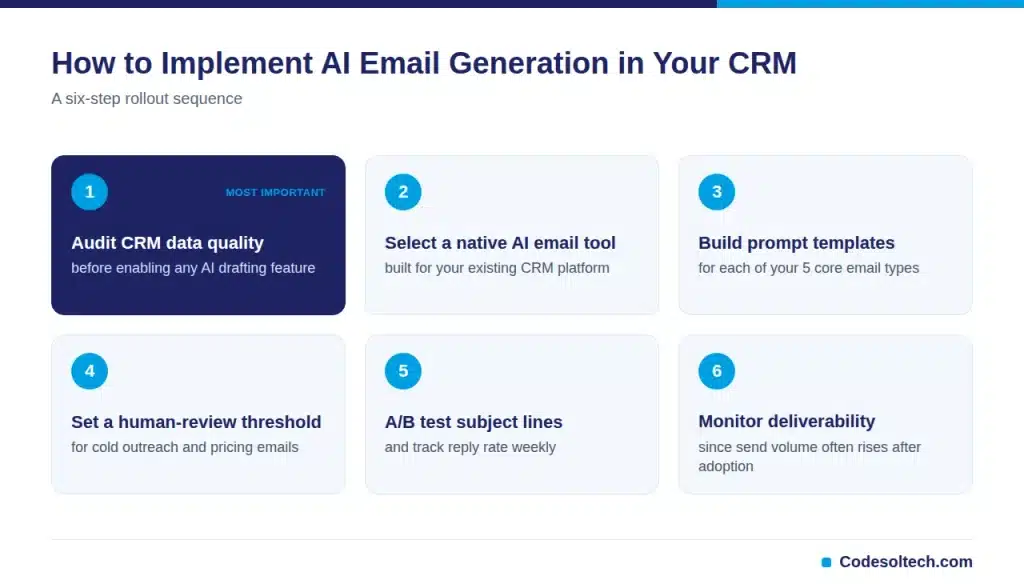
Step 1 matters most. A model trained on incomplete records repeats the same errors at higher volume.
Teams that pair this rollout with a broader workflow automation plan see faster adoption across the sales floor. A sound CRM integration architecture also keeps the AI model fed with current data from connected systems.
Companies migrating from a legacy system should sequence the work through a CRM migration plan first. AI email generation performs worse on a database still carrying migration errors.
How Do You Measure ROI on AI Email Generation
Track 3 numbers before and after rollout: hours spent drafting per rep, reply rate per template, and email deliverability score.
A drop in drafting hours with a stable or higher reply rate confirms the tool is working as intended.
FAQs
Does AI email generation reduce reply rates?
Reply rate depends on personalization depth, not on AI use alone. Generic AI drafts sent without review underperform manually personalized emails, while data-rich AI drafts often match or beat them.
Which CRMs offer built-in AI email generation?
Salesforce, HubSpot, Microsoft Dynamics 365, and Zoho CRM each ship native AI email drafting as of 2026. Smaller CRMs typically connect a model through a third-party integration instead.
Does AI email generation replace the sales rep?
No. It drafts the first version of an email. The rep still edits, verifies facts, and approves the send.
How long does AI email generation take to set up in a CRM?
Native tools activate in hours. Custom prompt templates and review workflows typically take 1 to 2 weeks to tune properly, since teams need real reply-rate data before finalizing a template.
Is AI-generated email considered spam under CAN-SPAM or GDPR?
The generation method does not change compliance status. Every AI-drafted email still needs a clear opt-out link and documented consent.
Final Words
AI email generation inside a CRM removes the blank-page problem from routine outreach. It does not remove the need for clean data or human review.
Teams that pair strong data hygiene with AI drafting save real time without sacrificing accuracy or compliance across their pipeline.
Ready to add AI email generation to your CRM the right way? Talk to CodeSolTech about a CRM build that supports it from day one.
Yoy May Like
AI Sales Assistants for Small Business: What They Actually Do
Predictive Sales Analytics in CRM: How AI Forecasts Revenue
AI Lead Scoring in CRM: 5-Stage Work Breakdown
Thanks For Reading 🙂
![Conversational AI in CRM: Stop Typing, Start Talking [2026]](https://www.codesoltech.com/wp-content/uploads/2026/10/Conversational-AI-in-CRM-Stop-Typing-Start-Talking-2026.webp)
![AI Customer Segmentation in CRM [Proven Data + 6-Step Setup]](https://www.codesoltech.com/wp-content/uploads/2026/09/AI-Customer-Segmentation.webp)