
An AI sales assistant is software that uses machine learning and natural language processing to automate sales tasks such as lead scoring, follow-up emails, and meeting scheduling. Small business sales teams deploy AI sales assistants to handle prospecting and admin work. This frees reps to focus on closing deals.
Why Small Businesses Are Adopting AI Sales Assistants Now
Small sales teams face a fixed constraint: limited headcount against growing lead volume. AI sales assistants remove that constraint by automating volume-based tasks.
Three Pressures Driving Adoption in 2026
Three specific pressures push small businesses toward AI sales assistants this year. Each pressure compounds the others.
- Rising customer expectations for fast, 24/7 response times
- Executive pressure to show AI-driven efficiency gains
- Limited budget for adding full-time sales reps
Customer response speed matters most. A prospect who waits days for a reply often buys from a faster competitor instead.
What the Adoption Data Shows
Gartner’s February 2026 survey found that 91% of customer service and support leaders report direct executive pressure to implement AI. Sales leadership at small businesses faces the same pressure with far fewer resources to act on it.
This pressure is not limited to enterprise teams. Small business owners report the same expectation from customers and lenders evaluating growth plans.
What Is an AI Sales Assistant
An AI sales assistant executes defined sales tasks without manual input from a rep. It qualifies leads, drafts emails, logs CRM data, and books meetings.
Core Technology Components
The technology relies on three components: machine learning models, natural language processing, and CRM integration. Each component handles a distinct function inside the sales workflow.
- Machine learning models score leads by predicting purchase likelihood
- Natural language processing drafts and personalizes outreach emails
- CRM integration syncs activity data across the sales pipeline
Salesforce classifies this category as an “AI agent” when it acts autonomously across multiple steps, not just a single task. A chatbot that only answers one question is not an agent.
Three Categories of AI Sales Assistants
AI sales assistants fall into three categories based on the task they automate. A small business typically starts with one category before expanding.
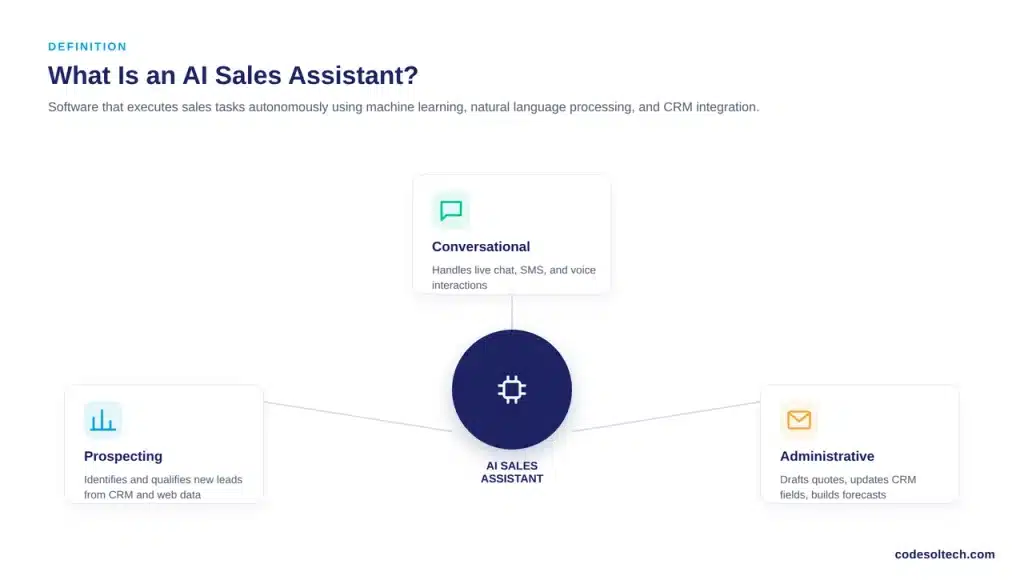
- Prospecting assistants: identify and qualify new leads from existing CRM and web data
- Conversational assistants: handle live chat, SMS, or voice interactions with prospects
- Administrative assistants: draft quotes, update CRM fields, and generate forecast reports
Most small business deployments begin with prospecting assistants. The task is repetitive, data-heavy, and easiest to measure.
How Does an AI Sales Assistant Work for a Small Sales Team
An AI sales assistant plugs into a small business’s CRM and executes prospecting, follow-up, and reporting tasks around the clock. It replaces the manual steps a rep would otherwise repeat for every lead.
The CRM Integration Loop
According to the Salesforce State of Sales, 7th Edition, 54% of sales teams now use AI agents in production. Another 34% expect to adopt them within two years.
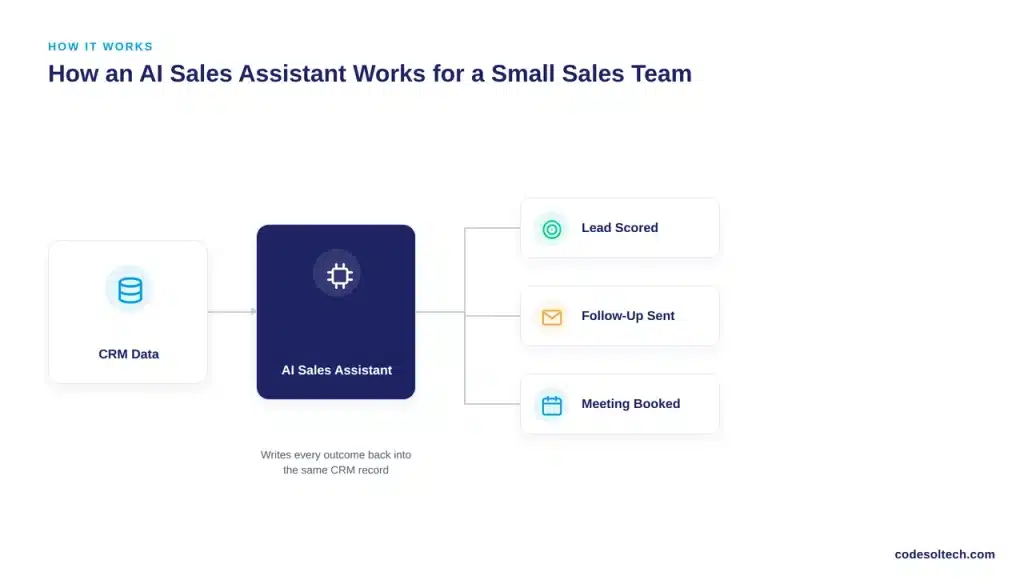
The assistant reads CRM data, scores or acts on it, then writes the outcome back into the same record. A rep sees an updated lead score or a logged email without touching either manually.
Advantages for Small Teams
Small teams gain three specific advantages from this setup:
- Continuous lead qualification without added headcount
- Automated follow-up sequences triggered by buyer behavior
- Centralized lead scoring data inside one CRM record
Salesforce reports that 92% of sales professionals with AI agents say the agents directly benefit their prospecting efforts.
Why Top Performers Pull Ahead
Top-performing sellers are 1.7 times more likely to use prospecting AI agents than underperformers, per the same Salesforce report.
This gap is not about individual effort. It comes down to which teams automated the repetitive first steps of the sales process early, then reinvested the saved time into higher-value conversations.
Core Functions of an AI Sales Assistant
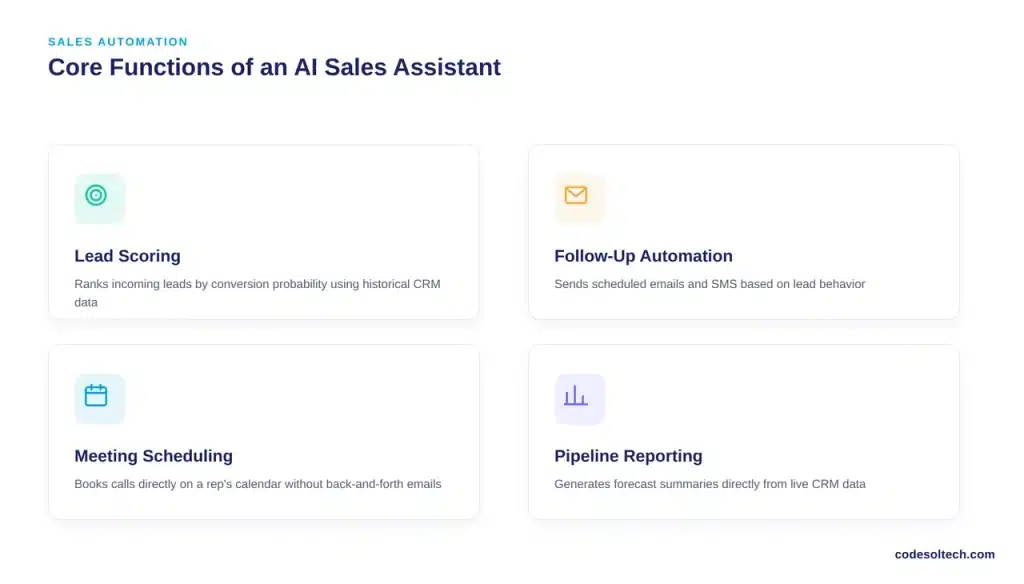
An AI sales assistant performs four core functions inside a small business sales operation. Each function replaces a task that previously required manual rep time.
Lead Scoring and Follow-Up Automation
- Lead scoring: ranks incoming leads by conversion probability using historical CRM data
- Follow-up automation: sends scheduled emails and SMS based on lead behavior
Lead scoring runs continuously in the background. A rep opens the CRM each morning to a list already ranked by priority, instead of guessing which lead to call first.
Meeting Scheduling and Pipeline Reporting
- Meeting scheduling: books calls directly on a rep’s calendar without back-and-forth emails
- Pipeline reporting: generates forecast summaries from live CRM data
Pipeline reporting removes a task that many small business owners do manually every week. The assistant pulls the same numbers directly from CRM records instead.
Why Reclaimed Time Compounds
These four functions connect directly to sales pipeline automation. A small business that automates all four reduces the manual data entry that typically consumes a rep’s day.
Reclaimed time compounds across a team. Ten reps saving even one hour daily return roughly ten hours of weekly selling time to the business.
Most small business CRM platforms now bundle at least one of these four functions into existing subscription tiers. This lowers the barrier to a first pilot significantly.
AI Sales Assistant vs Traditional CRM Automation
Traditional CRM automation executes fixed, rule-based workflows. An AI sales assistant adapts its output based on new data. The table below compares both approaches across five criteria.
| Criteria | Traditional CRM Automation | AI Sales Assistant |
|---|---|---|
| Lead qualification | Fixed scoring rules set once by admin | Dynamic scoring updated by live behavior |
| Email content | Static templates | Personalized per lead using NLP |
| Setup effort | Manual workflow building | Configured with existing CRM data |
| Adapts over time | No, requires manual edits | Yes, retrains on new outcomes |
| Best fit | Simple, repetitive tasks | Prospecting, forecasting, follow-up |
When Traditional Automation Is Still the Right Fit
Traditional CRM automation still fits fixed, low-variance tasks. A birthday email or a static welcome sequence does not need adaptive scoring.
A small business should keep simple rule-based automation for these tasks. Reserve the AI sales assistant budget for prospecting, forecasting, and follow-up.
What Data Proves AI Sales Assistants Deliver Results
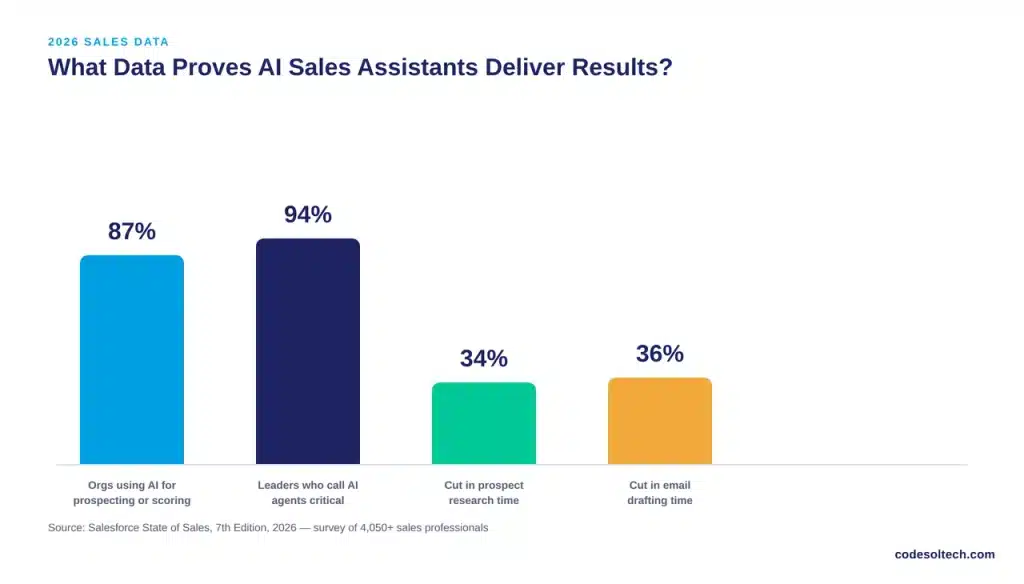
Salesforce’s 2026 State of Sales data shows measurable time savings and adoption gains tied directly to AI sales assistants. These figures come from a survey of over 4,050 sales professionals.
Adoption and Productivity Metrics
- 87% of sales organizations use AI for prospecting, forecasting, lead scoring, or email drafting
- 94% of sales leaders with agents call them critical for meeting business demands
- Reps expect AI agents to cut prospect research time by 34%
- Reps expect AI agents to cut email drafting time by 36%
Separately, Gartner’s February 2026 survey found that 91% of customer service and support leaders face executive pressure to implement AI.
What This Means for a Small Business
Sales and service functions face the same adoption pressure inside most small businesses, just with fewer resources than enterprise teams carry.
This adoption pattern connects directly to broader workflow automation ROI trends across small business operations. Time saved on research and drafting converts directly into more selling hours per rep.
How to Choose an AI Sales Assistant for a Small Business
A small business should evaluate an AI sales assistant against four specific criteria before purchase. Skipping this evaluation leads to tools that sit unused after setup.
Four Evaluation Criteria
- CRM compatibility: confirm native integration with the existing CRM, not a third-party workaround
- Data quality readiness: verify the CRM’s contact and deal data is clean before deployment
- Task scope: match the tool to specific tasks (prospecting, follow-up, or reporting), not a generic bundle
- Reporting transparency: require visible logs of every automated action for audit purposes
Reporting transparency matters most for accountability. A rep or manager needs to trace every automated email or score back to its trigger.
Where Most Small Businesses Fail This Evaluation
Data quality is the most common failure point. A CRM with duplicate or outdated records produces inaccurate lead scores.
Review CRM data quality and migration practices before activating an AI sales assistant. Fixing this after launch costs more time than fixing it before.
How to Implement an AI Sales Assistant in 5 Steps
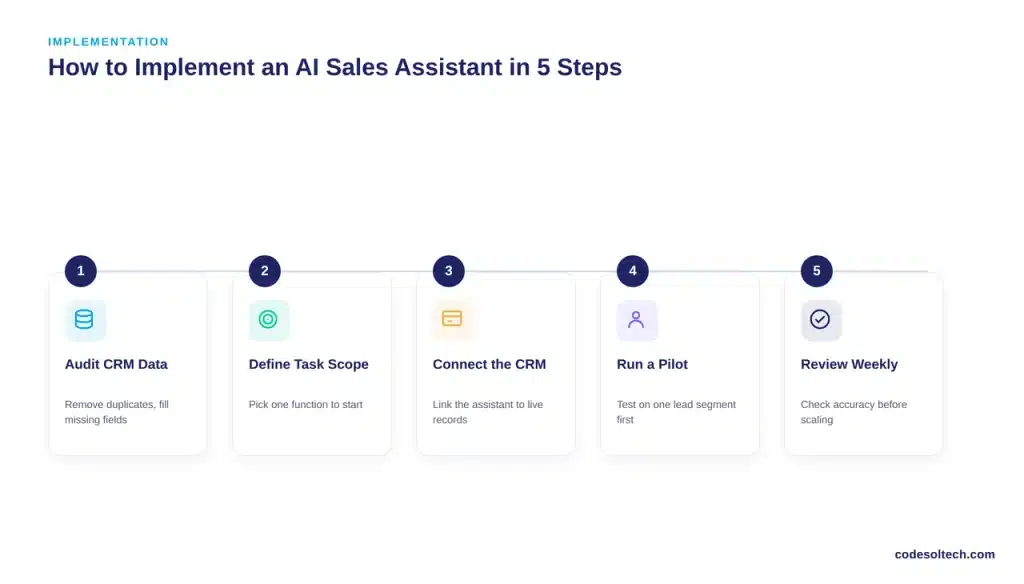
Implementation follows a fixed sequence. Skipping a step increases the risk of inaccurate lead scoring or missed follow-ups.
The Five-Step Rollout Sequence
- Audit CRM data quality. Remove duplicate contacts and fill missing deal fields before connecting any AI tool.
- Define the task scope. Select one function first, such as lead scoring or follow-up emails, rather than automating everything at once.
- Connect the CRM integration. Confirm the AI assistant reads and writes data directly inside the existing CRM.
- Run a pilot on one lead segment. Test the assistant on a limited group before a full rollout.
- Review automated actions weekly. Check logs for scoring accuracy and email tone before scaling to the full pipeline.
This sequence mirrors standard sales pipeline automation rollouts used across CRM deployments.
What to Monitor After Launch
A rollout does not end at go-live. Three signals confirm the assistant is working correctly.
- Lead scores matching actual conversion outcomes over time
- Reply rates on automated emails holding steady against manual baselines
- No increase in duplicate or conflicting CRM records
A drop in any of these signals points back to the original data quality audit, not the AI tool itself.
Common Risks and Limitations
An AI sales assistant does not replace a rep’s judgment in complex, high-value negotiations. It performs best on repeatable, data-driven tasks.
Data and Personalization Risks
- Poor CRM data produces inaccurate lead scores
- Over-automated outreach can feel impersonal to prospects
- Integration gaps between tools create duplicate or missed tasks
A small business should pilot the tool on one segment of leads first. This limits exposure before a full rollout.
Vendor Lock-In
Vendor lock-in is a secondary risk. Some AI sales assistants export data poorly if a business later switches CRM platforms.
Contract terms deserve review before signing. Confirm data export rights and format in writing, not verbally.
Budgeting for an AI Sales Assistant
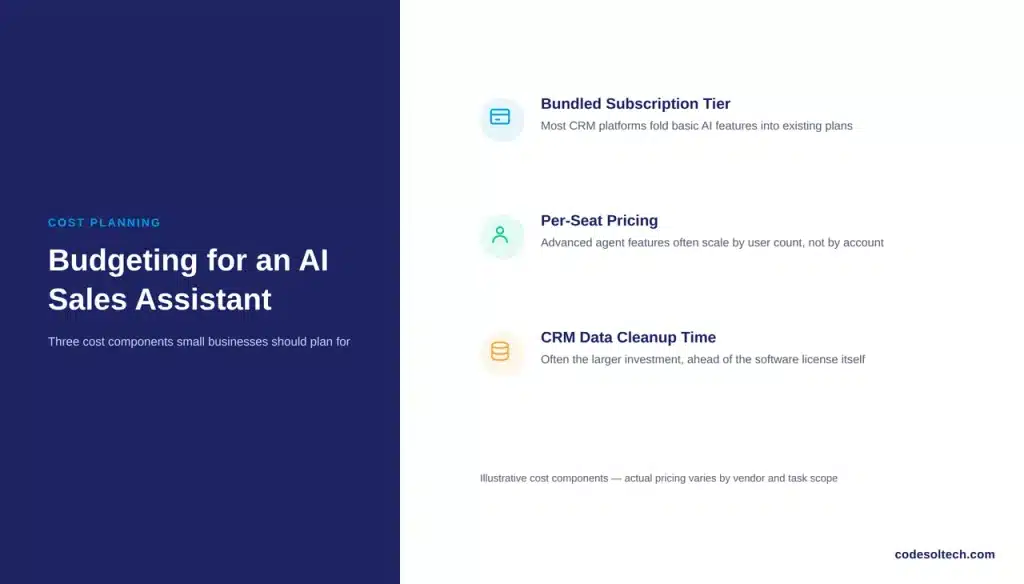
Pricing structures vary widely by vendor and task scope, so a single universal figure does not exist. Most small business CRM platforms fold basic AI features into existing subscription tiers.
Typical Pricing Structures
Advanced, multi-step AI agents typically sit in a higher pricing tier than basic automation. A small business should request a scoped quote tied to its exact task list rather than a flat “AI package” rate.
Per-seat pricing is common among CRM vendors. Confirm whether the AI features apply per user or across the whole account before comparing quotes.
The Hidden Cost: Data Cleanup
Budget conversations should include one more variable: the internal time cost of a CRM data cleanup before launch.
This step is often the larger investment, not the software license itself. A small business with years of unmanaged CRM data should plan for this cost separately.
FAQs
Does an AI sales assistant replace a sales rep?
No. It automates repetitive tasks like follow-up and reporting. The rep still owns negotiation and relationship building.
How much does an AI sales assistant cost for a small business?
Cost varies by CRM platform and task scope. Most small business plans bundle AI features into existing CRM subscription tiers.
Can an AI sales assistant work with a small CRM setup?
Yes, provided the CRM data is clean and the platform supports API integration. Poor data quality is the main blocker, not team size.
Which sales task should a small business automate first?
Start with follow-up emails or lead scoring. Both tasks are repetitive, data-driven, and easy to audit early.
Final Words
AI sales assistants are not a future trend. Salesforce’s own 2026 data shows 54% of teams already run them in production.
For a small business, the real gain is time. Reps spend it on relationships instead of repetitive admin work.
Start with one clean data source and one clear task before scaling further.
Ready to bring AI-driven sales automation into your CRM? Talk to CodeSolTech about building a sales workflow that fits your team’s exact process.
![Conversational AI in CRM: Stop Typing, Start Talking [2026]](https://www.codesoltech.com/wp-content/uploads/2026/10/Conversational-AI-in-CRM-Stop-Typing-Start-Talking-2026.webp)
![AI Customer Segmentation in CRM [Proven Data + 6-Step Setup]](https://www.codesoltech.com/wp-content/uploads/2026/09/AI-Customer-Segmentation.webp)