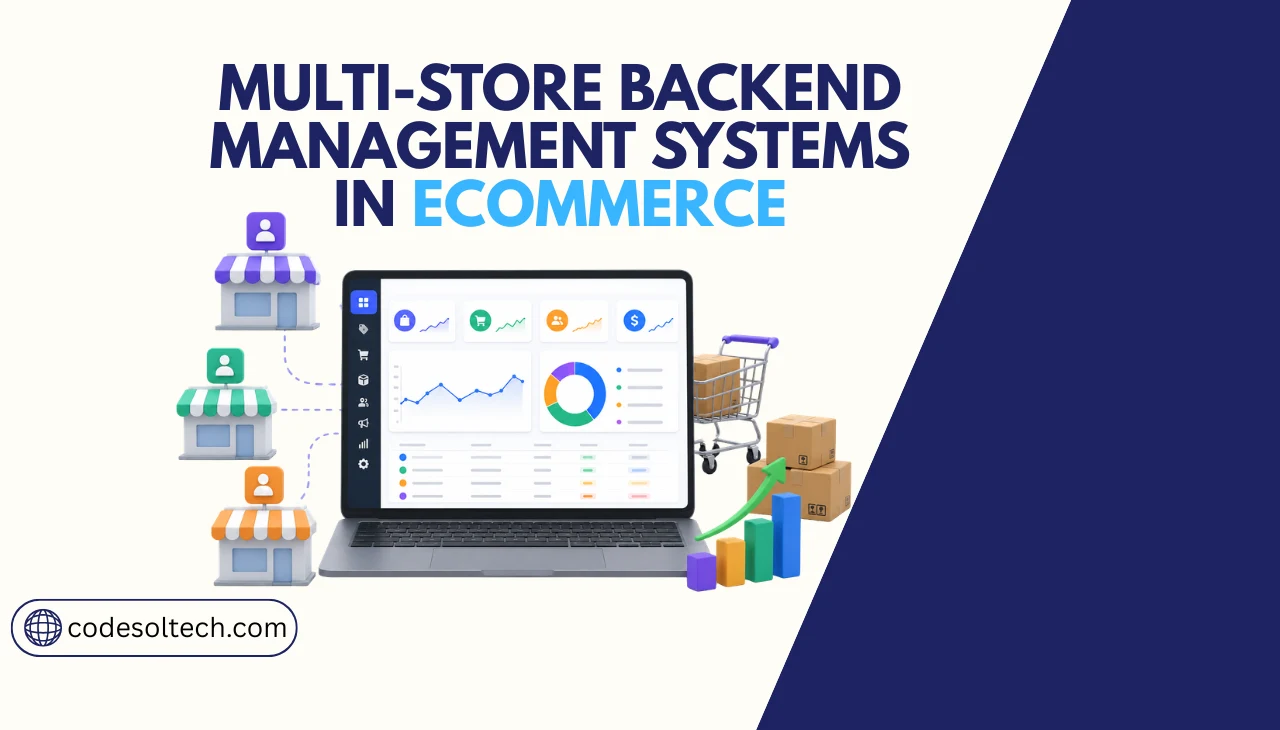
A multi-store backend management system is a centralized architecture that controls multiple independent storefronts, each with separate branding, pricing, and catalogs, from one admin interface. It consolidates inventory, order routing, customer data, and reporting across all stores, reducing operational overhead and scaling costs by 35–45%.
The global ecommerce market reached $6.3 trillion in 2026 and continues to expand across geographies, buyer segments, and brand verticals.
Brands running separate platform instances for each store spend 3 to 5 times more on development, integrations, and support than those operating from a centralized backend.
Multi-store architecture removes that cost multiplier by decoupling frontend presentation from backend logic.
What Is a Multi-Store Backend Management System?
A multi-store backend management system is a software architecture that connects multiple customer-facing storefronts to one shared operational core. The backend handles product data, inventory levels, order processing, customer records, and reporting.
Each storefront reads from and writes to the same backend database, so a single inventory update propagates to all active stores in real time.
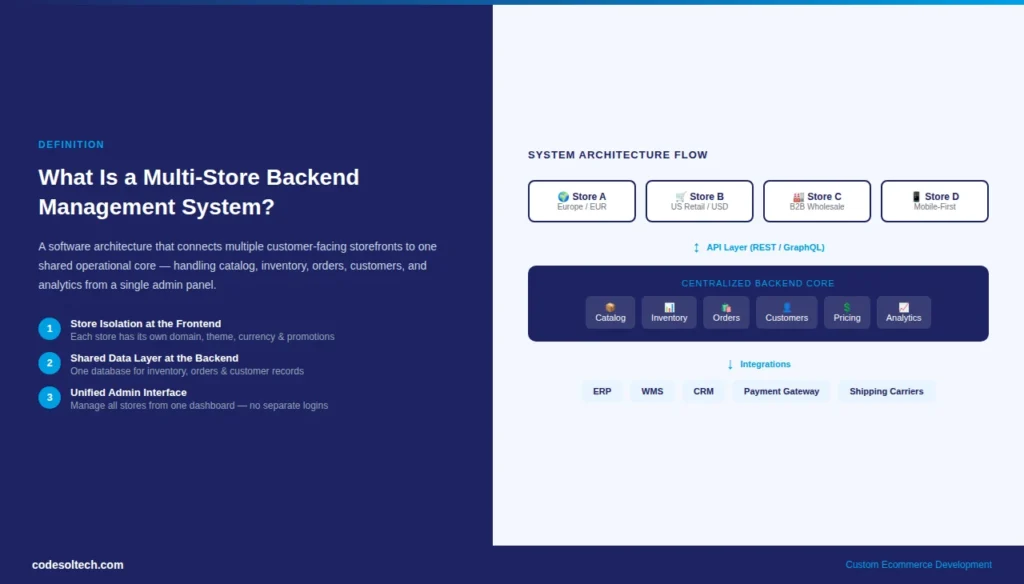
This architecture differs from a single-store system in 3 fundamental ways:
- Store isolation at the frontend: Each storefront has its own domain, theme, language, currency, and promotional logic independent from other stores.
- Shared data layer at the backend: Inventory pools, customer records, and order histories exist in one centralized database, accessible across all stores based on access rules.
- Unified admin interface: Operators manage all stores from a single dashboard without switching between separate admin panels or login sessions.
Platforms like Magento, Shopify Plus, WooCommerce Multisite, and custom-built solutions built on Node.js or Laravel each implement this architecture differently.
Custom-built systems give development teams full control over data models, API structures, and store isolation rules a critical advantage for businesses with non-standard catalog or pricing requirements.
Core Components of a Multi-Store Backend System
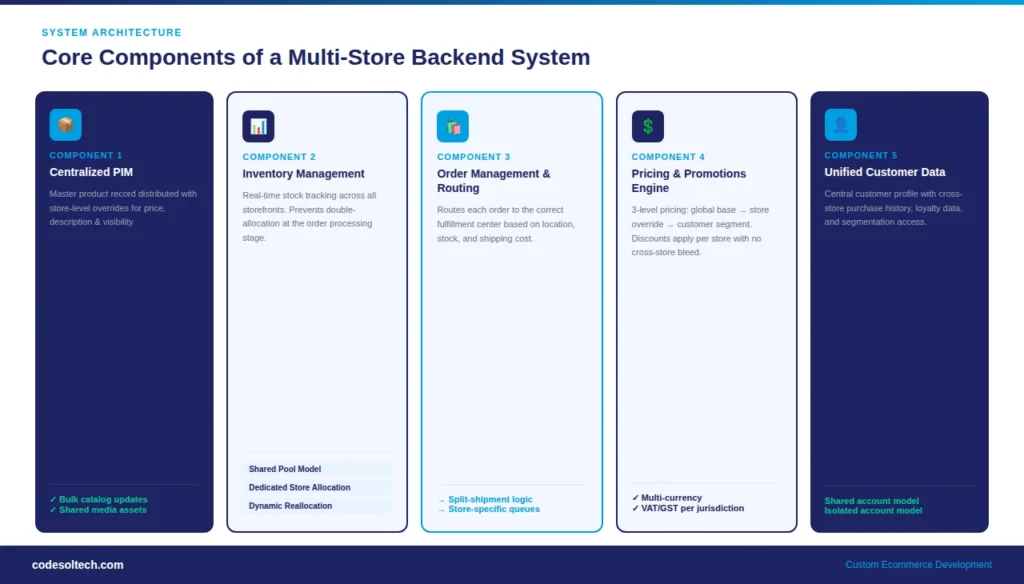
1. Centralized Product Information Management (PIM)
A PIM layer stores the master product record, including SKUs, descriptions, attributes, images, and pricing rules, and distributes store-specific variations to each storefront.
Without a PIM, teams manually update product data across each store, which introduces version inconsistencies and multiplies update time by the number of active stores.
A well-architected PIM in a multi-store system supports:
- Global product records with store-level overrides for price, description, and visibility
- Bulk catalog operations that push updates to all stores in a single action
- Product assignment rules that route catalog subsets to specific stores by region, brand, or buyer segment
- Media asset management with shared image repositories and store-specific alt text
2. Inventory Management Across Storefronts
Multi-store inventory management tracks stock levels at the product-location level and allocates available inventory across all storefronts in real time.
Without this layer, a product oversold on one storefront creates fulfillment failures across the entire operation. The system enforces stock reservations the moment an order enters processing, preventing double-allocation.
The inventory layer supports 3 allocation models depending on business structure:
- Shared pool model: All stores draw from a single inventory pool; stock decrements in real time as orders arrive from any storefront.
- Dedicated store allocation: Each store receives a fixed inventory allocation, preventing one high-volume store from exhausting shared stock.
- Dynamic reallocation: The system shifts inventory between stores based on demand signals, reducing overstock in slow-moving stores and preventing stockouts in high-demand ones.
3. Order Management and Routing Engine
The order management layer receives orders from all storefronts, applies routing logic to assign each order to the correct fulfillment location, and tracks status from placement through delivery.
In a multi-store environment, routing logic accounts for the originating storefront, the buyer’s shipping address, stock availability by warehouse, and fulfillment cost per carrier.
The routing engine executes 4 primary functions:
- Store-specific order queues that separate workflows for B2B, B2C, and wholesale stores
- Automated warehouse assignment based on proximity to the delivery address and stock availability
- Split-shipment logic for orders containing products held at different warehouse locations
- Return processing with store-specific refund rules and restocking workflows
4. Multi-Store Pricing and Promotions Engine
Pricing in a multi-store system operates at 3 levels: global base price, store-level override, and customer-segment price. The promotions engine applies discount rules, coupon codes, and tier-based pricing independently per store without cross-store interference.
A wholesale store running a volume discount campaign does not affect pricing visibility on the brand’s retail storefront.
- Store-specific price books with currency conversion for international storefronts
- Customer segment pricing (B2B contract rates, loyalty tiers, regional pricing)
- Time-bound promotional rules that activate and expire automatically per store
- Tax rule configuration per store jurisdiction, including VAT, GST, and sales tax calculations
5. Unified Customer Data and Authentication
A multi-store backend centralizes customer records so a buyer’s purchase history, address book, and preferences are accessible across all storefronts they interact with.
This cross-store customer profile feeds personalization engines, loyalty programs, and support teams with a complete view of customer activity regardless of which storefront the buyer used.
Authentication models in multi-store systems use 2 primary approaches:
- Shared customer account: One login works across all stores; suitable for brand family architectures where the business wants to link customer identity.
- Isolated customer accounts: Each store maintains separate accounts; suitable for multi-brand or multi-tenant architectures where brands operate independently.
What Technical Architecture Powers a Multi-Store Backend?
Multi-store backends use one of 3 architectural patterns, each with distinct trade-offs in performance, development cost, and operational flexibility.
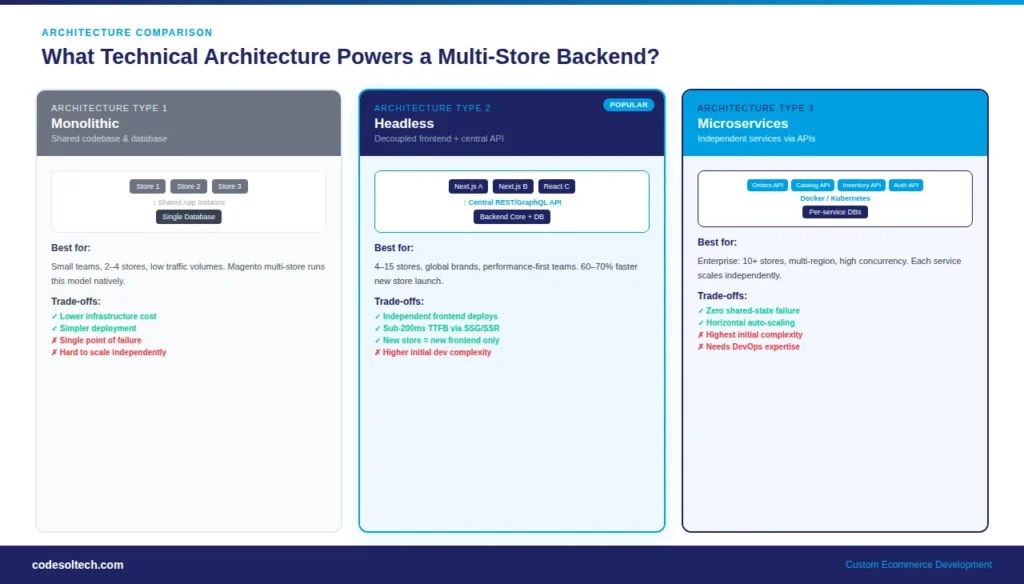
Monolithic Multi-Store Architecture
In a monolithic architecture, all storefronts and the backend share a single application codebase and database. Magento’s multi-store mode operates this way store views share one application instance, one database schema, and one admin panel.
This approach reduces infrastructure cost but creates a single point of failure: performance degradation in one component affects all storefronts simultaneously.
Headless Multi-Store Architecture
Headless architecture decouples the frontend presentation layer from the backend logic layer. Each storefront is an independent frontend application (built in React, Next.js, or Vue) that fetches data from a central backend API.
This model delivers 3 measurable advantages over monolithic systems:
- Frontend teams deploy storefront updates independently without touching backend code
- Page performance improves because frontends use static site generation (SSG) or server-side rendering (SSR) without backend bottlenecks
- New storefronts launch by deploying a new frontend connected to the existing backend API, reducing time-to-launch by 60–70% compared to building a new platform instance
Microservices Multi-Store Architecture
Microservices architecture decomposes backend functions inventory, orders, pricing, catalog, authentication into independent services that communicate via APIs.
Each service scales independently based on load. During peak sale events, the order processing service scales horizontally without scaling the catalog or authentication services. This architecture suits enterprise retailers managing 10 or more storefronts across multiple regions.
Microservices introduce higher initial development complexity but reduce long-term operational risk by eliminating shared-state failures between backend components.
Development teams at Codesoltech build microservice backends using containerized deployments with Docker and Kubernetes, enabling each service to be versioned and deployed independently.
Learn about our ecommerce web application development services to understand how we structure these systems for ecommerce clients.
Multi-Store vs. Single Store: When Does the Architecture Change Make Business Sense?
Businesses running a single storefront on a standard platform carry low architectural overhead. The decision to migrate to or build a multi-store backend depends on 4 operational triggers:
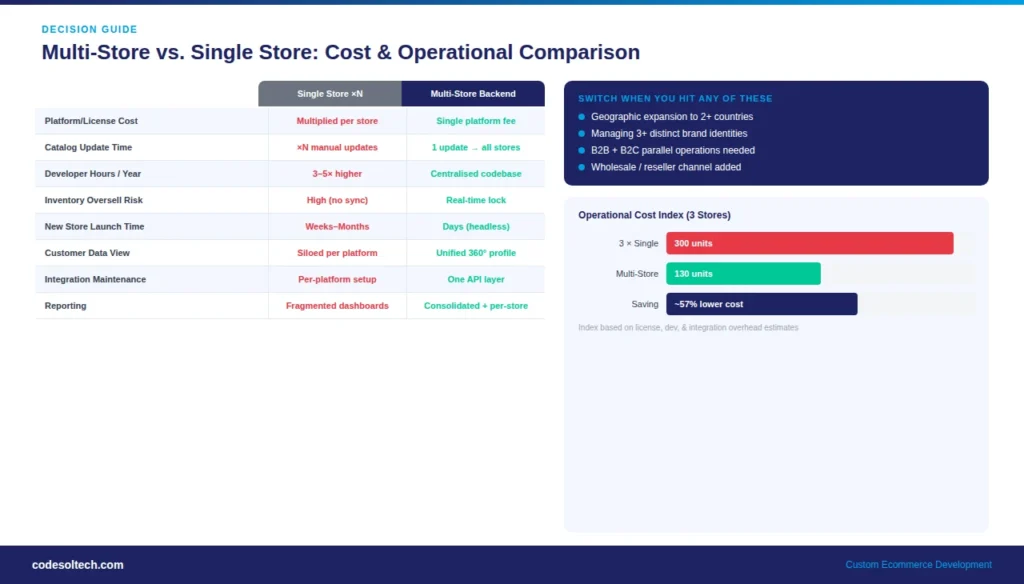
- Geographic expansion: Operating in 2 or more countries with separate currencies, languages, and tax jurisdictions requires store isolation that a single storefront cannot provide without significant custom development.
- Multi-brand ownership: A parent company managing 3 or more distinct brands needs separate storefronts with isolated customer bases, brand identities, and catalog structures all administered from one team without separate platform contracts.
- B2B and B2C parallel operations: Running a B2B portal with contract pricing alongside a B2C retail store requires completely separate checkout logic, account structures, and product visibility rules that a single store cannot segment cleanly.
- Channel multiplication: Adding a wholesale portal, marketplace storefront, or partner reseller store to an existing retail operation creates administrative overhead that grows linearly with each new channel unless the backend consolidates management.
Organizations that reach any of these triggers and continue operating on separate platform instances spend an estimated 40–60% more on platform licensing, integration maintenance, and developer hours than those consolidating onto a multi-store backend.
Key Features to Evaluate in a Multi-Store Backend System
Not all multi-store platforms provide equal backend control. When evaluating or specifying a system for custom development, 8 features determine operational effectiveness:
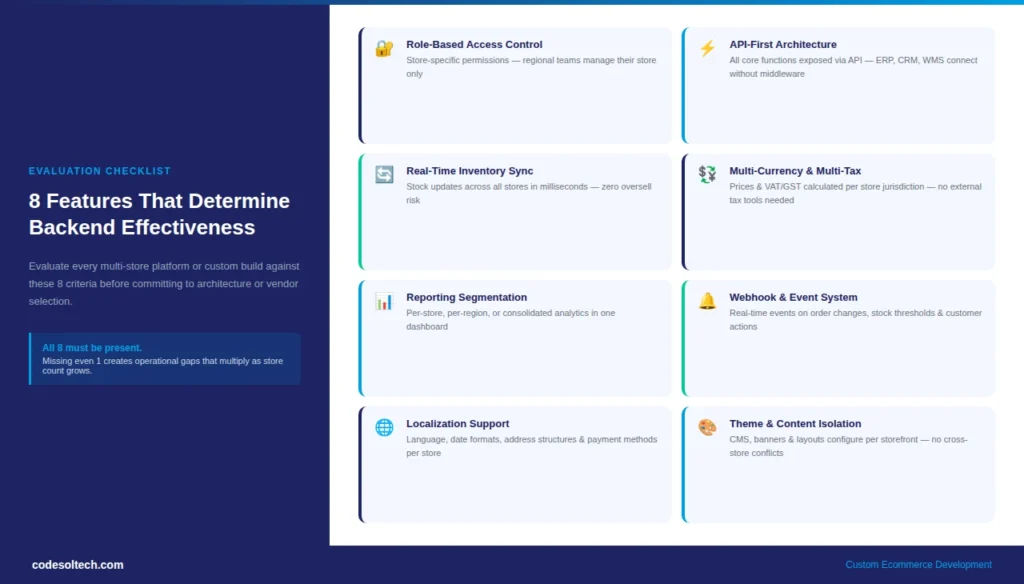
- Role-based access control (RBAC): Administrators assign store-specific permissions so regional teams manage their own storefronts without accessing other stores’ data.
- API-first architecture: Backend APIs expose all core functions — catalog, inventory, orders, customers — enabling external systems (ERP, CRM, WMS) to integrate without custom middleware.
- Real-time inventory sync: Stock levels update across all storefronts within milliseconds of each order, preventing oversell in high-traffic scenarios.
- Multi-currency and multi-tax support: The backend calculates prices and taxes per store jurisdiction without requiring separate tax configuration tools.
- Reporting segmentation: Analytics dashboards present performance data per storefront, per region, or consolidated across all stores depending on reporting need.
- Webhook and event system: The backend fires events on order status changes, inventory thresholds, and customer actions so connected systems respond in real time without polling.
- Localization support: Language packs, date formats, address structures, and payment method availability configure per store without global setting overrides.
- Theme and content isolation: CMS content, promotional banners, and homepage layouts configure per storefront independently from a shared admin, preventing cross-store content conflicts.
How Do You Build a Custom Multi-Store Backend System?
Custom multi-store backend development follows a 5-phase process. Each phase produces specific technical outputs that accumulate into a production-ready system.
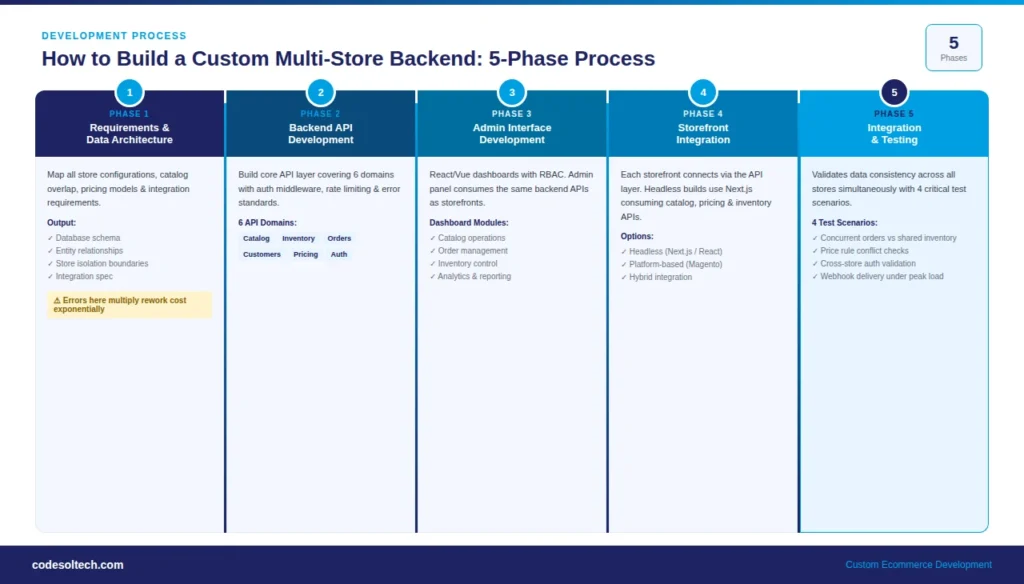
Phase 1: Requirements and Data Architecture
The development team maps all store configurations the number of stores, their catalog overlap percentage, pricing models, fulfillment rules, and integration requirements before writing a single line of code.
This phase produces a data architecture document specifying the database schema, entity relationships, and store isolation boundaries. Errors in this phase propagate into all subsequent phases and increase rework cost exponentially.
Phase 2: Backend API Development
Developers build the core API layer covering 6 domains: catalog management, inventory tracking, order processing, customer management, pricing rules, and authentication.
Each API endpoint follows RESTful or GraphQL conventions and includes authentication middleware, rate limiting, and error response standards. The API layer becomes the single integration point for all storefronts and external systems.
Phase 3: Admin Interface Development
The admin interface provides store managers with dashboards for catalog operations, order management, inventory control, and reporting. Multi-store admin interfaces use RBAC to control which stores each user account can access.
Development teams build admin panels in React or Vue, consuming the same backend APIs that storefronts use this ensures admin actions pass through the same business logic validation as storefront operations.
Phase 4: Storefront Integration
Each storefront connects to the backend via the API layer. For headless implementations, development teams build storefront frontends in Next.js or similar frameworks that consume catalog, pricing, and inventory APIs.
For platform-based implementations (Magento, WooCommerce), the custom backend replaces or extends the platform’s native data layer through plugin architecture or API override patterns.
Phase 5: Integration and Testing
Integration testing validates data consistency across all stores simultaneously.
The test suite covers 4 critical scenarios: concurrent order placement from multiple storefronts against shared inventory, price rule conflicts between store-level and global promotions, customer authentication across store boundaries, and webhook delivery reliability during peak order volumes.
Codesoltech’s development team builds custom multi-store backends using this exact process, delivering systems architected for the specific store count, catalog complexity, and integration requirements each client operates.
Explore our custom web development services to see how we approach these projects.
Common Integration Points for Multi-Store Backend Systems
A multi-store backend does not operate in isolation. It integrates with 6 categories of external systems that handle specialized functions outside the ecommerce core:
- ERP systems (SAP, NetSuite, Oracle): Synchronize financial data, purchase orders, and supplier inventory across all storefronts in real time.
- Warehouse Management Systems (WMS): Receive fulfillment instructions from the order routing engine and confirm shipment data back to the backend.
- Payment gateways (Stripe, Adyen, PayPal): Process transactions per store with store-specific payment method configurations and currency handling.
- CRM platforms (Salesforce, HubSpot): Receive customer behavioral data from all storefronts and feed segmentation and marketing automation workflows.
- Shipping carriers (FedEx, DHL, UPS): Receive shipment requests from the order management layer and return tracking data for customer-facing order status updates.
- Analytics platforms (Google Analytics 4, Mixpanel): Collect per-storefront behavioral events for conversion analysis and funnel optimization.
Performance and Scalability Considerations
Multi-store backends serve higher aggregate request volumes than single-store systems. A backend supporting 5 storefronts each receiving 1,000 concurrent users handles 5,000 concurrent API requests minimum.
Infrastructure design must account for this load multiplication at the database, caching, and application server layers.
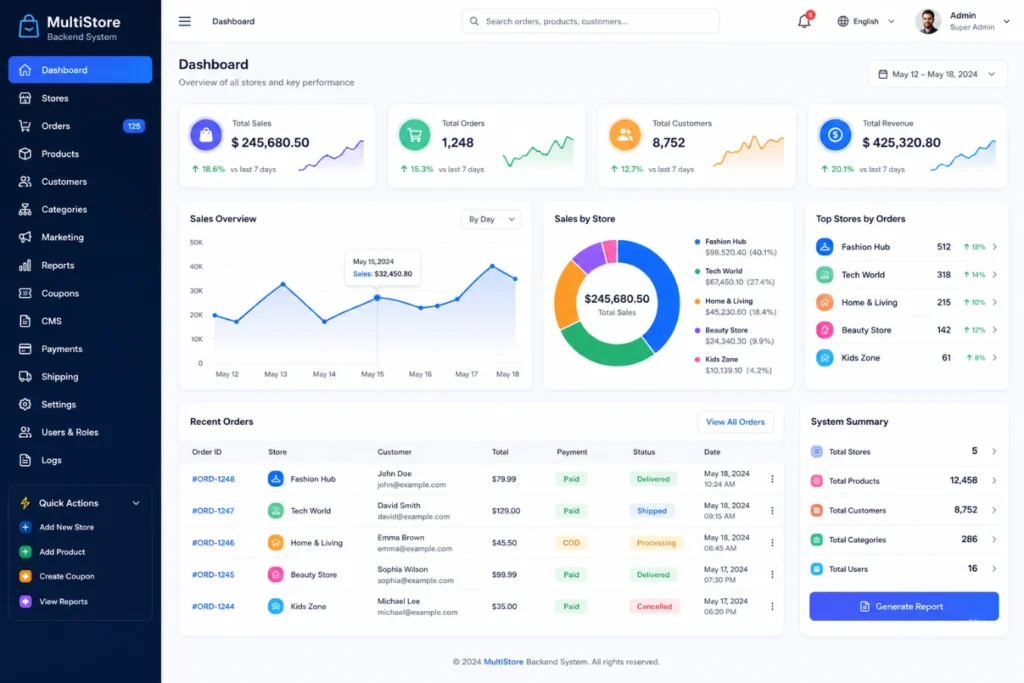
4 infrastructure patterns handle multi-store scale effectively:
- Database read replicas: Route read-heavy catalog and inventory queries to replica databases, reserving the primary write database for order and inventory mutations.
- CDN-backed asset delivery: Serve product images, CSS, and JavaScript from edge nodes close to each store’s target geography, reducing Time to First Byte (TTFB) below 200ms regardless of store location.
- Redis caching for catalog data: Cache product records, pricing rules, and navigation structures in Redis with store-specific cache keys, eliminating redundant database queries for each storefront page load.
- Horizontal API scaling: Deploy multiple API server instances behind a load balancer so traffic spikes on one storefront do not degrade response times for other stores sharing the same backend.
Final Words
Multi-store backend management systems eliminate the cost and complexity of running parallel platform instances.
Businesses operating 2 or more storefronts without a unified backend pay the operational tax on every catalog update, every order, and every integration maintenance cycle.
The right architecture whether headless, microservices, or platform-based depends on your store count, catalog complexity, and integration environment. Get those decisions right at the start.
Build Your Multi-Store Backend With Codesoltech
Codesoltech designs and develops custom multi-store backend management systems for ecommerce businesses scaling across regions, brands, and buyer segments. We architect the data models, build the APIs, and integrate your full tech stack from day one.

![Electrician CRM: Win More Jobs [Faster Estimates Guide]](https://www.codesoltech.com/wp-content/uploads/2026/10/Crm-for-an-electricians-business.webp)