
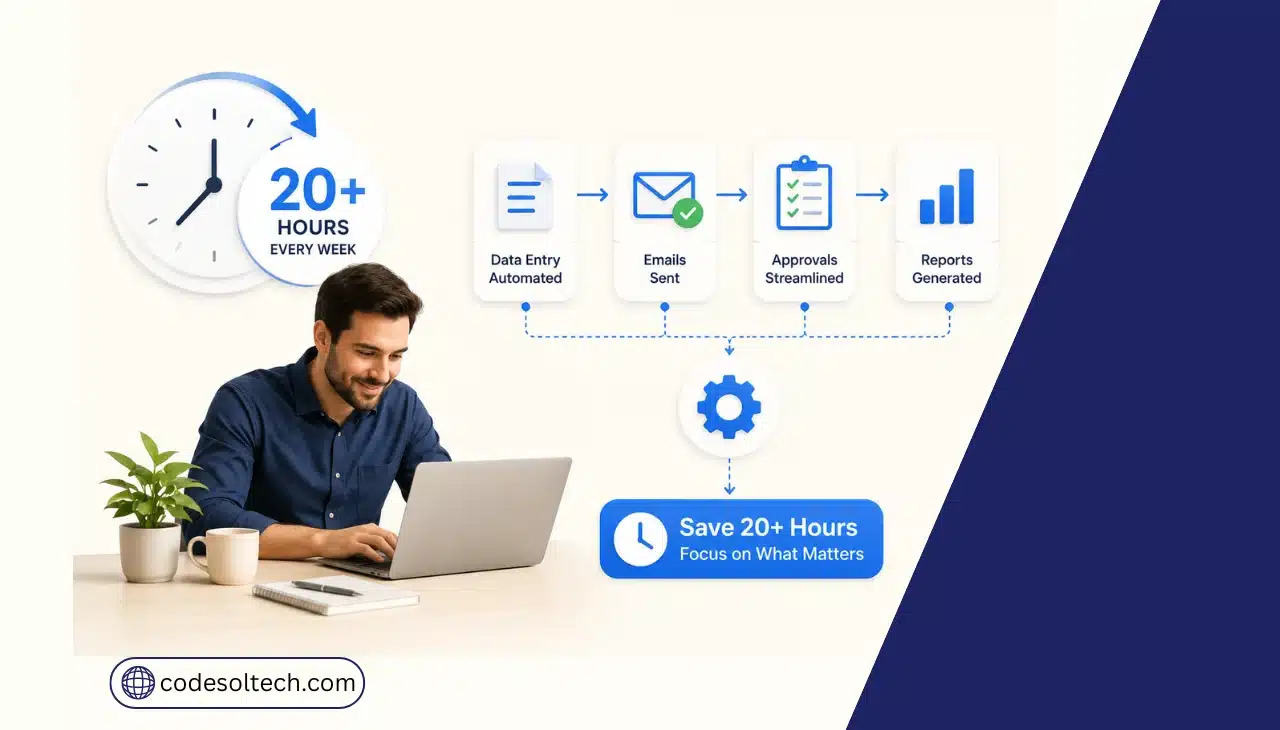
Workflow automation saves SMEs 20+ hours per week by removing five specific manual tasks: data entry, invoice follow-up, repetitive customer support replies, meeting scheduling, and report compilation. Each task shifts from a human-executed, multi-step process to a system-triggered, single-approval process.
The combined reduction typically exceeds 20 hours per employee per week within 90 days of deployment.
How Does Workflow Automation Save SMEs 20+ Hours a Week?
Workflow automation saves time by replacing manual, repetitive steps with triggers and rules that execute inside connected software systems.
A trigger detects an event a form submission, a new order, an incoming invoice and an automated action responds instantly, without a human opening five different tools to move the same piece of data.
Knowledge workers spend 60% of their working time on “work about work” coordinating tasks, chasing status updates, and duplicating effort rather than on skilled, revenue-generating work, according to Asana’s Anatomy of Work Index.
That figure translates into 209 hours per year lost to duplicative work and 103 hours lost to unnecessary meetings for the average employee. Workflow automation directly targets these categories.
SMEs recover time across five process groups when they automate:
- Data entry and system syncing: CRM integration moves data between CRM, accounting, and inventory systems automatically, eliminating manual re-keying.
- Invoice creation and payment follow-up: billing systems generate invoices from order data and send automated payment reminders through a connected payment gateway integration on a fixed schedule.
- Repetitive customer support replies: rule-based responders and AI chatbot integration answer FAQ-type queries (order status, return policy, pricing) without human intervention.
- Meeting and appointment scheduling: calendar automation tools match availability and book meetings without email back-and-forth.
- Reporting and data compilation: dashboards pull live data from connected systems, replacing manual spreadsheet exports.
The Automation Architecture: How the Systems Actually Connect
A workflow automation stack has four functional layers. Each layer performs one job, and the layers execute in sequence for every automated task.
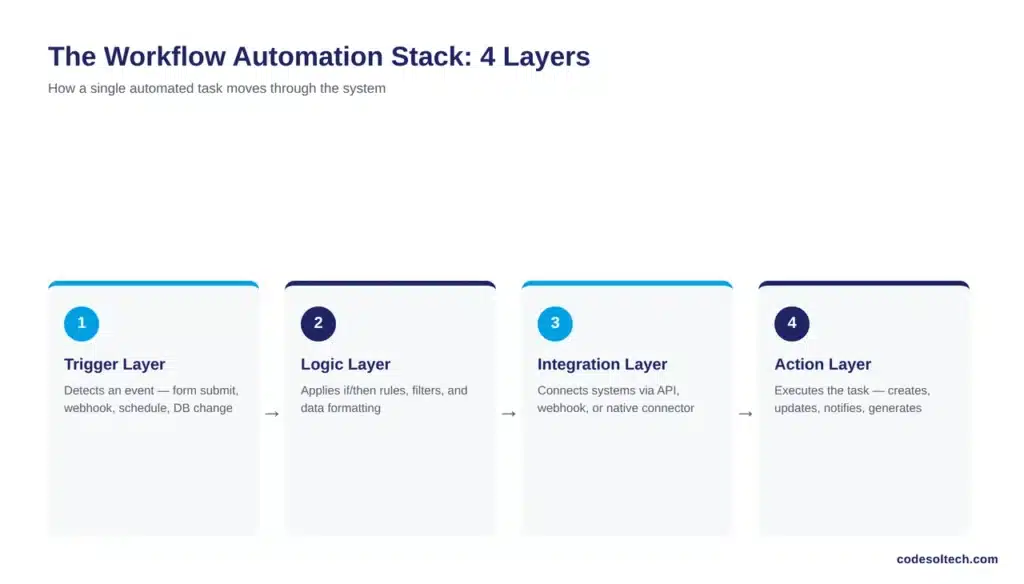
- Trigger layer: detects a defined event (form submission, webhook call, scheduled time, database change) and initiates the workflow.
- Logic layer: applies conditional rules (if/then branching, filters, data formatting) to decide what happens next.
- Integration layer: connects to external systems through APIs, webhooks, or native connectors (CRM, ERP, payment gateway, email platform).
- Action layer: executes the final task — creates a record, sends a notification, updates a field, or generates a document.
SMEs typically deploy this architecture through iPaaS (integration platform as a service) tools such as Zapier or Make for lightweight, cross-app workflows, and through RPA (robotic process automation) for tasks that require interacting with legacy interfaces that lack an API.
Low-code platforms sit above both, letting non-developers configure logic without writing scripts. Custom API integrations become necessary once a business exceeds the rate limits or data complexity that off-the-shelf connectors support a common trigger point for SMEs to commission custom software development.
Ecommerce businesses specifically hit this threshold with order and shipping data, which is why fulfillment automation is typically built as a custom integration rather than a template workflow.
Manual vs. Automated Process: A Time and Cost Comparison
The table below compares manual execution time against automated execution time for five common SME workflows. Figures represent composite weekly averages derived from Asana Anatomy of Work data, Forrester TEI benchmarks, and typical SME process audits.
| Process | Manual Time/Week | Automated Time/Week | Hours Saved/Week |
|---|---|---|---|
| Data entry & system syncing | 6.0 hrs | 0.5 hrs | 5.5 hrs |
| Invoice creation & payment follow-up | 4.0 hrs | 0.5 hrs | 3.5 hrs |
| Repetitive customer support replies | 8.0 hrs | 2.0 hrs | 6.0 hrs |
| Meeting & appointment scheduling | 3.0 hrs | 0.25 hrs | 2.75 hrs |
| Reporting & data compilation | 4.0 hrs | 0.5 hrs | 3.5 hrs |
| Total | 25.0 hrs | 3.75 hrs | 21.25 hrs |
Which Business Processes Should SMEs Automate First?
SMEs should automate customer support and data entry first, because these two categories return the highest combined hours saved (11.5 hours per week in the comparison above) and require the shortest implementation time.
Both processes are rule-based, high-frequency, and low in judgment complexity, the three conditions that determine automation priority.
Gartner reports that hyperautomation initiatives are now a standing practice for 90% of large enterprises, but fewer than 20% of organizations measure the effectiveness of those initiatives correctly. SMEs avoid this failure mode by sequencing automation in a fixed order:
- Step 1 — Audit: log every recurring task for one week and record time spent per task.
- Step 2 — Rank: sort tasks by frequency × time cost, and automate the top three first.
- Step 3 — Connect: build the trigger-to-action workflow using an integration platform or a custom API connection.
- Step 4 — Measure: track hours saved against the pre-automation baseline for 30 days.
- Step 5 — Expand: add the next-highest-ranked task once the first workflow runs without manual correction for two consecutive weeks.
What ROI Can SMEs Expect From Workflow Automation?
SMEs calculate automation ROI using one formula: hours saved per week × hourly labor cost × 52 weeks = annual value recovered.
A team that saves 20 hours weekly at a blended hourly cost of $35 recovers $36,400 in annual labor value equivalent to a half-time employee who does not take sick leave or vacation.
Forrester’s Total Economic Impact study of Microsoft Power Automate documents a 248% three-year ROI for a composite organization, with 200 hours of annual efficiency gains per employee involved in high-impact automation use cases.
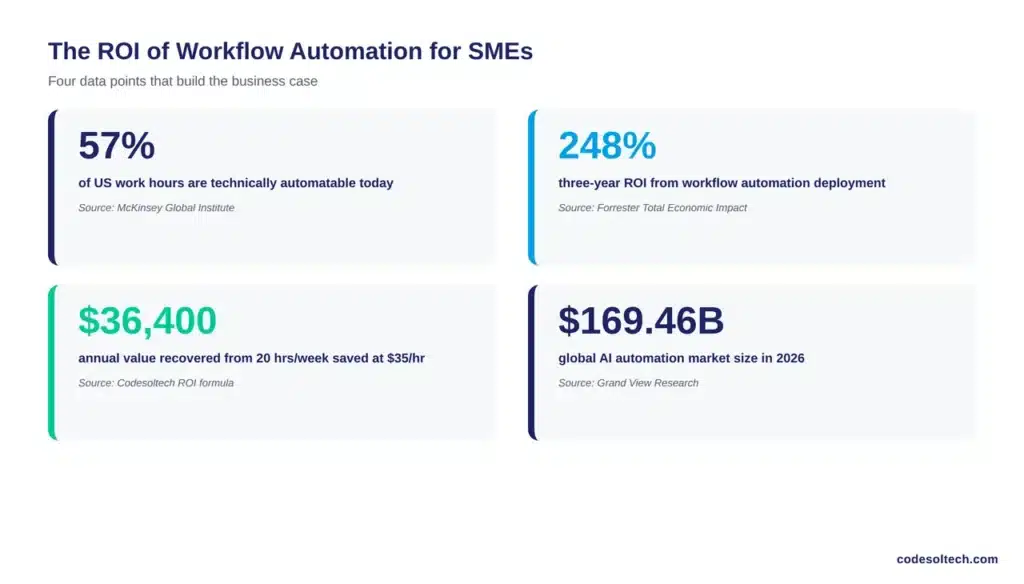
McKinsey Global Institute finds that 57% of current US work hours are technically automatable with existing technology, and that generative AI extends the automation-addressable share of work activities to 60–70% of total time spent working, up from roughly 50% in pre-generative-AI estimates.
The global AI automation market reflects this shift, growing to an estimated $169.46 billion in 2026, according to Grand View Research.
Not every automated hour converts to cost savings immediately. Some recovered time gets redirected into growth activities (sales outreach, product development) rather than headcount reduction.
SMEs should model ROI on redirected value, not exclusively on labor cost avoidance, to get an accurate business case.
5 Automation Mistakes That Cancel Out the Time Savings
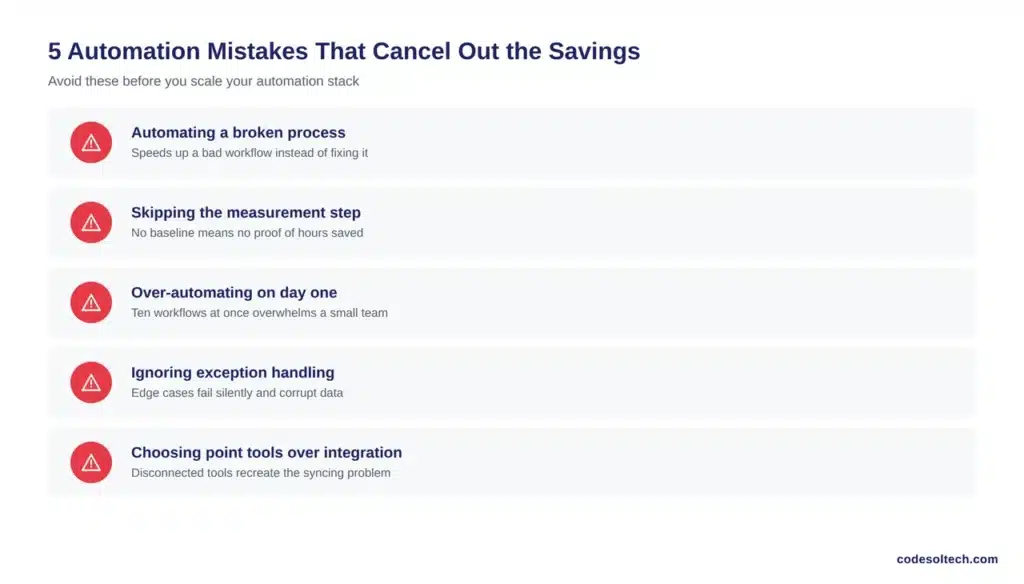
- Automating a broken process: automation executes a bad process faster; it does not fix the process. Document and correct the workflow before automating it.
- Skipping the measurement step: without a pre-automation time baseline, SMEs cannot verify actual hours saved, which matches Gartner’s finding that fewer than 20% of organizations measure hyperautomation effectiveness correctly.
- Over-automating on day one: building ten workflows simultaneously increases the maintenance burden beyond what a small team can monitor.
- Ignoring exception handling: every automated workflow needs a defined path for edge cases; without one, exceptions silently fail or create data errors.
- Choosing point tools over integrated architecture: stacking disconnected automation tools recreates the same data-syncing problem automation was meant to solve.
Final Words
Workflow automation saves SMEs 20+ hours weekly by replacing five repetitive manual processes with trigger-based systems. The saved time converts to measurable financial value using a simple formula: hours saved × hourly cost × 52 weeks.
Automation delivers this return only when SMEs sequence implementation correctly, measure results, and avoid automating broken processes. The data confirms the opportunity is real and growing every year.
Ready to reclaim 20+ hours a week for your team?
Talk to our automation engineers and get a free process audit that identifies exactly where your business is losing time — and how to fix it.



