A Stock Keeping Unit (SKU) is an alphanumeric identifier assigned to every distinct product and product variant in an inventory system. SKU management is the structured process of creating, organizing, tracking, and optimizing these identifiers to maintain accurate inventory control across all sales channels.
For scaling stores, SKU management transforms from a simple labeling task into a critical operational system that determines order accuracy, demand forecasting precision, and fulfillment speed.
This guide covers SKU logic architecture, variant management, naming conventions, system selection by store size, and the key performance metrics that distinguish proactive inventory operations from reactive ones.
What Is a SKU?
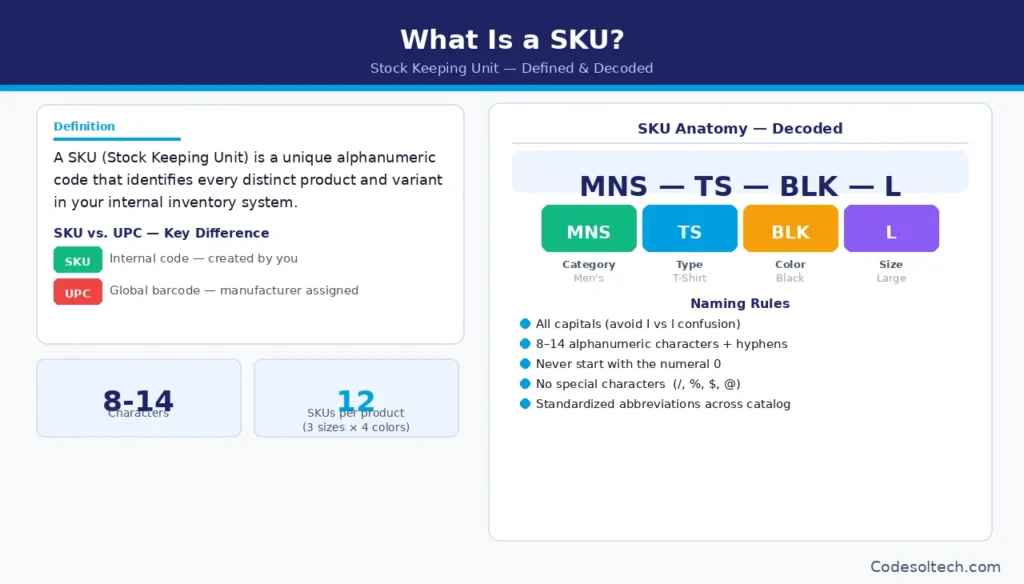
A SKU (Stock Keeping Unit) is a unique alphanumeric code, typically 8 to 14 characters, that identifies a specific product and all of its defining attributes within an internal inventory system.
A single product offered in 3 sizes and 4 colors generates 12 distinct SKUs, each tracking its own inventory level, reorder point, and sales velocity independently.
SKUs are internally created and controlled by the business that uses them.
SKUs differ fundamentally from Universal Product Codes (UPCs) and EAN barcodes. UPCs and EANs are globally standardized identifiers assigned by manufacturers and used at the point of sale. A SKU is an internal identifier — no two businesses use the same SKU for the same product.
A well-structured SKU encodes product attributes directly into its code.
The SKU MNS-TS-BLK-L encodes: category (MNS = Men’s), product type (TS = T-Shirt), color (BLK = Black), and size (L = Large). This structure allows warehouse staff, inventory systems, and automated pickers to extract product data from the code without querying a database.
What Is SKU Management?
SKU management is a discipline within inventory management that governs how SKUs are created, structured, maintained, and retired across an entire product catalog. It encompasses 5 core operational functions:
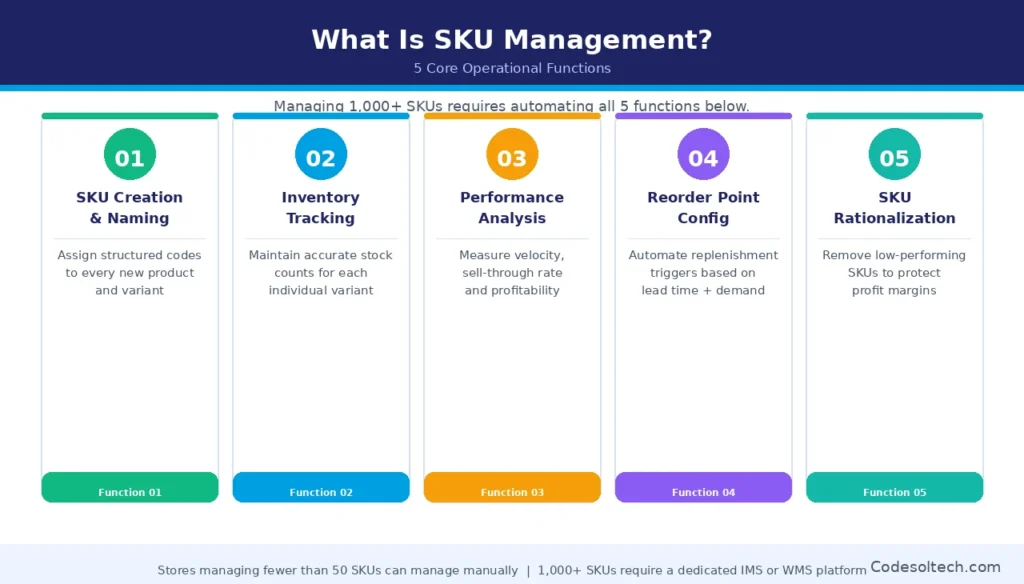
- SKU creation and naming — assigning structured, consistent codes to every new product and variant
- Inventory tracking at the SKU level — maintaining accurate stock counts for each variant
- Performance analysis by SKU — measuring velocity, sell-through rate, and profitability per unit
- Reorder point configuration per SKU — setting automated replenishment triggers based on lead time and demand
- SKU rationalization — identifying and removing underperforming SKUs that consume working capital without generating proportional revenue
A store managing fewer than 50 SKUs executes these functions manually. A store managing 1,000 or more SKUs requires a dedicated Inventory Management System (IMS) or Warehouse Management System (WMS) to automate SKU-level operations at scale.
Poor SKU management directly causes the two most expensive inventory failures in e-commerce: stockouts (lost revenue) and overstock (tied-up capital).
How Does a SKU Connect to Product Variants?
A SKU connects to product variants through a parent-child hierarchy, where one parent SKU represents the base product and individual child SKUs represent each unique variant combination.
Every distinct attribute combination — for example, size + color + material — generates its own child SKU with a separate inventory count, reorder point, and sales record.
This architecture allows an inventory system to track a “Blue Cotton T-Shirt, Size Medium” and a “Blue Cotton T-Shirt, Size Large” as independent stock units while grouping them under the same product for storefront display.
Parent SKU vs. Child SKU Architecture
A parent SKU is a non-inventoried identifier that acts as a grouping container for all variant child SKUs. It holds no stock quantity itself. A child SKU is the inventoried unit that carries stock levels, reorder points, physical dimensions, weight, and landed cost data.
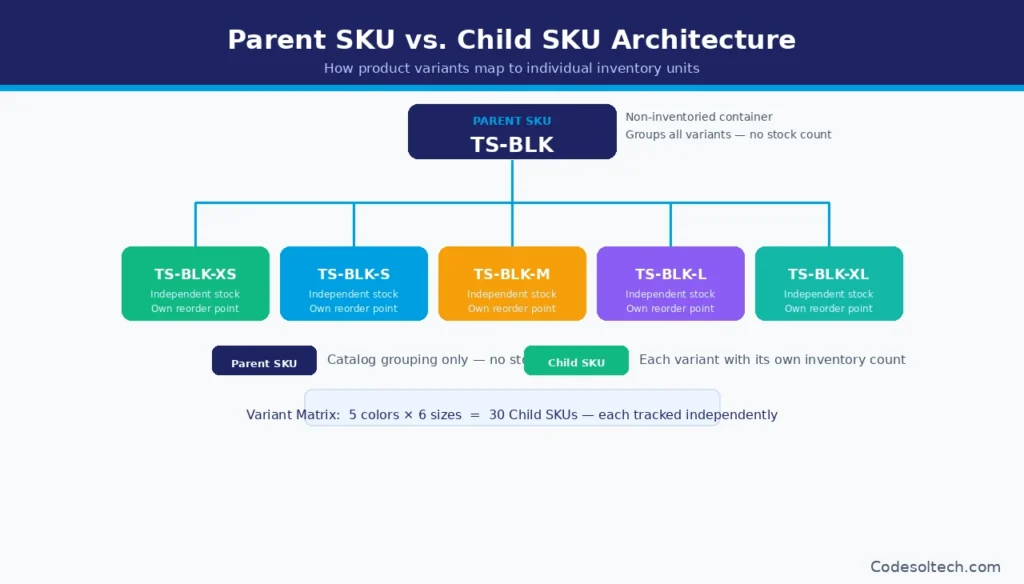
E-commerce platforms, including Shopify, WooCommerce, and BigCommerce, implement this parent-child model natively in their product catalog structure.
- Parent SKU example: TS-BLK (Black T-Shirt — catalog reference only, no stock quantity)
- Child SKU examples: TS-BLK-XS, TS-BLK-S, TS-BLK-M, TS-BLK-L, TS-BLK-XL (each with an independent stock count, reorder alert, and sales report)
Stores selling products with 2 variant dimensions must manage the full variant matrix — the total number of possible attribute combinations.
A shirt offered in 5 colors and 6 sizes produces a variant matrix of 30 child SKUs. Each cell in that matrix requires independent inventory tracking, independent reorder logic, and independent sales performance measurement.
Stores that treat a single size-color combination as a single SKU without the parent-child structure lose the granular data required to identify which specific variants drive revenue and which variants create dead stock.
SKU Naming Convention: The Standard Formula
A scalable SKU naming convention follows a left-to-right hierarchy from broadest category to most specific attribute. The standard formula is:
[Category Code] – [Product Code] – [Variant Attribute 1] – [Variant Attribute 2]
Example: MNS-TS-BLK-M = Men’s / T-Shirt / Black / Medium
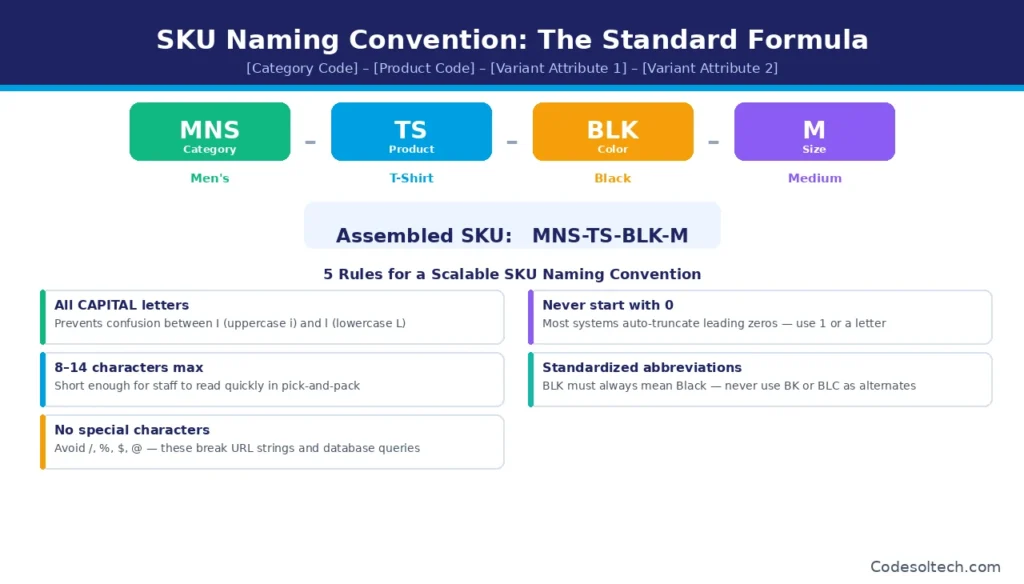
The naming convention must follow 5 structural rules to remain scalable as SKU count grows:
- Use all capital letters to prevent case-confusion errors between I (uppercase i) and l (lowercase L)
- Limit total SKU length to 8–14 alphanumeric characters plus hyphens
- Exclude special characters (/, %, $, @) that corrupt URL strings and break database queries
- Never begin a SKU with the numeral 0, which most systems truncate automatically
- Use standardized abbreviations across the entire catalog — BLK must always mean Black; never use BK or BLC as alternates for the same value
4 Types of SKUs Every Scaling Store Manages
Scaling stores manage 4 functionally distinct SKU types. Each type requires different logic in the inventory system and different handling at the point of fulfillment:
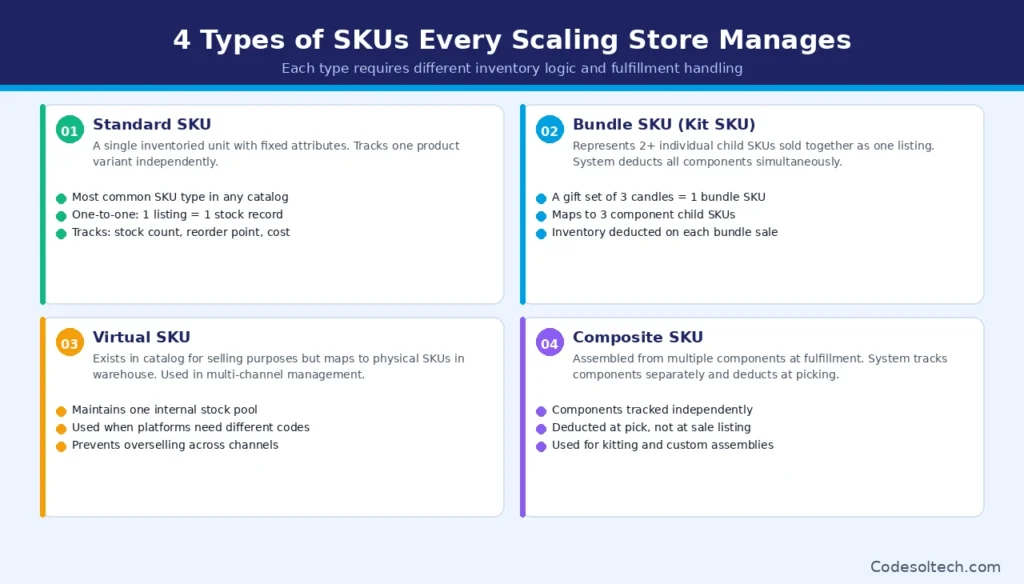
- Standard SKU: A single inventoried unit with fixed attributes. Tracks one product variant independently. This is the most common SKU type in any catalog.
- Bundle SKU (Kit SKU): A SKU that represents a combination of 2 or more individual child SKUs sold together as one listing. The inventory system deducts all component SKUs simultaneously when one bundle sells. A gift set containing 3 candles uses 1 bundle SKU mapped to 3 component child SKUs.
- Virtual SKU: A SKU that exists in the catalog for selling purposes but maps to one or more physical SKUs in the warehouse. Used in multi-channel inventory management to maintain a single internal stock pool across platforms that require different SKU formats.
- Composite SKU: A SKU assembled from multiple components at the time of order fulfillment (kitting). The inventory system tracks components separately and deducts them only at the point of picking — not at the point of sale listing.
SKU Logic: The Architecture Behind Scalable Inventory
SKU logic is the defined set of rules that governs how SKUs are assigned, structured, linked to variants, and interpreted by automated inventory systems. Without documented SKU logic, catalog expansion introduces naming inconsistencies that break inventory tracking.
With documented SKU logic, each new SKU slots predictably into the existing architecture — requiring no manual disambiguation by staff or systems.
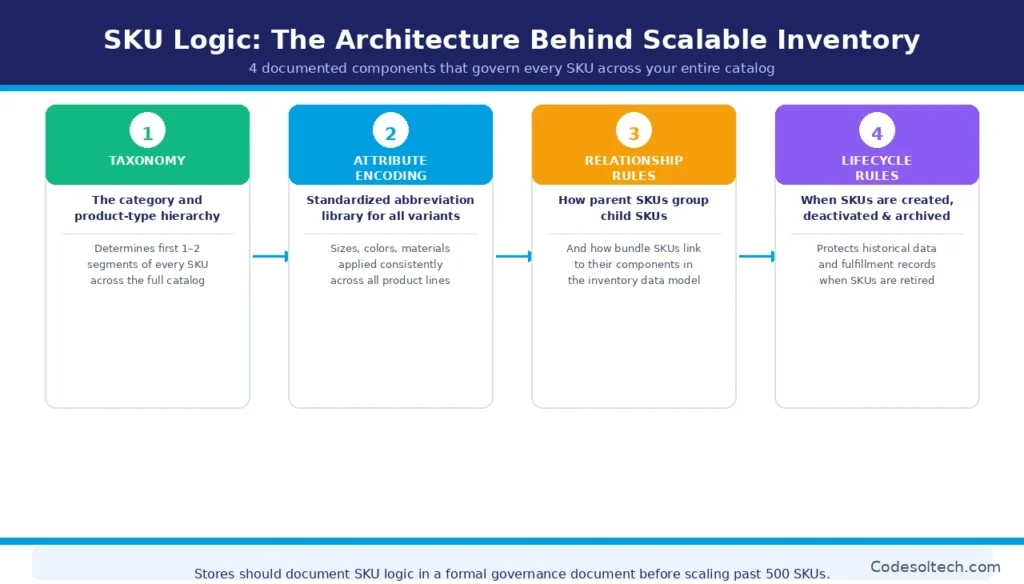
A complete SKU logic framework defines 4 components:
- Taxonomy: The category and product-type hierarchy that determines the first 1–2 segments of every SKU code across the entire catalog
- Attribute Encoding: The standardized abbreviation library for all variant values — sizes, colors, materials, and configurations — applied consistently across all product lines
- Relationship Rules: How parent SKUs group child SKUs, and how bundle SKUs link to their component SKUs in the inventory system’s data model
- Lifecycle Rules: The conditions under which SKUs are created, when they are deactivated, and how discontinued SKUs are archived without corrupting historical sales data or breaking fulfillment records
Stores that document their SKU logic in a formal SKU governance document before scaling past 500 SKUs eliminate the catalog fragmentation that requires costly restructuring at 2,000 or 5,000 SKUs.
The SKU governance document serves as the single source of truth for all team members, 3PL partners, and marketplace integrations that interact with the inventory system.
What SKU Management System Do You Need as You Scale?
The right SKU management system is determined by 3 variables: total active SKU count, number of active sales channels, and number of warehouse or fulfillment locations. Stores at 3 different scale stages require 3 fundamentally different system architectures.
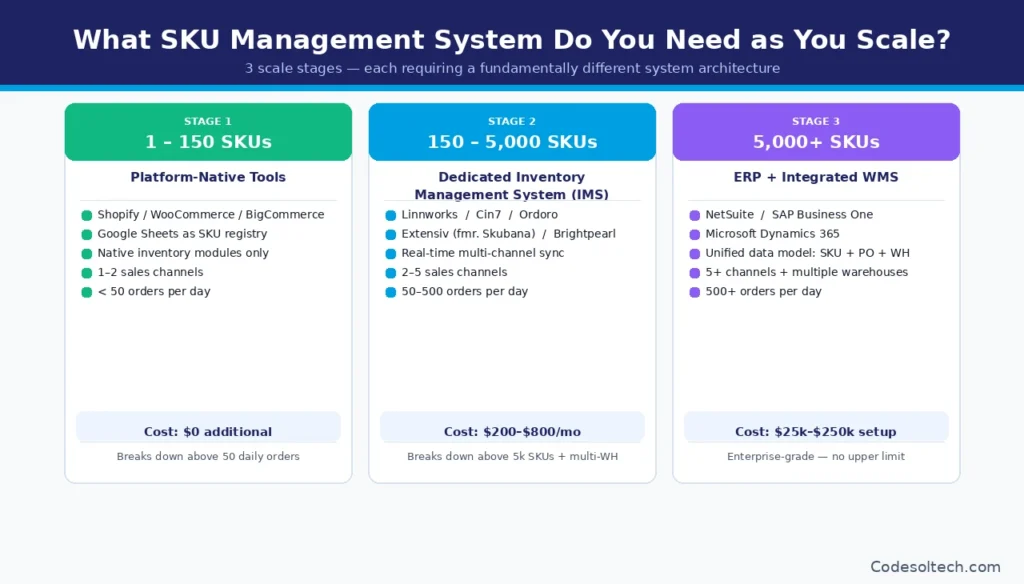
Using an underpowered system for the scale stage causes manual errors, inventory latency, and overselling. Using an overpowered system too early creates unnecessary cost and implementation complexity.
Scale Stage 1: 1–150 SKUs (Platform-Native Tools)
Stores managing fewer than 150 SKUs across 1–2 channels execute SKU management within the native inventory tools built into their e-commerce platform — Shopify, WooCommerce, or BigCommerce. A supplementary spreadsheet (Google Sheets or Excel) serves as a SKU registry.
This approach requires zero additional software spend. It breaks down when daily order volume exceeds 50 orders or when a second high-volume sales channel (such as Amazon) is added.
Scale Stage 2: 150–5,000 SKUs (Dedicated Inventory Management System)
Stores managing 150 to 5,000 SKUs across 2 or more channels require a dedicated Inventory Management System (IMS). An IMS centralizes SKU data, synchronizes inventory levels in real time across channels, automates reorder point alerts, and generates SKU-level performance reports.
Leading IMS platforms for this scale stage include Linnworks, Cin7, Ordoro, Extensiv (formerly Skubana), and Brightpearl. The primary selection criterion at this stage is native integration depth with existing sales channels and 3PL providers — not feature count.
Scale Stage 3: 5,000+ SKUs (ERP with Integrated WMS)
Stores managing more than 5,000 SKUs across multiple warehouses require an Enterprise Resource Planning (ERP) system with a native or tightly integrated Warehouse Management System (WMS).
ERP platforms including NetSuite, SAP Business One, and Microsoft Dynamics 365, manage SKU data, purchase orders, supplier records, financial ledgers, and fulfillment operations within one unified data model.
ERP implementation costs range from $25,000 to $250,000, depending on configuration scope and integration requirements.
SKU Management Best Practices for Stores Managing 1,000+ SKUs
High-volume e-commerce operations apply 8 operational best practices to maintain SKU accuracy and inventory efficiency at scale:
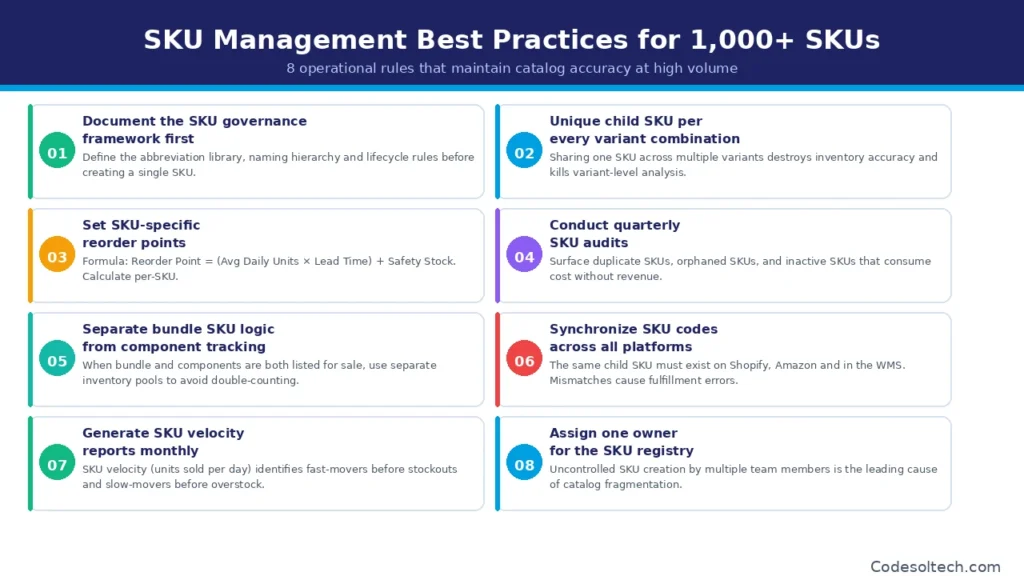
- Document the SKU governance framework before creating the first SKU. Define the abbreviation library, naming hierarchy, and lifecycle rules in writing — and enforce them as mandatory policy for all team members.
- Assign a unique child SKU to every variant combination. Sharing a single SKU across multiple variants destroys inventory accuracy at the individual unit level and prevents variant-level sales analysis.
- Set SKU-specific reorder points using the formula: Reorder Point = (Average Daily Units Sold × Supplier Lead Time in Days) + Safety Stock Units. Calculate this value independently for each SKU — not as a blanket setting across the catalog.
- Conduct quarterly SKU audits to surface duplicate SKUs, orphaned SKUs (assigned but not listed for sale), and inactive SKUs that consume storage cost without generating revenue.
- Separate bundle SKU logic from component SKU tracking in the IMS. When a bundle SKU and its component child SKUs are both listed for sale simultaneously, the system must use separate inventory pools to prevent double-counting.
- Synchronize SKU codes across all platforms. The same child SKU code must exist on Shopify, Amazon, and in the warehouse system. A mismatched SKU across channels is the direct cause of fulfillment errors and inventory discrepancies.
- Generate a SKU velocity report on a monthly cadence. SKU velocity — units sold per day per SKU — identifies fast-moving variants before stockouts occur and slow-moving variants before overstock accumulates.
- Assign ownership of the SKU registry to one designated role. Uncontrolled SKU creation by multiple team members is the leading operational cause of catalog fragmentation in scaling stores.
SKU Rationalization: Cut Dead SKUs, Protect Margins
SKU rationalization is the analytical process of identifying and eliminating SKUs that generate insufficient revenue to justify their inventory carrying costs. In most scaling stores, 80% of total revenue comes from 20% of active SKUs — a distribution known as the Pareto Principle applied to inventory.
The remaining 80% of SKUs consume warehouse space, tie up working capital, and increase operational complexity without proportional revenue contribution.
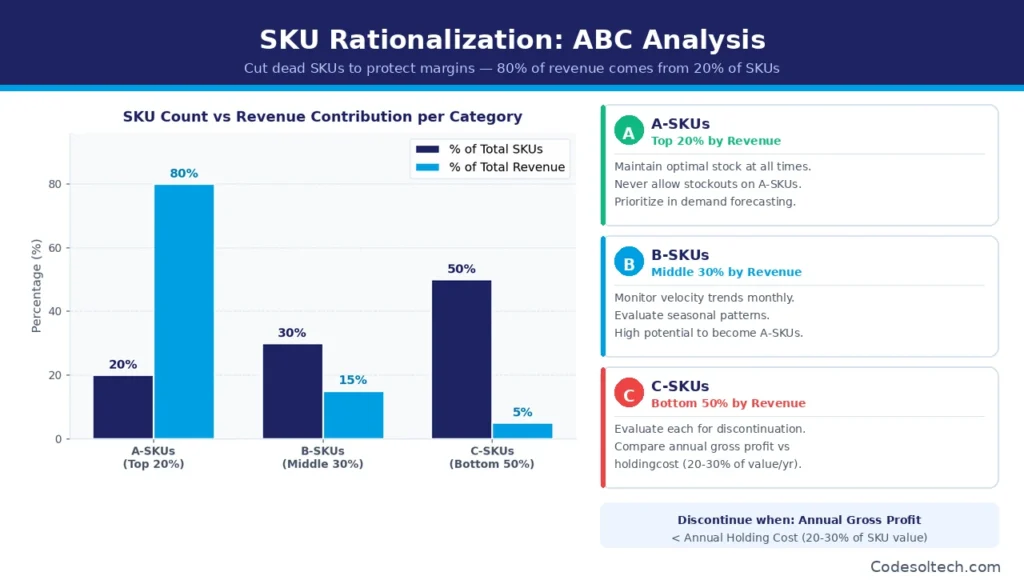
The standard SKU rationalization process applies ABC inventory analysis to rank every SKU by revenue contribution:
- A-SKUs (top 20% by revenue): Maintain optimal stock levels at all times. Prioritize in-demand forecasting and promotional planning. Never allow stockouts on A-SKUs.
- B-SKUs (middle 30% by revenue): Monitor velocity trends monthly. Evaluate seasonal patterns before discontinuing. B-SKUs have the highest potential to migrate to A-SKU status with targeted promotion.
- C-SKUs (bottom 50% by revenue): Evaluate each for discontinuation. Calculate the annual holding cost against the annual gross profit for every C-SKU before making a discontinuation decision.
A SKU qualifies for discontinuation when its annual gross profit is less than its annual inventory holding cost. Holding cost represents 20%–30% of inventory value per year and accounts for storage fees, insurance, opportunity cost, and shrinkage.
Stores discontinue C-SKUs through 3 channels: clearance promotions to liquidate remaining units, bulk liquidation to secondary market buyers, or donation of unsellable inventory to eliminate carrying costs immediately.
Key SKU Metrics Every Store Manager Must Track
5 SKU-level metrics provide the data required to manage inventory proactively rather than reactively:
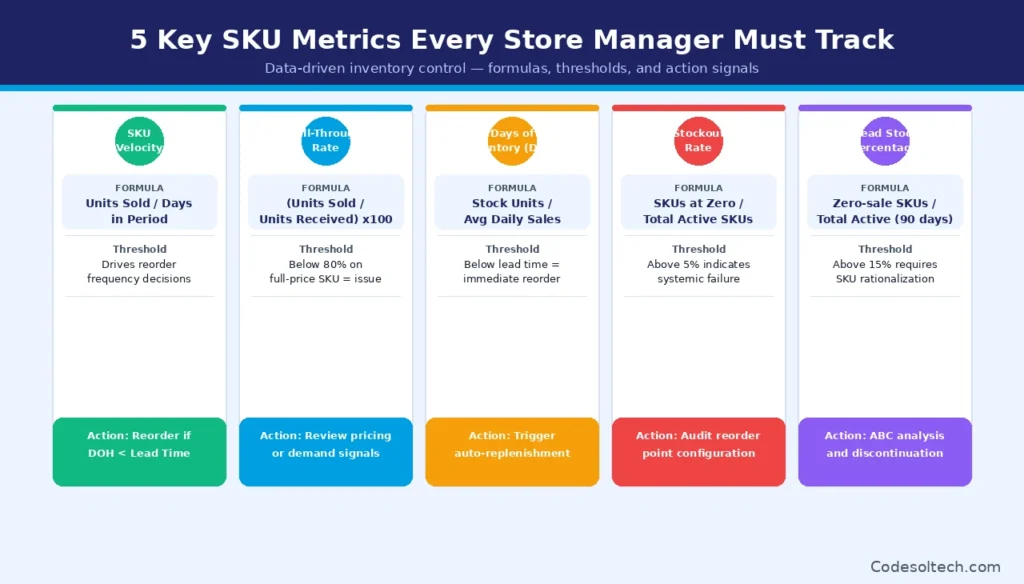
- SKU Velocity: Units sold per day per SKU. Formula: Total Units Sold ÷ Number of Days in Period. Drives reorder frequency and safety stock decisions.
- Sell-Through Rate: Percentage of received inventory sold within a defined period. Formula: (Units Sold ÷ Units Received) × 100. A sell-through rate below 80% for a full-price SKU signals a demand or pricing problem.
- Days of Inventory on Hand (DOH): Number of days current stock covers demand at current velocity. Formula: Current Stock Units ÷ Average Daily Units Sold. A DOH value below the supplier lead time triggers an immediate reorder.
- Stockout Rate: Percentage of active SKUs that reached zero inventory during a defined period. A stockout rate above 5% indicates systemic reorder point configuration failures across the catalog.
- Dead Stock Percentage: Percentage of total active SKUs with zero sales in the last 90 days. A dead stock percentage above 15% requires immediate SKU rationalization to reduce carrying costs.
How to Integrate SKU Systems with WMS, ERP, and OMS
An integrated SKU data architecture connects 3 operational systems into one continuous data flow. The Order Management System (OMS) receives orders and passes SKU-level pick instructions to the Warehouse Management System (WMS), which deducts fulfilled quantities from the Inventory Management System (IMS) or ERP in real time.
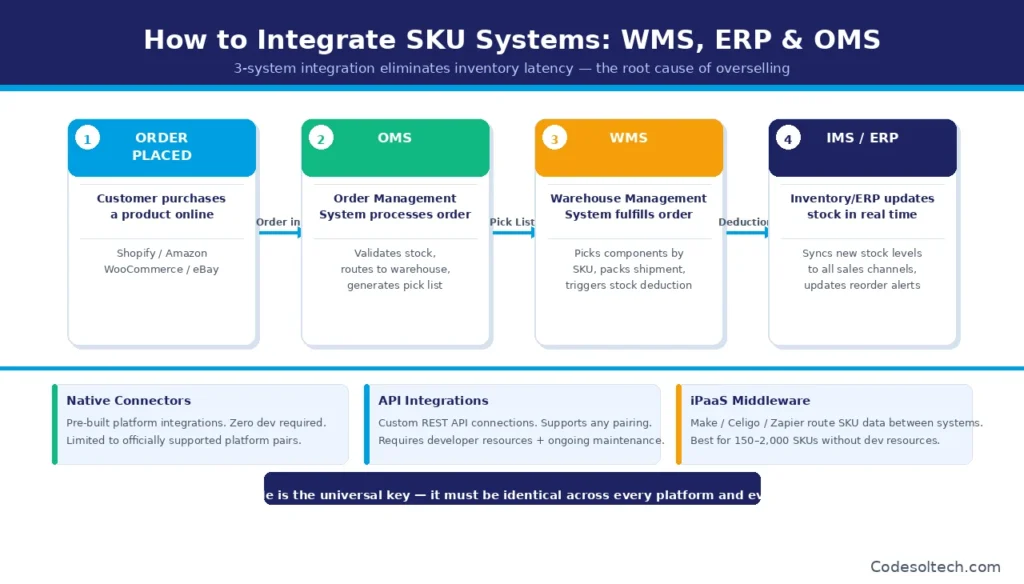
This 3-system integration eliminates inventory latency the delay between a sale and a stock count update which is the direct technical cause of overselling across channels.
Integration is executed through 3 methods, depending on technical resources and platform combinations:
- Native connectors: Pre-built integrations between platforms (e.g., Shopify + Linnworks, or Shopify + ShipBob). Zero custom development required. Limited to officially supported platform pairs.
- API integrations: Custom connections built using each platform’s REST API. Supports any platform combination. Requires dedicated developer resources and ongoing maintenance.
- iPaaS middleware: Third-party Integration Platform as a Service tools — including Make (formerly Integromat) and Celigo — that route SKU data between systems without custom code. Suitable for stores managing 150–2,000 SKUs that lack dedicated development resources.
The SKU code functions as the universal key across all 3 integration methods. Every system uses the SKU code to identify the same product unit, making SKU consistency across all platforms a non-negotiable technical requirement, not merely an operational preference.
A mismatched SKU between the e-commerce storefront and the WMS breaks every automated inventory deduction and produces inaccurate stock counts within 24 hours of going live.
Final Words
SKU management is the operational backbone of every scaling store.
A documented SKU logic framework, a correctly sized management system, and a consistent variant architecture prevent the inventory errors that destroy revenue and customer trust.
Stores that build SKU governance into their operations before scaling eliminate the catalog fragmentation that demands costly restructuring later.
Ready to build an inventory system that scales with your store?
Explore our complete guides on Inventory Management Software, E-Commerce Store Development, and Managing Product Variants, and implement an SKU architecture that grows with your business.