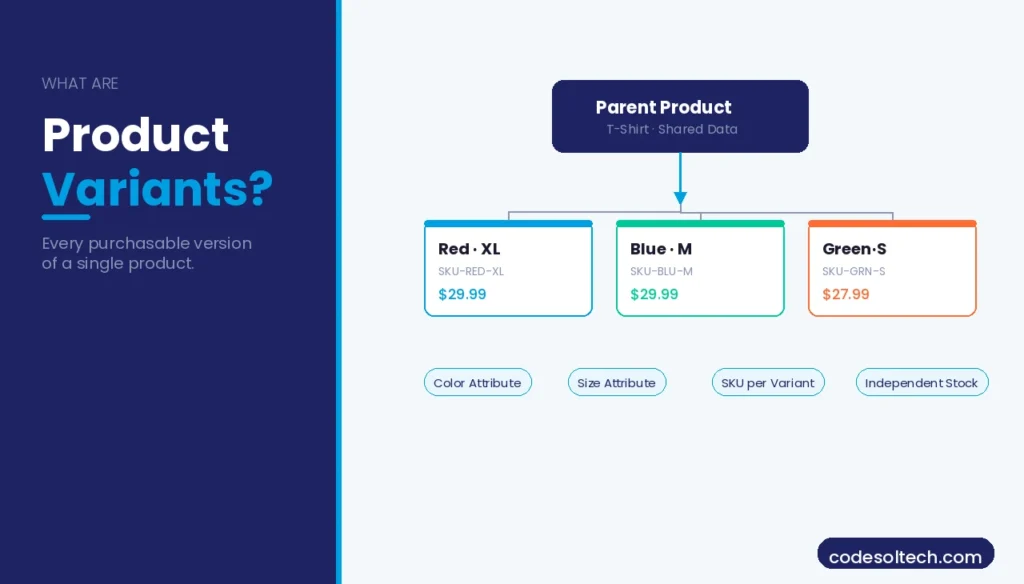
Product variants define every purchasable version of a single product. A T-shirt sold in 3 colors and 5 sizes produces 15 distinct variants. Each variant has its own SKU, price, stock count, and, optionally, its own image. Mishandling this architecture breaks catalog management, SEO indexation, and add-to-cart conversion simultaneously.
What Are Product Variants in Ecommerce?
A product variant is a purchasable child entity derived from a parent product by combining two or more attribute values.
The parent product holds shared content title, description, and brand, while each variant holds commerce-specific data, price, inventory, and weight.
This parent–child model is the structural foundation of every major ecommerce development platform.
Variants exist because customers select products along multiple dimensions before purchasing. 68% of online shoppers abandon a product page when the size or color they need is not clearly selectable, according to Baymard Institute research on product page UX. Proper variant architecture eliminates this friction.
Attributes, Options, and Product Variations: What Is the Difference?
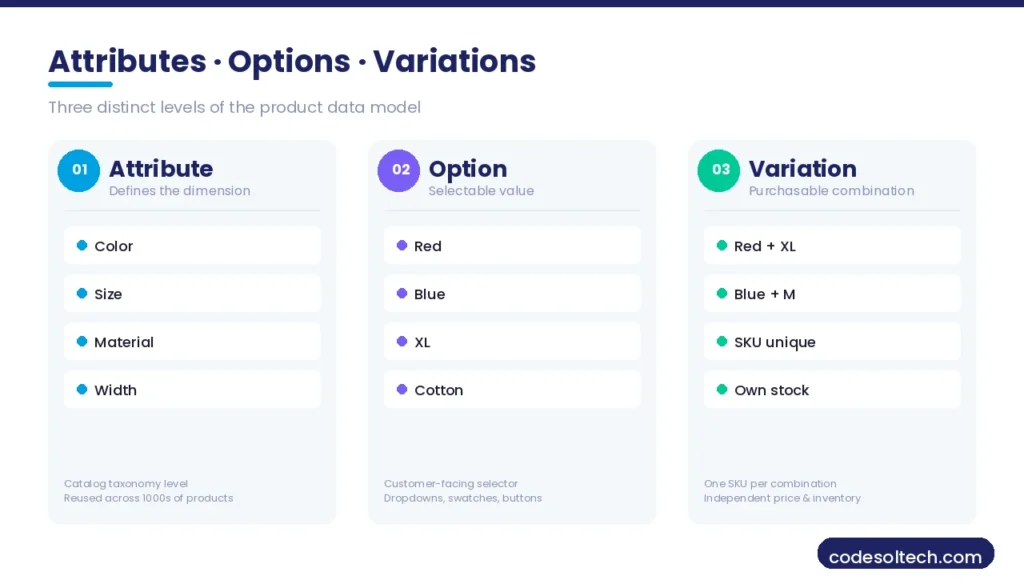
These 3 terms operate at 3 distinct levels of the product data model. Confusing them produces incorrect database schemas, broken filter navigation, and duplicate content penalties from search engines.
Product Attributes
An attribute is a defined characteristic of a product category. “Color,” “Size,” and “Material” are attributes. Attributes belong to the catalog taxonomy and are reused across thousands of products. In Magento, attributes are stored in the eav_attribute table and assigned to attribute sets. In WooCommerce, attributes register as custom taxonomies in WordPress.
Product Options
An option is a selectable value within an attribute. “Red,” “Blue,” and “Green” are options of the “Color” attribute. Options are the values customers interact with on the product detail page (PDP) via swatches, dropdowns, or radio buttons. Each option maps to a specific option ID in the platform database.
Product Variations
A product variation — also called a product variant or child product — is the intersection of 2 or more selected options. Selecting “Red” + “Large” produces one variation. This variation receives a unique SKU, a stock quantity, and an individual price.
The total number of possible variations equals the Cartesian product of all option counts across all attributes.
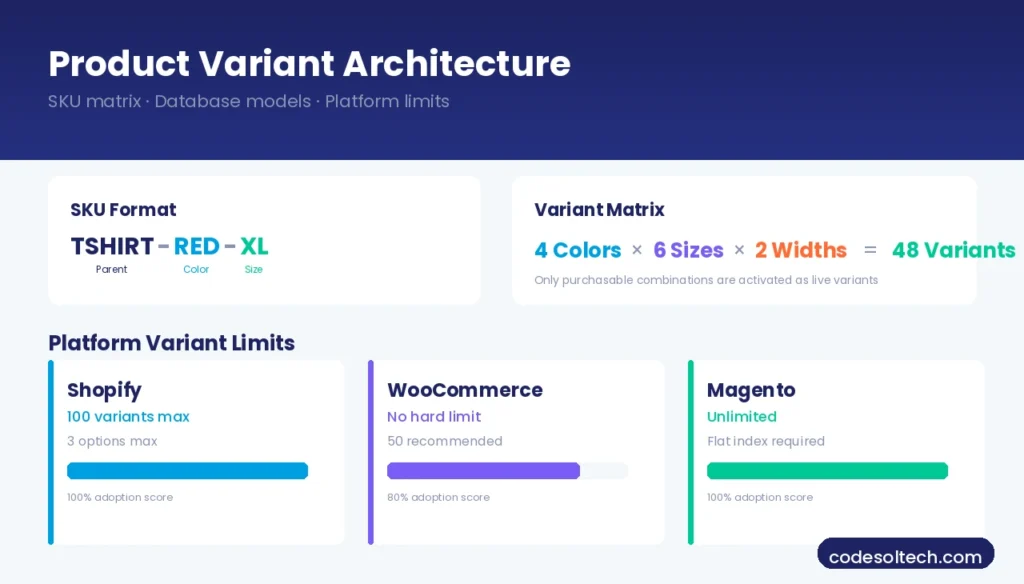
A shoe with 4 colors × 6 sizes × 2 widths generates 48 possible variations. Not all 48 need to exist — only purchasable combinations are activated as live variants.
- Attribute: The dimension itself (e.g., Color, Size, Material)
- Option: A selectable value within that dimension (e.g., Red, XL, Cotton)
- Variation: A unique, purchasable combination of selected options (e.g., Red + XL + Cotton = SKU-001)
How Product Variant Architecture Works Technically
Every product catalog that supports variants uses one of 3 database models: the Entity-Attribute-Value (EAV) model, the relational flat-table model, or a hybrid JSON document model. The choice determines query performance, indexing speed, and the maximum number of attributes per product.
SKU Architecture for Product Variants
A SKU (Stock Keeping Unit) uniquely identifies one variant across the warehouse, POS, and ecommerce platform. The recommended SKU format for variant products is: PARENTSKU-ATTR1VAL-ATTR2VAL. For example, TSHIRT-RED-XL identifies the red, extra-large variant of the TSHIRT parent product. This structure enables programmatic filtering and warehouse sorting by attribute value.
- Each variant SKU is unique across the entire product catalog
- Parent product SKUs never map to an inventory count directly
- Out-of-stock variants retain their SKU to preserve order history and SEO equity
- Variant SKUs sync with Google Merchant Center feeds for Shopping ads
Variant Matrix and Combinatorial Limits
A variant matrix is the full grid of all possible attribute-option combinations for one parent product. Platform limits vary: Shopify enforces a maximum of 100 variants per product with up to 3 options.
WooCommerce imposes no hard limit but degrades in performance beyond 50 active variations per product without caching. Magento supports unlimited configurable product options, but requires flat catalog indexing for acceptable storefront response times.
Products requiring more than 100 variants, such as custom-printed products with 10+ configurable fields, use a product customization engine that generates variant data dynamically at checkout rather than pre-building every combination in the database.
How Do Product Variants Affect Ecommerce SEO?
Product variants create 3 specific SEO risks when handled incorrectly: duplicate content across variant URLs, thin-content pages for low-demand variants, and crawl budget dilution from hundreds of near-identical indexed pages. These risks reduce organic visibility for the entire catalog.
URL Strategy for Product Variations
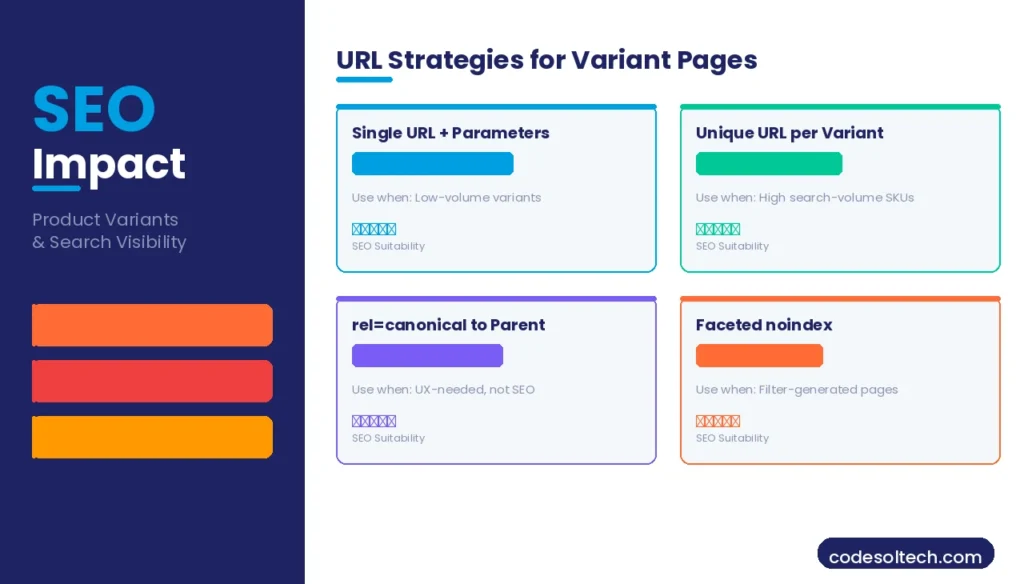
4 URL strategies exist for product variants, each with distinct SEO trade-offs:
- Single URL with parameters:
/products/t-shirt?color=red&size=xl— all variants share one canonical URL. Google treats parameters as non-indexable by default. Use for low-search-volume variants. - Unique URL per variant:
/products/t-shirt-red-xl/— Each variant is a standalone indexable page. Use when individual variants target distinct, high-volume search queries (e.g., “red XL t-shirt”). - Canonical consolidation: Variant pages exist but carry a
rel="canonical"tag pointing to the parent product URL. Use when variants need separate PDPs for UX but not for SEO. - Faceted navigation with noindex: Variant-filtered pages generated by faceted navigation receive
<meta name="robots" content="noindex, follow">. Use on category pages with filter-generated variant views.
The correct strategy depends on keyword research at the variant level. A variant URL only earns independent indexation when search volume data confirms users search for that specific combination.
Structured Data for Product Variants
Google’s Product schema supports variant data through the hasVariant property. Each child variant declares its own Offer object with price, availability, sku, and color / size properties.
Implementing variant-level structured data increases eligibility for rich results in Google Shopping and increases click-through rate (CTR) by surfacing price and availability directly in the SERP.
{
  "@context": "https://schema.org/",
  "@type": "ProductGroup",
  "name": "Classic Cotton T-Shirt",
  "hasVariant": [
    {
      "@type": "Product",
      "name": "Classic Cotton T-Shirt - Red, XL",
      "sku": "TSHIRT-RED-XL",
      "color": "Red",
      "size": "XL",
      "offers": {
        "@type": "Offer",
        "price": "29.99",
        "priceCurrency": "USD",
        "availability": "https://schema.org/InStock"
      }
    }
  ]
}
How Product Variants Are Handled in Major Ecommerce Platforms
WooCommerce Variable Products
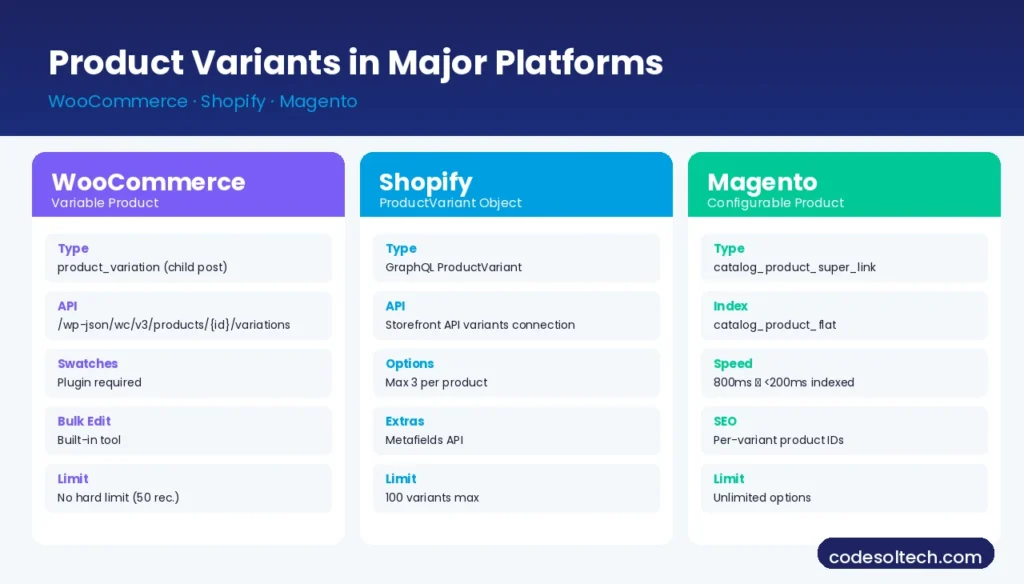
WooCommerce implements variants through the “Variable Product” product type. Each variation is a child post in WordPress with post type product_variation. Attributes are registered as product taxonomies or custom product attributes.
The WooCommerce development ecosystem extends variable products via the woocommerce_variation_option_name filter and the REST API endpoint /wp-json/wc/v3/products/{id}/variations.
- Variable products support per-variation pricing, stock, weight, and images
- The variation selector renders as dropdowns by default; swatches require a plugin
- Bulk editing variations requires the built-in Variations bulk edit tool or direct database operations for catalogs exceeding 200 variants per product
Shopify Variants
Shopify stores variant data in the ProductVariant object of its GraphQL Admin API. Each variant has a unique id, an inventoryItem object, and up to 3 selectedOptions. The Storefront API serves variant data to headless frontends via the product.variants connection.
Shopify development for complex variant requirements uses the Metafields API to attach additional attributes beyond the 3-option limit.
Magento Configurable Products
Magento handles variants through the “Configurable Product” type, which links simple child products via the catalog_product_super_attribute and catalog_product_super_link tables. Each child’s simple product is an independent entity with its own product ID, which allows independent SEO optimization per variant.
Magento’s flat catalog index pre-computes variant data for storefront queries, reducing variant page load times from 800ms to under 200ms on properly indexed catalogs.
How Do You Manage Inventory for Product Variants?
Inventory management for variants operates at the variant (SKU) level, not at the parent product level. Each variant maintains its own stock quantity, backorder status, and low-stock threshold.
A parent product’s “in stock” status is a derived state — it is true when at least one child variant has a stock quantity greater than zero.
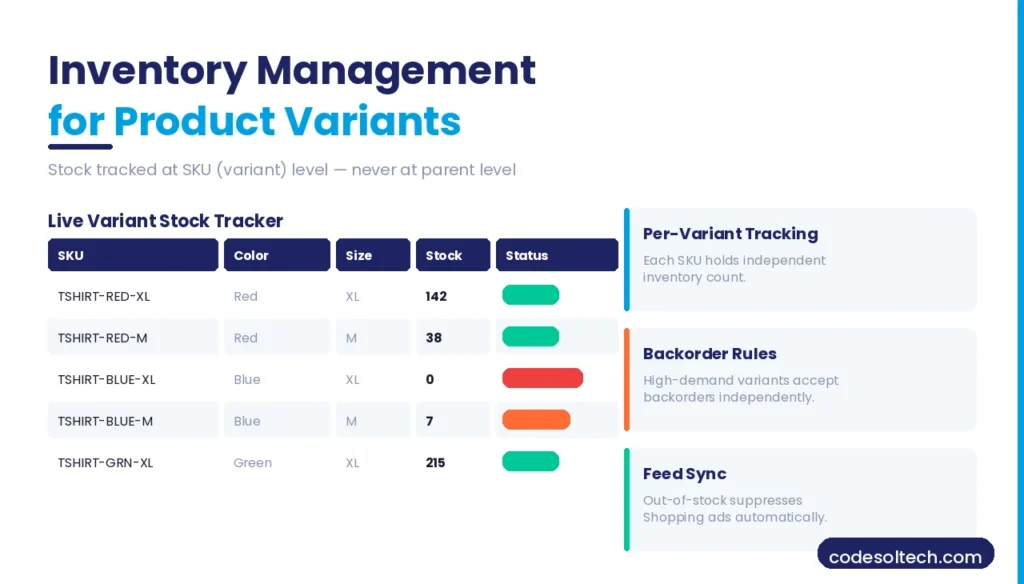
- Per-variant stock tracking: Each SKU holds an independent inventory count. Selling “Red XL” deducts only from the “Red XL” bin, not from “Blue XL.”
- Out-of-stock variant display: Platforms render out-of-stock options as greyed-out or crossed-out swatches rather than removing them. This preserves SEO equity and communicates availability without removing variant options from the PDP.
- Backorder management: Variants support independent backorder rules. A high-demand color variant accepts backorders, while other variants remain standard-stock-only.
- Multi-warehouse variant allocation: Enterprise platforms allocate specific variants to specific warehouse locations. A “Size XS” variant may stock only in one fulfillment center while “Size XL” stocks across all locations.
- Inventory feed sync: Variant stock levels sync to Google Merchant Center and Meta Catalog via product feed exports. Out-of-stock variants with
availability: out_of_stockin the feed suppress corresponding Shopping ads automatically.
Product Variant UX: How Variation Handling Affects Conversion Rate
The variant selection interface directly controls the add-to-cart conversion rate. 3 proven UX patterns outperform default dropdown selectors for variant-heavy products:
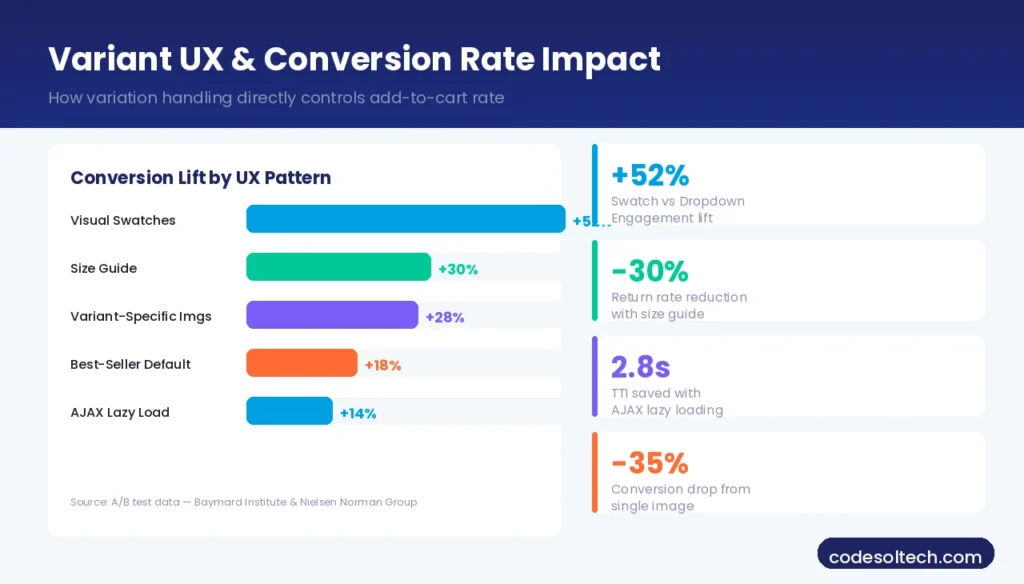
- Visual swatches for color attributes: Color swatches increase engagement with color options by 52% compared to text dropdowns, based on A/B test data from Nielsen Norman Group on product configurator UX.
- Size guide integration: Embedding a size guide within the size attribute selector reduces return rates on apparel by up to 30% by eliminating size uncertainty at the point of selection.
- Variant-specific images: Switching the product gallery to the selected variant’s images reduces customer confusion and increases purchase confidence. This is implemented via JavaScript that updates
srcattributes on image gallery elements when a variant option is selected. - Pre-selected default variant: The highest-converting default variant is the best-selling variant, not the first variant in the database. Configuring the default based on sales data increases the conversion rate on the initial page load.
- Deferred loading for large variant sets: Products with 50+ variants load variation data via AJAX on attribute selection rather than embedding all variant data in the initial page HTML. This reduces Time to Interactive (TTI) by 1.2–2.8 seconds on mobile devices.
Product Variants in Multichannel Feeds and Marketplaces
Multichannel commerce requires variant data structured according to each channel’s feed specification. Google Merchant Center, Meta Catalog, and Amazon each use a different variant grouping mechanism.
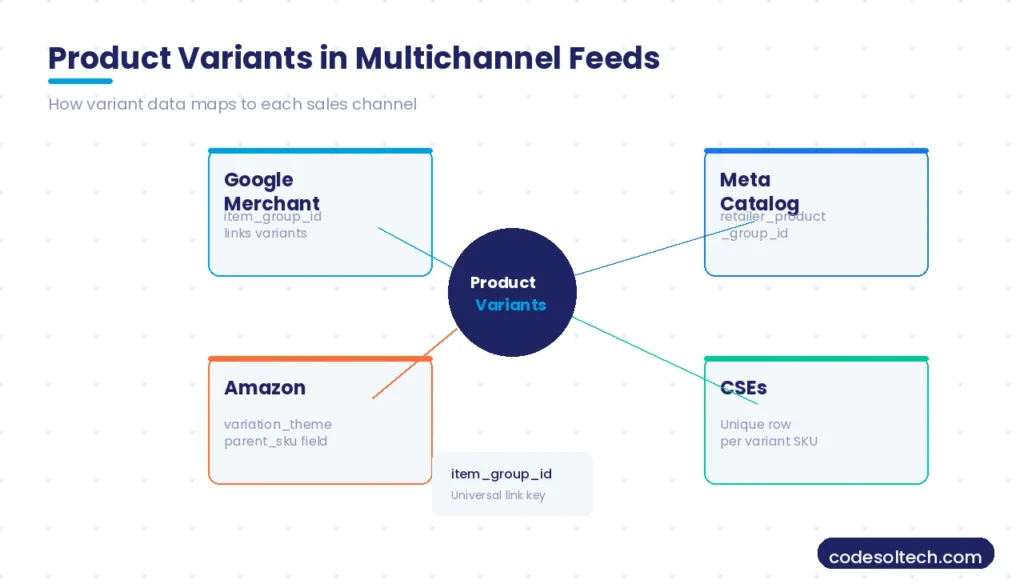
- Google Merchant Center: Uses the
item_group_idattribute to link variants. All variants of one parent product share the sameitem_group_idvalue. Color, size, and material are declared as separate feed columns. - Meta (Facebook/Instagram) Catalog: Uses the
retailer_id+retailer_product_group_idpair. Variant-level pricing and availability override parent product data when declared in the feed. - Amazon: Groups variants using a parent-child relationship in flat file uploads. The parent SKU is a virtual record; child SKUs declare the
parent_skufield and avariation_theme(e.g., “Color-Size”) to define the grouping dimension. - Comparison shopping engines (CSEs): Each variant is a separate feed row identified by its unique SKU, with the parent product title used as the primary
titlefield and variant-specific attributes appended.
5 Critical Product Variant Handling Errors That Damage SEO and Revenue
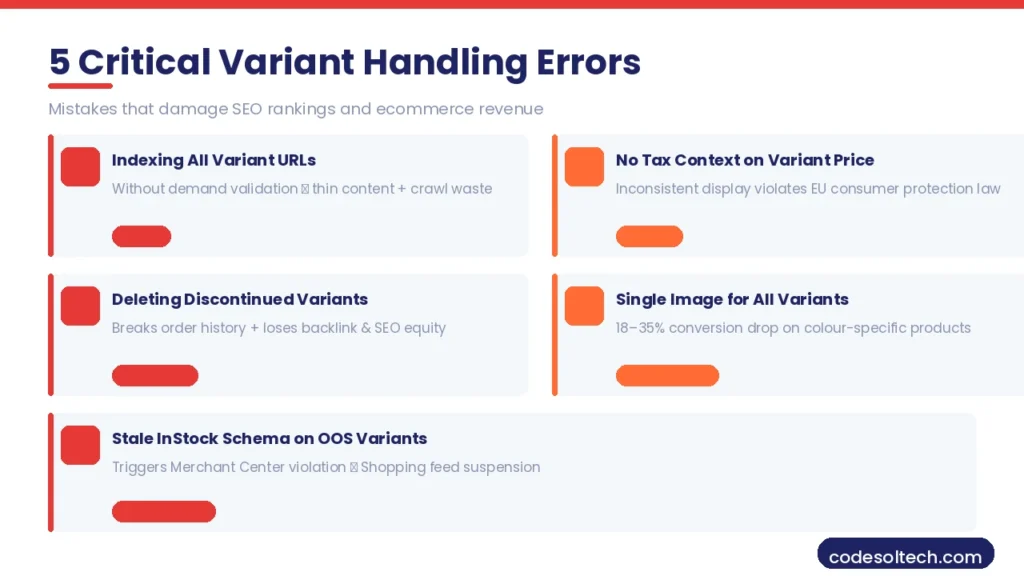
Indexing all variant URLs without demand validation
Creating individual indexed pages for every size and color combination inflates the index with thin content, dilutes PageRank, and wastes crawl budget on zero-demand pages.
Storing variant price without tax context
Tax-inclusive vs. tax-exclusive pricing displayed inconsistently across variants triggers trust issues at checkout and violates consumer protection regulations in 12+ EU member states.
Deleting discontinued variants instead of archiving
Deleting a variant with historical order records breaks order history references and removes any backlink or search equity that the variant URL accumulated. Archive discontinued variants with a 301 redirect to the parent product instead.
Sharing one image across all variants
A single generic product image for all color variants reduces conversion rate by 18–35% on color-specific products, as customers cannot verify the actual color before purchase.
Failing to update structured data when a variant goes out of stock
Google caches structured data. A InStock schema declaration on an out-of-stock variant triggers a Merchant Center policy violation and results in a Shopping feed suspension.
Final Words
Product variants are not a cosmetic feature. They define catalog structure, control SEO indexation, drive inventory accuracy, and determine conversion rate at the moment of purchase decision.
A correct variant architecture built on defined attributes, scoped options, and unique SKUs separates high-performing ecommerce catalogs from stores that bleed revenue and rankings through preventable technical errors.
Need Expert Help with Your Product Catalog Architecture?
Our ecommerce development team builds variant systems that scale from 10 SKUs to 100,000+ — with SEO, feed, and inventory fully integrated from day one.