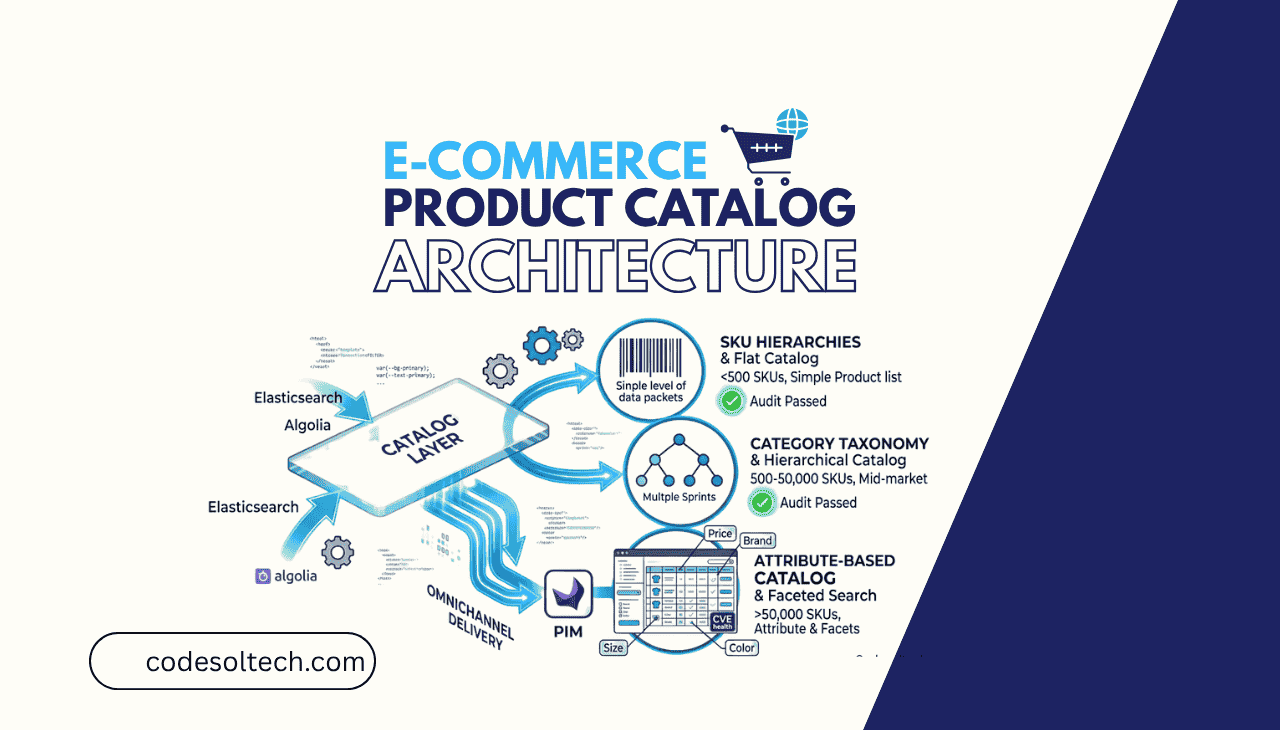
Product catalog architecture is the structured system that organizes every product in an e-commerce store, defining how SKUs are modeled, how categories are hierarchically nested, how product attributes are assigned, and how all of this data is stored, retrieved, and displayed.
A well-designed catalog architecture directly determines search performance, site crawlability, filtering accuracy, and conversion rate. Poorly structured catalogs produce duplicate content, bloated crawl budgets, and broken faceted navigation all of which suppress organic rankings.
This guide covers the 4 core components of ecommerce catalog architecture SKU structure, product taxonomy, attribute modeling, and catalog data schema, with specific technical decisions for each layer. In This Article
What Is Product Catalog Architecture?
Product catalog architecture is the data model and organizational framework that defines how products, their variants, attributes, and categories are structured within an e-commerce platform.
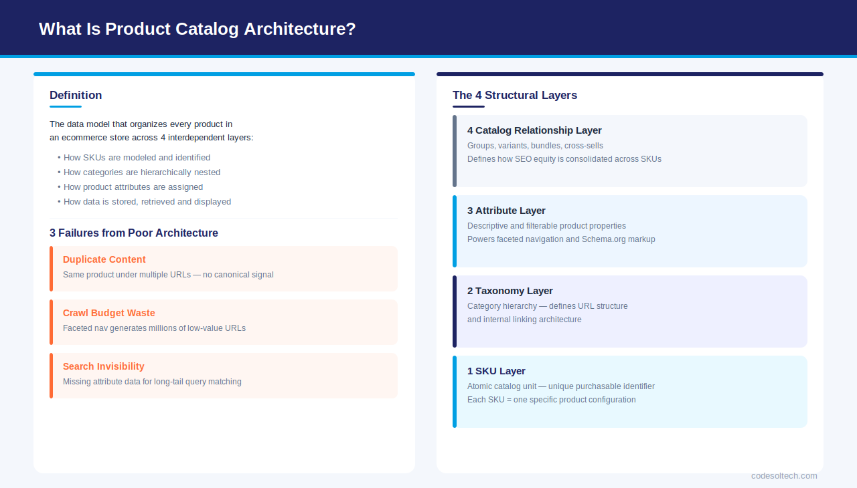
It encompasses 4 interdependent layers: the SKU data model (individual product identifiers), the taxonomy structure (category hierarchies), the attribute schema (filterable and descriptive product properties), and the catalog relationships (how products relate to each other as groups, variants, or bundles).
Catalog architecture is distinct from frontend design. It operates at the database and data-model layer — in systems like Shopify, Magento 2, WooCommerce, or a custom headless commerce stack. Every page a customer sees on an e-commerce store is rendered from data structured by the catalog architecture beneath it.
A catalog without deliberate architecture produces 3 specific technical failures:
- Duplicate content — the same product appearing under multiple category URLs without canonical signals
- Crawl waste — faceted navigation generating millions of low-value URLs that consume Googlebot’s crawl budget
- Search invisibility — products missing structured attribute data that search algorithms use to match long-tail queries
The 4 Core Components of E-commerce Catalog Architecture
Every e-commerce catalog, regardless of platform, consists of 4 structural components. Each component has a direct impact on both user experience and search engine performance.
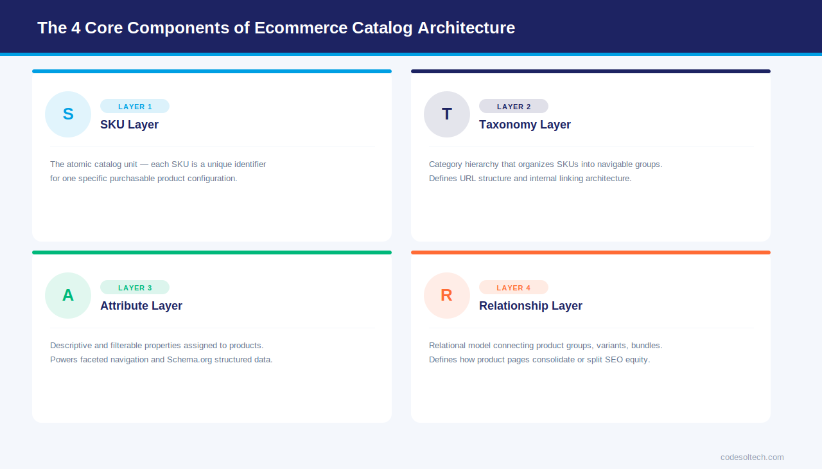
- 1. SKU Layer — The atomic unit of the catalog. Each SKU (Stock Keeping Unit) is a unique identifier assigned to a specific, purchasable product configuration (e.g., Blue T-Shirt, Size M = one SKU).
- 2. Taxonomy Layer — The category hierarchy that organizes products into navigable groups (e.g., Men > Tops > T-Shirts). Taxonomy defines URL structure and internal linking architecture.
- 3. Attribute Layer — Descriptive and filterable properties assigned to products (e.g., Color, Material, Weight, Brand). Attributes power faceted navigation and structured data markup.
- 4. Catalog Relationship Layer — The relational data model connecting product groups, variants, bundles, and cross-sells. This layer defines how product pages consolidate or split SEO equity.
Each of these layers must be designed in coordination. An attribute schema designed without taxonomy awareness produces faceted navigation that conflicts with category URL structure. A SKU hierarchy designed without variant grouping logic creates duplicate product pages.
All 4 layers are interdependent systems, not independent decisions.
SKU Architecture: Types, Hierarchy & Data Model
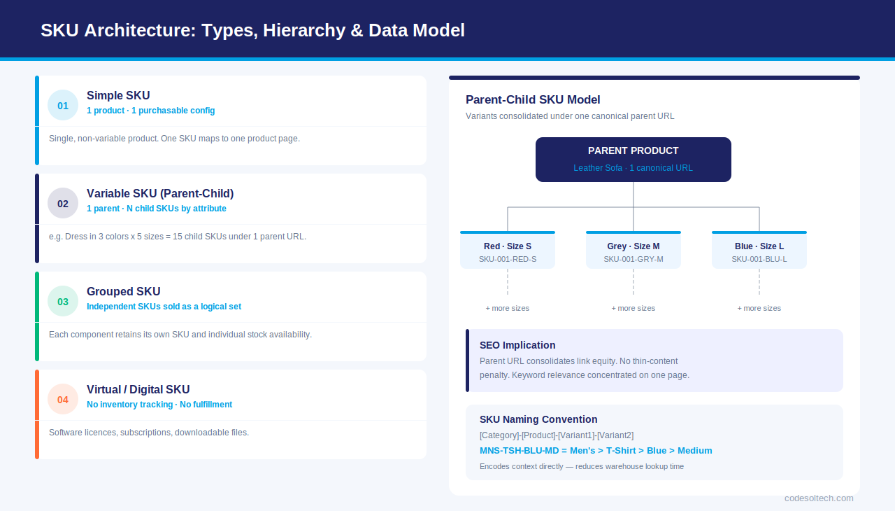
A SKU (Stock Keeping Unit) is a unique alphanumeric identifier that represents one specific, purchasable configuration of a product. In e-commerce catalog architecture, SKUs are organized into 4 types based on their structural complexity and variant relationships.
The 4 SKU Types in E-commerce
- Simple SKU — A single, non-variable product with one purchasable configuration. Example: a book with a single ISBN. One SKU maps to one product page.
- Variable SKU (Parent-Child Model) — A parent product with 2 or more child SKUs differentiated by attributes like color, size, or material. Example: a dress available in 3 colors × 5 sizes = 15 child SKUs under 1 parent URL.
- Grouped SKU — A collection of independent simple SKUs sold together as a logical set. Each component retains its own SKU and individual availability. Example: a camera body, lens, and case sold as a bundle.
- Virtual/Digital SKU — A non-physical product (software license, subscription, or downloadable file) with no inventory tracking requirements. Virtual SKUs share attribute structures with simple SKUs but carry no fulfillment attributes.
SKU Naming Convention and Structure
A well-structured SKU naming convention encodes product context directly into the identifier. The most scalable format follows a 4-segment pattern: [Category Code]-[Product Code]-[Variant 1]-[Variant 2]. For example: MNS-TSH-BLU-MD decodes to Men’s > T-Shirt > Blue > Medium. This format reduces lookup time in warehouse management systems (WMS) and eliminates ambiguous stock queries.
SKU proliferation is the primary scalability challenge in ecommerce catalog management. A store with 500 base products, each available in 4 colors and 6 sizes, generates 12,000 child SKUs. Each child SKU requires its own inventory record, pricing data, image assets, and availability status.
The ecommerce development architecture must support this scale without degrading product page load time or search index performance.
Parent-Child SKU: The SEO Implication
In the parent-child SKU model, the parent product URL consolidates all child variant data onto one canonical page. This architecture preserves link equity, prevents thin-content penalties from individual variant pages, and concentrates keyword relevance signals on a single URL.
The parent page renders variant selection via JavaScript without generating separate crawlable URLs for each child SKU — unless the variants carry distinct enough search demand to justify individual landing pages (e.g., “red leather sofa” vs. “blue leather sofa”).
Product Taxonomy Design: 3 Models Compared
Product taxonomy is the hierarchical classification system that organizes a catalog’s SKUs into navigable categories. Taxonomy design directly determines URL structure, internal link architecture, breadcrumb trails, and the semantic relationship between category and product pages.
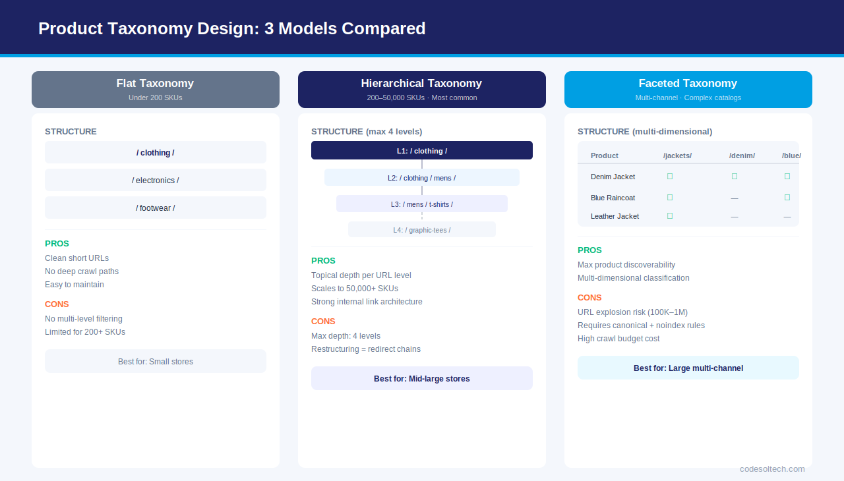
There are 3 primary taxonomy models used in ecommerce catalog architecture.
Model 1: Flat Taxonomy
A flat taxonomy organizes all products into a single tier of categories with no nested subcategories. This model is suitable for catalogs with fewer than 200 SKUs across 10–20 product types. Flat taxonomies produce clean, short URLs (/category/product-name/) and eliminate deep crawl paths.
The limitation is that flat taxonomies cannot accommodate multi-dimensional product differentiation a catalog selling 5,000 SKUs across 40 product types requires hierarchical nesting to remain navigable.
Model 2: Hierarchical Taxonomy
A hierarchical taxonomy organizes products into parent-child category trees with 2–5 levels of nesting. This is the dominant model for mid-to-large ecommerce stores. Example structure:
- Level 1 (Root):
/clothing/ - Level 2 (Department):
/clothing/mens/ - Level 3 (Category):
/clothing/mens/t-shirts/ - Level 4 (Subcategory):
/clothing/mens/t-shirts/graphic-tees/
Each taxonomy level generates a category landing page that targets a specific keyword intent. The /clothing/mens/t-shirts/ URL targets category-level navigational queries, while /clothing/mens/t-shirts/graphic-tees/ targets more specific transactional queries.
Hierarchical taxonomy enables e-commerce SEO practitioners to build topical depth across the catalog without creating duplicate URL paths. The maximum recommended depth for crawlable ecommerce taxonomy is 4 levels; category pages nested beyond Level 4 receive reduced crawl frequency from Googlebot.
Model 3: Faceted Taxonomy (Multi-Dimensional Classification)
Faceted taxonomy allows a single product to belong to multiple category dimensions simultaneously. A blue denim jacket can be classified under /jackets/, /denim/, and /blue-clothing/ as parallel taxonomy paths. Faceted taxonomy maximizes product discoverability but generates the largest volume of indexable URLs.
An uncontrolled faceted taxonomy on a 10,000-SKU catalog produces between 100,000 and 1,000,000 URL combinations through attribute filtering — the primary cause of crawl budget exhaustion in large ecommerce stores.
The correct management strategy for faceted taxonomy combines 3 technical controls:
- Canonical tags — pointing all facet-generated filter URLs back to the parent category page
- robots.txt disallow — blocking crawl access to parameterized filter URLs that offer no unique ranking value
- Selective indexation — allowing only high-demand facet combinations (e.g.,
/dresses/red/with 1,000+ monthly searches) to be indexed as standalone pages
What Is the Best Catalog Architecture for Large E-commerce Stores?
The best catalog architecture for large ecommerce stores is a hierarchical taxonomy (3–4 levels) combined with a faceted attribute layer, controlled by canonical tags and selective indexation rules.
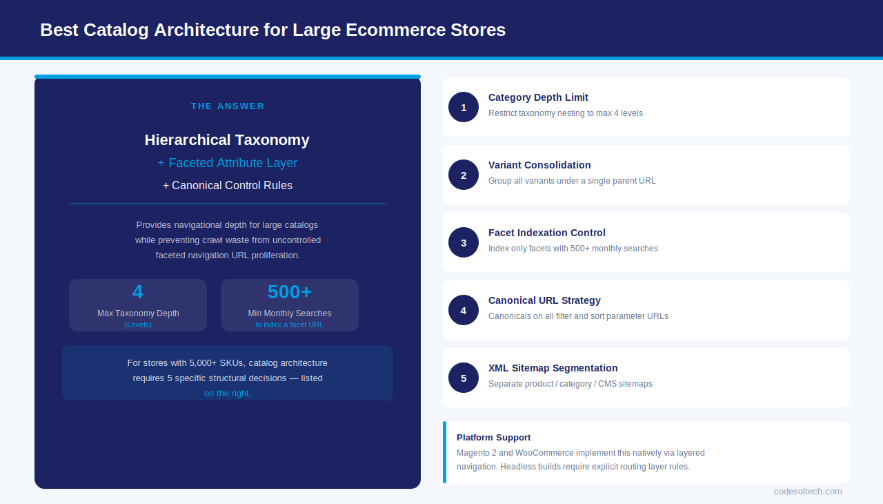
This combination provides the navigational depth required for large catalogs while preventing the crawl waste and duplicate content generated by uncontrolled faceted navigation.
For stores with more than 5,000 SKUs, catalog architecture requires 5 specific structural decisions:
- Category depth limit — Restrict taxonomy nesting to a maximum of 4 levels to keep all category pages within 4 clicks of the homepage.
- Variant consolidation — Group all product variants under a single parent URL using the parent-child SKU model to prevent thin-content proliferation.
- Attribute-based facet control — Assign “indexable” status only to attribute combinations with documented monthly search volume above 500 queries.
- Canonical URL strategy — Implement canonical tags on all filter and sort parameter URLs to consolidate link equity on the primary category page.
- XML sitemap segmentation — Separate product, category, and CMS pages into distinct XML sitemaps to enable Googlebot to prioritize high-value product and category URLs.
Platforms like Magento 2 and WooCommerce implement this architecture natively through their layered navigation and category anchor systems. Headless commerce implementations built on platforms like Shopify Hydrogen or custom Next.js frontends require explicit engineering of these rules at the routing layer.
Learn more about headless ecommerce development and how routing architecture is configured in decoupled storefronts.
Product Attribute Modeling and Schema Design
Product attributes are the descriptive and filterable properties assigned to SKUs within the catalog. Attributes serve 3 distinct functions: they power faceted navigation filters, they populate structured data markup (Schema.org Product), and they provide the raw data for search relevance matching on long-tail queries.
The 3 Attribute Types in E-commerce Catalogs
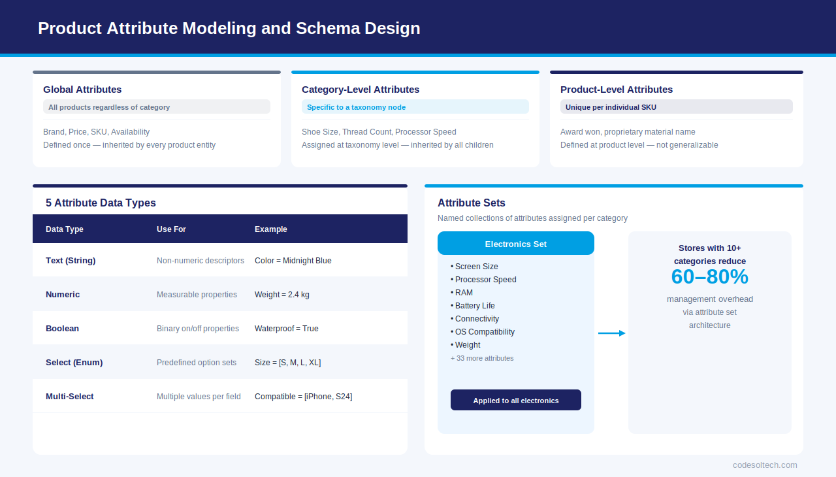
- Global Attributes — Properties shared across all products regardless of category (Brand, Price, SKU, Availability). Global attributes are defined once at the platform level and inherited by every product entity.
- Category-Level Attributes — Properties specific to a product category (Shoe Size for footwear, Thread Count for bedding, Processor Speed for electronics). These attributes are assigned at the taxonomy node level and inherited by all products within that category branch.
- Product-Level Attributes — Unique properties defined for individual products or SKUs that do not generalize across their category (a specific award won, a proprietary material name, a limited-edition colorway identifier).
Attribute Data Types and Their Schema Impact
Each attribute stores one of 5 data types, and the data type determines how the attribute is indexed, filtered, and rendered in structured data:
- Text (String) — For non-numeric descriptors: Color = “Midnight Blue,” Material = “100% Organic Cotton.” Text attributes are tokenized for full-text search.
- Numeric (Integer/Decimal) — For measurable properties: Weight = 2.4 kg, Screen Size = 15.6 inches. Numeric attributes enable range-filter facets.
- Boolean — For binary properties: Waterproof = True/False, In Stock = True/False. Boolean attributes power availability and feature filters.
- Select (Enum) — For predefined option sets: Size = [XS, S, M, L, XL, XXL]. Enum attributes are the foundation of variant selection UIs.
- Multi-Select — For attributes that accept multiple values: Compatible Devices = [iPhone 15, Samsung S24, Google Pixel 9]. Multi-select attributes are critical for accessory and component catalogs.
Attribute Sets: Grouping for Catalog Efficiency
An attribute set is a named collection of attributes assigned to a product category. Instead of manually assigning 40 individual attributes to each new electronics product, a single “Electronics” attribute set configures all 40 attributes simultaneously.
Magento 2 implements attribute sets as a native catalog management feature. WooCommerce implements equivalent functionality through product attribute inheritance in custom product types. Stores with more than 10 product categories reduce catalog management
overhead by 60–80% by implementing attribute set architecture rather than per-product attribute assignment.
Catalog Architecture and E-commerce SEO
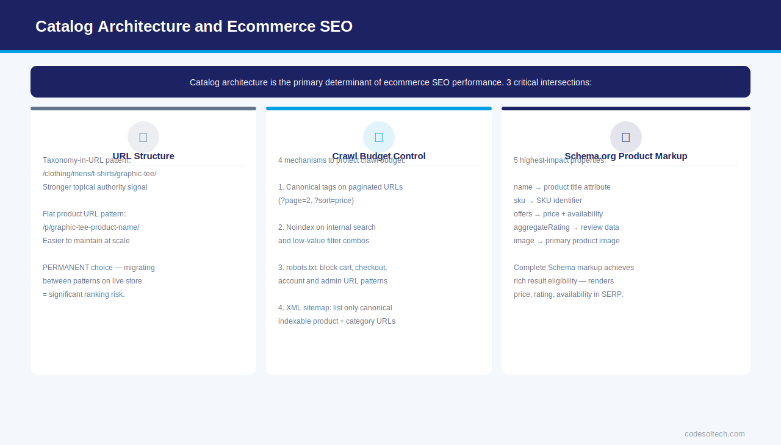
Catalog architecture is the primary determinant of e-commerce SEO performance. The 3 most critical SEO-architecture intersections are URL structure, crawl budget allocation, and structured data implementation.
URL Structure from Taxonomy
Every taxonomy node generates a URL. The URL structure of a product page communicates its categorical context to search engine crawlers. The 2 dominant URL patterns in e-commerce are:
- Taxonomy-in-URL pattern:
/clothing/mens/t-shirts/graphic-tee-product-name/— encodes full category path, strengthens topical relevance, but creates longer URLs and complicates re-categorization. - Flat product URL pattern:
/p/graphic-tee-product-name/— category-agnostic, shorter, easier to maintain at scale, but loses categorical context signal in the URL itself.
For stores with stable taxonomy structures and fewer than 50,000 SKUs, the taxonomy-in-URL pattern delivers stronger category-level topical authority. For stores with dynamic inventories and frequent category restructuring, the flat product URL pattern eliminates the 301 redirect chains generated by taxonomy changes.
The choice is permanent migrating between these patterns on a live store requires URL migration at scale and carries significant ranking risk.
Crawl Budget and Catalog Size
Google allocates a finite crawl budget to each domain based on domain authority and server response speed. An ecommerce store with 50,000 product pages, 500 category pages, and an uncontrolled faceted navigation system generates between 2 million and 10 million unique URLs.
Googlebot cannot crawl all of these URLs within a reasonable timeframe, which delays the indexation of new products and updated prices.
Catalog architecture controls crawl budget through 4 mechanisms:
- Canonical tags on paginated category pages (
?page=2,?sort=price) pointing to the root category URL - Noindex meta tags on internal search result pages and low-value filter combinations
- robots.txt disallow on shopping cart, checkout, account, and administrative URL patterns
- XML sitemap optimization listing only canonicalized, indexable product and category URLs
Schema.org Structured Data for Products
The Schema.org Product schema type provides 12 core properties that map directly to catalog attributes. The 5 most impactful properties for ecommerce search performance are:
name— maps to the product title attributesku— maps to the SKU identifier in the catalog data modeloffers→priceandavailability— maps to pricing and stock attributesaggregateRating— maps to review data in the product entityimage— maps to the primary product image asset in the DAM or media library
Products with complete Schema.org markup achieve rich result eligibility in Google Search, rendering price, availability, and rating directly in the SERP. This reduces click-through cost for the same ranking position. Learn more about product page optimization and how structured data implementation improves SERP visibility.
How Does Catalog Architecture Affect Site Performance?
Catalog architecture affects site performance through database query complexity, page rendering load, and image asset delivery. A poorly normalized catalog data model increases Time to First Byte (TTFB) by 200–800ms on category pages that aggregate data from multiple product entities.
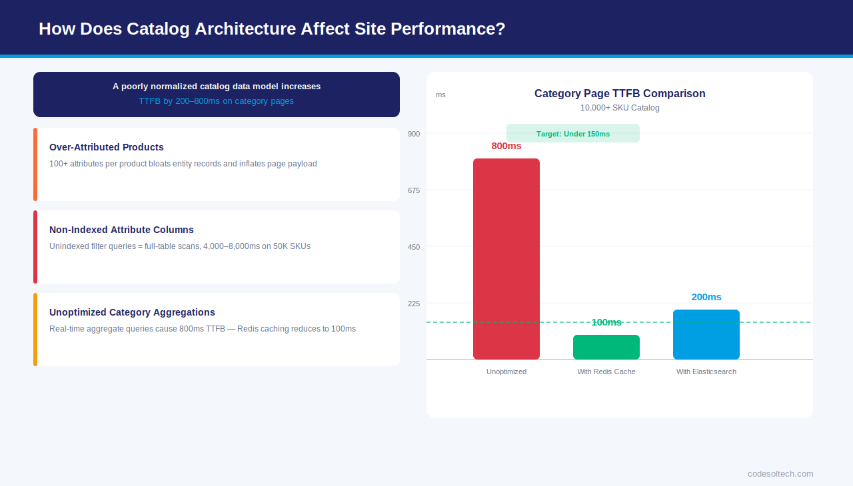
The 3 architectural patterns that degrade performance in large ecommerce catalogs are:
- Over-attributed products — Assigning 100+ attributes to every product regardless of category relevance bloats the product entity record, increases database read times, and inflates page payload size. Attribute sets solve this by scoping attribute count to category-relevant fields only.
- Non-indexed attribute columns — Faceted navigation filters execute SQL queries against attribute columns. Attribute columns used in filtering must carry database indexes; unindexed filter queries cause full-table scans that scale linearly with catalog size and collapse under concurrent user load.
- Unoptimized category aggregations — Category pages display aggregate data (product count, price ranges, available filter options) derived from real-time database queries. Implementing Redis or Varnish caching for category aggregation queries reduces category page TTFB from 800ms to under 100ms on catalogs exceeding 10,000 SKUs.
Platform-level performance architecture for catalogs includes full-page caching (built into Magento 2’s Varnish integration), Elasticsearch-powered catalog search (replacing MySQL full-text search for stores with 1,000+ products), and CDN delivery for product image assets.
These are not optional optimizations for large catalogs — they are architectural requirements. See our guide on e-commerce performance optimization for implementation specifics.
PIM vs. Native Catalog Management
A Product Information Management (PIM) system is a centralized platform dedicated to storing, enriching, and distributing product data across multiple e-commerce channels. PIM differs from native e-commerce catalog management in 3 functional dimensions: data richness, multi-channel distribution, and workflow governance.
When to Use a PIM System
A PIM system is the correct architectural choice when a business meets 3 or more of the following criteria:
- The catalog contains more than 5,000 active SKUs
- Products are sold across 2 or more channels (own website, marketplaces like Amazon, wholesale portals)
- Product data originates from multiple suppliers with inconsistent attribute formats
- The catalog requires localization into 2 or more languages
- Content teams and technical teams manage product data independently
PIM systems like Akeneo, Pimcore, and inRiver connect to ecommerce platforms via API. The PIM stores the master product record — the complete, enriched dataset including all attributes, digital assets, and translations.
The ecommerce platform (Magento, Shopify, WooCommerce) receives a synchronized subset of this data configured for storefront display. This decoupled architecture eliminates the risk of data corruption from direct storefront editing.
Native Catalog Management: When It Suffices
Native ecommerce catalog management — the built-in product management system of WooCommerce, Shopify, or Magento — suffices for catalogs with fewer than 5,000 SKUs operating on a single channel. Native systems handle attribute assignment, variant configuration, category assignment, and media management within one interface, eliminating integration complexity.
The limitation emerges at scale: native systems lack bulk data transformation tools, supplier data normalization workflows, and multi-channel publishing pipelines. Review our WooCommerce development and Shopify development services to understand which platform’s native catalog system fits your scale requirements.
6 Common Catalog Architecture Errors
These 6 architectural errors appear consistently in ecommerce audits and each produces measurable organic and commercial damage:
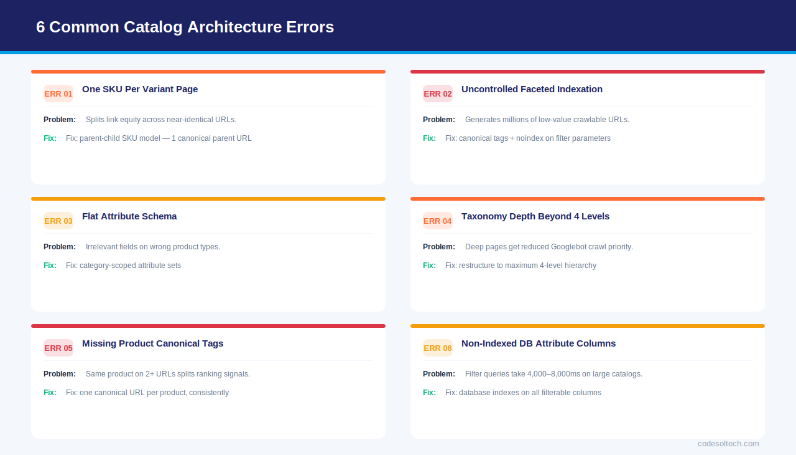
- One SKU per variant page (no parent-child grouping)
Publishing individual product pages for every color/size variant creates thin-content pages and splits link equity across hundreds of near-identical URLs. Fix: implement the parent-child SKU model with variant selection on the parent URL. - Uncontrolled faceted navigation indexation
Allowing search engines to index all filter URL combinations on a 10,000-SKU catalog generates millions of low-value pages that consume crawl budget and dilute topical authority. Fix: apply canonical tags and noindex rules to all filter parameter URLs that lack unique search demand. - Flat attribute schema (no attribute sets)
Assigning all attributes globally to every product forces irrelevant fields (e.g., “Shoe Width” appearing on a shirt product). This degrades data quality, increases page render payload, and introduces schema markup errors. Fix: define category-specific attribute sets with scoped inheritance. - Taxonomy depth beyond 4 levels
Category pages nested 5+ levels deep receive reduced crawl priority from Googlebot. Products assigned only to deep subcategories are discovered and indexed more slowly than products assigned to shallower categories. Fix: restructure deep taxonomy branches into 4-level maximum hierarchies. - Missing product-to-category canonical tags
Products assigned to multiple categories generate multiple accessible URLs for the same product page (e.g.,/mens/t-shirts/product/and/sale/t-shirts/product/). Without a canonical tag pointing to the preferred URL, search engines split ranking signals across both paths. Fix: define one canonical URL per product and implement<link rel="canonical">consistently. - Non-indexed attribute columns in the database
Executing faceted navigation filters against non-indexed database columns produces full-table scans. On a catalog with 50,000 products, an unindexed filter query returns results in 4,000–8,000ms — an unacceptable latency for user experience and Core Web Vitals. Fix: add database indexes to all attribute columns used in filtering and sorting operations.
Product Variants in Catalog Architecture
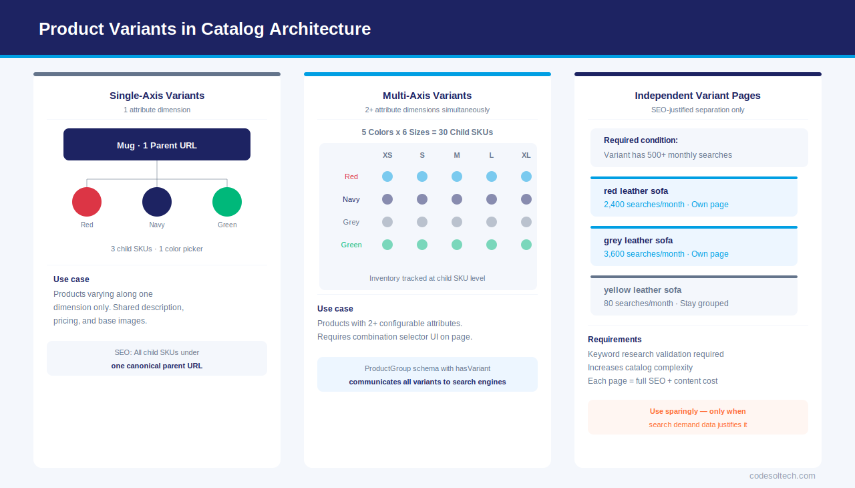
Product variants are child SKUs that share a common parent product entity but differ in one or more configurable attributes. The variant architecture decision — how variants are modeled, stored, and displayed — is one of the highest-impact choices in ecommerce catalog design.
The 3 Variant Relationship Models
- Single-axis variants — Products vary along one attribute dimension only (e.g., a mug available in 4 colors). The parent page displays 4 color swatches. All 4 child SKUs share the same product description, images (except color-specific shots), and pricing.
- Multi-axis variants — Products vary along 2 or more attribute dimensions simultaneously (e.g., a shirt in 5 colors × 6 sizes = 30 child SKUs). The parent page requires a combination selection interface (Color picker + Size selector). Inventory is tracked at the child SKU level.
- Independent variant pages (SEO-justified separation) — In cases where individual variant combinations carry distinct high-volume search demand, each variant receives its own canonical URL and full SEO treatment. Example: “red leather sofa” (2,400 monthly searches) and “grey leather sofa” (3,600 monthly searches) justify separate pages. This decision requires keyword research validation before implementation — it increases catalog complexity and content maintenance cost.
The variant architecture also determines how Schema.org/Product Structured data is implemented. For parent-child variants, the recommended approach uses hasVariant with ProductGroup schema a structure that communicates variant relationships to search engines without creating duplicates Product entities for each child SKU.
Final Words
Product catalog architecture is the structural foundation of every e-commerce store’s SEO and performance output.
SKU modeling, taxonomy design, and attribute schema are not backend implementation details — they are strategic decisions that determine how search engines discover, index, and rank product pages.
A catalog built with deliberate architecture scales cleanly. A catalog built without it creates compounding technical debt that grows with every new SKU added.
Need help designing a scalable e-commerce catalog architecture?
Our e-commerce development team architects catalog systems for Magento, WooCommerce, and headless platforms from SKU data modeling to taxonomy design and faceted navigation SEO.