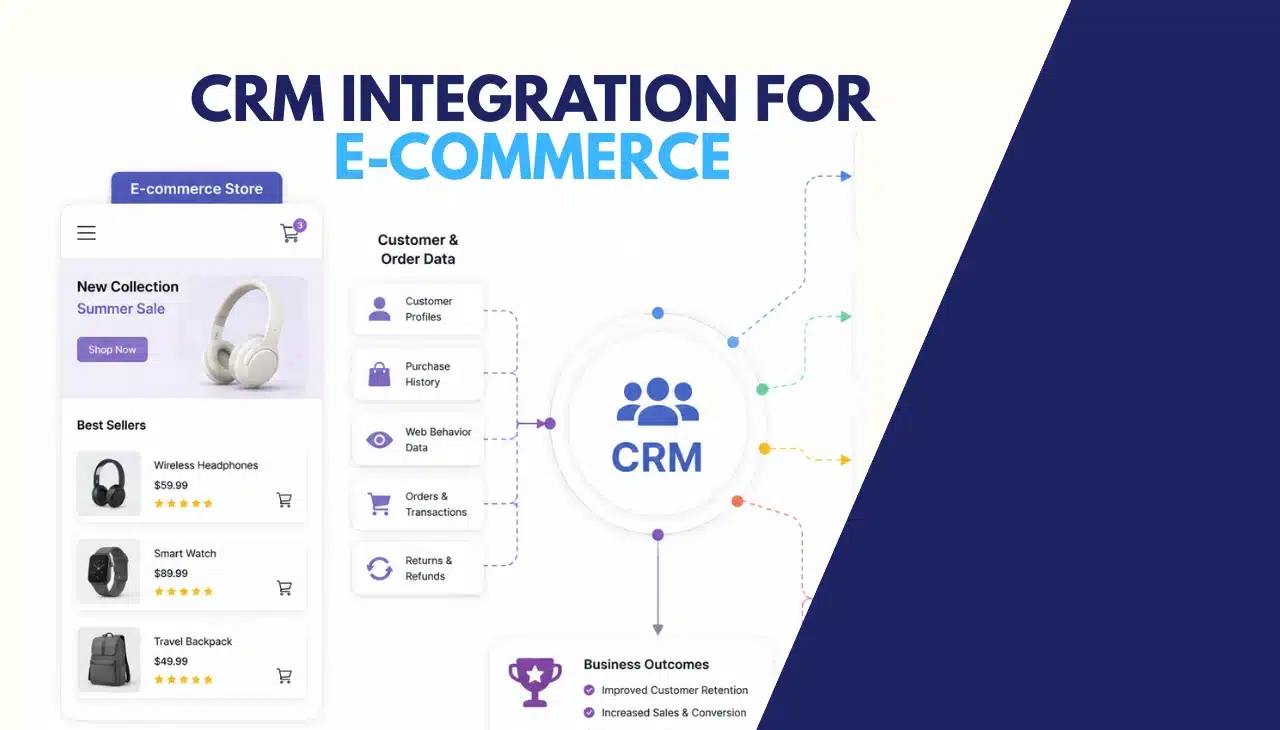
CRM integration for e-commerce connects your store’s order data, customer behavior, and marketing tools into a single platform. It eliminates data silos, enables automated personalization, and gives sales and support teams a unified customer view.
Businesses that implement CRM integration report an average 29% increase in sales and a 34% improvement in customer retention within the first 12 months.
The global CRM market reached $89.03 billion in 2024 and is projected to grow to $145.60 billion by 2029, a compound annual growth rate of 10.7%. Approximately 45% of e-commerce businesses have already integrated a CRM system into their platform.
Businesses that have not yet integrated operate with an incomplete customer view that directly limits personalization, retention, and revenue growth.
What Does CRM Integration for E-commerce Actually Do?
CRM integration for e-commerce creates bidirectional data sync between your store and your CRM platform. When a customer places an order on Shopify, that transaction record flows into the CRM within seconds.
When a support agent updates a customer’s preference in the CRM, that change reflects in the next marketing campaign segment automatically. This bidirectional flow eliminates the manual export-import cycle that creates stale data.
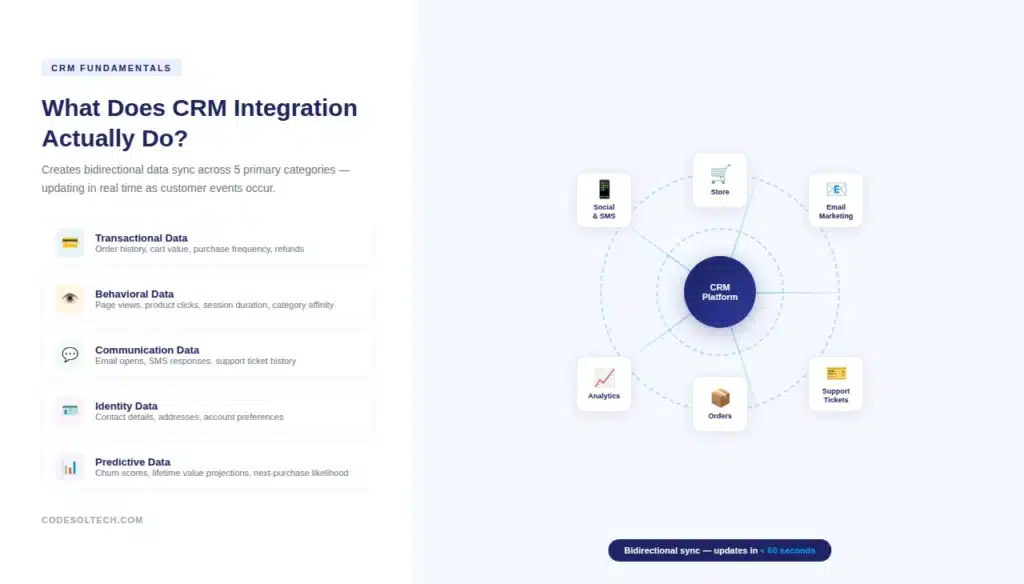
The integration operates across 5 primary data categories:
- Transactional data — order history, cart value, purchase frequency, refund events
- Behavioral data — page views, product clicks, session duration, category affinity
- Communication data — email opens, SMS responses, support ticket history
- Identity data — contact details, shipping addresses, account preferences
- Predictive data — churn probability scores, lifetime value projections, next-purchase likelihood
Each data category requires a different sync strategy. Transactional data demands near-real-time sync (under 60 seconds) to keep fulfillment and support teams accurate.
Behavioral data aggregates on a 15–30 minute cycle. Predictive scores recalculate on a daily or weekly batch job depending on the ML model architecture.
A CRM integration that treats all data types with the same sync frequency creates unnecessary API load and misses the responsiveness requirements of transactional data.
CRM vs. ERP: Which One Manages What?
E-commerce operators frequently confuse CRM and ERP scope. An ERP system manages back-office operations inventory, procurement, accounting, and HR. A CRM manages customer-facing data interactions, purchase history, segmentation, and marketing automation.
In a fully integrated e-commerce stack, both systems run simultaneously and share a data layer without duplicating ownership of any record.
The integration boundary between CRM and ERP in e-commerce typically sits at the order record:
- The CRM owns the customer profile, communication history, and segment membership
- The ERP owns inventory levels, purchase order costs, and financial reconciliation
- The order record exists in both systems with the CRM holding the customer-facing view and the ERP holding the operational view
Businesses that attempt to use ERP as a CRM replacement report 3 common failures: poor marketing segmentation capability, no behavioral data capture, and inability to execute automated communication workflows.
These are structural limitations, not configuration problems ERP systems are not architected for customer-facing personalization at scale.
CRM Integration Architecture: REST APIs, Webhooks, and Middleware
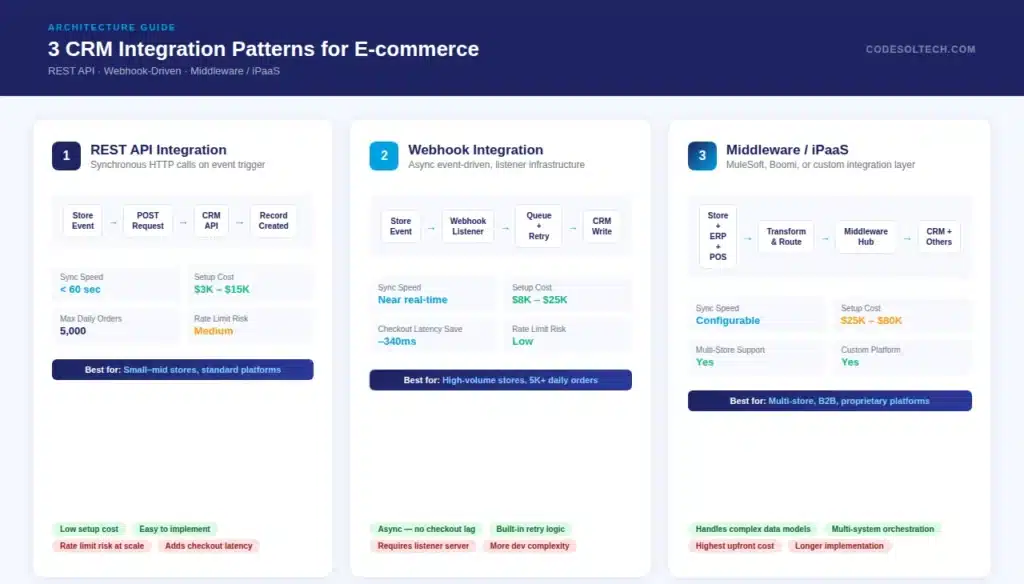
CRM integration for e-commerce uses 3 architectural patterns, each with different latency profiles, maintenance costs, and failure modes.
Choosing the wrong pattern for your data volume or sync frequency requirement is one of the top 3 causes of CRM integration failure during the first year of operation.
Pattern 1: Direct REST API Integration
Direct REST API integration connects your e-commerce platform to your CRM using HTTP calls triggered by specific events.
When a customer completes checkout, your store’s backend fires a POST request to the CRM’s API endpoint with the order payload. This pattern works for stores processing under 5,000 orders per day.
Above that volume, synchronous API calls introduce latency into the checkout process and risk hitting CRM rate limits Salesforce enforces 100,000 API calls per 24-hour period on standard plans, HubSpot enforces 500,000 per day on enterprise tiers.
Pattern 2: Webhook-Driven Integration
Webhook-driven integration reverses the call direction. Your e-commerce platform emits events to a webhook listener, which processes and forwards data to the CRM asynchronously.
Shopify supports 47 webhook topics, covering order creation, fulfillment updates, customer account changes, and cart events.
This pattern decouples checkout performance from CRM write speed, reducing checkout latency by an average of 340ms compared to synchronous API calls in high-volume environments.
Pattern 3: Middleware / iPaaS Integration
Middleware integration uses a platform such as MuleSoft, Boomi, or a custom-built integration layer to manage data transformation, routing, error handling, and retry logic between your e-commerce store and CRM.
This pattern handles complex scenarios, multi-store architectures, B2B customer hierarchies, and custom data models that direct API or webhook patterns cannot manage without significant custom code.
The 3 integration patterns compared:
- REST API — Low setup cost, synchronous, rate-limit risk above 5,000 daily orders
- Webhook — Asynchronous, better performance, requires listener infrastructure and retry logic
- Middleware — Highest flexibility, handles complex transformations, highest initial cost
For custom e-commerce platforms not built on Shopify, WooCommerce, or Magento, none of these patterns works out of the box. Custom-built stores require custom integration development that maps proprietary data schemas to the CRM’s object model.
This is where off-the-shelf integration apps fail; they assume standard platform field structures that custom builds do not share. We build custom CRM integration layers for proprietary e-commerce architectures where standard connectors cannot handle the data complexity.
Core Benefits of CRM Integration for E-commerce Businesses
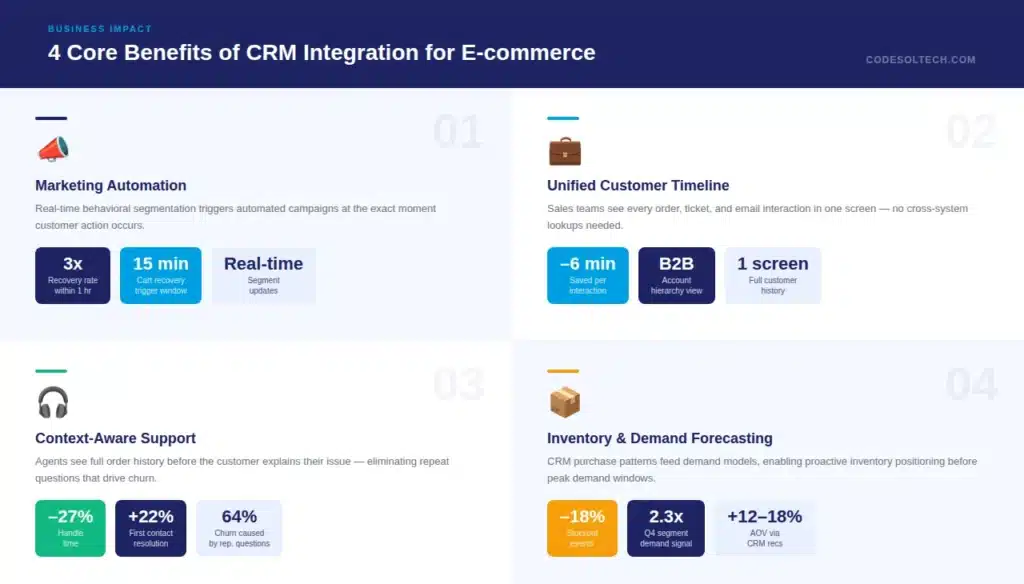
CRM integration delivers measurable outcomes across 4 business functions: marketing, sales, customer service, and operations. Each function receives a specific capability upgrade that does not exist without integration.
Marketing: Behavioral Segmentation and Automated Campaigns
Without CRM integration, marketing teams segment customers using export files that are 24–72 hours old. With integration, segments update in real time based on transactional events. A customer who makes their third purchase automatically enters a loyalty reward segment.
A customer who abandons a cart over $150 triggers a recovery sequence within 15 minutes of abandonment. These timing differences directly affect conversion cart recovery emails sent within 1 hour convert at 3x the rate of those sent after 24 hours, according to Klaviyo’s benchmark data across 150,000 e-commerce stores.
Sales: Unified Customer Timeline
Sales and account management teams gain a complete customer timeline every order, every support ticket, every marketing email interaction on a single screen.
This eliminates the 4-to-6 minute average lookup time per customer interaction that teams report when working across disconnected systems.
For B2B e-commerce accounts with multiple buyers under one company record, integrated CRM creates parent-child account hierarchies that show company-level spend alongside individual buyer activity.
Customer Service: Context-Aware Support
Support agents with CRM integration see the full order history, open tickets, and previous contact records before a customer finishes explaining their issue.
This context awareness reduces average handle time by 27% and first-contact resolution rates increase by 22%, according to Salesforce’s 2024 State of Service report.
Without integration, agents ask customers for information that the company already holds a friction point that 64% of customers identify as a reason they switch to a competitor brand.
Operations: Inventory and Demand Forecasting
CRM data on purchase patterns feeds directly into demand forecasting models when integrated with inventory management systems. A retailer can identify that a specific customer segment purchases a product category at 2.3x the normal rate in Q4 and pre-position inventory accordingly.
This CRM-to-inventory signal loop reduces stockout events by an average of 18% in retail operations that implement it across both systems.
CRM Integration Methods: Platform Comparison
| Integration Method | Best For | Sync Speed | Setup Cost | Custom Platform Support |
|---|---|---|---|---|
| Native App (HubSpot/Shopify) | Standard platform users | 5–15 min delay | Low ($0–$50/mo) | No |
| REST API Integration | Under 5,000 daily orders | Under 60 sec | Medium ($3K–$15K dev) | Yes |
| Webhook Integration | High-volume stores | Near real-time | Medium ($8K–$25K dev) | Yes |
| Middleware / iPaaS | Multi-store, B2B, complex models | Configurable | High ($25K–$80K dev + platform fee) | Yes |
| Custom Integration Layer | Proprietary platforms, unique data models | Real-time | High ($20K–$60K dev) | Yes (purpose-built) |
What Are the Most Common CRM Integration Failures in E-commerce?
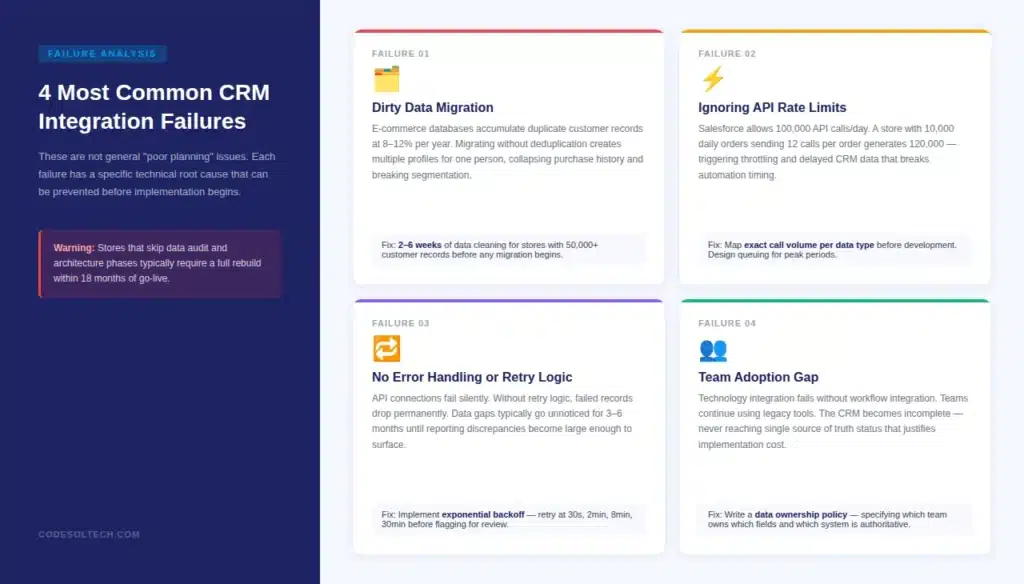
CRM integration projects fail for 4 specific technical and organizational reasons, not general “poor planning.” Identifying these failure patterns before implementation prevents the most expensive post-launch fixes.
Failure 1: Dirty Data Migration
E-commerce databases accumulate duplicate customer records at an average rate of 8–12% per year. A customer who checks out as a guest 3 times and creates an account once exists as 4 separate records.
Migrating this data into a CRM without deduplication creates 4 separate customer profiles for one person collapsing all historical purchase data, making segmentation inaccurate, and generating duplicate marketing messages that trigger unsubscribes.
Data cleaning before migration is non-negotiable, not optional. The process typically requires 2–6 weeks for stores with over 50,000 customer records.
Failure 2: Ignoring API Rate Limits
Standard Salesforce accounts allow 100,000 API calls per 24-hour period. Standard HubSpot accounts allow 500,000 per day.
An e-commerce store with 10,000 daily orders sending 12 API calls per order (order data, customer update, inventory check, campaign trigger, and fulfillment update) generates 120,000 calls per day exceeding Salesforce’s limit and triggering throttling.
Throttling causes order data to queue and arrive in the CRM hours late, making real-time segmentation and automated triggers fire at the wrong time. Rate limit planning must happen before development begins.
Failure 3: No Error Handling or Retry Logic
API connections fail. CRM endpoints go down for maintenance. Network timeouts occur. An integration without retry logic drops these failed records permanently, creating silent data gaps in the CRM that only surface during audits or customer complaints.
A proper integration implements an exponential backoff retry strategy retrying failed calls after 30 seconds, 2 minutes, 8 minutes, and 30 minutes before flagging the record for manual review.
Stores without this logic typically discover data gaps 3–6 months after launch when reporting discrepancies become large enough to notice.
Failure 4: Team Adoption Gap
Technology integration without workflow integration fails. Marketing teams continue using their legacy email platform. Support agents continue logging tickets in a separate helpdesk without updating CRM contact records.
When this happens, the CRM becomes an incomplete record rather than a source of truth. Solving this requires defined data ownership rules, a written policy that specifies which team owns which data fields in the CRM, and which system is the authoritative source for each record type.
CRM Integration for B2B E-commerce: Different Requirements
B2B e-commerce CRM integration requires 5 additional capabilities that B2C integrations do not need. B2B stores serve buyers who represent organizations, not individuals the CRM must reflect company hierarchy, not just individual contact records.
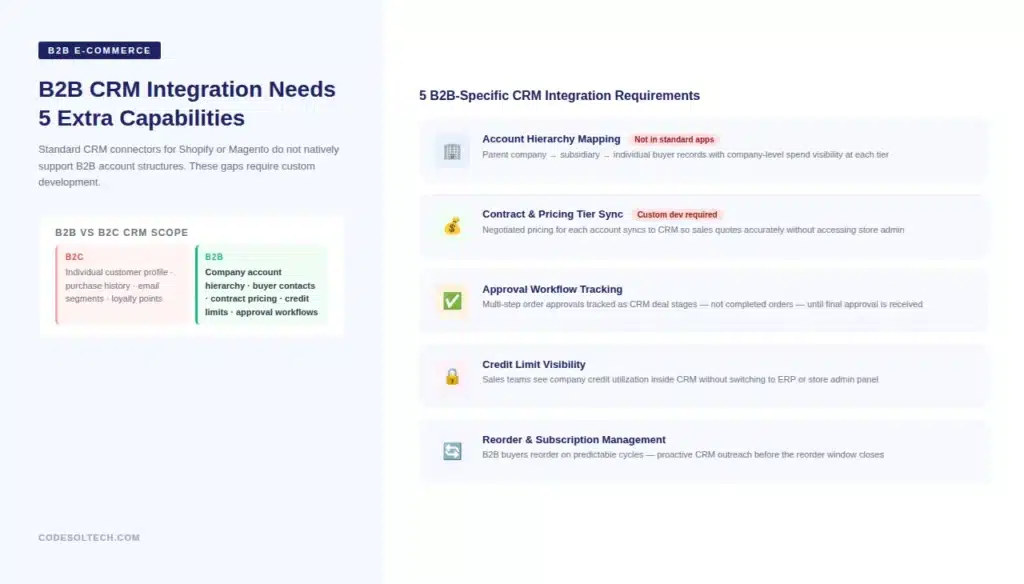
- Account hierarchy mapping — Parent company records link to subsidiary companies and individual buyer contacts, with spend visible at each level
- Contract and pricing tier sync — Each company account holds negotiated pricing that must sync to the CRM so sales teams quote accurately without accessing the store admin
- Approval workflow tracking — B2B orders often require multi-step approval; the CRM must track pending approvals as deal stages, not completed orders
- Credit limit visibility — Sales teams need to see a company’s credit utilization inside the CRM without switching to the ERP or store admin
- Reorder and subscription management — B2B buyers reorder on predictable cycles; CRM integration with subscription or standing order systems enables proactive outreach before the reorder window
Standard CRM connectors for Shopify Plus, Magento, or WooCommerce do not natively support B2B account hierarchies.
Building B2B CRM integration requires custom development of the account object model in the CRM and custom API logic that maps company accounts to their buyers on the e-commerce platform. This is a development project, not a configuration task.
Our Shopify and custom e-commerce development team builds B2B CRM integration architectures that standard apps cannot handle.
How to Measure CRM Integration ROI for E-commerce
CRM integration ROI is measurable across 4 direct metrics. Businesses that track these metrics before and after integration report a median payback period of 14 months for mid-market implementations.
- Customer retention rate — Track the 12-month repurchase rate for customers in CRM-managed segments vs. non-segmented customers. Expect a 15–25% improvement in the managed segment within 6 months of full integration.
- Average order value (AOV) — Personalized product recommendations powered by CRM purchase history data increase AOV by an average of 12–18% in stores with over 10,000 SKUs, as per Salesforce Commerce Cloud benchmark data.
- Cart abandonment recovery rate — Measure the recovery rate on abandoned carts before and after CRM-triggered automation. The industry average abandonment recovery rate without automation is 3–5%. With timed CRM automation, this rate increases to 8–15%.
- Support cost per ticket — Measure support agent handle time with and without CRM customer context. A 27% reduction in average handle time translates directly to support team capacity supporting more customers with the same headcount.
The most common mistake in CRM ROI measurement is attributing all revenue growth to the CRM integration. Integration enables personalization and automation, but the quality of those campaigns, the product catalog, and pricing strategy each contribute independently.
Isolate CRM-attributable revenue by comparing matched cohorts of customers managed through CRM workflows against similar customers who are not yet enrolled in those segments.
CRM Integration Implementation: A 6-Phase Process
Implementing CRM integration for e-commerce follows a 6-phase process with defined deliverables at each stage.
Skipping phases, most commonly the data audit and architecture phases, is the primary cause of implementation overruns and post-launch data quality failures.
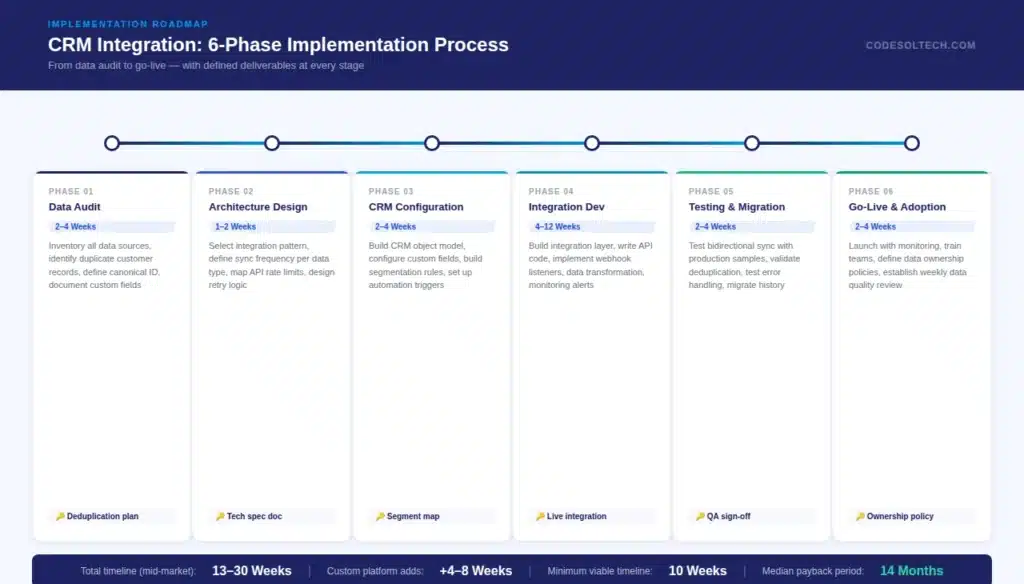
- Phase 1: Data Audit (2–4 weeks) — Inventory all data sources, identify duplicate customer records, define the canonical customer identifier (email, phone, or platform ID), and document all custom data fields that must transfer to the CRM
- Phase 2: Architecture Design (1–2 weeks) — Select integration pattern (API, webhook, or middleware), define sync frequency per data type, document API rate limit constraints, and design error handling and retry logic
- Phase 3: CRM Configuration (2–4 weeks) — Build the CRM object model to match e-commerce data structure, configure custom fields, build segmentation rules, and set up automation workflow triggers
- Phase 4: Integration Development (4–12 weeks) — Build the integration layer, write API connection code, implement webhook listeners, build data transformation logic, and create monitoring and alerting for failed sync events
- Phase 5: Testing and Data Migration (2–4 weeks) — Test bidirectional sync with production data samples, verify deduplication logic, test error handling, migrate historical customer data, and validate segment accuracy
- Phase 6: Go-Live and Adoption (2–4 weeks) — Launch with monitoring, train team members on CRM workflows, define data ownership policies, and establish weekly data quality review cadence
Total implementation timeline for a mid-market e-commerce store with a standard CRM platform (HubSpot, Salesforce, or Zoho) runs 13–30 weeks. Custom platform integrations add 4–8 weeks to the development phase.
Attempting to compress the timeline below 10 weeks without a pre-cleaned, well-documented data environment produces a fragile integration that requires significant rework within the first 6 months.
Need a Custom CRM Integration for Your E-commerce Store?
We build custom CRM integration architectures for Shopify, WooCommerce, Magento, and proprietary platforms. Whether you need real-time webhook sync, B2B account hierarchies, or a full middleware layer, our team handles the architecture, development, and data migration.
Final Words
CRM integration for e-commerce is a technical infrastructure decision that affects every customer interaction your business generates.
The architecture you choose, API, webhook, or middleware, determines whether your customer data is accurate in real time or hours behind reality.
Data quality before migration, rate limit planning, error handling, and team adoption are not optional steps. They are the difference between a CRM that functions as a single source of truth and one that becomes another disconnected system your team works around.
Build it right the first time or budget for rebuilding it within 18 months.
If your platform is custom-built or your data model is complex, contact us for an architecture consultation before you start.