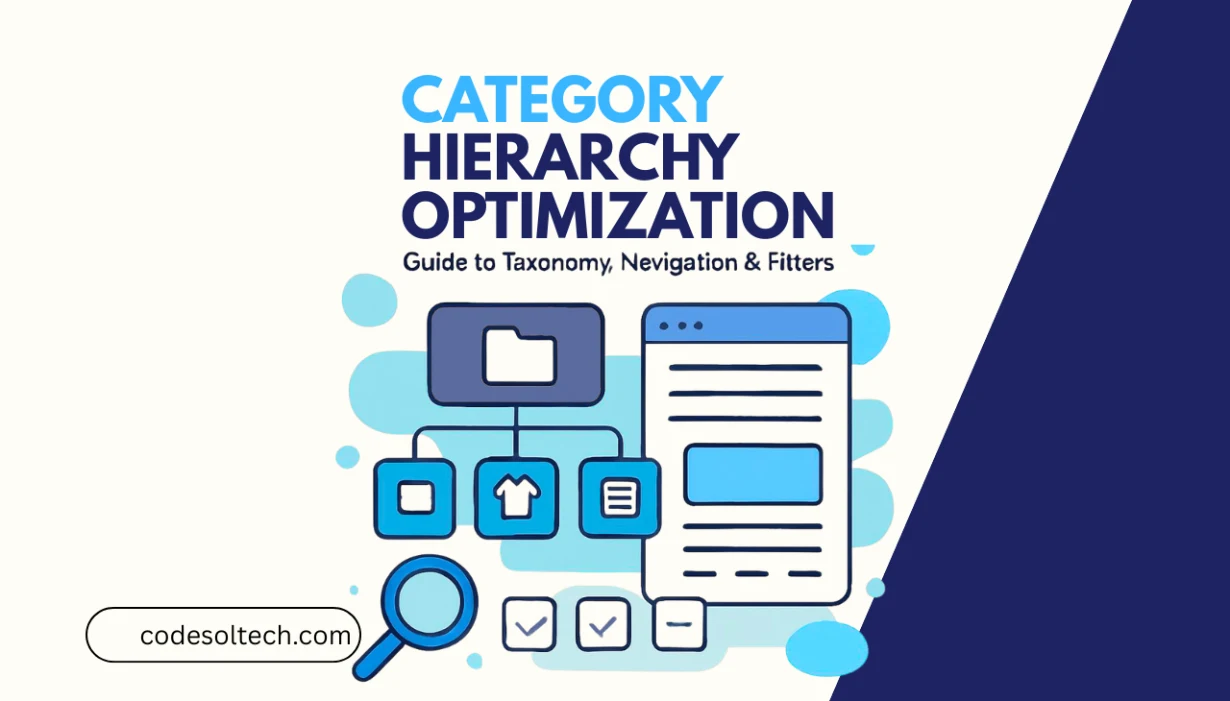
Category hierarchy optimization is the process of structuring a website’s taxonomy into a logical, crawlable, and keyword-aligned system of parent categories, subcategories, and product-level pages. A correctly optimized hierarchy reduces crawl depth, distributes internal link equity efficiently, and signals topical authority to search engines.
Poorly structured hierarchies dilute PageRank, create orphan pages, and inflate crawl budgets all of which suppress organic rankings at scale.
This guide covers the 4 core components of category hierarchy optimization: taxonomy architecture, navigation design, faceted filter management, and URL structure.
Each component directly affects organic rankings, crawl efficiency, and user engagement metrics on both e-commerce and informational websites.
What Is Category Hierarchy Optimization?
Category hierarchy optimization is a technical and semantic SEO discipline that structures a website’s product or content taxonomy into a multi-level tree: root domain → parent categories (Level 1) → subcategories (Level 2) → sub-subcategories (Level 3) → individual pages (Level 4).
The hierarchy defines the URL structure, internal linking architecture, and the topical clustering model that search engines use to evaluate site authority.
Google’s Product Taxonomy — a structured classification system covering over 5,427 product categories — demonstrates how search engines think about hierarchical product classification.
Websites that mirror this taxonomy logic align their structure with Google’s own ontology, which improves category page indexing rates and semantic relevance scoring.
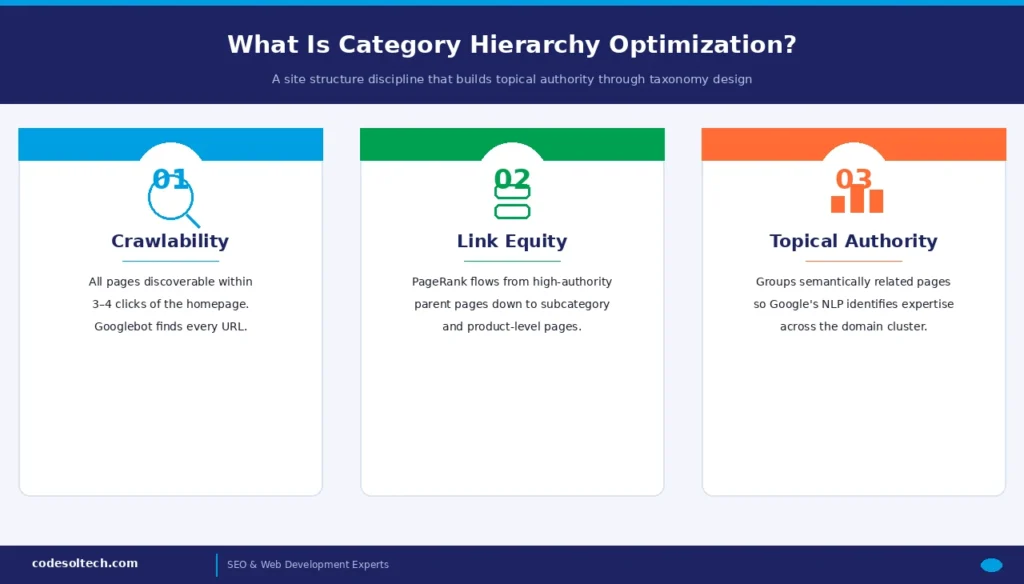
A category hierarchy serves 3 distinct SEO functions:
- Crawlability: Ensures Googlebot discovers all pages within a maximum of 3–4 clicks from the homepage.
- Link equity distribution: Passes PageRank from high-authority parent pages down to deeper subcategory and product pages.
- Topical authority signaling: Groups semantically related pages, allowing Google’s NLP systems to identify subject-matter expertise within a domain.
Why Category Hierarchy Directly Impacts SEO Rankings
Search engines crawl websites through hyperlinks. A flat hierarchy where every page is reachable within 2 clicks of the homepage maximizes crawl frequency for all pages.
A deep hierarchy where pages sit 6–8 clicks from the homepage causes Googlebot to deprioritize those pages during crawl budget allocation, resulting in delayed or incomplete indexation.
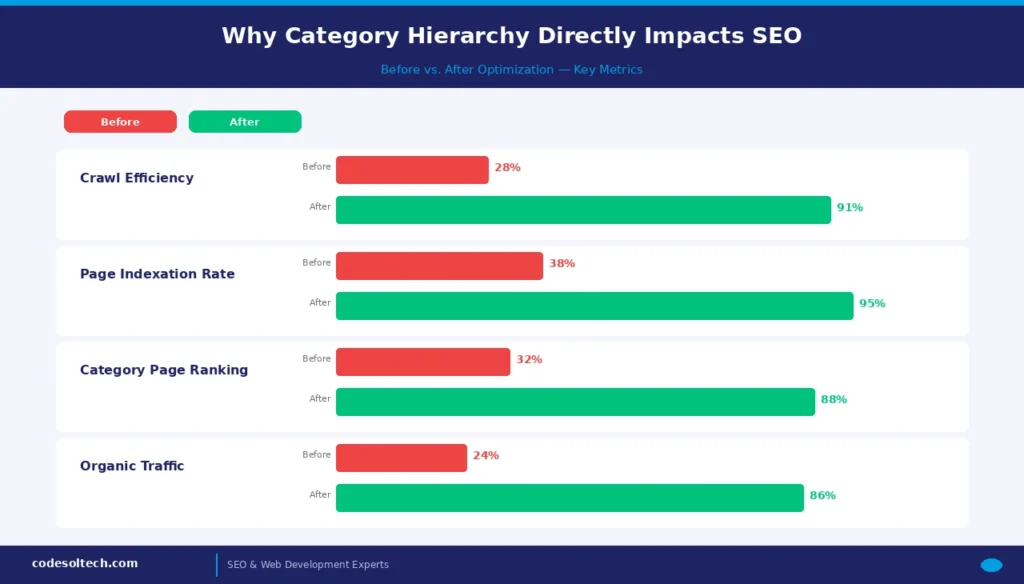
Google’s documentation on crawl budget management confirms that crawl budget is finite and determined by crawl rate and crawl demand.
Large e-commerce sites with 50,000+ SKUs waste crawl budget on parameter-generated URLs created by unoptimized faceted navigation filters, leaving core category pages under-crawled and their rankings suppressed.
Category hierarchy also directly controls keyword cannibalization. When parent and subcategory pages target overlapping keyword clusters without a clear topical boundary, Google struggles to assign the correct ranking URL. A properly structured taxonomy assigns each hierarchy level a distinct keyword intent:
- Level 1 — Root categories: Broad, high-volume navigational intent (e.g., “Men’s Shoes” — 60,500 monthly searches)
- Level 2 — Subcategories: Mid-funnel categorical intent (e.g., “Men’s Running Shoes” — 12,100 monthly searches)
- Level 3 — Sub-subcategories: Transactional, long-tail intent (e.g., “Men’s Trail Running Shoes” — 2,400 monthly searches)
- Level 4 — Product pages: Specific product and brand-name transactional intent (e.g., “Nike Pegasus 41 Trail Men’s”)
💡 Topical Authority Insight: A site that correctly maps keyword intent to each hierarchy level earns what Koray Tuğberk GÜBÜR defines as “Topical Authority” — the state where a search engine trusts a domain to be the most comprehensive, expert source on a subject cluster.
Category hierarchy is the structural skeleton that makes topical authority achievable.
Taxonomy Architecture: The 3-Level Framework
Taxonomy is the formal classification system that organizes a website’s content or products into a hierarchical structure with defined parent-child relationships. In SEO, taxonomy architecture determines how link equity flows, how breadcrumbs render in SERPs, and how Google’s Knowledge Graph clusters related entities within a domain.
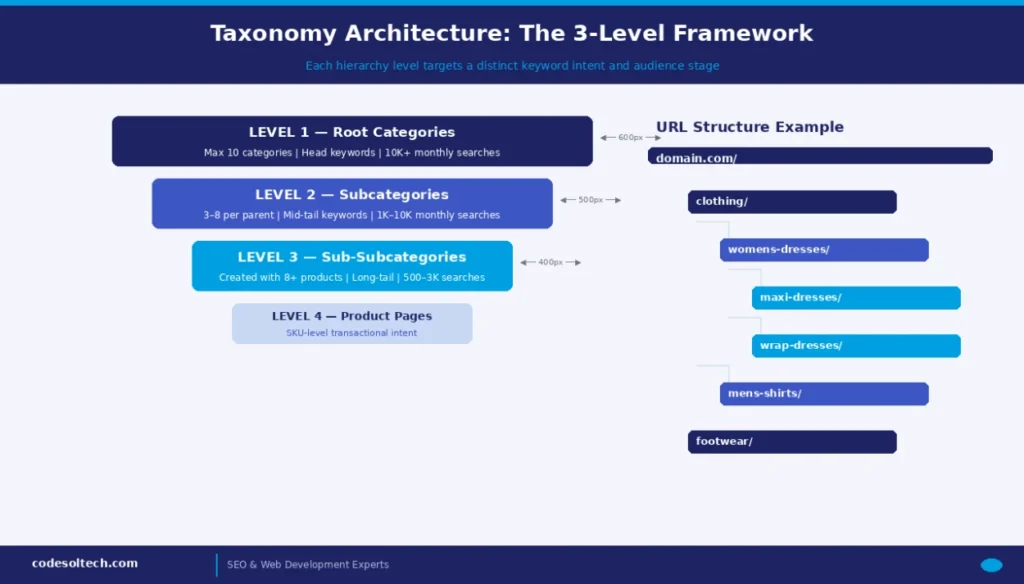
The optimal taxonomy framework for most e-commerce sites uses 3 category levels below the root domain, producing a total page depth of 4 clicks: homepage → L1 → L2 → L3 → product. Sites with fewer than 500 products use 2 category levels.
Sites with over 100,000 SKUs use a maximum of 4 category levels, reserving the 4th level exclusively for high-traffic, high-inventory subcategories.
The 3-Level Taxonomy Model
- Level 1 — Root Categories: Maximum 10 primary categories. These target head keywords with monthly search volumes above 10,000. URL pattern:
/clothing/ - Level 2 — Subcategories: 3–8 subcategories per L1 parent. These target mid-tail keywords with 1,000–10,000 monthly searches. URL pattern:
/clothing/womens-dresses/ - Level 3 — Sub-Subcategories: Created only when the parent L2 category contains a minimum of 8 distinct products within that classification. URL pattern:
/clothing/womens-dresses/maxi-dresses/
The 8-Product Rule: Creating a subcategory page with fewer than 8 products produces a thin content page. Google’s quality systems classify these as low-value, which reduces the overall domain quality score and suppresses rankings across the entire site — not just the thin page.
The taxonomy must be product-led, not search-volume-led. If a category contains 25 distinct products sharing a genuine attribute (e.g., “Paisley Notebooks”), the subcategory earns creation regardless of its monthly search volume.
Conversely, if a high-volume keyword like “floral notebooks” maps to only 2 available products, the category does not meet the inventory threshold and is not created.
How Many Category Levels Does a Website Need?
Most websites need 3 category levels — root categories, subcategories, and sub-subcategories — with products at Level 4. The correct number of levels is determined by 3 factors: total product count, inventory diversity, and target keyword breadth.
| Product Count | Optimal Levels | Structure | Max Page Depth |
|---|---|---|---|
| Under 100 | 1 level | Homepage → Category → Product | 3 clicks |
| 100 – 1,000 | 2 levels | Homepage → L1 → L2 → Product | 4 clicks |
| 1,000 – 50,000 | 3 levels | Homepage → L1 → L2 → L3 → Product | 5 clicks |
| Over 50,000 | 4 levels max | Homepage → L1 → L2 → L3 → L4 → Product | 6 clicks |
Adding a 5th level creates crawl depth issues that reduce indexation rates by 30–45% for the deepest pages, based on Googlebot crawl behavior documented in large-scale technical SEO audits.
Non-clickable categories in the navigation menu groupings that exist solely for UX organization without their own indexable page are a valid strategy for Level 1 groupings that target no specific keyword.
Flat vs. Deep Hierarchy: Technical Comparison
A flat hierarchy places all category pages within 2 clicks of the homepage. A deep hierarchy distributes categories across 5–8 click levels. Each model produces distinct SEO outcomes measured across 5 technical dimensions:
| Dimension | Flat Hierarchy | Deep Hierarchy |
|---|---|---|
| Crawl Efficiency | High — all pages reachable in ≤3 clicks | Low — pages at depth 6+ are under-crawled |
| PageRank Flow | Concentrated — strong signal to fewer pages | Diluted — signal weakens at each additional level |
| Keyword Targeting | Limited — fewer pages for long-tail terms | Extensive — enables granular long-tail capture |
| UX Navigation | Simple — fewer clicks to product level | Complex — risk of user drop-off at nav steps |
| Cannibalization Risk | Higher — broad pages compete for similar queries | Lower — granular pages target distinct intent |
The optimal hierarchy balances both models: 3 structured vertical levels with flat horizontal internal linking that cross-links related subcategories across the same tier, not just through the parent-child relationship.
This creates a semantic mesh that strengthens topical authority signals without increasing crawl depth.
URL Structure Within Category Hierarchy
URL structure within category hierarchy defines how topical relevance is communicated to both search engines and users. A hierarchical URL pattern — domain.com/category/subcategory/sub-subcategory/product-name/ — embeds keyword context at every path segment, reinforcing the topical relevance of each page within the hierarchy.
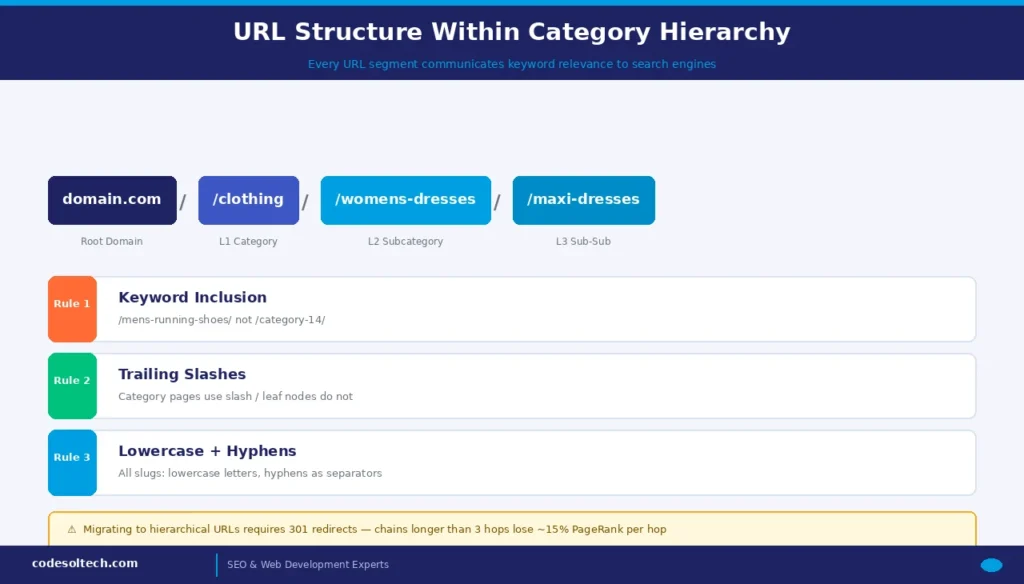
3 URL structure rules govern category hierarchy optimization:
- Rule 1 — Keyword inclusion: Every URL slug contains the primary keyword of that category level. The slug
/mens-running-shoes/outperforms/category-14/in both organic click-through rates and keyword relevance signals. Google’s systems parse URL strings as entity signals during relevance evaluation. - Rule 2 — Slash-terminated paths: Category URLs use trailing slashes (
/category/subcategory/) to signal directory-level pages. Product URLs do not use trailing slashes to signal leaf nodes. Consistency across all URLs prevents crawl duplication from both slash and no-slash variants being indexed separately. - Rule 3 — Lowercase and hyphenated: All URL slugs use lowercase letters and hyphens as word separators. Underscores (
_) create word-boundary ambiguity in Google’s tokenizer, reducing keyword extraction accuracy. CamelCase slugs create canonicalization risk when URLs are referenced in mixed-case by external sources.
Migrating from non-hierarchical URLs (e.g., /product?id=456&cat=12) to hierarchical URLs requires 301 permanent redirects mapped at the individual page level. Redirect chains longer than 3 hops reduce the passed PageRank by approximately 15% per additional hop.
All redirects are mapped and tested before deployment using a redirect mapping spreadsheet cross-referenced against the existing crawl export.
Faceted Navigation & Filter Optimization
Faceted navigation is the filter-and-sort system that allows users to refine category pages by product attributes such as size, color, price range, brand, and material.
Unoptimized faceted navigation generates millions of parameterized URLs; every filter combination produces a unique URL, which exponentially inflates a site’s crawlable URL count and destroys crawl budget efficiency.
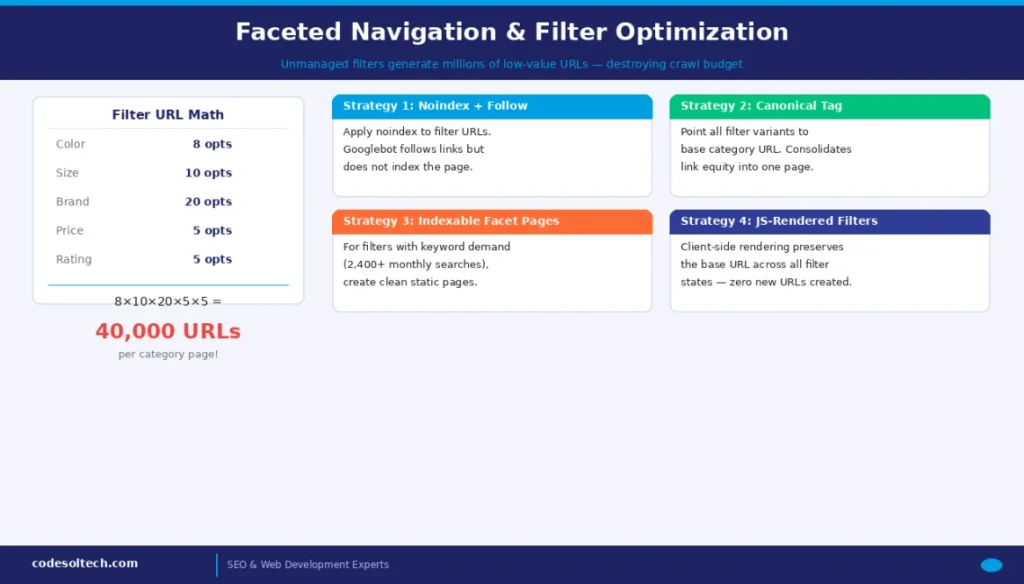
A standard e-commerce category page with 5 filter dimensions (color: 8 options, size: 10 options, brand: 20 options, price: 5 ranges, rating: 5 options) generates a theoretical maximum of 8 × 10 × 20 × 5 × 5 = 40,000 unique filter-combination URLs from a single category page.
At the site-wide scale across 200 category pages, this produces 8,000,000 crawlable parameterized URLs — all competing for Googlebot’s finite crawl capacity.
4 Strategies for Faceted Filter SEO Management
- Strategy 1 — Noindex + Follow (Standard approach for most filters):
Apply<meta name="robots" content="noindex, follow">to parameterized filter URLs. Googlebot follows the links to discover products but does not index the filter URL itself. Use this for low-SEO-value filter combinations such as size + color permutations that lack independent keyword demand. - Strategy 2 — Canonical Tag (For filter pages used as paid landing pages):
Apply<link rel="canonical" href="/category/subcategory/">to all parameterized filter pages, pointing back to the base category URL. This consolidates link equity into the canonical page. Use this when filter pages must remain indexable for non-SEO reasons, such as serving as PPC ad landing page destinations. - Strategy 3 — Indexable Facet Pages (For filters with verified search demand):
Create static, optimized category pages for filter combinations that have defined keyword demand. “Red running shoes for women” (2,400 monthly searches) earns a static page at/womens-running-shoes/red/, not a parameterized URL. These pages contain unique H1 tags, meta descriptions, and category descriptions targeting the specific filter query. - Strategy 4 — JavaScript-rendered filters (For UX-first filtering without URL generation):
Implement client-side rendered filters that update the product grid without generating a new URL. The base category URL remains constant across all filter states. This approach eliminates the need to create parameter URLs entirely while preserving the user filtering experience.
How Do Faceted Filters Affect Crawl Budget?
Faceted filters multiply crawlable URLs exponentially, consuming crawl budget on low-value parameterized pages instead of high-priority category and product pages. Google allocates crawl budget based on a site’s PageRank distribution and historical crawl data.
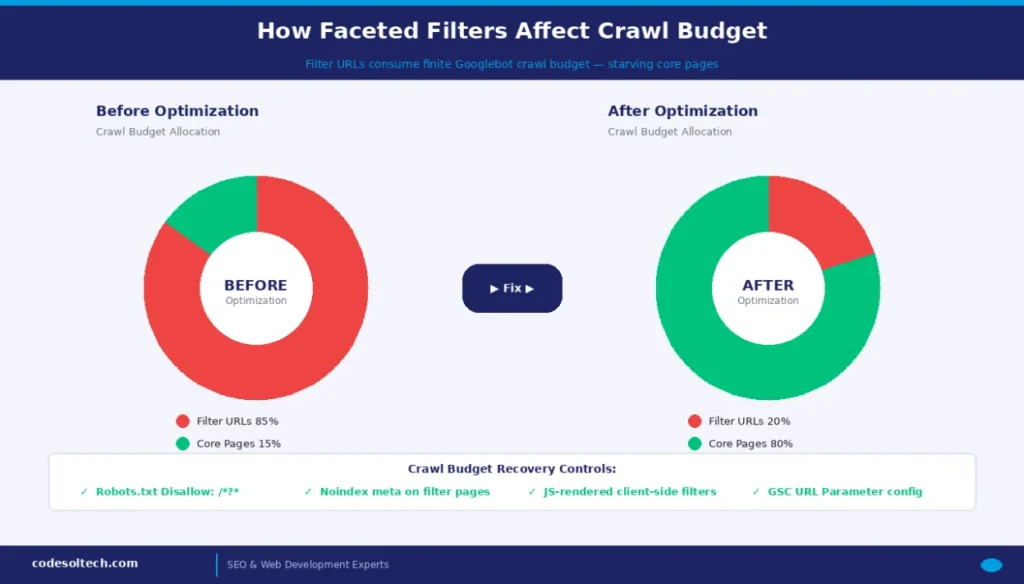
Filter-generated URLs typically receive minimal internal links and zero external backlinks, so Google assigns them low crawl priority yet still expends budget crawling them when they are not explicitly blocked or noindexed.
Google’s John Mueller confirmed in Search Central documentation that crawl budget issues directly cause pages on large sites to be crawled infrequently or not at all. Sites with over 10,000 parameterized filter URLs benefit immediately from implementing robots.txt Disallow rules for parameter patterns combined with Google Search Console’s URL parameter configuration.
Implement these 4 crawl budget controls for faceted navigation:
- Add
Disallow: /*?*inrobots.txtfor all parameterized filter URLs that lack independent SEO value — blocking Googlebot from discovering and queuing these URLs entirely. - Configure Google Search Console → Legacy Tools → URL Parameters to designate filter parameters (e.g.,
?color=,?size=,?sort=) as “Doesn’t affect page content” for parameters that don’t warrant unique indexation. - Implement
rel="nofollow"on internal links pointing to low-value filter combinations within the page’s HTML to prevent Googlebot from discovering these URLs through link crawling. - Set filter pagination parameters (e.g.,
?page=2) to noindex while keeping them followed, and implementrel="next"/rel="prev"pagination signals on filterable category pages where pagination applies.
Internal Linking Within Category Structure
Internal linking within a category hierarchy serves 2 distinct functions: distributing PageRank from authority pages to lower-hierarchy pages, and establishing semantic relationships between topically related category clusters.
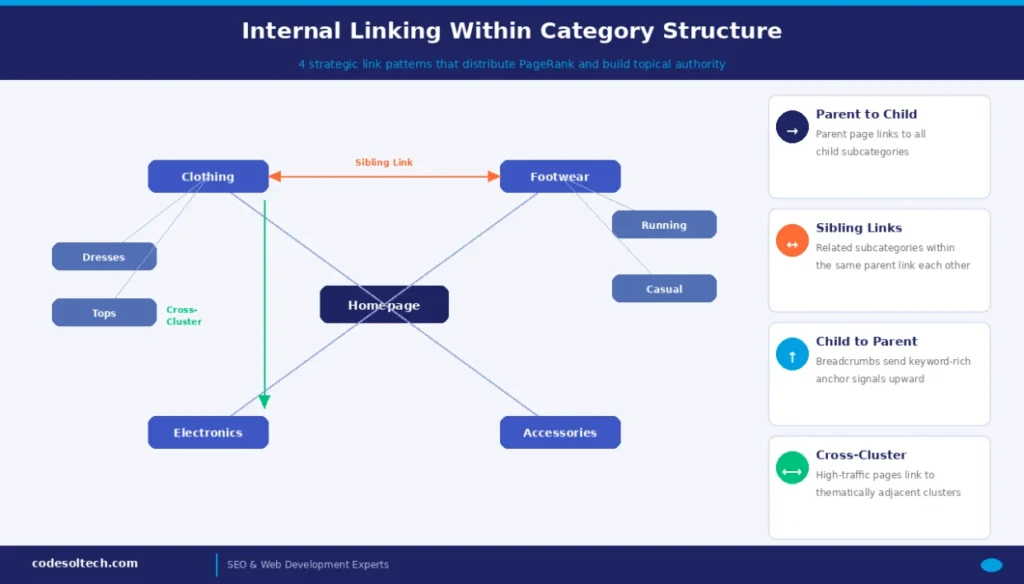
A category hierarchy without strategic internal linking wastes the PageRank accumulated by the homepage and top-level category pages.
4 internal linking patterns support category hierarchy optimization:
- Parent-to-child links: Every parent category page links to all direct subcategories in the main content area — not only in the navigation menu. In-content contextual links carry greater PageRank weight than navigation menu links because they appear within the primary content area that Googlebot evaluates for relevance signals.
- Sibling links: Related subcategories within the same parent link to each other. A “Women’s Running Shoes” page links to “Women’s Trail Shoes” and “Women’s Track Shoes,” reinforcing the semantic cluster around “women’s athletic footwear” as a topical domain.
- Child-to-parent links: Subcategory and product pages include contextual breadcrumb links back to all parent categories, distributing keyword-rich anchor text signals upward through the hierarchy.
- Cross-cluster links: High-traffic category pages link to thematically adjacent categories in other clusters. A “Men’s Running Shoes” page links to “Running Socks,” “Running Accessories,” and “Running Insoles,” expanding the topical authority signal across the domain’s semantic entity graph.
Anchor text in internal links must use descriptive, keyword-rich phrases. Generic anchors such as “click here” or “see more” provide no keyword-relevance signal.
Keyword-aligned internal anchor text directly influences Google’s understanding of the target page’s primary topic, accelerating that page’s ranking potential for the anchored keyword.
Breadcrumb Navigation: Schema Markup and SEO Value
Breadcrumb navigation is the hierarchical trail — Home > Category > Subcategory > Product — displayed above page content and rendered within Google’s organic search results in place of the raw URL.
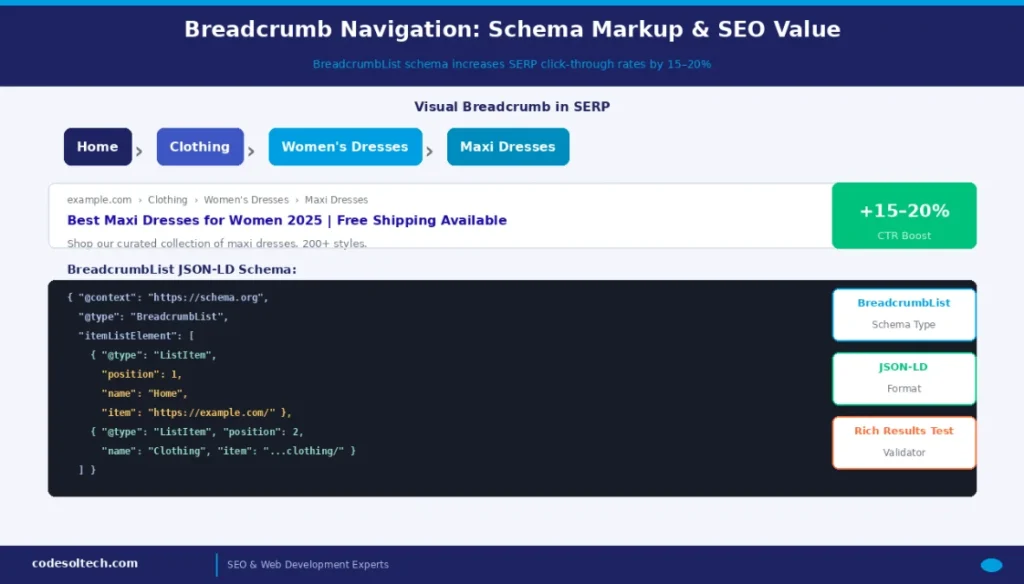
Google renders breadcrumb trails in SERPs when BreadcrumbList Structured data is correctly implemented, increasing organic click-through rates by an average of 15–20% compared to URL-only SERP snippets.
Implementing BreadcrumbList schema markup from Schema.org enables Google to extract the hierarchy directly from structured data, ensuring the SERP breadcrumb representation matches the intended category structure even when the visual breadcrumb deviates from the URL pattern.
The correct JSON-LD implementation for a 3-level breadcrumb on a subcategory page:
{
  "@context": "https://schema.org",
  "@type": "BreadcrumbList",
  "itemListElement": [
    {
      "@type": "ListItem",
      "position": 1,
      "name": "Home",
      "item": "https://example.com/"
    },
    {
      "@type": "ListItem",
      "position": 2,
      "name": "Clothing",
      "item": "https://example.com/clothing/"
    },
    {
      "@type": "ListItem",
      "position": 3,
      "name": "Women's Dresses",
      "item": "https://example.com/clothing/womens-dresses/"
    }
  ]
}
Breadcrumb schema validation is mandatory before publishing. Use Google’s Rich Results Test to verify that the BreadcrumbList structured data is correctly parsed.
Mismatches between schema markup and the visual breadcrumb displayed on-page cause Google to ignore the structured data entirely, eliminating the SERP breadcrumb trail enhancement.
Breadcrumb + Category Hierarchy Alignment: The breadcrumb schema must mirror the actual category hierarchy exactly. If a product page exists at /clothing/womens-dresses/maxi-dresses/product-name/, the BreadcrumbList contains 4 ListItems Home, Clothing, Women’s Dresses, and Maxi Dresses.
Shortcuts in the schema that skip hierarchy levels produce structured data errors and reduce SERP feature eligibility.
Category Page Content Requirements
Category pages rank for category-level keywords only when they contain unique, keyword-aligned textual content that differentiates the page from its parent and sibling categories.
Google’s quality guidelines classify category pages that contain only product grids with no descriptive text as thin content, reducing their probability of ranking for competitive head keywords regardless of the site’s domain authority.
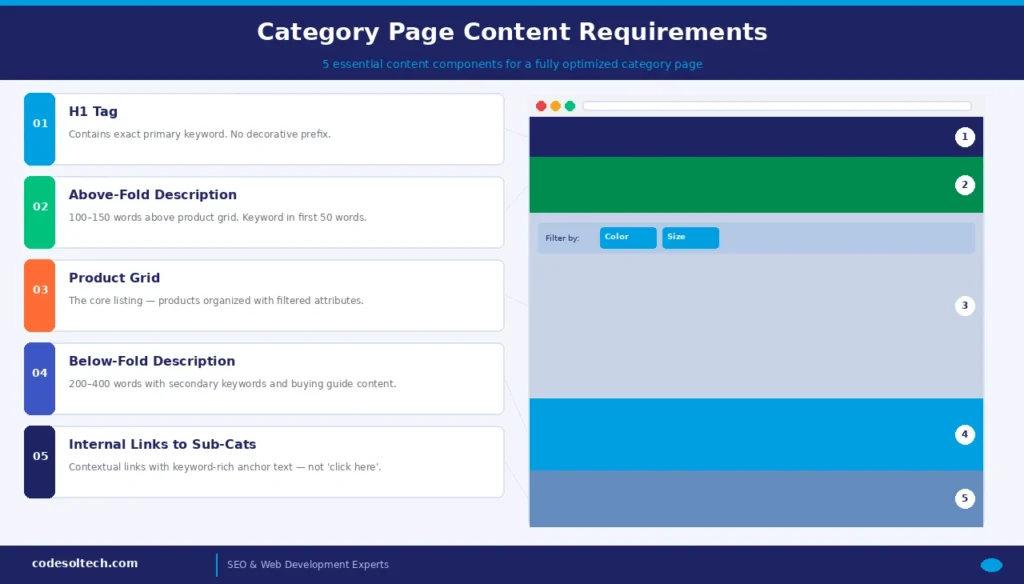
A fully optimized category page contains 5 content components:
- H1 tag: Contains the primary category keyword exactly as it appears in the target search query. Women’s Running Shoes — not “Explore Our Women’s Running Shoes Collection.” The H1 must match the keyword’s surface form to maximize exact-match keyword relevance.
- Above-the-fold description (100–150 words): Placed immediately above the product grid. This block defines the category, identifies 3–5 key product attributes, and contains the primary keyword within the first 50 words. Search engines weigh content that appears earlier in the document’s DOM more heavily than content that appears below the product grid.
- Below-the-fold description (200–400 words): Placed below the product grid. This block expands topical coverage with secondary keywords, related semantic entities, and buying-guide content that satisfies the informational intent signals associated with category-level queries.
- Internal links to subcategories: Contextual links to all child subcategories embedded within the above-the-fold or below-the-fold descriptions using keyword-rich anchor text — not generic “Shop All” labels.
- Attribute-labeled filters: Product filter labels use attribute-specific language (“Filter by Terrain Type,” “Filter by Support Level”) rather than generic labels (“Filter”), reinforcing the topical relevance of filter attributes for Google’s NLP parsing of the page’s content entity graph.
How to Audit an Existing Category Hierarchy?
Audit an existing category hierarchy using this 5-step process: crawl and map the hierarchy depth → identify orphan categories → detect keyword cannibalization → audit filter URL indexation → validate breadcrumb schema.
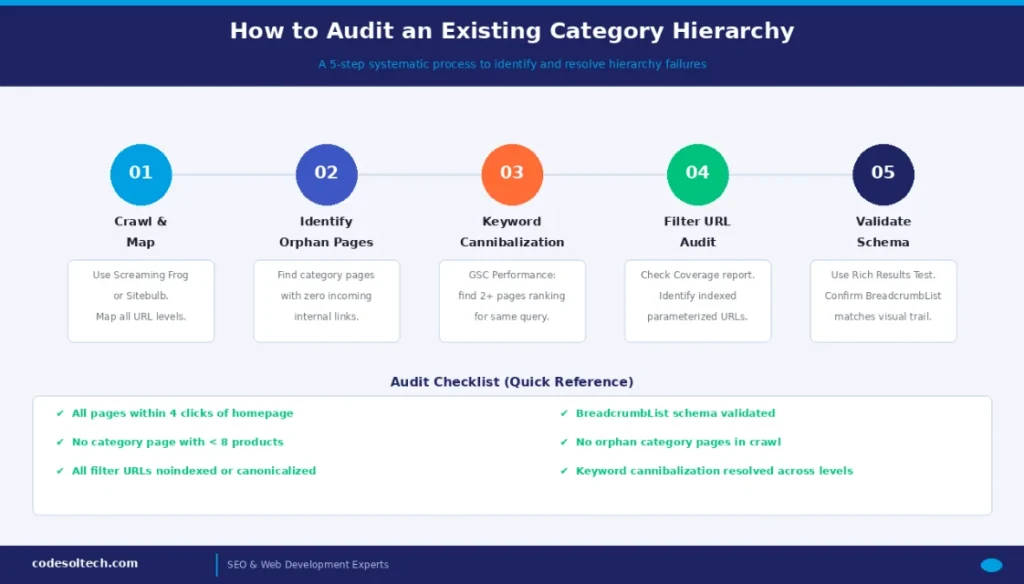
Step-by-Step Category Hierarchy Audit Process
Step 1 — Crawl and map hierarchy depth: Use Screaming Frog SEO Spider or Sitebulb to crawl the entire domain. Export all URLs and filter by category path patterns. Map each URL to its hierarchy level based on the number of URL path segments. Flag all pages sitting below Level 4 (more than 4 URL path segments from root) for structural review.
Step 2 — Identify orphan category pages: Filter the crawl export to find category pages with 0 internal incoming links from other pages on the site. Orphan category pages receive no PageRank flow and are crawled infrequently by Googlebot.
Resolve by linking orphan pages from their parent category navigation block or through contextual in-content internal links.
Step 3 — Detect keyword cannibalization between levels: Export Google Search Console’s Performance report, filtering for queries where 2 or more category pages appear in the same query’s URL impression data. A parent category page (/shoes/) and a subcategory page (/shoes/running/) both appearing for “running shoes” indicates a taxonomy boundary failure.
Resolve by differentiating content focus between levels or by implementing a canonical from the parent to the subcategory for that keyword intent.
Step 4 — Audit filter URL indexation: In Google Search Console → Coverage report → “Indexed” pages filter. Sort by URL pattern to identify parameterized filter URLs (URLs containing ?color=, ?size=, &sort=, &page=) that Google has indexed.
Each indexed low-value filter URL represents a crawl budget drain. Implement noindex tags or self-referencing canonical tags to remove these from the index within 2–3 crawl cycles.
Step 5 — Validate breadcrumb schema across hierarchy levels: Use Google’s Rich Results Test on a representative sample of 10 category pages — including 2 from each hierarchy level. Confirm that BreadcrumbList schema renders correctly and that the schema’s item hierarchy matches the visual breadcrumb displayed on the page.
Mismatches indicate either a CMS template error or a conflict between the schema injection plugin and the page’s actual URL structure.
Category Hierarchy Optimization Audit Checklist
- All category pages are within 4 clicks of the homepage
- No category page contains fewer than 8 products (e-commerce) or 5 posts (content sites)
- Root categories are limited to a maximum of 10 at Level 1
- All parameterized filter URLs are noindexed or canonicalized to the base category URL
- BreadcrumbList schema is implemented and validated on all category levels via Rich Results Test
- Every category URL slug contains the primary target keyword in lowercase with hyphens
- No orphan category pages exist in the crawl (0 incoming internal links)
- Above-the-fold category descriptions are present on all L1–L3 category pages (100–150 words minimum)
- Internal links connect parent, sibling, and cross-cluster category pages with keyword-rich anchor text
- Keyword cannibalization between hierarchy levels is identified and resolved
- Robots.txt blocks parameterized filter URL patterns where applicable
- 301 redirects map all old non-hierarchical URLs to new hierarchical equivalents
Final Words
Category hierarchy optimization is the structural foundation of all SEO efforts. Taxonomy defines topical authority. Navigation controls how PageRank flows. Faceted filters, when left unmanaged, destroy crawl budget at scale.
Start with a 3-level structure. Enforce the 8-product minimum. Canonicalize all filter URLs. Implement BreadcrumbList schema. Then, audit quarterly because hierarchy errors compound over time as new categories and products are added.
Ready to Optimize Your Category Hierarchy?
Get a professional taxonomy and site structure audit and uncover the structural SEO gaps costing you organic traffic and rankings.