A bulk product upload system is a server-side mechanism that ingests, validates, and persists large volumes of product records into an e-commerce database in a single automated operation.
Platforms such as WooCommerce, Shopify, and Magento expose dedicated bulk upload pipelines that accept structured data files, most commonly CSV (Comma-Separated Values), and execute batch CRUD transactions against the product catalog.
Enterprise stores with 10,000+ active SKUs rely on these systems to eliminate manual data-entry bottlenecks and reduce catalog update time from days to minutes.
What Is a Bulk Product Upload System?
A bulk product upload system is composed of 4 functional layers: a data ingestion layer (file parser), a validation layer (schema and business-rule enforcement), a transformation layer (data mapping and normalisation), and a persistence layer (database write engine).
Each layer processes records sequentially or in parallel batches before the data reaches the product database.
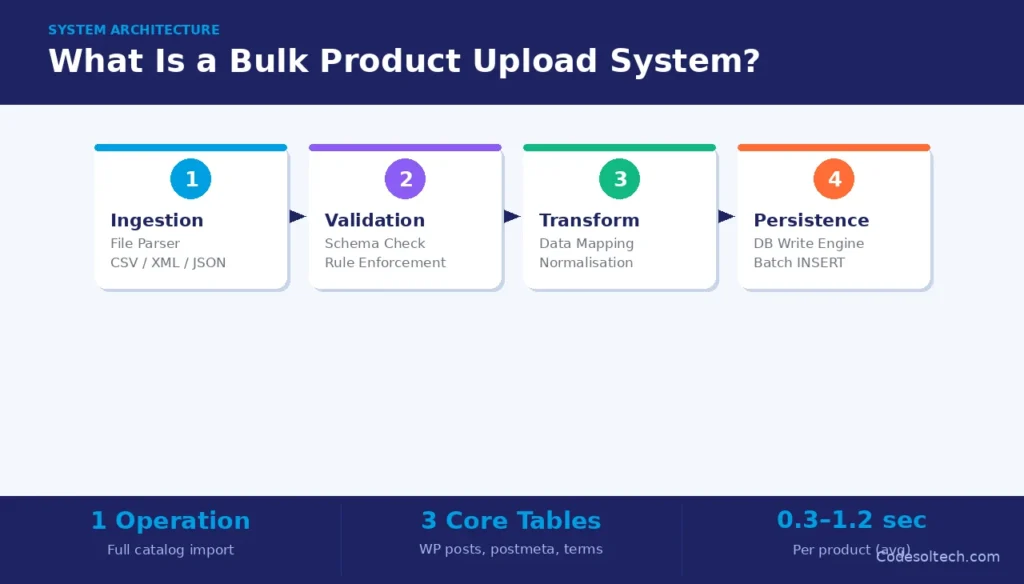
The system architecture determines import throughput, measured in records per second, which scales with server CPU, memory allocation, and database connection-pool size.
Bulk upload differs from real-time API product creation in 3 key ways:
- Throughput: Bulk systems insert hundreds of rows per transaction; REST API endpoints insert one record per HTTP request.
- Error handling: Bulk pipelines generate import reports listing row-level failures; REST APIs return per-request HTTP error codes.
- Resource consumption: Bulk jobs run as background queue workers; REST calls consume synchronous web-server threads.
CSV Import: The Standard Data Transfer Protocol for Bulk Product Data
CSV import is the dominant file format for bulk product upload because CSV is a plain-text, delimiter-separated format that every major spreadsheet tool and ERP system can export without proprietary encoding.
A WooCommerce CSV import file maps column headers directly to database field names — for example, sku, regular_price, stock_quantity, and product_cat.
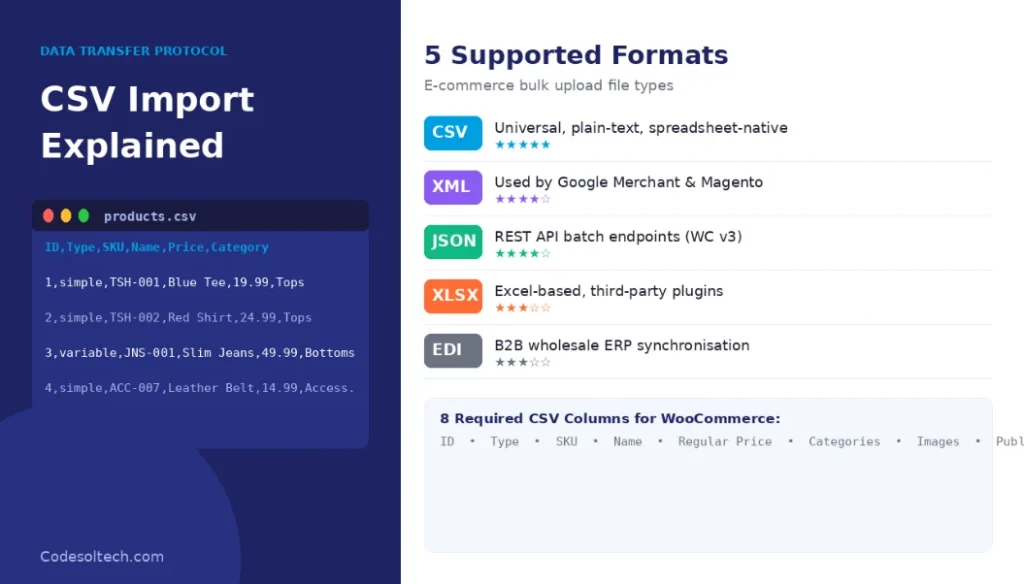
The WooCommerce importer natively processes up to 500 rows per batch before committing a transaction, preventing memory exhaustion on shared hosting environments.
Alternative bulk import formats used by enterprise platforms include:
- XML / feed files — used by Google Merchant Center and Magento’s import module.
- JSON payloads — accepted by REST API batch endpoints (e.g., WooCommerce REST API v3 batch route).
- XLSX (Excel) — supported via third-party import plugins such as WP All Import.
- TSV (Tab-Separated Values) — used in Amazon Seller Central flat-file uploads.
- EDI (Electronic Data Interchange) — used in B2B and wholesale catalog synchronisation between supplier and retailer ERP systems.
CSV File Structure Requirements for E-Commerce Product Data
A valid e-commerce CSV import file contains 3 mandatory components: a header row that defines field names, data rows where each row represents one SKU, and a UTF-8 encoding declaration that prevents character-set errors on multilingual product names.
The header row must match the platform’s expected column schema exactly; a mismatched column name causes the importer to skip the field silently rather than throw an error, resulting in incomplete product records.
A minimum viable product CSV for WooCommerce contains these 8 required columns:
ID— existing post ID for updates; empty for new products.Type— product type: simple, variable, or grouped.SKU— unique stock-keeping unit identifier; must be alphanumeric.Name— product title; maps topost_titleinwp_posts.Regular price— numeric value; no currency symbols.Categories— slash-separated category hierarchy (e.g., Clothing > Tops).Images— comma-separated absolute URLs; the importer fetches and attaches each image.Published— boolean: 1 for published, 0 for draft.
CSV Import Validation and Error Handling
The validation layer in a CSV import pipeline executes 2 categories of checks: structural validation (column count, data types, encoding) and business-rule validation (duplicate SKU detection, price range enforcement, required-field presence).
Structural validation runs before any database write; it rejects malformed rows and writes them to an error log with a row number and failure reason. Business-rule validation runs inside the transaction; it rolls back individual rows that violate constraints while committing valid rows.
A robust import system generates a post-import report that lists 3 data points per failed row: the row index, the field that failed validation, and the expected data format. Stores using WooCommerce development frameworks can extend validation logic via the woocommerce_product_import_pre_insert_product_object action hook, which fires before each product record is committed to the database.
How Does Database Handling Work in a Bulk Product Upload System?
Database handling in a bulk upload system refers to the set of operations the persistence layer executes to write, index, and commit product records to relational or non-relational storage.
In WordPress-based e-commerce (WooCommerce), product data is distributed across 3 core tables: wp_posts (product metadata and status), wp_postmeta (custom fields such as price, SKU, and stock), and wp_term_relationships (category and tag taxonomies).
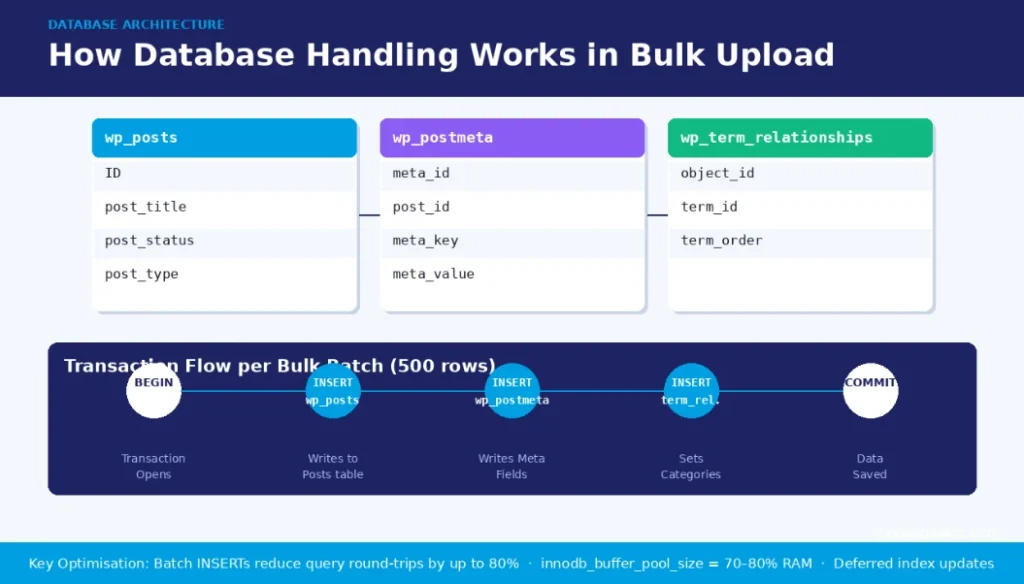
A single product insert requires writes to all 3 tables within one database transaction to maintain referential integrity.
The persistence layer uses batch inserts to reduce database round-trips. Instead of executing one INSERT statement per product, the system groups 100–500 rows into a single multi-row statement INSERT, reducing total query execution time by up to 80% on high-latency database connections.
This technique is documented in MySQL’s official INSERT optimisation guide.
Database Transaction Management and Rollback in Bulk Imports
A database transaction in a bulk upload context is an atomic unit of work: either all rows in the batch are committed or none are, ensuring data consistency. WooCommerce’s native importer wraps each batch of 500 rows in a single BEGIN … COMMIT block.
If a constraint violation occurs mid-batch (e.g., a duplicate SKU on row 342 of 500), the system applies a partial rollback strategy: it rolls back the individual failing row, logs the error, and continues committing the remaining 499 rows.
Full batch rollback is reserved for schema-level failures, such as a missing required column.
Production bulk upload systems on stores with 50,000+ SKUs configure 3 additional database-level optimisations:
- Disabled auto-commit: Batching
COMMITcalls reduces I/O flush operations per row from N to N/batch-size. - Deferred index updates: MySQL’s
ALTER TABLE … DISABLE KEYScommand suspends secondary index rebuilds during the import and re-enables them in a single pass after completion. - Increased
innodb_buffer_pool_size: Raising the InnoDB buffer pool to 70–80% of available RAM reduces disk I/O during large sequential write operations.
Indexing Strategy and Query Optimisation for Product Catalogs
After a bulk import completes, the database rebuilds indexes on 4 high-traffic columns: sku (for product lookup queries), post_status (for published/draft filtering), price (for range-filter queries on category pages), and stock_status (for in-stock filtering).
Without proper indexing, a product search query on a 100,000-SKU catalog executes a full table scan against wp_postmeta, resulting in query times exceeding 3 seconds. A composite index on (meta_key, meta_value) reduces that query to under 50 milliseconds.
Stores leveraging custom WooCommerce solutions implement HPOS (High-Performance Order Storage) to migrate product meta into a dedicated, indexed schema.
4 Types of Bulk Product Upload Methods in E-Commerce Platforms
E-commerce platforms support 4 distinct bulk upload methods, each suited to a specific operational context:
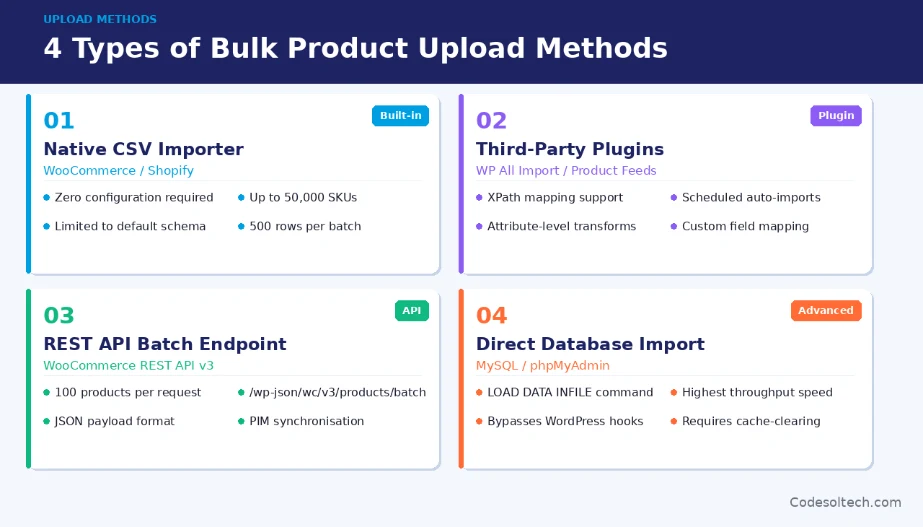
- Native CSV Importer: Built into WooCommerce and Shopify; zero configuration required; suitable for catalogs under 50,000 SKUs; limited to the platform’s default schema.
- Third-Party Import Plugins: Tools such as WP All Import and product feed management plugins extend native importers with XPath mapping, scheduled imports, and attribute-level transformation logic.
- REST API Batch Endpoints: WooCommerce REST API v3 exposes a
/wp-json/wc/v3/products/batchroute that accepts a JSON payload of up to 100 product objects per request; suitable for programmatic catalog synchronisation between a PIM (Product Information Management) system and the storefront. - Direct Database Import: Using MySQL’s
LOAD DATA INFILEcommand or phpMyAdmin import, a database administrator inserts product records directly intowp_postsandwp_postmeta; this method bypasses WordPress hooks and requires manual cache-clearing after completion.
What Are the Most Common Bulk Upload Errors and How Do You Fix Them?
Bulk import failures originate from 5 recurring error categories, each with a defined remediation:
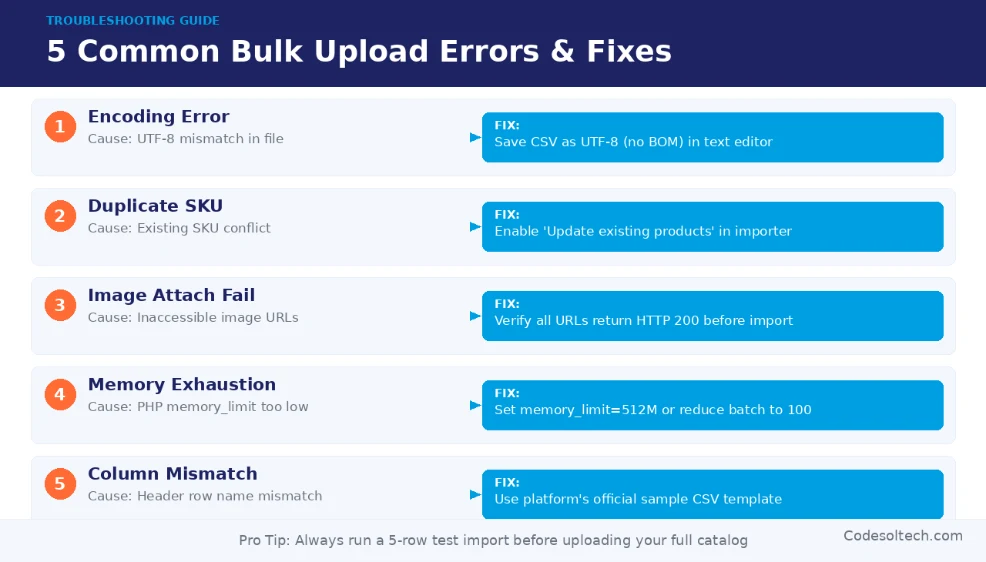
- Encoding errors (UTF-8 mismatch): Fix by opening the CSV in a text editor, saving with explicit UTF-8 encoding (without BOM), and re-uploading.
- Duplicate SKU conflicts: Fix by enabling the importer’s “Update existing products” toggle, which triggers an
UPDATEinstead ofINSERTfor matching SKUs. - Image attachment failures: Fix by verifying that all image URLs in the CSV are publicly accessible (HTTP 200 status) before import; firewalled or relative URLs cause the attachment step to time out.
- PHP memory limit exhaustion: Fix by increasing
memory_limitto 512M inphp.inior by reducing the importer’s batch size from 500 to 100 rows. - Column header mismatch: Fix by downloading the platform’s official sample CSV and using its header row as the template for all custom catalog files.
Bulk Upload vs. Manual Product Entry: Performance Benchmarks
Manual product entry in WooCommerce takes an average of 8–12 minutes per product when including image upload, category assignment, attribute configuration, and SEO metadata.
A configured CSV bulk upload system processes the same product in approximately 0.3–1.2 seconds, depending on server hardware and the number of attached images.
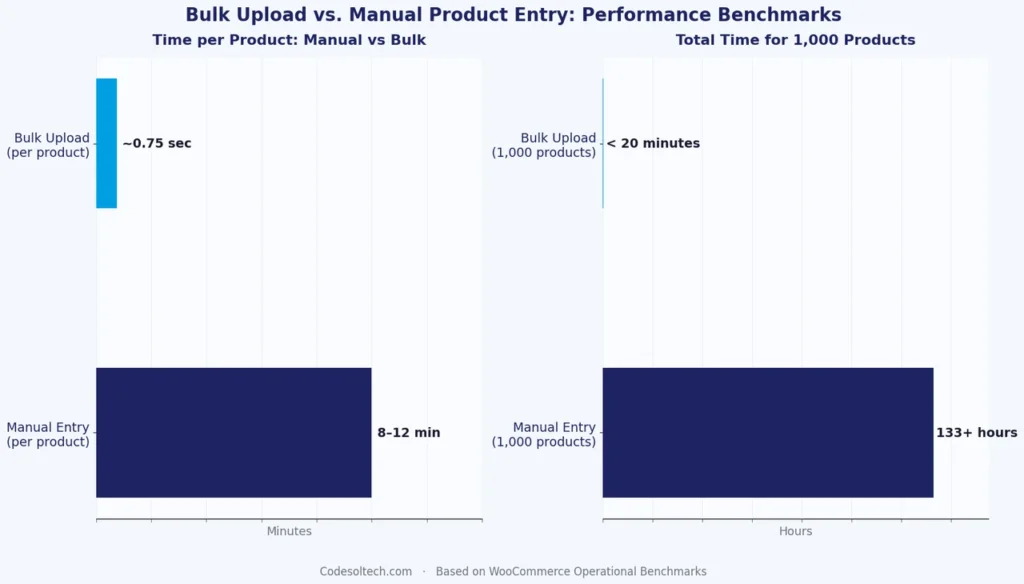
For a catalog of 1,000 products, the time difference is 133+ hours (manual) versus under 20 minutes (bulk import). This throughput gap makes bulk upload the only operationally viable method for stores migrating from legacy platforms or onboarding wholesale supplier catalogs.
Stores operating on e-commerce development frameworks that require frequent catalog refreshes — such as fashion, electronics, and FMCG verticals — schedule bulk imports via WP-Cron or server-level cron jobs to execute automated feed updates every 6, 12, or 24 hours.
Automated scheduling eliminates manual operator intervention and ensures stock levels, prices, and product availability remain synchronised between the supplier ERP and the storefront database.
How Bulk Product Upload Affects E-Commerce SEO
Bulk upload affects e-commerce SEO through 3 direct mechanisms. First, mass-imported products without unique meta_description and post_title values generate duplicate meta-tag patterns that dilute crawl budget.
Second, image URLs are imported without alt attributes fail Google’s image indexing requirements, reducing product visibility in Google Image Search.

Third, bulk-created variable products generate large numbers of canonical URLs for attribute combinations; without proper canonical tag configuration, these URLs compete with the parent product page in search results.
A structured bulk import workflow addresses all 3 SEO risks by including 4 SEO-specific columns in the CSV file:
meta:_yoast_wpseo_title— unique SEO title per product.meta:_yoast_wpseo_metadesc— unique meta description under 160 characters.meta:_yoast_wpseo_canonical— explicit canonical URL for variable product variants.images_alt_text— pipe-separated alt text for each imported product image.
Final Words
Bulk product upload systems transform catalog management from a manual bottleneck into an automated pipeline. CSV import defines the data transfer protocol. Database handling determines insert speed and data integrity.
Stores that configure both layers correctly with validated schemas, indexed databases, and SEO-enriched import files scale their product catalogs without proportional increases in operational overhead.
Ready to migrate or scale your product catalog?
Our team builds custom WooCommerce bulk upload pipelines complete with CSV validation, automated scheduling, and database optimisation so your catalog stays accurate and your import times stay fast.