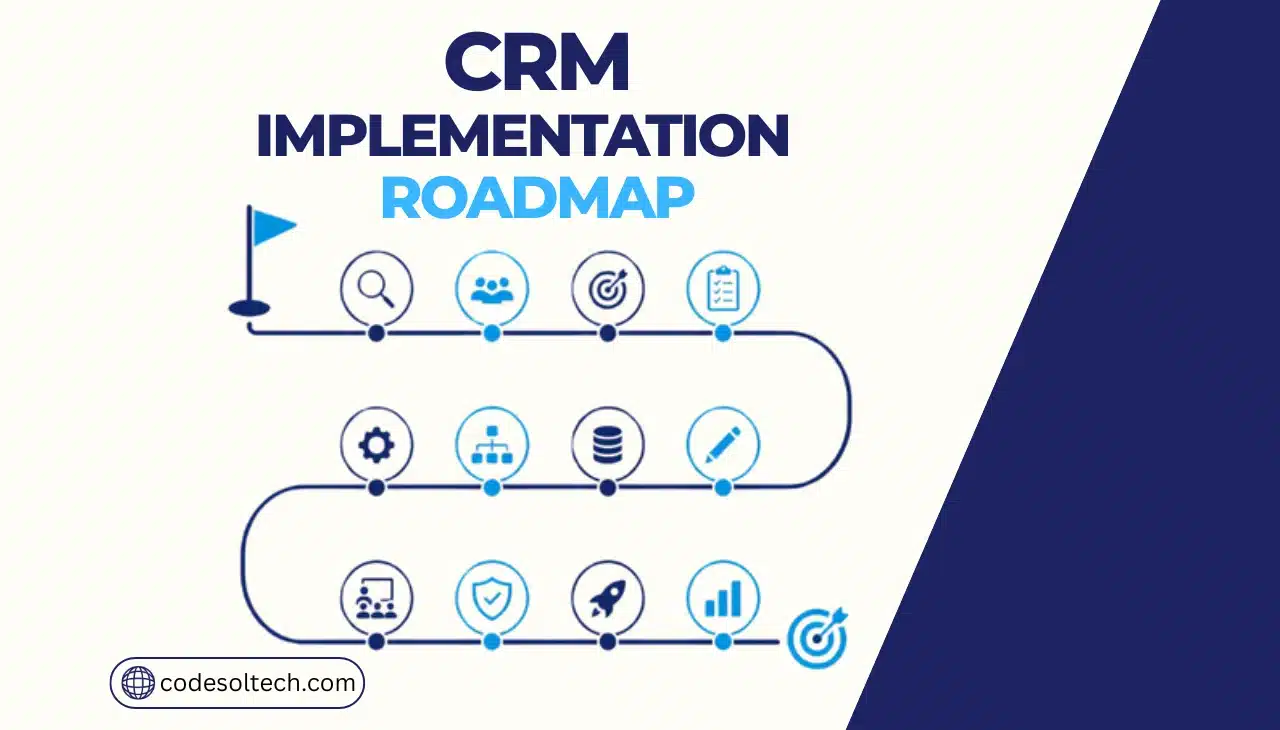
CRM implementation is the structured process of planning, configuring, migrating data into, and rolling out a customer relationship management system so that sales, marketing, and support teams adopt it as their system of record. A complete implementation covers 12 phases.
Defining objectives, gathering requirements, selecting the platform, designing the architecture, preparing data, configuring the system, building integrations, migrating records, testing, training users, launching, and measuring adoption.
What a CRM implementation includes
A CRM implementation includes four categories of work: technical configuration (fields, pipelines, permissions, automation), data operations (cleaning, mapping, migrating, and validating records), integration engineering (connecting the CRM to ERP, accounting, marketing, and support systems), and change management (training, communication, and adoption tracking).
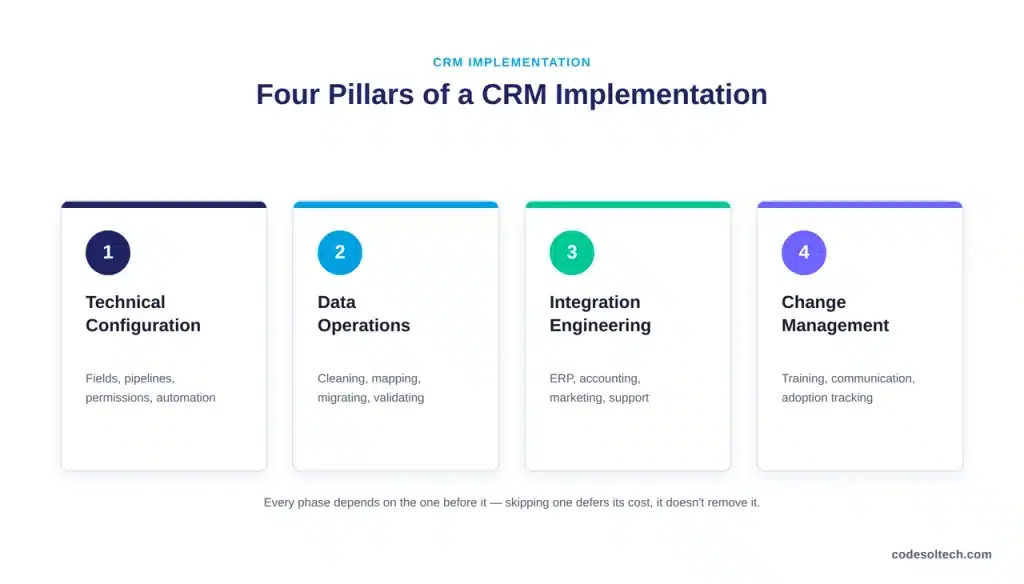
Technical configuration is usually the fastest phase. Change management is usually the phase organizations under-resource.
CRM implementation vs. CRM migration
CRM implementation is the full deployment lifecycle. CRM migration is one phase inside it the extraction, transformation, and import of existing customer data into the new system.
A business can migrate data without a full implementation (a lift-and-shift between platforms), but it cannot implement a CRM without eventually migrating data.
Confusing the two leads teams to treat data migration as an afterthought rather than a dedicated phase with its own testing and validation steps.
Why CRM implementation requires more than software setup
Software setup configures the tool. Implementation changes how people work. A sales team that has tracked deals in spreadsheets for five years does not adopt CRM discipline because IT flips a switch; it adopts CRM discipline when the system removes more friction than it adds.
This is why implementation plans that stop at “go-live” consistently underperform plans that extend through a measured adoption period.
Why Do CRM Implementations Fail?
CRM implementations fail primarily due to organizational and data problems, not software limitations.
Estimates of the failure rate vary by how “failure” is defined some studies count missed deadlines, others count unmet business objectives but the studies converge on one root cause: user adoption.
According to Forrester’s Total Economic Impact research on Salesforce Service Cloud, organizations that implement CRM properly, with adoption built into the rollout plan, realize a 248% return on investment.
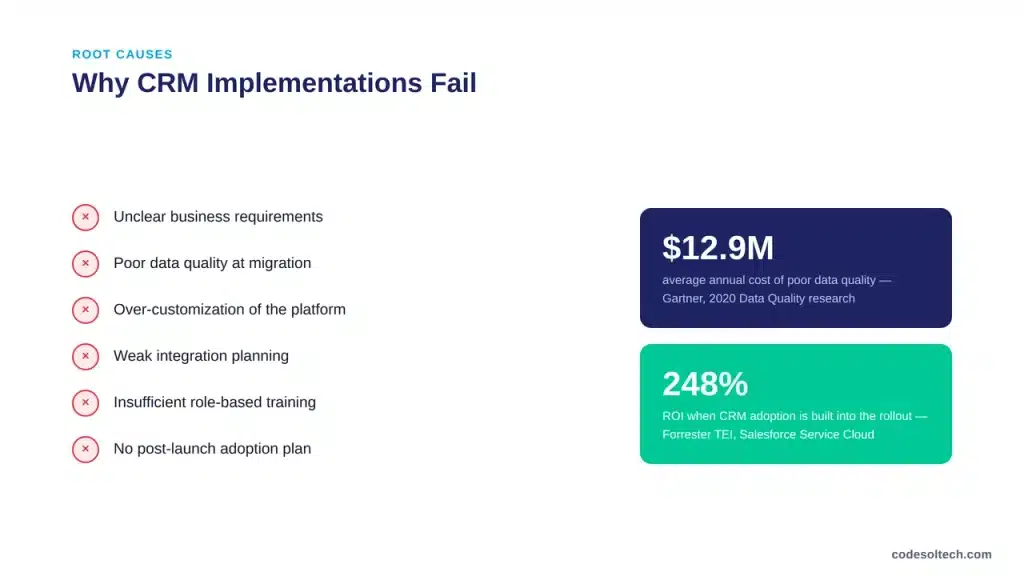
The gap between that outcome and a failed rollout is rarely the platform itself.
- Unclear business requirements: teams select software before defining the problem it needs to solve.
- Poor data quality: duplicate, outdated, or incomplete records get migrated as-is and undermine trust in the system from day one.
- Over-customization: heavy configuration that mirrors old, inefficient processes instead of improving them.
- Weak integration planning: the CRM becomes one more disconnected system instead of a central source of truth.
- Insufficient training: generic, one-size-fits-all sessions that do not map to each role’s actual workflow.
- Lack of executive sponsorship: no visible leadership commitment to enforce the new system of record.
- No post-launch adoption plan: implementation is treated as complete at go-live, with no measurement afterward.
Data quality deserves particular attention. Gartner’s research on data quality management based on a survey of 154 reference customers across 16 data quality vendors found that poor data quality costs the average organization $12.9 million per year in wasted resources and missed opportunities.
A CRM migrated with dirty data inherits that cost immediately.
The 12-Step CRM Implementation Roadmap at a Glance
The complete roadmap runs from goal-setting to post-launch optimization. Each step below links to the detailed section that follows.
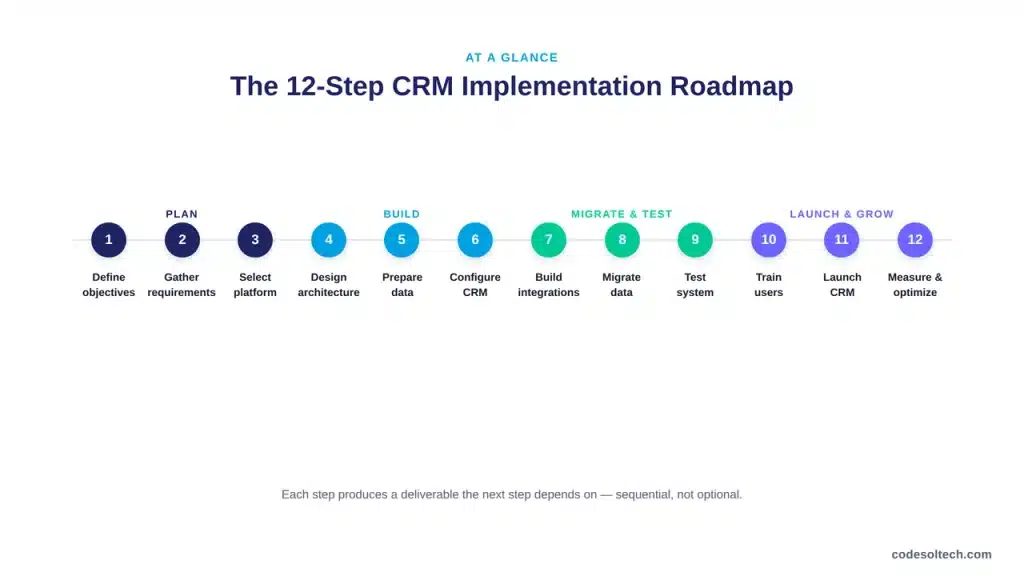
- Define implementation objectives
- Gather requirements from every department
- Select the CRM platform
- Design the CRM architecture
- Clean and prepare existing data
- Configure and customize the CRM
- Build integrations with existing systems
- Migrate data
- Test the system before launch
- Train users by role
- Launch the CRM
- Measure adoption and optimize
Steps 1–2: Define Objectives and Gather Requirements
Objectives set the criteria for every later decision, including which CRM to buy. Measurable objectives specify a metric, a baseline, and a target for example, “reduce lead response time from 48 hours to 4 hours” rather than “improve sales efficiency.”
Requirements gathering then translates objectives into functional needs across five departments: sales, marketing, support, management, and IT.
- Sales requirements: pipeline stages, lead routing rules, quota tracking
- Marketing requirements: campaign attribution, lead scoring, list segmentation
- Support requirements: case routing, SLA tracking, knowledge base integration
- Management requirements: forecasting accuracy, pipeline visibility, custom reporting
- Security and compliance requirements: role-based permissions, data residency, audit logging
Classify each requirement as must-have, should-have, or nice-to-have before evaluating platforms. This prevents a common failure pattern: selecting a CRM for its impressive optional features while it fails a core requirement.
Step 3: Select the CRM Platform
Platform selection should compare cloud versus self-hosted deployment, off-the-shelf versus custom-built CRM, integration capabilities, scalability under projected data volume, and total cost of ownership over three years not just the first-year license price.
Test finalist platforms against your top five must-have requirements using real sample data before signing a contract; feature lists in sales demos rarely surface the configuration limitations that appear during actual use.
Step 4: Design the CRM Architecture
Architecture design defines the CRM’s role as the system of record for customer data, maps how data flows between the CRM and adjacent systems (ERP, accounting, marketing automation), and sets user roles and permission tiers before a single field is configured.
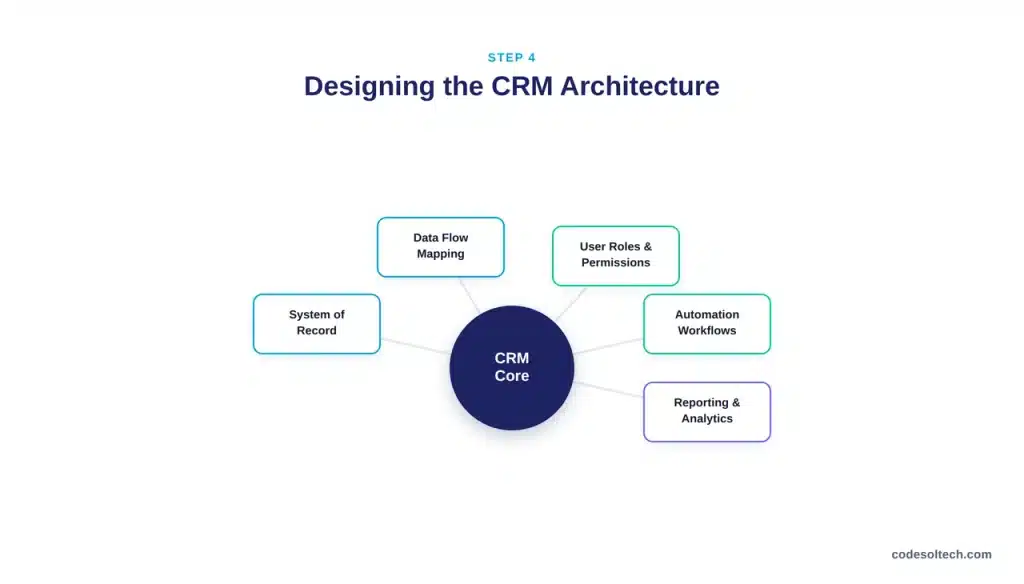
Organizations running multiple business units on one CRM instance should resolve data segregation and tenant isolation at this stage retrofitting a multi-tenant data model after launch is materially more expensive than designing it upfront.
Step 5: Clean and Prepare Data
Data preparation happens before migration, not during it.
This phase audits existing customer records, removes duplicates, standardizes formats (phone numbers, company names, addresses), validates contact information, and maps old fields to new CRM fields.
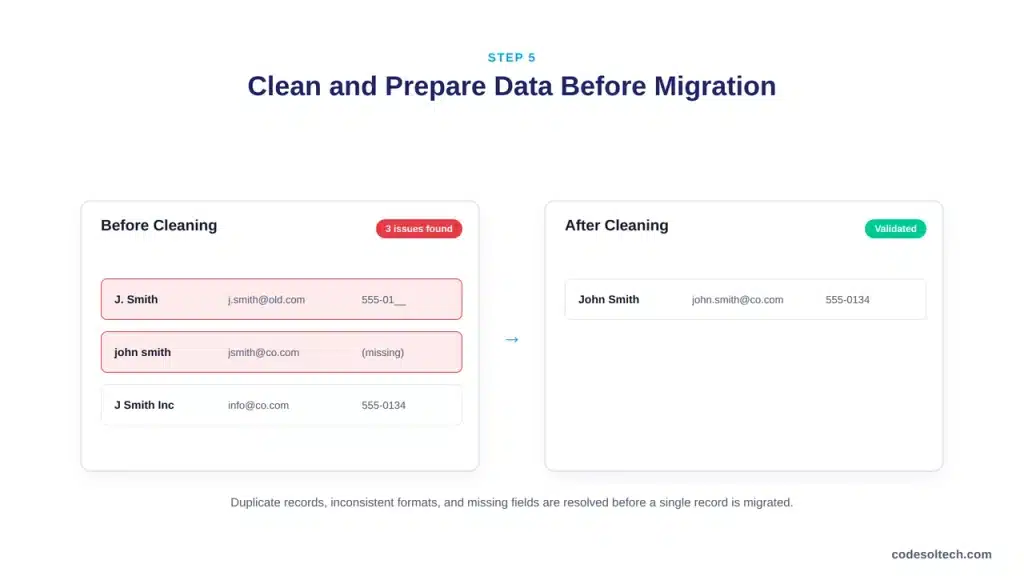
The operating principle: CRM automation cannot compensate for inaccurate or poorly structured customer data. A workflow built on a duplicate record fires twice; a report built on inconsistent field values undercounts or overcounts.
- Audit source data for duplicates, gaps, and format inconsistencies
- Standardize naming conventions and required fields
- Assign data ownership for each record type before go-live
- Define ongoing data quality rules, not just a one-time cleanup
Step 6: Configure and Customize the CRM
Configuration uses the CRM’s existing capabilities pipelines, custom fields, dashboards, notifications. Customization extends or modifies the platform to support requirements the out-of-the-box configuration cannot meet.
Configure first; customize only where a documented business requirement cannot be satisfied through configuration.
Over-customization is a leading cause of implementation delays and post-launch maintenance burden, because every custom object adds a dependency that must be re-tested with each platform update.
Step 7: Build Integrations
A CRM that does not connect to ERP, accounting, marketing automation, support, and ecommerce systems becomes another data silo rather than a central source of truth.
Integration work typically covers API connections, webhook triggers, and scheduled data synchronization between systems.
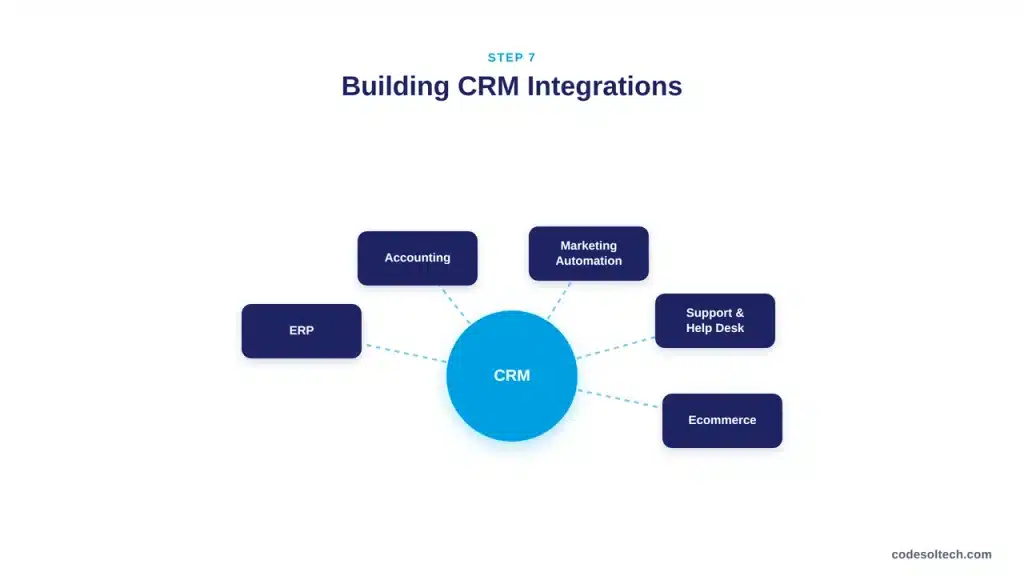
Integration architecture decisions made here directly affect the accuracy of downstream reporting; a poorly designed sync between CRM and ERP is one of the most common sources of the mismatched customer records that show up months after launch.
Step 8: Migrate Data
Migration follows a five-stage flow: extract, clean, map, transform, and import.
Run the full sequence against a sample dataset before migrating production records, and validate a statistically meaningful sample of migrated records against the source system, checking field-level accuracy rather than just record counts.
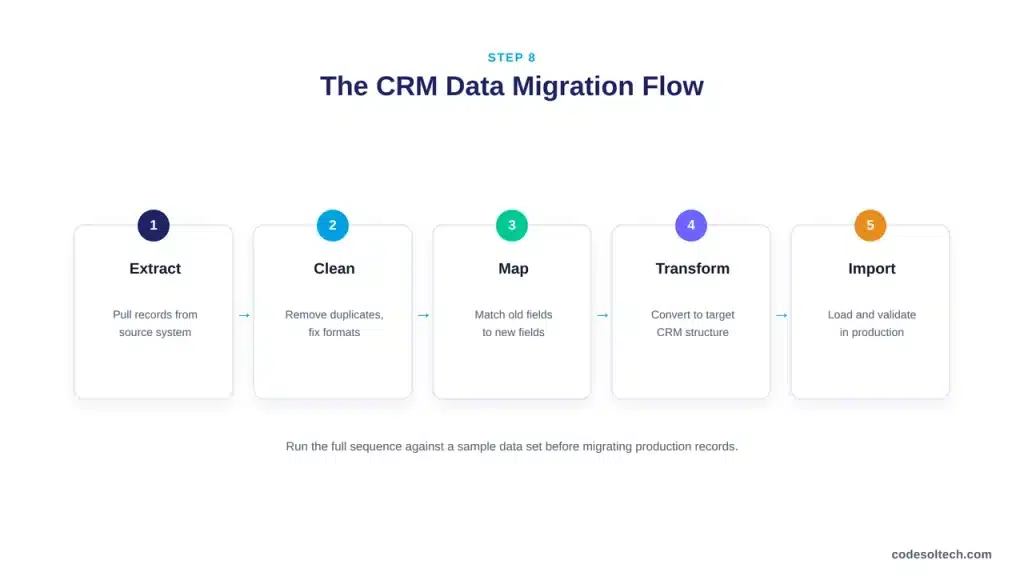
Migration errors caught after go-live cost significantly more to fix, because by then live transactions are layered on top of the flawed records.
Step 9: Test the System Before Launch
Testing covers functional testing, data validation, integration testing, workflow testing, permission testing, user acceptance testing, and performance testing under expected load. A practical UAT checklist:
- Can users create and update records without errors?
- Are leads routed to the correct owner automatically?
- Do automated workflows trigger under the correct conditions?
- Do integrations synchronize data correctly in both directions?
- Do reports and dashboards show accurate, current information?
- Can users access only the data their role permits?
Steps 10–11: Train Users and Launch
Training should be role-based, not comprehensive. A support rep does not need pipeline forecasting training; a sales manager does not need case-routing training. Each role should train only on the workflows it performs, using real data and real scenarios rather than generic demos.
For launch, choose between a phased rollout (lower risk, longer timeline, better for complex organizations) and a big-bang rollout (faster, higher risk, better suited to smaller or simpler implementations) based on organizational complexity, not on internal preference for speed.
| Rollout Approach | Best For | Main Advantage | Main Risk |
|---|---|---|---|
| Big-bang rollout | Smaller, simpler implementations | Faster organization-wide launch | Higher disruption if issues surface |
| Phased rollout | Complex, multi-department organizations | Easier testing and adoption per phase | Longer overall timeline |
Step 12: Measure Adoption and Optimize
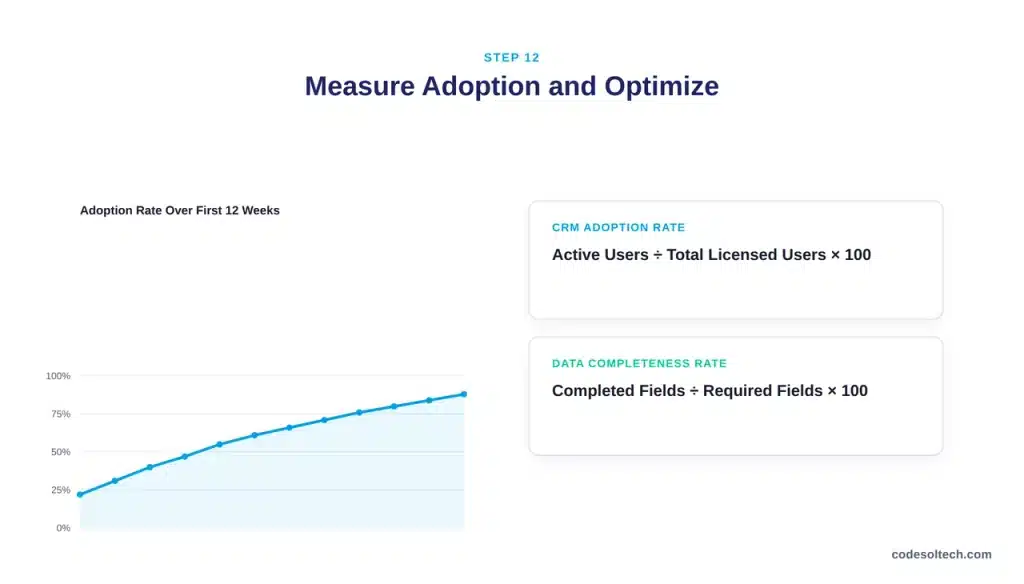
Implementation does not end at launch. Post-launch measurement tracks login frequency, record completeness, workflow usage, and data accuracy by team, then feeds that data back into ongoing optimization. Two formulas anchor this phase:
- CRM Adoption Rate = Active CRM Users ÷ Total Licensed Users × 100
- Data Completeness Rate = Completed Required Fields ÷ Total Required Fields × 100
Reps who adopt mobile CRM access consistently outperform reps who log in only from a desktop.
Salesforce’s State of Sales research found that sales professionals still spend only 40% of an average workweek on direct selling activity, with the remaining 60% consumed by administrative and non-selling work.
A CRM that reduces that administrative load is the strongest lever available for adoption. If it increases the load instead, adoption drops regardless of how well the software was configured.
How Long Does CRM Implementation Take?
CRM implementation timelines range from a few weeks for a basic configuration to 6–12 months for a complex enterprise deployment with heavy customization. The primary variables are data volume, number of integrations, and the extent of customization required — not company size alone.
| Implementation Type | Typical Complexity |
|---|---|
| Basic CRM setup, no migration | Low |
| CRM plus data migration | Medium |
| CRM plus multiple system integrations | High |
| Custom CRM development | Very high |
How Much Does CRM Implementation Cost?
Total cost of ownership for a CRM implementation includes licensing, configuration, data migration, integration development, custom development, training, and ongoing maintenance.
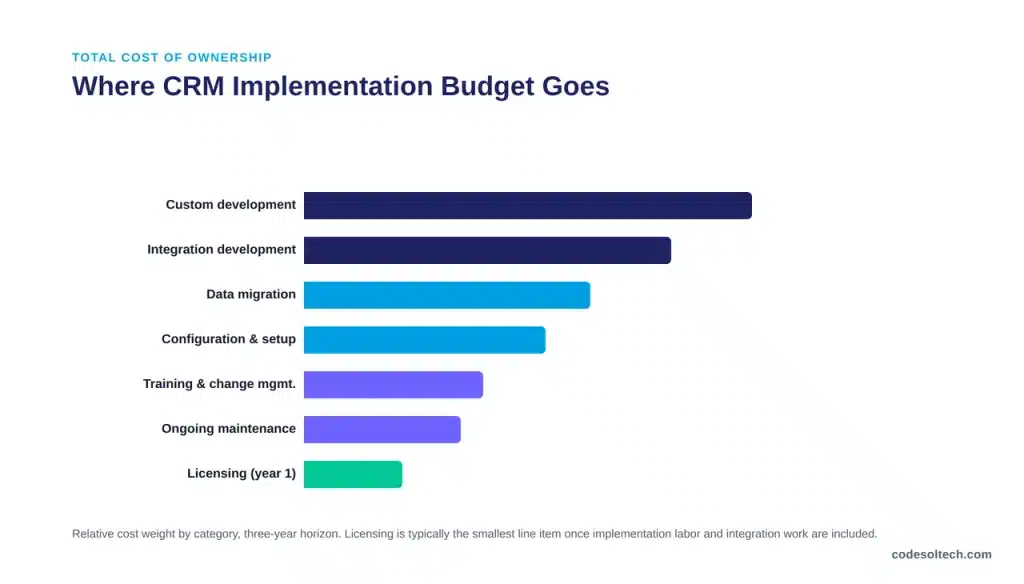
Licensing is usually the smallest line item over a three-year horizon once implementation labor, integration engineering, and change management are included.
Businesses evaluating cost should request a three-year TCO estimate from any vendor or implementation partner, not a first-year quote the gap between the two is where budget overruns originate.
Common CRM Implementation Mistakes to Avoid
- Choosing a platform before requirements are documented
- Migrating data without a cleaning phase
- Over-customizing instead of adapting process to configuration
- Deprioritizing integration planning until after launch
- Automating an inefficient process instead of fixing it first
- Skipping user acceptance testing to hit a launch date
- Delivering one training session for every role
- Treating go-live as the finish line instead of the starting line
When Should You Choose Custom CRM Implementation?
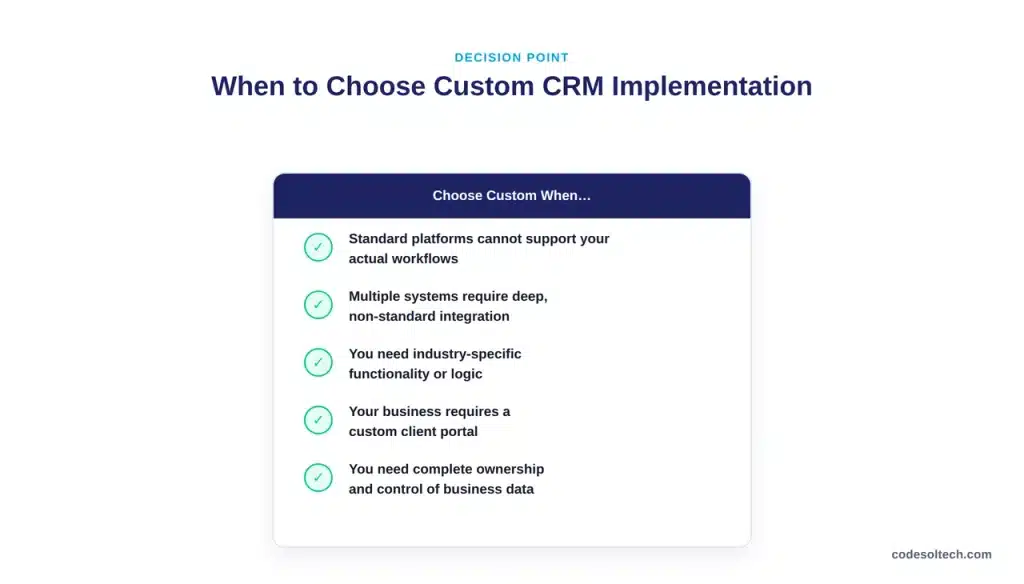
Custom CRM implementation becomes the right choice when standard platforms cannot support the business’s actual workflows, when multiple systems require deep, non-standard integration, or when the business needs a client portal, industry-specific logic, or complete data ownership that off-the-shelf platforms cannot provide.
For a full breakdown of when custom development outperforms configuration on a standard platform, see our guide to custom CRM development.
Organizations weighing this decision should also review our article on CRM integration architecture, which covers the technical patterns for connecting a CRM to ERP, accounting, and support systems at scale.
FAQs
What is CRM implementation?
CRM implementation is the end-to-end process of planning, configuring, migrating data into, integrating, testing, and rolling out a CRM system so that teams adopt it as their system of record.
What are the steps in CRM implementation?
The 12 core steps are: define objectives, gather requirements, select the platform, design the architecture, prepare data, configure the system, build integrations, migrate data, test, train users, launch, and measure adoption.
How long does CRM implementation take?
Timelines range from a few weeks for a basic setup to 6–12 months for a complex enterprise deployment, depending on data volume, integration count, and customization scope.
How much does CRM implementation cost?
Total cost of ownership includes licensing, configuration, data migration, integration development, training, and ongoing maintenance, not licensing alone.
What is CRM data migration?
CRM data migration is the phase of implementation that extracts, cleans, maps, transforms, and imports existing customer data into the new CRM, followed by validation against the source system.
How do you increase CRM user adoption?
Adoption improves when the CRM reduces manual work rather than adding to it, when training is role-specific, and when adoption metrics are tracked and reviewed after launch rather than assumed.
What is the most common cause of CRM implementation failure?
Poor user adoption is the most frequently cited cause, typically traced back to unclear objectives, poor data quality, and generic training rather than a defect in the software itself.
Should a business customize its CRM?
Customize only where a documented requirement cannot be met through existing configuration options. Over-customization increases implementation time and long-term maintenance cost.
What is the difference between CRM implementation and CRM integration?
CRM implementation is the full deployment lifecycle. CRM integration is one component within it the technical work of connecting the CRM to other business systems such as ERP or marketing automation.
When should a business choose custom CRM development?
Custom development makes sense when unique workflows, deep multi-system integration, or industry-specific functionality exceed what standard CRM platforms can configure.
Final Words
A CRM implementation is not finished when the software goes live it is finished when employees use it without being told to, data stays accurate without constant correction, and the business can point to a measurable result tied to one of its original objectives.
Treat the 12 steps above as sequential, not optional, and adoption follows as a consequence rather than a separate project.
Ready to Plan a CRM Implementation That Employees Actually Use?
CodeSol Technologies designs and implements custom CRM systems built around your team’s real workflows, not a generic template.