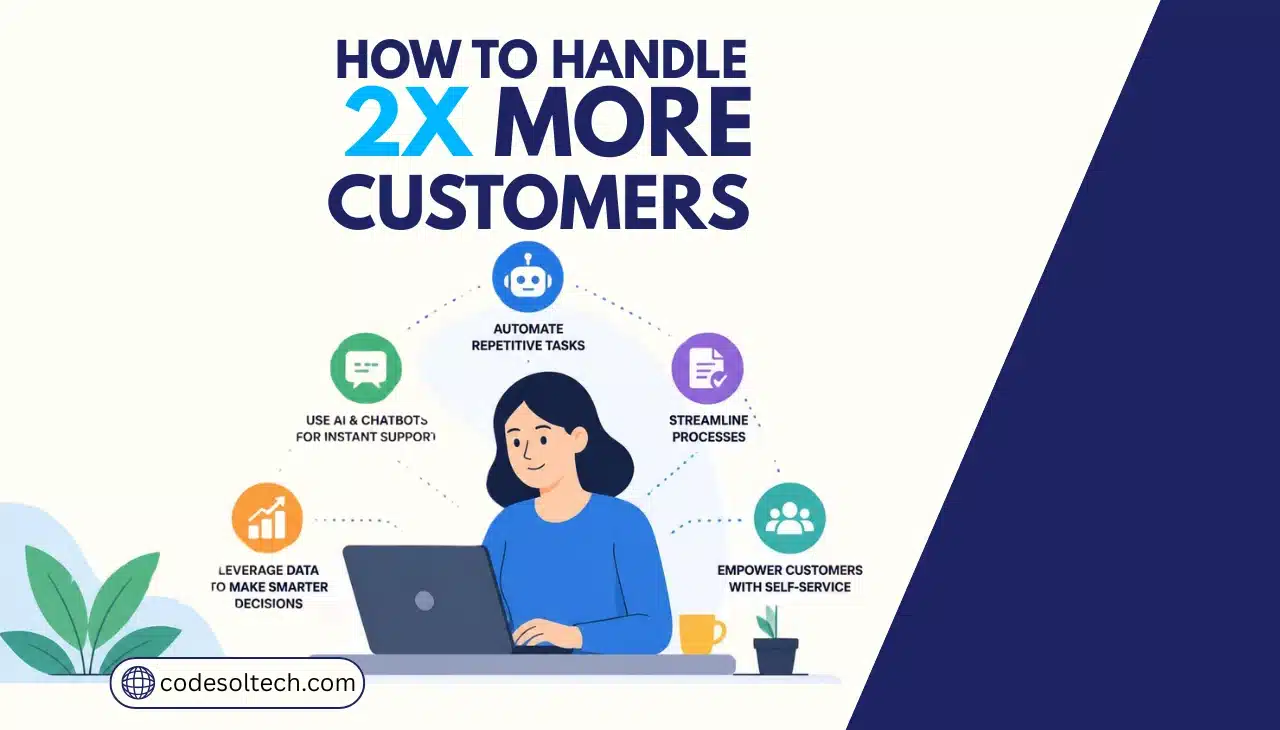
A business handles 2x more customers without hiring by automating repetitive service tasks, integrating its CRM with a chatbot or help desk system, and routing only complex cases to human agents.
This approach removes manual data entry, ticket sorting, and repeat-answer work from the team’s schedule, which increases the number of customers each employee supports.
Can a Small Team Really Serve 2x More Customers Without New Hires?
Yes. A small team serves 2x as many customers without new hires when it automates tasks that consume employee time but do not require human judgment.
According to Asana’s Anatomy of Work Index, knowledge workers spend 60% of their workday on “work about work” status updates, data entry, and repeat coordination instead of the skilled tasks they were hired to do. Removing that 60% through automation is what creates capacity for growth.
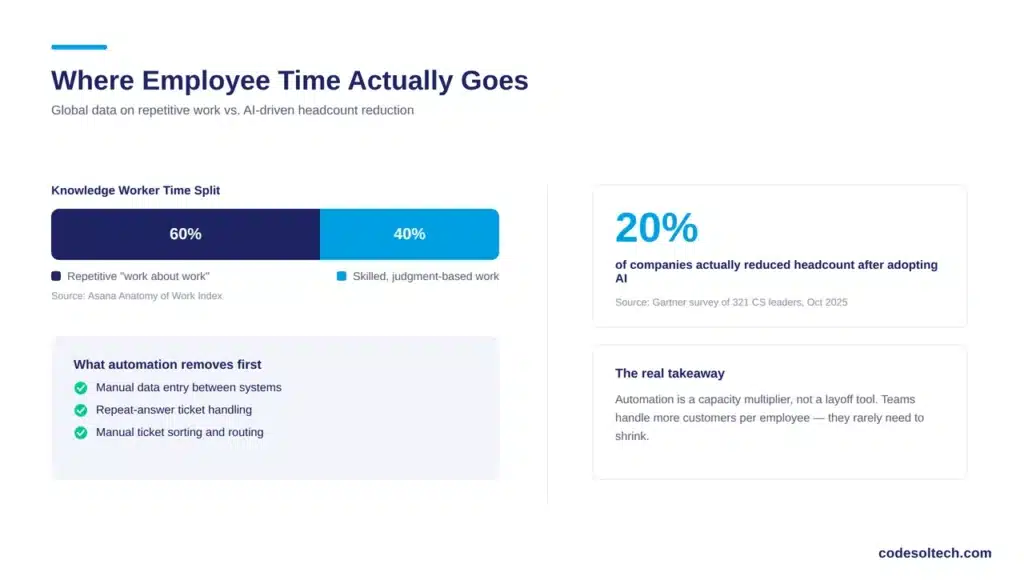
Gartner’s October 2025 survey of 321 customer service leaders found that only 20% of organizations reduced headcount due to AI.
The data shows automation is not primarily a headcount-cutting tool. It is a capacity multiplier: the same team handles more volume without adding staff, because software absorbs the repetitive layer of the workload.
Three conditions determine whether a team can scale this way:
- The business has documented, repeatable processes (SOPs) that a system can follow
- Customer data lives in one connected system, not scattered spreadsheets or inboxes
- Low-complexity requests are separated from high-complexity requests before a human sees them
Which Customer Service Tasks Should You Automate First?
Automate the highest-frequency, lowest-complexity tasks first. These tasks consume the most staff hours but require the least judgment, which makes them the fastest to automate and the highest-impact to remove from a human’s queue.
| Task | Manual Process | Automated Process | Capacity Impact |
|---|---|---|---|
| Order status inquiries | Agent looks up order in ERP, replies by email | Chatbot pulls live order status from CRM/ERP integration | High |
| Ticket routing | Agent reads and manually assigns each ticket | Workflow automation tags and routes by keyword and urgency | High |
| Password/account resets | Agent verifies identity and resets manually | Self-service portal handles reset without agent involvement | Medium |
| Payment and invoice questions | Agent checks payment gateway dashboard manually | Payment gateway integration surfaces status inside the CRM | Medium |
| Complex complaints, refund disputes | Agent handles case end-to-end | Routed to human agent with full context pre-loaded | Low (stays manual by design) |
The last row matters as much as the first four. Automation is designed to remove volume from the queue, not to remove judgment from decisions that need it.
Complex, high-stakes, or emotionally charged cases stay with a human agent, and the system’s job is to hand that agent full context instead of a blank ticket.
What Does the Automation Stack Look Like in Practice?
A capacity-scaling automation stack has four layers: a connected CRM, a routing and ticketing system, a customer-facing chatbot or self-service portal, and workflow automation that moves data between them without manual re-entry.
Each layer removes one category of repetitive work.
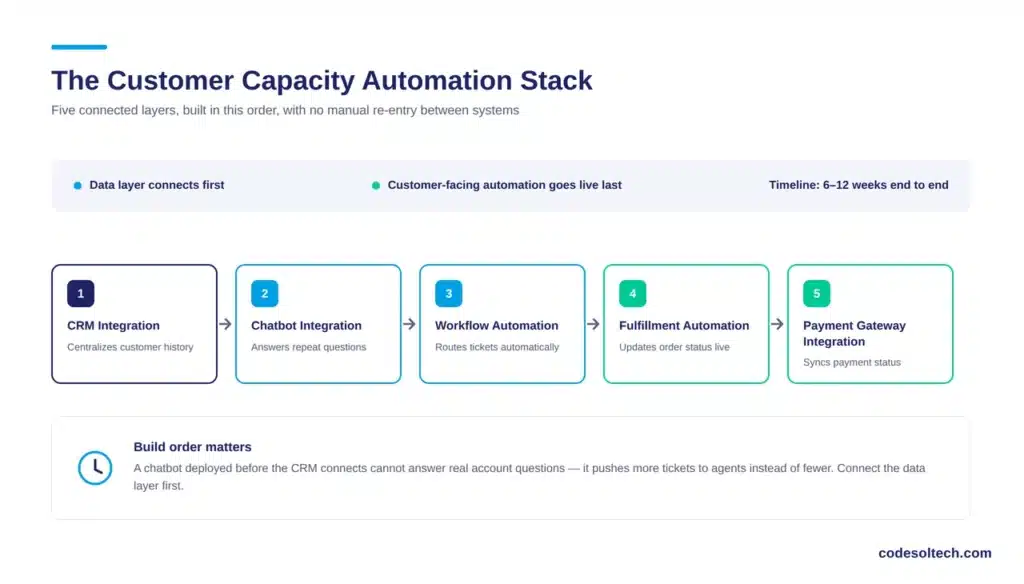
- CRM integration — centralizes customer history so no agent starts a conversation from zero
- Chatbot integration — answers repeat questions (order status, hours, pricing, return policy) without a human touch
- Workflow automation — moves tickets, updates records, and triggers follow-ups without manual clicks
- Fulfillment automation — updates customers automatically as orders move through production or shipping, cutting “where is my order” volume
- Payment gateway integration — reflects payment and refund status in real time inside the support tool agents already use
McKinsey’s State of Customer Care research found that leading organizations are using agentic AI to keep customer care costs flat while supporting organizational growth, rather than treating automation purely as a cost-cutting exercise.
That distinction matters for a growing business: the goal is throughput per employee, not fewer employees.
How Long Does This Take to Implement?
Most businesses deploy the first layer of automation chatbot integration and basic ticket routing in 2 to 4 weeks. Full CRM-to-fulfillment integration, where order status, payments, and support tickets sync automatically, typically takes 6 to 12 weeks, depending on how many existing systems need to connect.
The build order matters. Deploying a chatbot before the CRM is connected creates a bot that cannot answer real account questions, which pushes more tickets to human agents instead of fewer. The CRM and data layer come first; customer-facing automation comes second.
How Do You Know If Your Business Is Ready?
A business is ready for this kind of automation when three things are already true:
- Support requests follow repeatable patterns (the same 10-15 question types account for most ticket volume)
- Customer and order data already exists in a digital system, even if disconnected
- Someone on the team can document current processes clearly enough for a developer to translate them into rules
If none of these are true yet, the first step is not automation software. It is process documentation writing down exactly how a ticket moves from intake to resolution today. Automating an undocumented, inconsistent process just makes the inconsistency happen faster.
What Should You Track After Launch?
Three metrics show whether the automation is actually adding capacity, not just adding software:
- Tickets resolved per agent, per week — the direct measure of added capacity
- First-contact resolution rate — should hold steady or improve; a drop means automation is routing badly
- Escalation accuracy — the percentage of automated-to-human handoffs that actually needed a human
If ticket volume per agent rises but first-contact resolution falls, the system is moving faster without solving the customer’s problem. That is a routing and escalation-logic issue, not a reason to add more automation on top of a broken handoff.
Final Words
Handling 2x more customers without hiring is a process problem, not a staffing problem. Fix repetitive tasks with workflow automation, connect your systems, and let your team focus on cases that need a human touch. The data backs it: automation adds capacity first, and headcount reduction is rarely the actual outcome.
Ready to build this stack for your business?
Talk to CodeSol Technologies about a custom automation plan for your customer service workflow.
![CRM Knowledge Base Integration: [Types + 5-Step Setup]](https://www.codesoltech.com/wp-content/uploads/2026/09/CRM-Knowledge-Base-Integration-Definition-Types-and-Setup-Steps.webp)
![Fixing CRM Contact Deduplication [Causes & Fixes Guide]](https://www.codesoltech.com/wp-content/uploads/2026/09/Fixing-CRM-Contact-Deduplication-Causes-Fixes-Guide.webp)