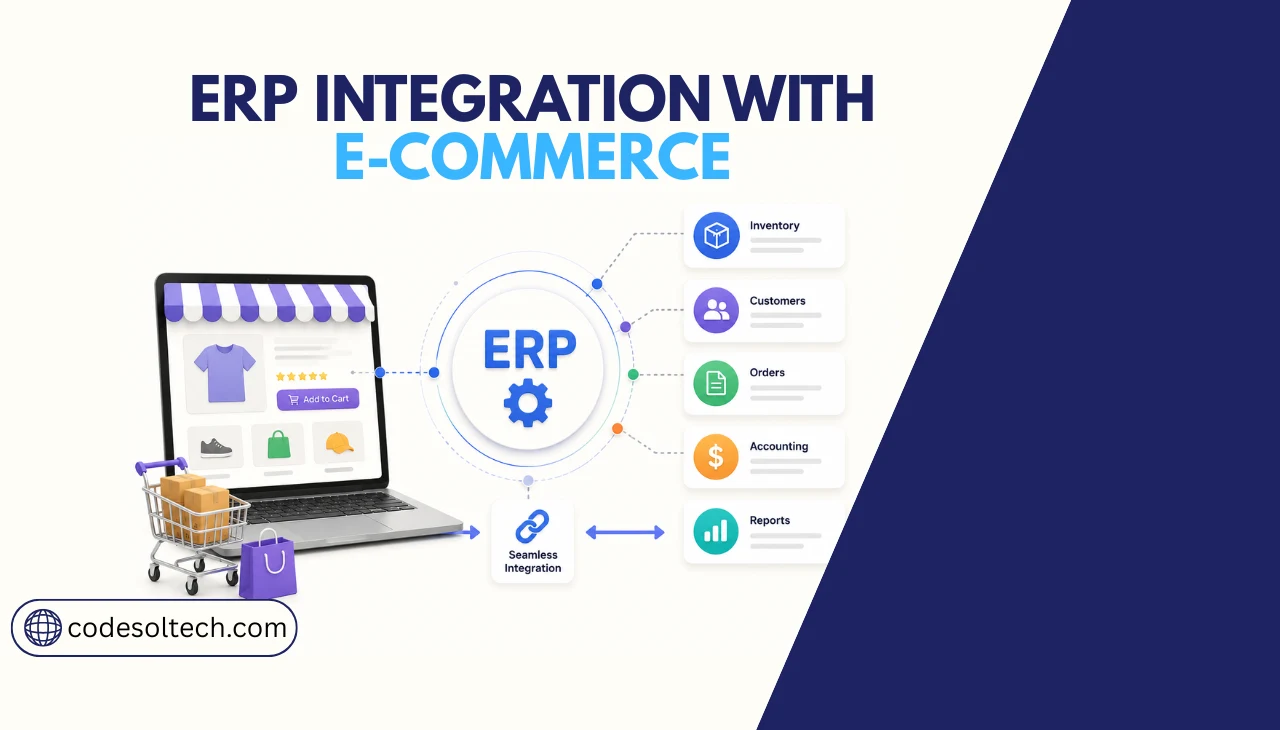
ERP integration with ecommerce connects your store’s front end to back-office systems, inventory, finance, and order management through APIs or middleware. It eliminates manual data entry, syncs stock levels in real time, and pushes order data directly into accounting.
Businesses that implement ERP-ecommerce integration report a 67% average revenue increase and a 16% reduction in order errors. Implementation takes 3 to 12 months, depending on complexity.
The global ERP software market grows from $81.15 billion in 2024 to a projected $238.79 billion by 2032, and ecommerce adoption drives a significant share of that expansion.
As of 2026, 53% of businesses classify ERP as a priority investment, with distribution and manufacturing sectors leading implementation rates.
This guide covers exactly how ERP-ecommerce integration works at a technical level, which data sync methods deliver the best results, how finance system connections operate, and what a custom integration build requires.
What Is ERP Integration with Ecommerce?
ERP integration with ecommerce creates a live data bridge between the storefront layer and the back-office operations layer. The storefront handles product display, cart, checkout, and customer accounts.
The ERP handles inventory quantities, purchase orders, accounts receivable, accounts payable, general ledger entries, and employee-level workflow.
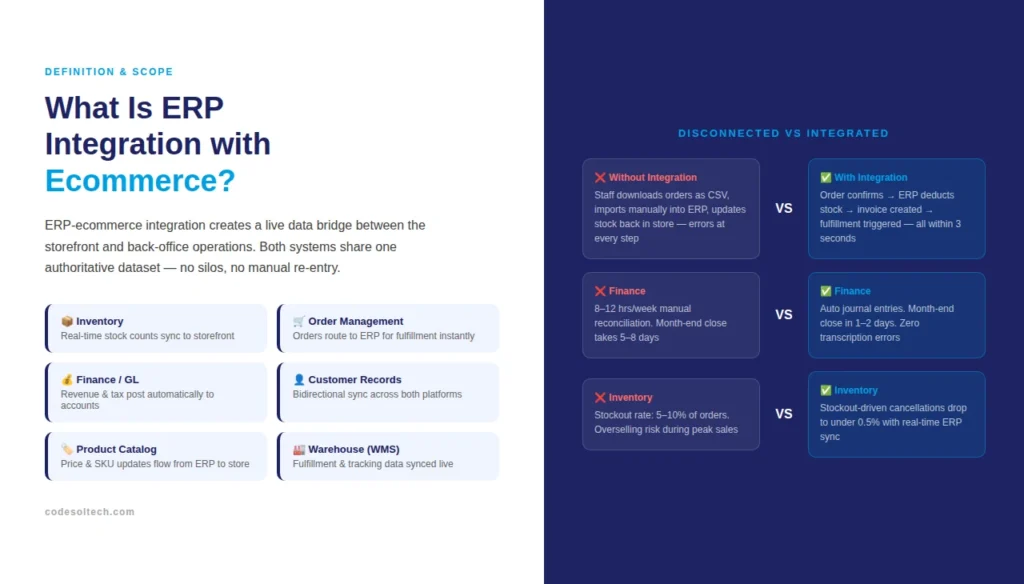
Integration means both systems share one authoritative dataset instead of maintaining separate, siloed records.
A disconnected setup forces staff to export orders as CSV files, import them into the ERP, then update stock levels back in the store, a process that introduces errors at every handoff point.
An integrated setup passes each confirmed order to the ERP automatically within seconds, triggering stock deduction, invoice creation, and fulfillment routing without human intervention.
Core Systems That Connect in an ERP-Ecommerce Integration
- Inventory Management: Real-time stock counts sync from the ERP to the storefront, preventing overselling and backorder errors
- Order Management: Each placed order transmits to the ERP for fulfillment, picking, and shipping label generation
- Finance System / General Ledger: Revenue, tax, and refund data posts automatically to accounting modules
- Customer Records: New account registrations, order history, and loyalty data sync bidirectionally
- Product Catalog: Price updates, new SKUs, and product attributes publish from the ERP to the storefront without manual re-upload
- Warehouse Management System (WMS): Fulfillment locations, bin assignments, and shipment tracking updates pass back to the storefront for customer visibility
How Does ERP Data Sync Work in an Ecommerce Integration?
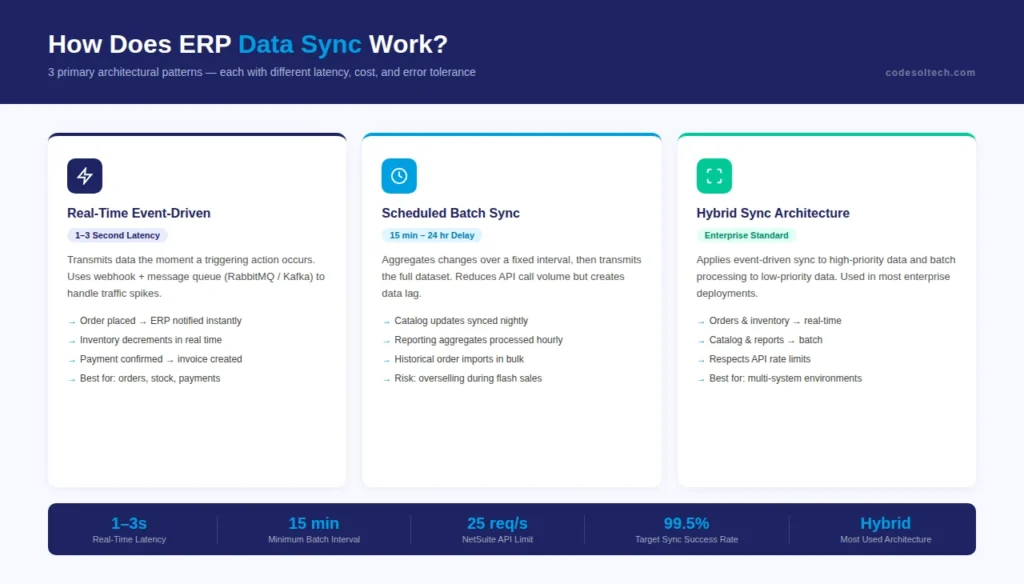
ERP data sync operates through 3 primary architectural patterns: real-time event-driven sync, scheduled batch sync, and hybrid sync. Each method carries different latency, infrastructure cost, and error tolerance characteristics.
Choosing the wrong sync method causes either system overload from too many API calls or stale data from infrequent updates.
Real-Time Event-Driven Sync
Event-driven sync transmits data the moment a triggering action occurs. When a customer places an order, the ecommerce platform fires a webhook that the integration layer captures and forwards to the ERP within 1 to 3 seconds.
The ERP processes the payload, deducts inventory, creates an invoice record, and returns a confirmation.
This method requires a message queue such as RabbitMQ or Apache Kafka to handle traffic spikes without dropping events during peak sales periods.
Scheduled Batch Sync
Batch sync aggregates changes over a fixed interval, typically every 15 minutes, hourly, or nightly, then transmits the full dataset in a single operation.
Batch sync reduces API call volume and suits scenarios where slight data delays are acceptable, such as updating a product catalog overnight.
It performs poorly for inventory sync in high-velocity stores where stock levels change by the minute, because a 15-minute lag creates overselling risk during flash sales.
Hybrid Sync Architecture
Hybrid sync applies event-driven transmission to high-priority data (orders, inventory decrements, payment confirmations) and batch processing to low-priority data (catalog updates, reporting aggregates, historical order imports).
Most enterprise ecommerce integrations use hybrid architectures because they balance performance with API rate limit constraints imposed by ERP vendors.
Data Sync Methods Compared
| Sync Method | Latency | Best For | Risk |
|---|---|---|---|
| Real-Time (Event-Driven) | 1–3 seconds | Orders, inventory, payments | High API load during spikes |
| Batch | 15 min – 24 hrs | Catalog updates, reporting | Stale data, overselling risk |
| Hybrid | Mixed | Enterprise multi-system setups | Higher build complexity |
4 Types of ERP-Ecommerce Integration Methods
The integration method determines the long-term maintenance burden, cost of ownership, and flexibility of the connection. Businesses that choose a method without evaluating their transaction volume and ERP version face costly re-builds 12 to 18 months after go-live.
- Point-to-Point (Direct API Integration): The ecommerce platform connects directly to the ERP via REST or SOAP APIs. This method works for simple setups with 2 systems and under 1,000 orders per month. It becomes unmanageable when a third system such as a separate WMS or 3PL connector enters the stack, because each new system requires individual API mappings.
- Middleware / Integration Platform as a Service (iPaaS): A middleware layer such as MuleSoft, Boomi, or Zapier for enterprise sits between the ERP and storefront, translating data formats and routing payloads. iPaaS solutions reduce custom code requirements by 40 to 60% and provide visual monitoring dashboards for failed transmissions. Monthly licensing costs range from $500 to $5,000 depending on transaction volume.
- Enterprise Service Bus (ESB): An ESB acts as a central message broker for organizations running 5 or more connected systems. IBM App Connect and Oracle Integration Cloud are the most widely deployed ESB solutions. ESBs handle protocol translation (REST to SOAP, JSON to XML), message queuing, and transformation logic at scale.
- Native ERP Integration (Built-In Connector): Some ecommerce platforms ship with pre-built connectors for specific ERP systems. Native connectors eliminate middleware costs and reduce implementation time by 30 to 50%, but they restrict customization. They work for standard workflows and break when business logic deviates from the connector’s default mappings.
How Finance System Integration Works in ERP-Ecommerce
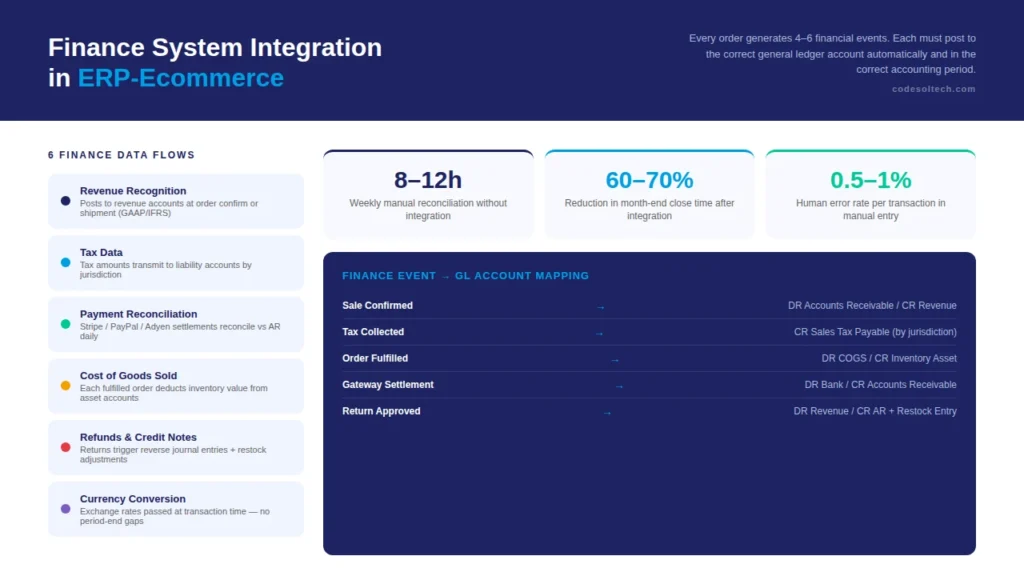
Finance system integration is the most technically critical component of ERP-ecommerce connectivity. Every order generates 4 to 6 financial events: a revenue entry, a tax liability, a cost of goods deduction, a payment gateway settlement record, and, if returned, a credit note and a restocking entry.
Each event must be posted to the correct general ledger account automatically and within the correct accounting period to maintain audit-compliant financial records.
What Finance Data Flows Between Systems
- Revenue Recognition: Sale amount posts to revenue accounts at order confirmation or shipment, depending on accounting standards (GAAP vs IFRS)
- Tax Data: Calculated tax amounts transmit to tax liability accounts by jurisdiction — critical for multi-state or cross-border ecommerce operations
- Payment Gateway Reconciliation: Settlement batches from Stripe, PayPal, or Adyen reconcile against ERP accounts receivable records daily
- Cost of Goods Sold (COGS): Each fulfilled order deducts inventory value from asset accounts and records corresponding COGS entries
- Refunds and Credit Notes: Return approvals trigger reverse journal entries, credit memos, and restock adjustments in a single automated flow
- Currency Conversion: Multi-currency stores pass exchange rates to the ERP at transaction time so finance teams avoid end-of-period reconciliation discrepancies
Finance Reconciliation Without ERP Integration
Finance teams at stores without ERP integration spend an average of 8 to 12 hours per week manually reconciling payment gateway reports against accounting software.
Month-end close processes are extended by 3 to 5 days because accountants download CSV files from 3 to 4 separate platforms, cross-reference line items, and enter adjustments manually.
Human error rates in manual reconciliation average 0.5 to 1% per transaction volume, which compounds into material discrepancies at scale.
ERP Finance Integration in Practice
A properly configured finance integration maps each ecommerce event type to a specific journal entry template in the ERP. The mapping table defines the debit account, credit account, tax treatment, and posting date rule for every transaction type.
Once the mapping is configured and tested, the finance team receives daily auto-reconciled accounts with zero manual data entry. Custom ecommerce development that includes finance system integration typically reduces month-end close time by 60 to 70%.
What Does ERP Integration with Ecommerce Cost to Build?
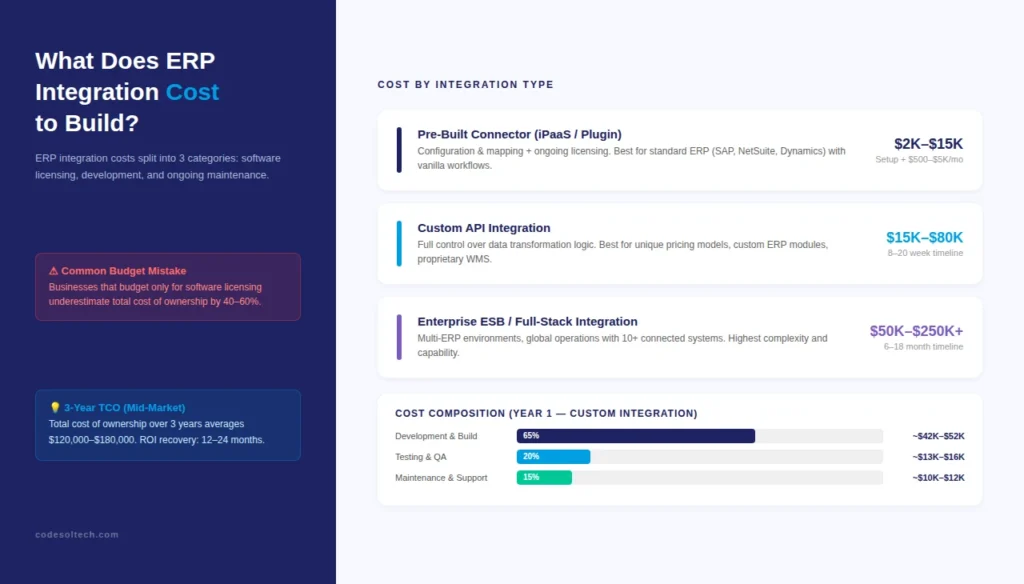
ERP integration costs divide into 3 categories: software licensing, development and implementation, and ongoing maintenance.
Businesses that budget only for software licensing underestimate total cost of ownership by 40 to 60%, because implementation and post-launch support consume the majority of spend in year one.
Cost Breakdown by Integration Type
- Pre-Built Connector (iPaaS / Plugin):
- Setup cost: $2,000 – $15,000 (configuration and mapping)
- Ongoing licensing: $500 – $5,000 per month
- Best for: Standard ERP systems (SAP, NetSuite, Microsoft Dynamics) with vanilla workflows
- Limitation: Cannot handle custom business rules without additional development
- Custom API Integration:
- Development cost: $15,000 – $80,000 depending on system complexity
- Timeline: 8 to 20 weeks
- Best for: Businesses with unique pricing models, custom ERP modules, or proprietary WMS systems
- Advantage: Full control over data transformation logic and sync frequency
- Enterprise ESB / Full Stack Integration:
- Implementation cost: $50,000 – $250,000+
- Timeline: 6 to 18 months
- Best for: Multi-ERP environments, global operations with 10+ connected systems
The total cost of ownership over 3 years for a mid-market custom ERP integration averages $120,000 to $180,000, including development, licensing, maintenance, and iterative improvements.
Businesses that invest in a properly architected integration recover costs within 12 to 24 months through reduced labor, fewer order errors, and faster financial close cycles.
Our team at Codesoltech builds custom ecommerce integrations engineered for your specific ERP and business logic not templated connectors that break at edge cases.
Most Common ERP Systems Used with Ecommerce Platforms
ERP system selection determines which integration path is available, how much customization is possible, and what the long-term maintenance burden looks like.
The 5 most widely deployed ERP systems in ecommerce environments each carry distinct integration capabilities.
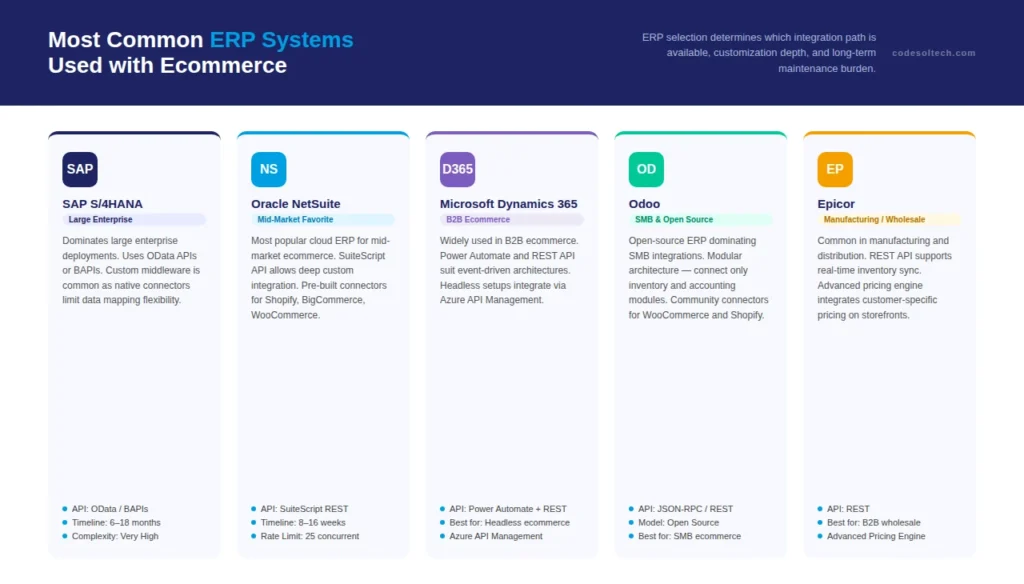
- SAP S/4HANA: Dominates large enterprise deployments. Integration uses SAP’s OData APIs or BAPIs. Custom middleware is common because SAP’s native ecommerce connectors limit data mapping flexibility. Implementation complexity is high, with integrations taking 6 to 18 months at the enterprise level.
- Oracle NetSuite: The most popular cloud ERP for mid-market ecommerce. NetSuite’s SuiteScript API layer allows deep custom integration. Pre-built connectors exist for Shopify, BigCommerce, and WooCommerce. Integration timelines range from 8 to 16 weeks for standard implementations.
- Microsoft Dynamics 365: Widely used in B2B ecommerce. Dynamics 365’s Power Automate layer and extensive REST API make it well-suited for event-driven integration architectures. Headless ecommerce setups integrate cleanly with Dynamics via Azure API Management.
- Odoo: Open-source ERP that dominates SMB ecommerce integrations. Odoo’s modular architecture allows selective integration — connect only the inventory and accounting modules without deploying the full ERP suite. Community connectors exist for WooCommerce and Shopify, with custom API work needed for enterprise logic.
- Epicor: Common in manufacturing and distribution ecommerce. Epicor’s REST API supports real-time inventory sync, and the ERP’s advanced pricing engine integrates with ecommerce platforms to display customer-specific pricing on the storefront. Popular with B2B wholesale ecommerce.
What Are the Real Benefits of ERP-Ecommerce Integration?
ERP-ecommerce integration delivers measurable operational improvements across inventory accuracy, order processing speed, financial reporting, and customer satisfaction.
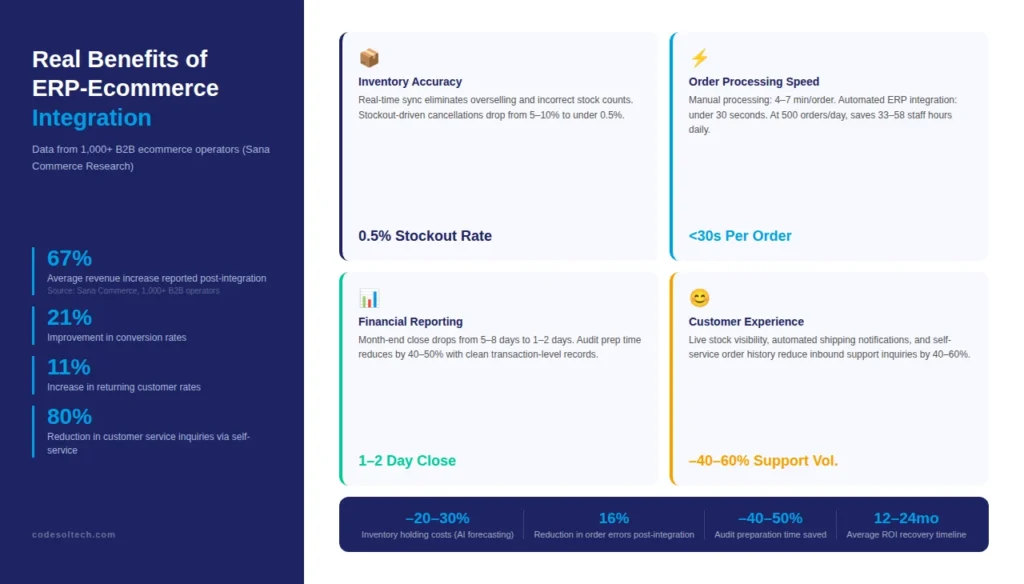
Organizations that connect their ERP to their storefront report a 67% average revenue increase, a 21% improvement in conversion rates, and an 11% increase in returning customer rates, according to research from Sana Commerce across 1,000+ B2B ecommerce operators.
Inventory Accuracy
Real-time inventory sync eliminates the 2 most common ecommerce errors: selling out-of-stock products and displaying incorrect stock counts. Businesses running separate inventory systems experience stockout rates of 5 to 10% of orders.
After ERP integration, stockout-driven cancellations drop to under 0.5% because the storefront reads inventory directly from the ERP’s authoritative count.
AI-powered demand forecasting modules embedded in modern ERPs reduce inventory holding costs by 20 to 30%, according to McKinsey’s analysis of distribution operations.
Order Processing Speed
Manual order processing averages 4 to 7 minutes per order: a staff member logs into the ecommerce platform, downloads the order, logs into the ERP, creates a sales order manually, and triggers fulfillment.
Automated ERP integration reduces order processing time to under 30 seconds per order by eliminating every manual step. At 500 orders per day, this saves 33 to 58 staff hours daily.
Financial Reporting Accuracy
Finance teams at integrated businesses close their monthly books in 1 to 2 days instead of 5 to 8 days. Automated journal entries eliminate the transcription errors that cause trial balance discrepancies.
Auditors receive clean, transaction-level records with full timestamps and source system references, reducing audit preparation time by 40 to 50%.
Customer Experience Improvements
- Live stock visibility prevents orders on unavailable products, reducing cancellation-related customer complaints by 80%
- Automated shipping notifications generated from ERP fulfillment events reduce inbound customer service inquiries by 40 to 60%
- Customer-specific pricing synced from the ERP displays accurate contract prices on the storefront, eliminating pricing disputes in B2B ecommerce
- Self-service order history and invoice access powered by ERP data reduces customer service call volume by up to 80%, as demonstrated by Harrison & Clough’s deployment on Microsoft Dynamics NAV
How Long Does ERP Integration with Ecommerce Take to Implement?
ERP integration implementation timelines range from 3 weeks to 18 months. The primary driver of timeline length is not the ERP system itself but the complexity of the business logic that must be encoded into the integration layer.
Custom pricing tiers, multi-warehouse routing rules, tax jurisdiction logic, and multi-currency handling each add 2 to 6 weeks of development and testing time.
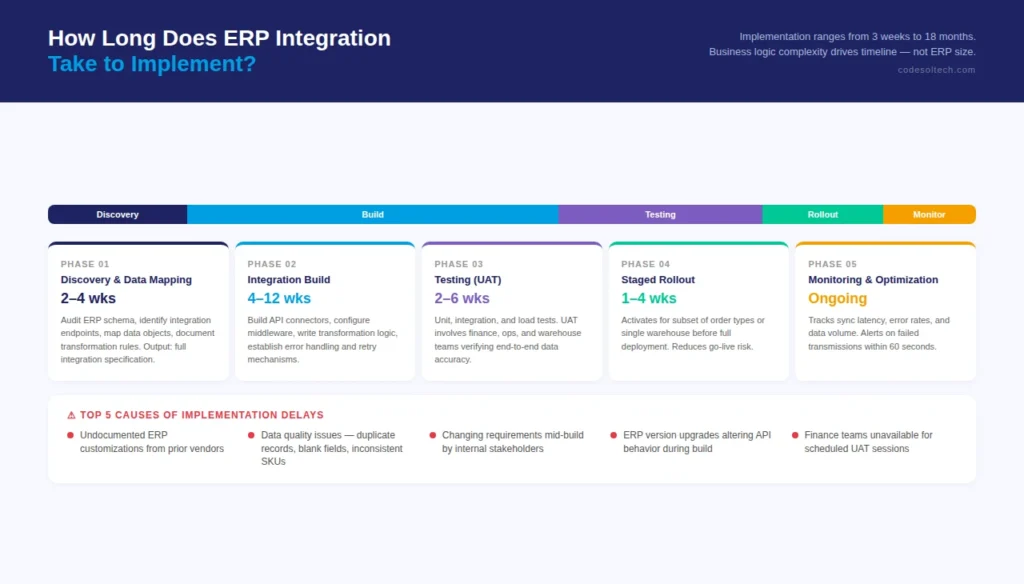
Implementation Phases
- Phase 1 — Discovery and Data Mapping (2–4 weeks): Development team audits the ERP’s data schema, identifies all integration endpoints, maps ecommerce data objects to ERP entities, and documents transformation rules. Output: a complete integration specification document.
- Phase 2 — Integration Build (4–12 weeks): Developers build API connectors, configure middleware, write data transformation logic, and establish error handling and retry mechanisms. Parallel development is possible for separate data streams (orders, inventory, finance).
- Phase 3 — Testing (2–6 weeks): Unit tests validate individual API endpoints. Integration tests validate end-to-end data flows. Load tests confirm the integration handles peak transaction volumes without dropped events. User acceptance testing (UAT) involves finance, operations, and warehouse teams verifying data accuracy.
- Phase 4 — Staged Rollout (1–4 weeks): Integration activates for a subset of order types or a single warehouse location before full deployment. A staged rollout reduces go-live risk by isolating failure impacts to a recoverable scope.
- Phase 5 — Monitoring and Optimization (Ongoing): Post-launch monitoring tracks sync latency, error rates, and data volume. Dashboards alert operations teams to failed transmissions within 60 seconds. Quarterly reviews identify optimization opportunities as business requirements evolve.
Common Causes of Implementation Delays
- Incomplete or undocumented ERP customizations that the vendor built years prior and no one mapped
- Data quality problems in the existing ERP include duplicate records, blank fields, and inconsistent SKU formatting
- Changing business requirements mid-build when stakeholders add new integration requirements after development begins
- ERP version upgrades that alter API behavior during the integration build window
- Missing user acceptance testing resources, finance teams too busy to participate in scheduled UAT sessions
How to Choose an ERP-Ecommerce Integration Development Partner
The integration partner carries the highest risk factor in any ERP project. A poorly architected integration creates technical debt that costs 3 to 5 times the original build cost to untangle 18 months post-launch.
Evaluating a partner’s technical capability not just their sales presentation, determines project outcome.
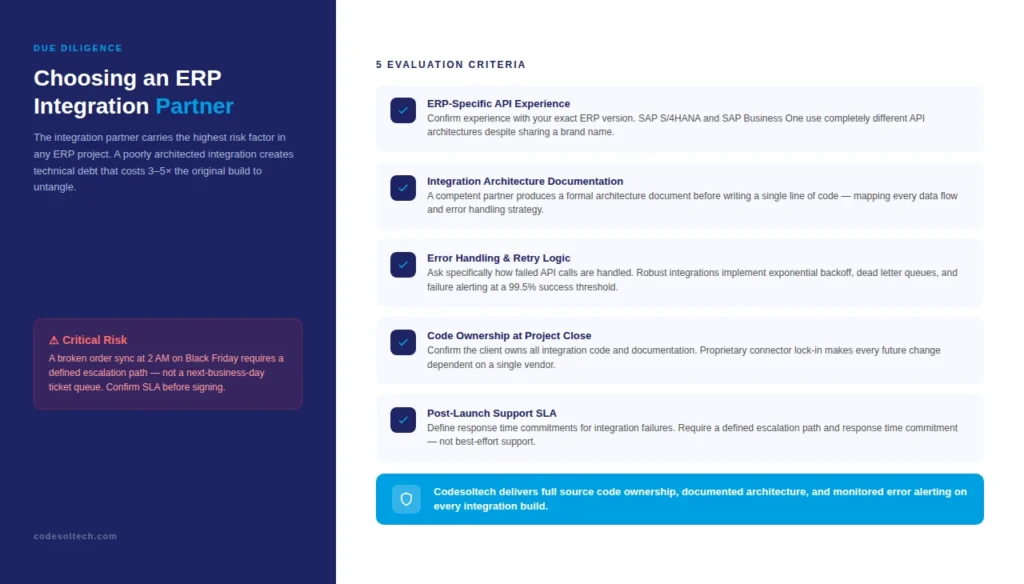
Evaluation Criteria for ERP Integration Partners
- ERP-Specific API Experience: Confirm the partner has direct experience with your specific ERP version, not just the product family. SAP S/4HANA and SAP Business One use completely different API architectures despite sharing a brand name.
- Integration Architecture Documentation: A competent partner produces a formal integration architecture document before writing a single line of code. This document maps every data flow, defines error handling strategies, and specifies the message queue or middleware stack.
- Error Handling and Retry Logic: Ask specifically how the integration handles failed API calls. A robust integration implements exponential backoff retry logic, dead letter queues for unprocessable messages, and alerting for transmission failures exceeding a 99.5% success rate threshold.
- Ownership of Integration Code: Confirm the client owns all integration code and documentation at project completion. Lock-in through proprietary connector models leaves businesses dependent on a single vendor for every future change.
- Post-Launch Support SLA: Define response time commitments for integration failures. A broken order sync at 2 AM on Black Friday requires a defined escalation path, not a next-business-day ticket queue.
Codesoltech delivers custom web development and Shopify development with ERP integration built as a core engineering discipline not an afterthought connector.
Every integration we build includes full source code ownership, documented architecture, and a monitored error alerting system.
Top Challenges in ERP-Ecommerce Integration (And How to Solve Them)
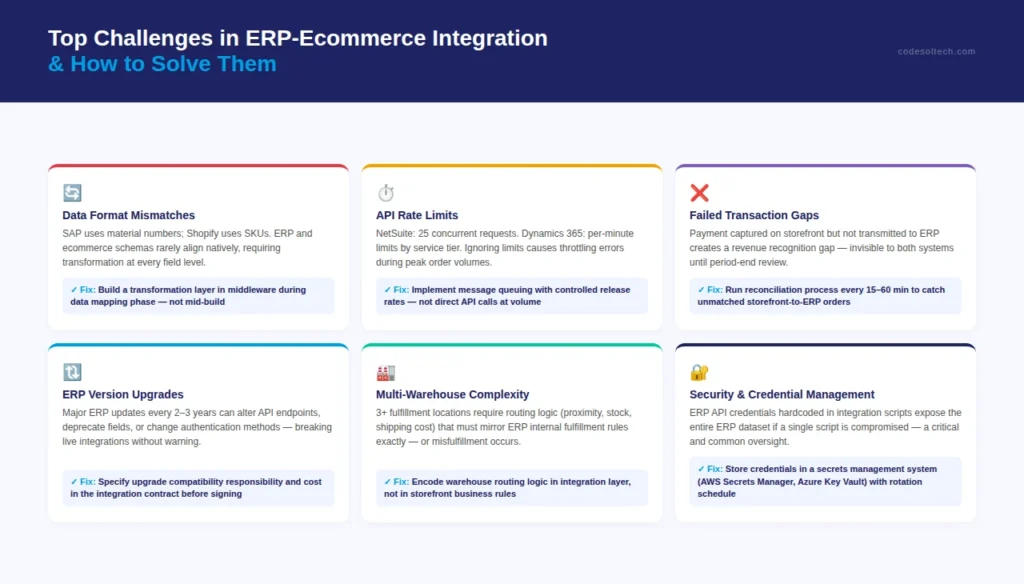
- Data Format Mismatches: ERP systems store product data in formats that differ from ecommerce platform schemas. SAP uses material numbers; Shopify uses SKUs. A transformation layer in the integration middleware converts formats before transmission. Solve this during the data mapping phase, not mid-build.
- API Rate Limits: ERP vendors impose API call rate limits NetSuite allows 25 concurrent requests; Dynamics 365 limits calls per minute per service tier. Integration architectures that ignore rate limits cause throttling errors during high-order-volume periods. Message queuing with controlled release rates is the standard solution.
- Handling Failed Transactions: A payment captured on the storefront but never transmitted to the ERP creates a revenue recognition gap. Every integration requires a transaction reconciliation process that runs every 15 to 60 minutes, identifying orders that were confirmed on the storefront but lack a corresponding ERP record.
- ERP Version Upgrades: ERP vendors release major version updates every 2 to 3 years. Each upgrade can alter API endpoints, deprecate fields, or change authentication methods. Integration contracts must specify who is responsible for upgrade compatibility maintenance and at what cost.
- Multi-Warehouse Complexity: Businesses with 3 or more fulfillment locations require routing logic that determines which warehouse fulfills each order based on proximity, stock availability, and shipping cost. This logic lives in the integration layer and must mirror the ERP’s internal fulfillment rules exactly.
- Security and Credential Management: ERP API credentials must rotate on a defined schedule and store in a secrets management system not hardcoded in integration scripts. A single compromised API key exposes the entire ERP dataset to unauthorized access.
ERP Integration for B2B vs B2C Ecommerce: Key Differences
B2B and B2C ecommerce operations require different integration configurations, even when connecting to the same ERP.
B2B transactions carry 5 structural complexities that do not exist in consumer ecommerce: customer-specific contract pricing, credit terms and payment on account, multi-buyer organizational account hierarchies, purchase order reference requirements, and approval workflows before order processing.
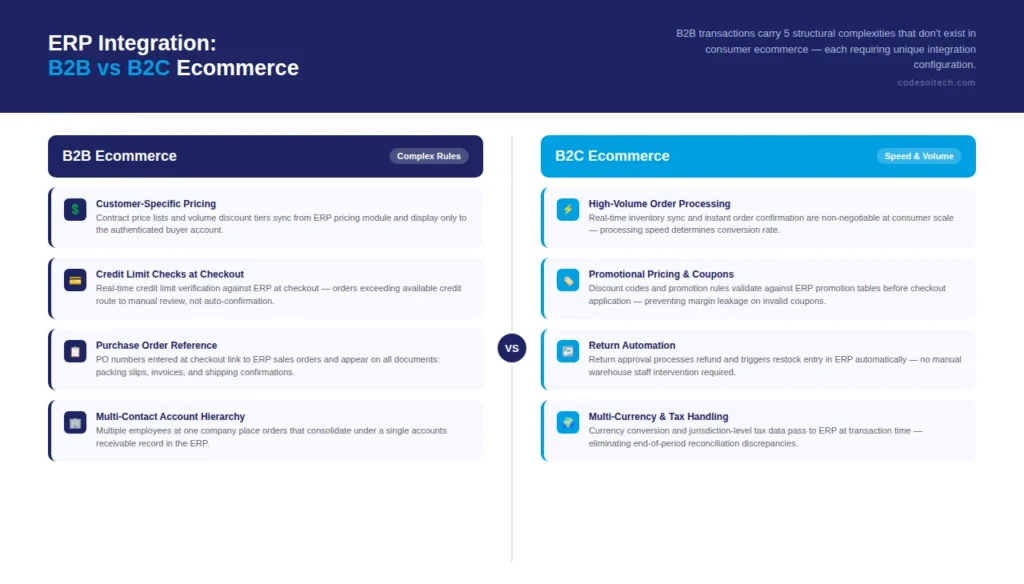
B2B ERP Integration Requirements
- Customer-specific price lists and volume discount tiers sync from the ERP pricing module to the storefront and display only to the authenticated buyer account they belong to
- Credit limit checks run against the ERP in real time at checkout — orders that exceed a buyer’s available credit route to manual review rather than automatic confirmation
- Purchase order numbers entered at checkout link to ERP sales orders and appear on all subsequent documents: packing slips, invoices, and shipping confirmations
- Multi-contact account structures allow multiple employees at one customer company to place orders that consolidate under a single accounts receivable record in the ERP
B2C ERP Integration Requirements
- High-volume, low-complexity order processing prioritizes speed — real-time inventory sync and instant order confirmation are non-negotiable at consumer scale
- Promotional pricing and discount codes require integration logic that validates coupon rules against ERP promotion tables before applying discounts at checkout
- Return management automation processes refunds and triggers inventory restock entries in the ERP without manual warehouse staff intervention
Final Words
ERP integration with ecommerce is not a software feature it is an engineering project with measurable business outcomes.
Businesses that integrate ERP systems with their storefront eliminate manual data entry, close financial books faster, and scale order volume without adding headcount.
The integration method, sync architecture, and finance system mapping all determine whether the build delivers its promised ROI or becomes a maintenance liability. Get the architecture right from day one.
Need a Custom ERP-Ecommerce Integration Built Right?
Codesoltech engineers custom ERP integrations for ecommerce businesses, from data sync architecture to finance system connections. We build integrations you own, with documentation, monitored error handling, and zero vendor lock-in.
Tell us about your ERP and storefront setup. We’ll map out exactly what the integration requires and what it will cost before any commitment.