Web Accessibility is the practice of designing and developing digital products so that people with disabilities — visual, auditory, motor, and cognitive — can perceive, operate, and understand them without barriers. The Web Content Accessibility Guidelines (WCAG) 2.2, published by the World Wide Web Consortium (W3C) on October 5, 2023, is the current international standard governing this practice.
WCAG 2.2 contains 13 guidelines organized under 4 core principles and introduces 9 new success criteria beyond WCAG 2.1.
Businesses that fail to meet WCAG 2.2 Level AA conformance face legal liability under legislation such as the Americans with Disabilities Act (ADA), the European Accessibility Act (EAA), and Section 508 of the US Rehabilitation Act.
Beyond legal compliance, accessible websites deliver structural signals — semantic markup, logical hierarchy, and descriptive labels — that search engine crawlers use to interpret and rank content.
WCAG 2.2 Framework: Principles, Guidelines, and Success Criteria
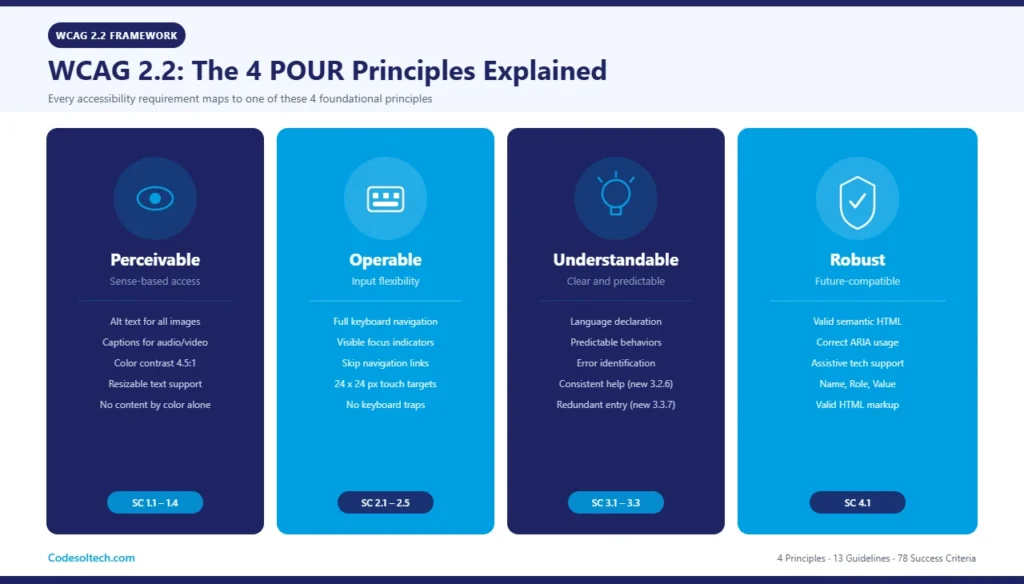
WCAG 2.2 organizes all accessibility requirements into a 3-layer architecture: Principles → Guidelines → Success Criteria. The 4 principles form the acronym POUR. Each principle contains multiple guidelines. Each guideline contains testable success criteria assigned to one of 3 conformance levels: A, AA, or AAA.
The 4 WCAG 2.2 Principles (POUR Model)
- Perceivable: Users perceive all information through at least one sense. Text alternatives for images, captions for audio, and sufficient color contrast are Perceivable requirements.
- Operable: Users operate all interface components and navigation using keyboard, pointer, or assistive input devices. Focus indicators, skip navigation links, and sufficient touch target sizes are Operable requirements.
- Understandable: Users understand both the content and the interface behavior. Predictable page behavior, error identification, and language declaration are Understandable requirements.
- Robust: Content remains interpretable by current and future assistive technologies. Valid, well-structured HTML and correct ARIA implementation are Robust requirements.
WCAG 2.2 Conformance Levels: A, AA, and AAA
WCAG 2.2 defines 3 conformance levels to categorize the relative impact and achievability of each success criterion. Level A (25 criteria) addresses the most critical barriers. Level AA (13 additional criteria) sets the internationally accepted legal baseline. Level AAA (23 additional criteria) represents enhanced accessibility for specialized contexts and is not required as a blanket standard.
The web development process at CodeSolTech targets WCAG 2.2 Level AA conformance as the default build standard for all client projects, ensuring both legal compliance and maximum user reach.
What Are the 9 New Success Criteria in WCAG 2.2?
WCAG 2.2 adds 9 new success criteria that did not exist in WCAG 2.1. These criteria address mobile usability, cognitive accessibility, and focus-visibility deficiencies identified through real-world testing from 2018 to 2023. WCAG 2.2 also removes Success Criterion 4.1.1 (Parsing), which became redundant due to improvements in modern browser rendering engines.
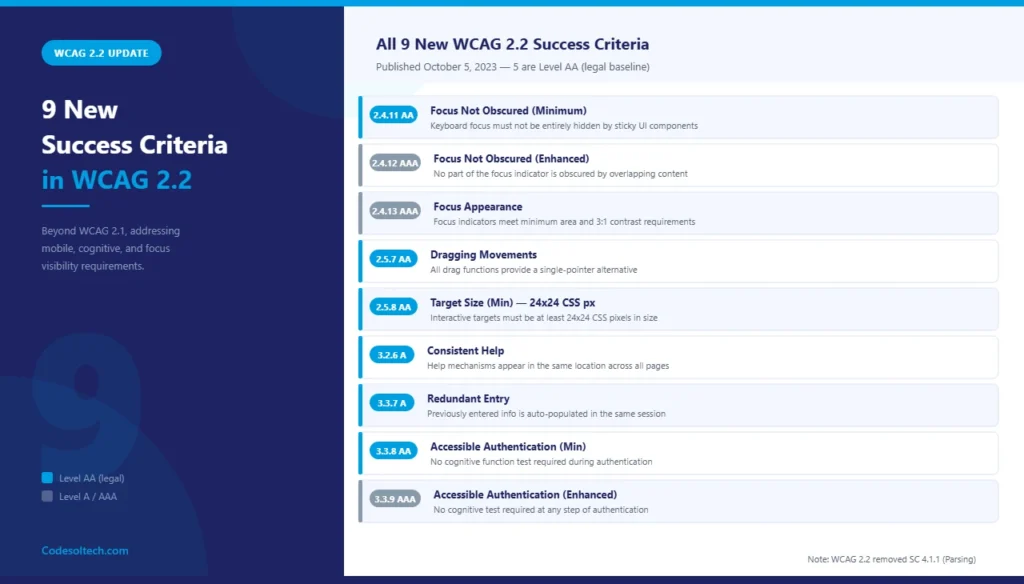
- 2.4.11 – Focus Not Obscured (Minimum) [AA]: Keyboard focus indicators are not entirely hidden by sticky headers or overlapping components.
- 2.4.12 – Focus Not Obscured (Enhanced) [AAA]: No part of the keyboard focus indicator is obscured by other content.
- 2.4.13 – Focus Appearance [AAA]: Focus indicators meet minimum area (perimeter of the component × 2 CSS pixels) and contrast (3:1) requirements.
- 2.5.7 – Dragging Movements [AA]: All functionality requiring dragging provides a single-pointer alternative (e.g., click-and-drop).
- 2.5.8 – Target Size (Minimum) [AA]: Interactive targets are at least 24×24 CSS pixels in size, or have sufficient spacing to prevent accidental activation.
- 3.2.6 – Consistent Help [A]: Help mechanisms (contact links, chat widgets) appear in the same location across all pages within a set.
- 3.3.7 – Redundant Entry [A]: Information previously entered in the same session is either auto-populated or available for selection to reduce cognitive load.
- 3.3.8 – Accessible Authentication (Minimum) [AA]: Authentication processes do not require users to solve cognitive function tests (puzzles, memorization) unless alternatives exist.
- 3.3.9 – Accessible Authentication (Enhanced) [AAA]: No cognitive function test is required at any step of authentication.
Semantic HTML: The Structural Foundation of Web Accessibility
Semantic HTML uses elements whose tag names convey their function and meaning to browsers, screen readers, and search engines. Elements such as <header>, <nav>, <main>, <article>, <section>, <aside>, and <footer> carry inherent landmark roles that assistive technologies expose to users as navigation points. A non-semantic structure built entirely with <div> and <span> tags produces zero landmark information.
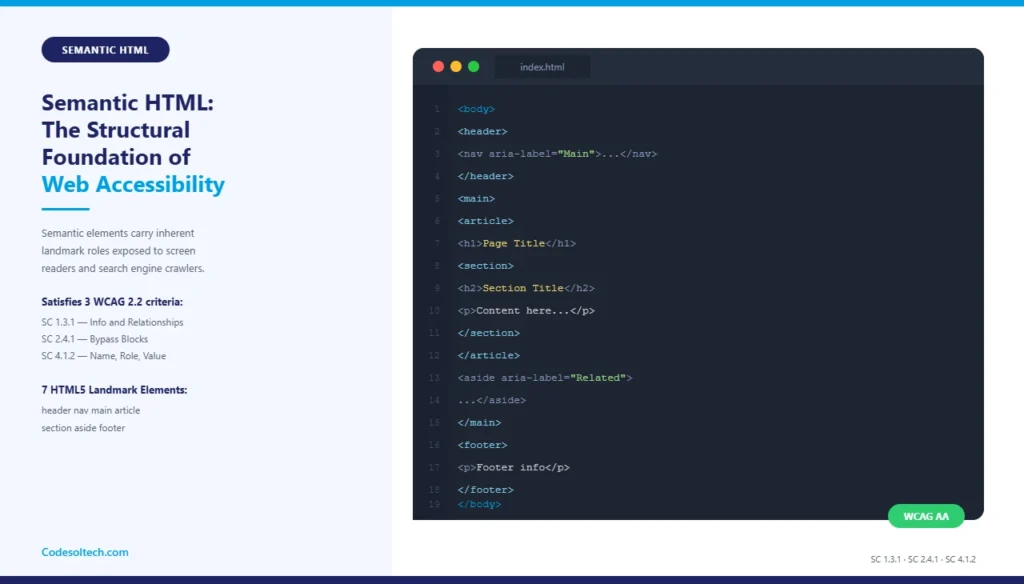
The W3C specifies that the correct use of semantic HTML satisfies multiple WCAG 2.2 success criteria simultaneously: 1.3.1 (Info and Relationships), 2.4.1 (Bypass Blocks), and 4.1.2 (Name, Role, Value). Each heading level — <h1> through <h6> — must follow a strict nesting hierarchy to create an accessible document outline.
Semantic HTML Best Practices for WCAG 2.2 Compliance
- Use
<button>for all interactive controls that trigger actions, and<a href>exclusively for navigation to URLs. - Use
<label>elements associated with every<input>,<select>, and<textarea>via theforattribute matching the input’sid. - Use
<table>only for tabular data, not for layout, and include<th scope="col/row">headers in every data table. - Declare the document language with
<html lang="en">to satisfy SC 3.1.1 (Language of Page). - Use
<figure>and<figcaption>to associate visual content with its descriptive caption. - Replace
<div role="button">anti-patterns with native<button>elements to avoid requiring manual ARIA keyboard event handling.
Search engines process semantic HTML as structured data signals. The technical SEO services at CodeSolTech audit semantic structure as a first-pass accessibility and crawlability signal, because both disciplines share the same underlying requirement: machine-readable content hierarchy.
ARIA Labels: Accessible Names for Interactive and Dynamic Elements
ARIA (Accessible Rich Internet Applications) is a W3C specification that defines a set of HTML attributes — role, aria-* states, and aria-* properties — used to supplement or override the default accessibility semantics of HTML elements. ARIA does not change visual rendering; it modifies only the Accessibility Tree that assistive technologies consume.
The ARIA specification establishes 3 categories of attributes: Roles (define element type), Properties (define element characteristics), and States (define dynamic element conditions). WCAG 2.2 Success Criterion 4.1.2 requires that all interactive components expose a valid accessible name, role, and state to the accessibility tree.
How Do ARIA Labels Work in Practice?
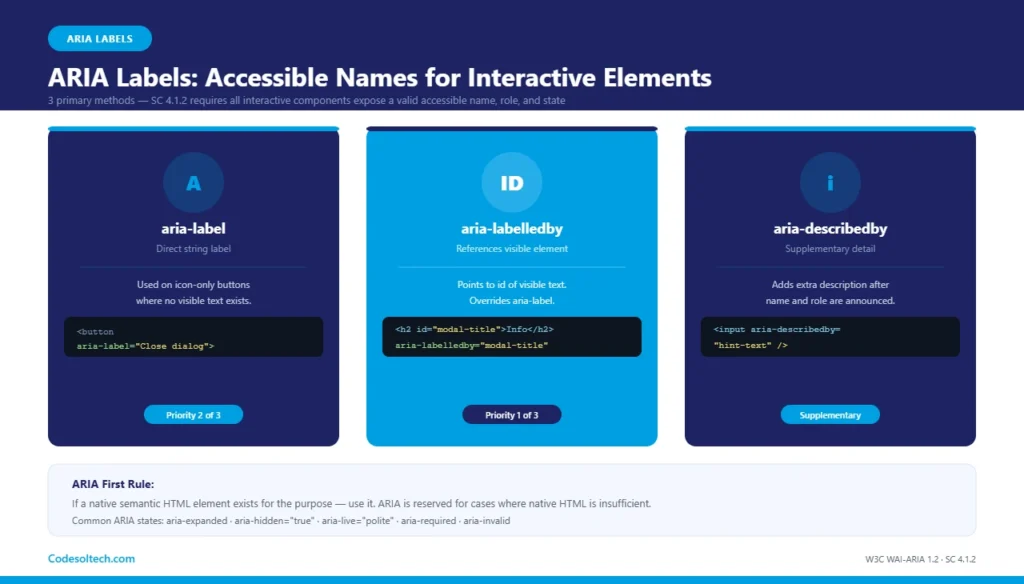
ARIA labels provide accessible names to elements that lack visible text labels. The 3 primary methods for assigning an accessible name using ARIA are: aria-label, aria-labelledby, and aria-describedby. The W3C defines a strict accessible name computation algorithm that determines which method takes precedence when multiple labeling mechanisms exist on the same element.
aria-label: Assigns a direct string as the accessible name. Used on icon-only buttons where no visible text exists. Example:<button aria-label="Close dialog"><svg ...></svg></button>.aria-labelledby: References theidof another visible element whose text content becomes the accessible name. It overridesaria-labelin the computation algorithm.aria-describedby: References supplementary descriptive text. It supplements (not replaces) the accessible name and is announced after the name and role by screen readers.aria-live: Declares a region that updates dynamically. Valuespoliteandassertivecontrol announcement interruption priority for screen readers.aria-expanded: Communicates the open/closed state of accordion panels, dropdowns, and navigation menus. Required on all toggle controls.aria-hidden="true": Removes decorative elements (icon SVGs, background images) from the accessibility tree to prevent redundant announcements.
The MDN Web Docs ARIA reference documents all 69 ARIA roles and their associated required and supported states and properties. The first rule of ARIA use states: if a native semantic HTML element exists for the purpose, use it — ARIA is reserved for cases where native HTML is insufficient.
Color Contrast in WCAG 2.2: Ratios, Requirements, and Testing
Color contrast ratio is the mathematical relationship between the relative luminance of foreground text and its background. The W3C calculates this ratio using the formula defined in WCAG 2.2 Definition: Relative Luminance. The ratio ranges from 1:1 (no contrast, identical colors) to 21:1 (maximum contrast, black on white).
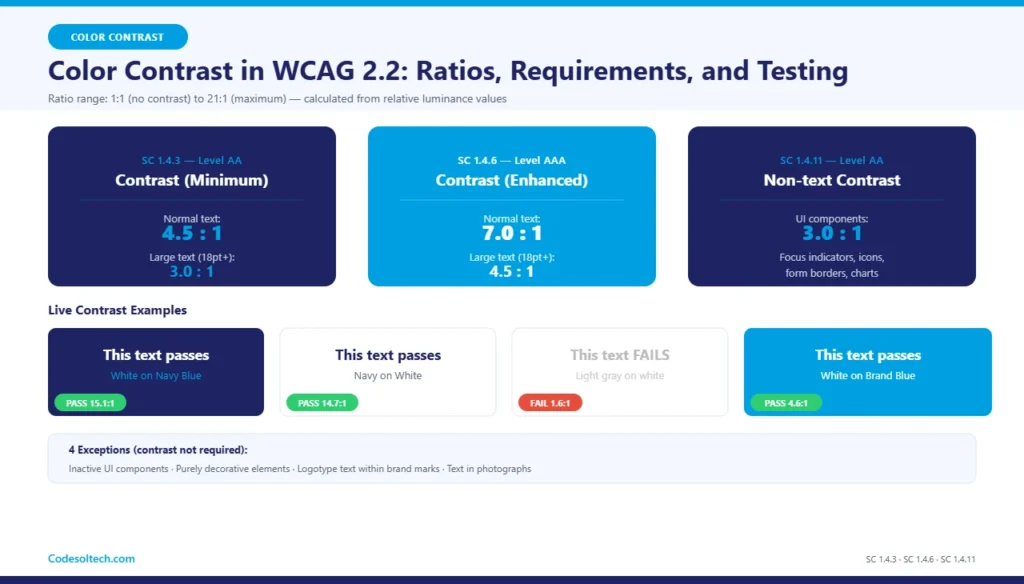
WCAG 2.2 defines 2 contrast success criteria with distinct thresholds for normal and large text. Large text is defined as 18pt (24px) regular weight or 14pt (18.67px) bold weight. Text below these sizes is normal text and requires higher contrast ratios.
- SC 1.4.3 – Contrast (Minimum) [AA]: Normal text requires a minimum contrast ratio of 4.5:1. Large text requires a minimum ratio of 3:1.
- SC 1.4.6 – Contrast (Enhanced) [AAA]: Normal text requires a minimum contrast ratio of 7:1. Large text requires a minimum ratio of 4.5:1.
- SC 1.4.11 – Non-text Contrast [AA]: UI components (form borders, focus indicators, chart lines) and informational graphics require a minimum contrast ratio of 3:1 against adjacent colors.
4 exceptions exist where contrast requirements do not apply: inactive UI components, purely decorative elements, logotype text within brand marks, and text embedded in photographs. Designers must test all interactive and informational elements in both light and dark theme variants before release.
Color Contrast Testing Tools
- WebAIM Contrast Checker (webaim.org): Calculates contrast ratio between two hex color values and reports pass/fail for AA and AAA levels.
- Chrome DevTools Accessibility Panel: Highlights contrast failures directly on rendered page elements with suggested fix values.
- Colour Contrast Analyser (TPGi): Desktop tool supporting eyedropper color sampling for testing against rendered gradients and images.
- axe DevTools: Browser extension that performs automated contrast audits as part of a full WCAG scan, reporting violations with element selectors.
Does Web Accessibility Improve SEO Rankings?
Web accessibility and technical SEO share 11 overlapping implementation requirements. Both disciplines require descriptive alternative text (alt attributes), logical heading hierarchy, keyboard-navigable interactive elements, fast page load times (Core Web Vitals), and mobile-responsive layouts.
Google’s crawlers do not execute JavaScript by default during the first pass, so inaccessible, JavaScript-dependent content that lacks server-side fallbacks is invisible to both screen readers and Googlebot.
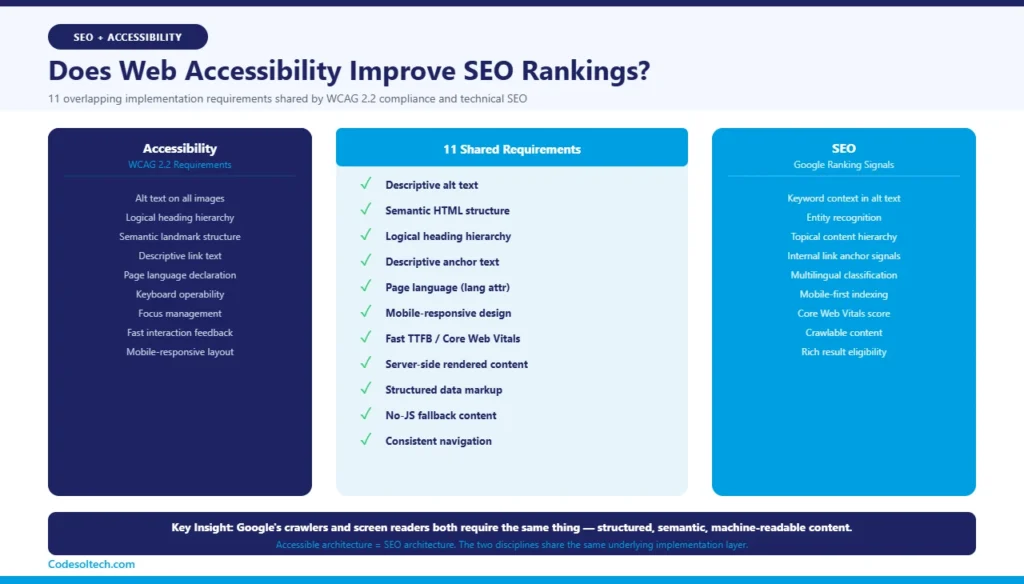
- Alt text on images satisfies WCAG 2.2 SC 1.1.1 and provides keyword context to Google Images and entity recognition algorithms.
- Semantic landmark structure creates a predictable document outline that both screen readers and Google’s NLP systems parse to establish topical relevance.
- Descriptive link text (WCAG SC 2.4.4) eliminates “click here” anchor text that carries no semantic weight for crawlers or users.
- Fast Time to First Byte (TTFB), required for Core Web Vitals, directly aligns with WCAG 2.2’s requirement for responsive, low-latency interaction feedback.
- Page language declaration (
langattribute) assists both screen reader pronunciation engines and Google’s language classification for multilingual search.
The full-stack development services at CodeSolTech integrate accessibility audits into the pre-launch QA checklist, ensuring semantic structure, ARIA implementation, and contrast compliance are validated before deployment. Accessible architecture is SEO architecture — the two are not separate concerns.
Web Accessibility Testing: 4 Methods Developers Use
WCAG 2.2 compliance testing requires 4 combined methods because no single automated tool detects all 78 success criteria. Automated tools identify approximately 30–40% of WCAG violations; the remaining violations require manual and assistive-technology testing. The W3C Web Accessibility Initiative evaluation methodology defines a 5-step conformance evaluation process for websites.
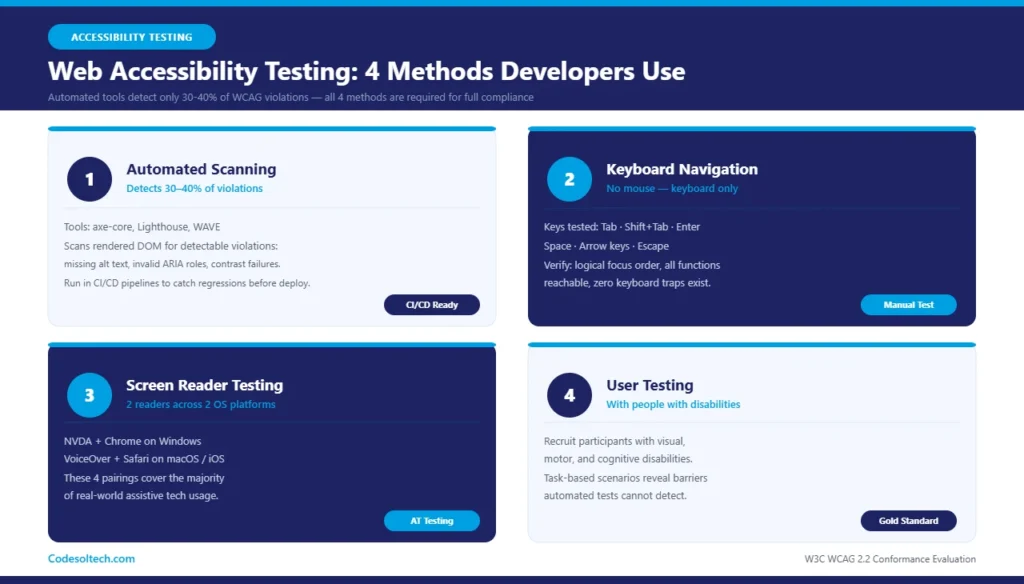
- 1. Automated Scanning: Tools like axe-core, Lighthouse, and WAVE scan the rendered DOM for detectable violations (missing alt text, invalid ARIA roles, contrast failures). Run automated scans in CI/CD pipelines to catch regressions before production deployment.
- 2. Keyboard Navigation Testing: Navigate all interactive elements using Tab, Shift+Tab, Enter, Space, and arrow keys without a mouse. Verify that focus order is logical, all functions are reachable, and no keyboard trap exists at any point.
- 3. Screen Reader Testing: Test with 2 screen readers across 2 operating systems: NVDA + Chrome on Windows and VoiceOver + Safari on macOS/iOS. These 4 pairings cover the majority of real-world assistive technology usage.
- 4. User Testing with People with Disabilities: Recruit participants with visual, motor, and cognitive disabilities to complete task-based scenarios. This method identifies usability barriers that automated and manual technical tests do not detect.
Final Words
WCAG 2.2 is not optional it is the enforced legal and technical standard for web accessibility in 2024 and beyond.
Semantic HTML, ARIA labels, and color contrast are the 3 pillars that determine whether a website is usable by all 1.3 billion people living with disabilities worldwide.
Accessible websites rank better, convert more broadly, and face zero legal liability. Build accessible from day one — retrofitting costs 10× more than building right the first time.
Build an Accessible, High-Ranking Website With CodeSolTech
Our development team at CodeSol Technologies builds every website to WCAG 2.2 Level AA standards fully semantic, ARIA-compliant, and contrast-tested. Whether you need an accessibility audit on an existing project or a compliant build from scratch, we deliver measurable results.