A dental CRM tracks the full patient relationship recall due dates, treatment plan follow-up, insurance renewals, and reactivation outreach not just the calendar. Scheduling software books a time slot. A CRM prevents patients from disappearing between visits by triggering outreach based on clinical and behavioral data, not manual staff memory.
A CRM performs a broader function: it decides who needs to be contacted, when, and why, based on rules the practice defines.
Dental practice management software (PMS) handles the clinical and financial record charting, billing, insurance claims, and the appointment book. A CRM sits alongside or on top of the PMS and reads its data to trigger action. When a hygiene visit closes without a rebooked date, the CRM flags it.
When a treatment plan sits unaccepted for 30 days, the CRM queues a follow-up. The PMS records what happened. The CRM decides what happens next.
This distinction matters because most dental software failures are not scheduling failures. They are follow-up failures: patients who leave the office without a next step and never hear from the practice again until they book elsewhere or stop coming entirely.
Why Appointment-Only Systems Leave Revenue on the Table
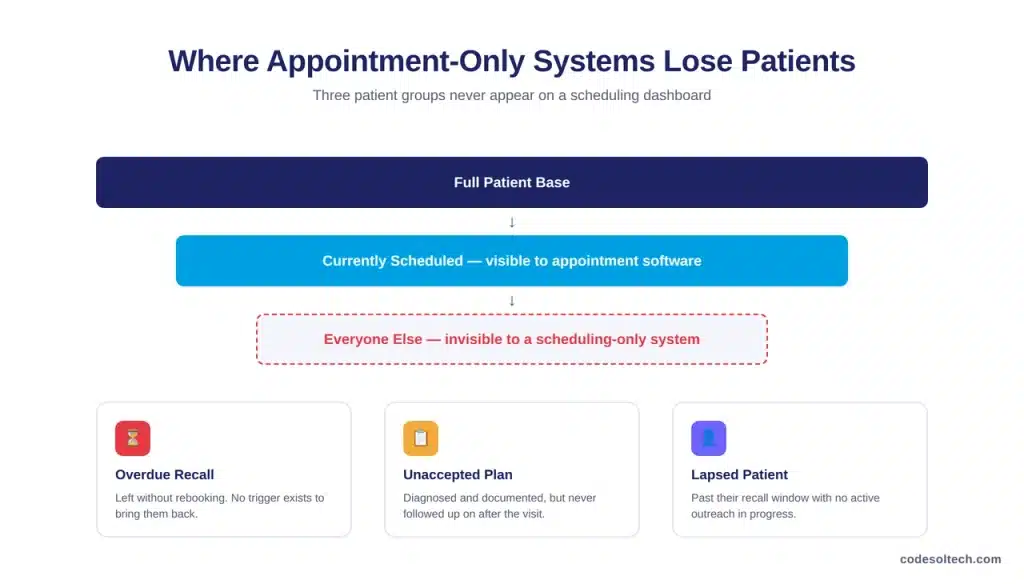
An appointment-only workflow only manages patients who are already scheduled. It does nothing for the patient who missed their last cleaning, the one whose treatment plan was never accepted, or the one who has quietly gone inactive.
These patients do not show up on a scheduling dashboard because there is nothing scheduled to show.
Reminder systems reduce this gap for patients who already have a booked visit.
A Cochrane systematic review of randomized controlled trials found that mobile phone text message reminders increased attendance at healthcare appointments compared with no reminders at all, with a risk ratio of 1.10 (95% CI 1.03–1.17) across the pooled trial data.
That effect only applies once a patient is on the schedule. It does not recover the patient who never rebooked.
A CRM closes the second gap. It identifies patients with no future appointment past their recall window and starts outreach automatically, without requiring front-desk staff to run manual reports or remember who is overdue.
Core Functions of a Dental Patient CRM
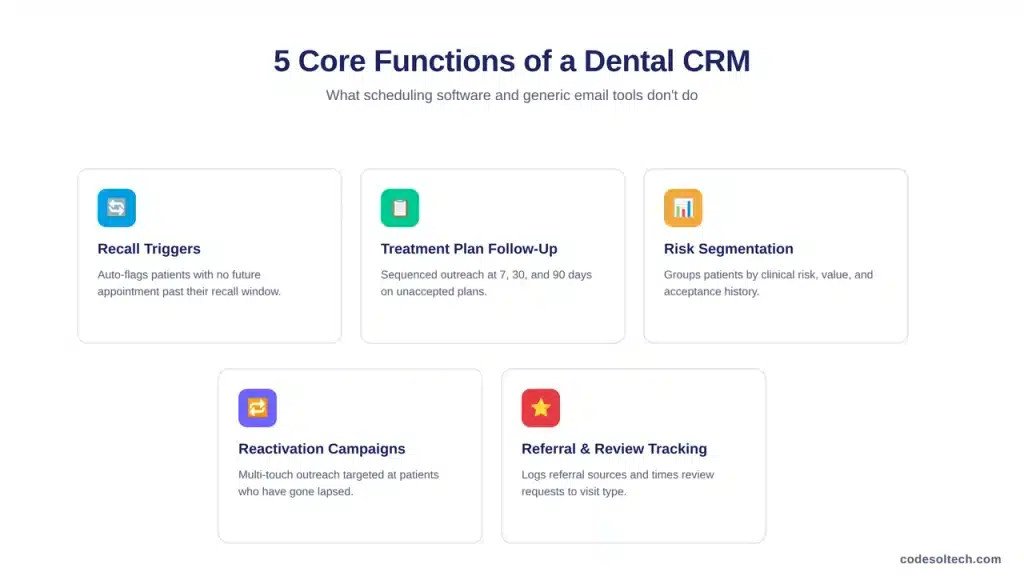
A dental CRM performs five core functions that scheduling software and generic email tools do not:
- Automated recall and reappointment triggers
- Treatment plan follow-up sequencing
- Patient segmentation by risk and value
- Reactivation campaigns for lapsed patients
- Referral and review tracking
Automated Recall and Reappointment Triggers
The CRM assigns each patient a recall interval based on clinical risk, then monitors whether a corresponding future appointment exists.
If a patient leaves without rebooking, the system starts a defined outreach sequence, typically a text, followed by email, followed by a phone task assigned to staff if no response follows.
This removes recall tracking from a spreadsheet or a paper tickler file and turns it into a rule the software enforces every day.
Treatment Plan Follow-Up
Unaccepted treatment plans represent diagnosed, documented need that generates no revenue until the patient commits.
A CRM tracks the date a plan was presented and triggers follow-up at set intervals, commonly 7, 30, and 90 days with messaging tailored to the treatment category.
Restorative and periodontal plans can route through different sequences than cosmetic or elective ones, since the urgency and objections differ.
Patient Segmentation by Risk and Value
Not every patient warrants the same outreach cadence. A CRM segments the patient base by variables such as periodontal risk, treatment acceptance history, insurance status, and total lifetime production.
High-risk periodontal maintenance patients receive tighter recall intervals and more aggressive reminders than low-risk patients on a standard annual exam schedule. Segmentation prevents both under-contacting high-need patients and over-messaging low-need ones.
Reactivation Campaigns for Lapsed Patients
A lapsed patient has passed their recall window without any scheduled visit or active outreach in progress. A CRM runs multi-touch reactivation campaigns combining text, email, and in some workflows postal mail targeted specifically at this segment.
Because reactivation targets a known, previously engaged patient rather than a cold lead, it typically operates at a lower acquisition cost than new patient marketing.
Referral and Review Tracking
A CRM logs which patients were referred, by whom, and whether the referral converted into an active patient record. It can also trigger review requests after positive treatment outcomes, timed to specific visit types rather than sent as a blanket request to every patient regardless of experience.
Dental CRM vs. Practice Management Software
Practices frequently ask whether a CRM replaces their existing practice management software. It does not. The two systems handle different jobs and typically operate together, with the CRM reading data from the PMS to trigger its own workflows.
| Function | Practice Management Software | Dental CRM |
|---|---|---|
| Primary record | Clinical charting, billing, insurance claims | Patient communication history and outreach status |
| Appointment book | Stores and displays scheduled visits | Monitors for missing or overdue appointments |
| Trigger logic | None — staff acts manually on the data | Automated rules based on recall date, treatment status, or inactivity |
| Patient segmentation | Not typically supported | Segments by risk, value, and behavior |
| Outreach channels | Limited to appointment confirmations | Text, email, phone tasks, and campaign sequences |
How Do Dental Practices Keep Patient Data HIPAA-Compliant in a CRM?
A dental CRM handling protected health information must operate under a signed Business Associate Agreement (BAA) with the practice, apply the HIPAA minimum necessary standard to message content, and log patient communication consent and preferences.
A recall text confirming an appointment date typically requires less scrutiny than a message referencing a specific diagnosis or treatment plan, so message templates should avoid unnecessary clinical detail.
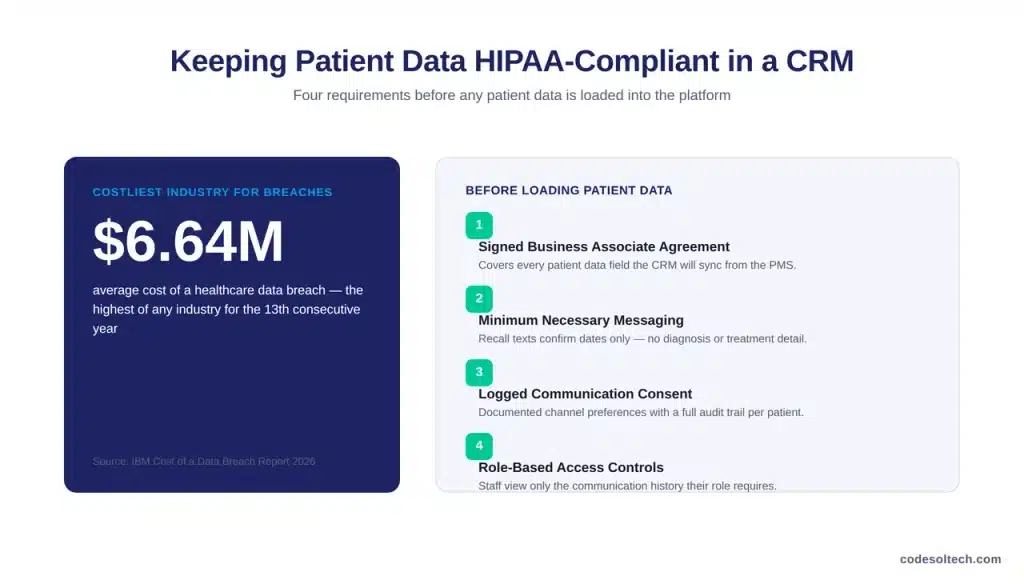
The financial stakes for getting this wrong are direct. Healthcare recorded the highest average data breach cost of any industry for the thirteenth consecutive year, at $6.64 million per incident, according to IBM’s 2026 Cost of a Data Breach Report.
Patient PII stored in a CRM names, contact details, appointment history, and in some cases, treatment categories falls within the scope of data that drives this cost, which is why vendor selection should include a documented BAA and confirmation of encryption at rest and in transit before any patient data is loaded into the platform.
Three practical requirements follow: confirm the CRM vendor’s BAA covers the specific data fields the practice plans to sync, restrict which staff roles can view full communication history, and maintain an audit trail of consent for each communication channel used.
Implementing a CRM Without Disrupting Front-Desk Workflow
Implementation fails most often when a practice imports messy data into a new system and expects clean automation to follow. The sequence below reduces that risk.
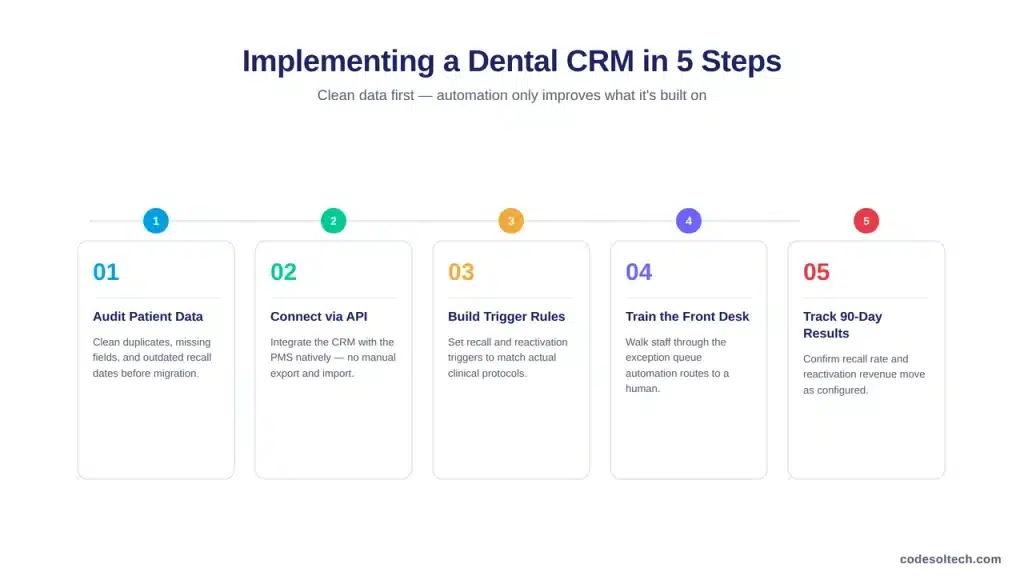
- Audit existing patient records for duplicate entries, missing contact fields, and outdated recall dates before migration.
- Connect the CRM to the practice management system through its native integration or API rather than manual export and import.
- Build recall and reactivation triggers around the practice’s actual clinical protocols, not default vendor settings.
- Train front-desk staff on the exception queue the list of patients the automation could not resolve and routes to a human.
- Track recall rate and reactivation revenue for 90 days post-launch to confirm the automation is functioning as configured.
A CRM connected to unreliable source data will automate unreliable outreach at scale, which is a worse outcome than manual tracking.
Data quality work at the start of implementation is what determines whether the system improves recall performance or simply reproduces the same failures faster.
FAQs
Does a dental practice need a CRM if it already has practice management software?
Yes, if recall, treatment plan follow-up, or reactivation currently rely on staff memory or manual reports. Practice management software stores the record; it does not generate outreach on its own.
Can a small, single-location practice justify a CRM?
Single-location practices are the most common CRM buyers, since they have the least staff capacity to manually track recall and reactivation across their full patient base.
Does CRM automation replace front-desk staff?
No. It removes repetitive tracking work, recall lists, follow-up calls for unaccepted plans, and routes exceptions to staff, so front-desk time shifts toward conversations the software cannot resolve.
How long does CRM implementation typically take?
Data audit and PMS integration are the longest steps. A practice with clean existing records can typically complete implementation and staff training within four to six weeks.
Final Words
Appointment scheduling manages patients who are already coming in. A CRM manages the far larger group who are not the overdue recall, the unaccepted plan, the lapsed patient.
That gap is where dental practices lose recurring revenue quietly, one missed rebooking at a time, without it ever showing up as a scheduling problem.
See What a CRM Recovers in Your Recall List
CodeSol Technologies builds and integrates dental CRM systems that connect to your existing practice management software and automate recall, treatment plan follow-up, and reactivation.