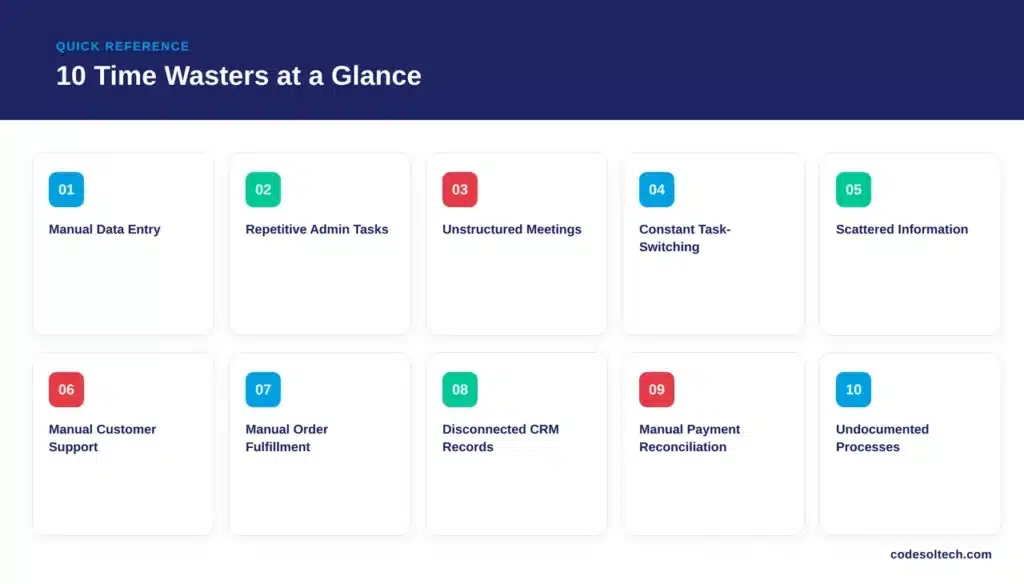
The biggest time wasters in small businesses are manual data entry, repetitive admin tasks, unstructured meetings, constant task-switching, scattered information systems, manual customer support, manual order fulfillment, disconnected CRM records, manual payment reconciliation, and undocumented processes.
Together, these ten issues consume 60% or more of a typical workweek that could otherwise be devoted to revenue-generating work.
Small business owners lose measurable hours every week to tasks that automation and structured systems eliminate. This article lists the ten highest-impact time wasters, quantifies their cost using primary research, and explains the direct fix for each one.
Each fix below maps to a specific automation or integration category, so business owners can prioritize which system to build or buy first.
What Is the Biggest Time Waster in Small Business Operations?
Manual data entry across disconnected systems is the single largest time-waster in small-business operations. Employees retype the same customer, order, and inventory data into separate tools because those tools do not communicate with each other.
This duplication compounds daily and scales with every new customer, order, or employee added to the business.
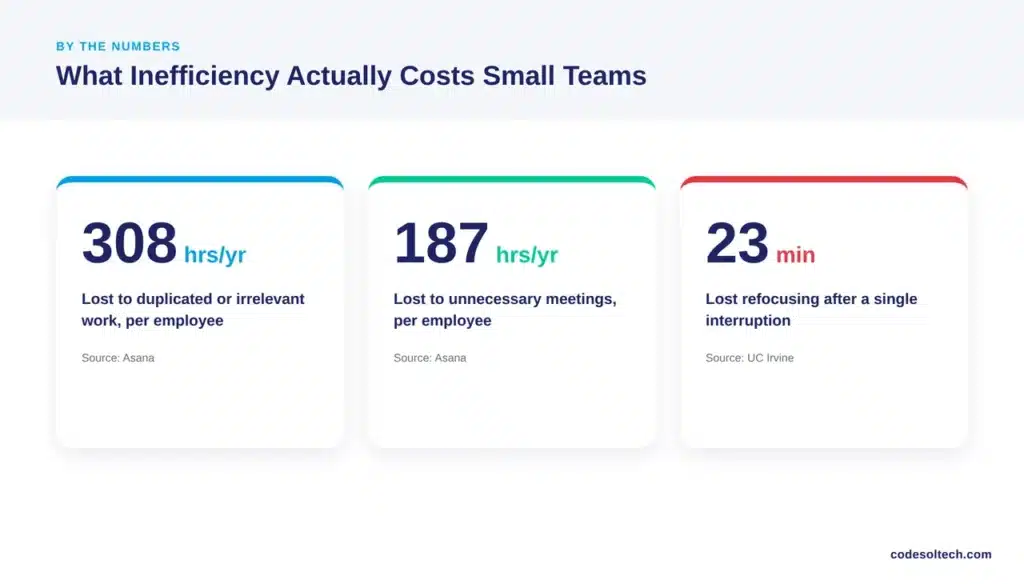
Asana’s Anatomy of Work Index found that U.S. knowledge workers lose 308 hours a year to duplicated work and tasks that are no longer relevant.
That figure equals 7.7 standard 40-hour workweeks per employee, per year, spent redoing work that already existed somewhere else in the business.
How Many Hours Does a Small Business Lose to Inefficiency Each Year?
A small business loses between 400 and 600 hours per employee each year to combined inefficiencies in meetings, searching, switching, and manual admin work. This estimate is calculated from three verified data points, not a single survey.
- Knowledge workers spend 61% of their time on “work about work” rather than skilled tasks, according to Asana.
- Employees spend 28% of the average workweek managing email and nearly 20% searching for internal information, according to McKinsey Global Institute.
- Every workplace interruption costs 23 minutes and 15 seconds of lost focus before full concentration returns, according to Gloria Mark’s research at UC Irvine.
These three data points overlap and compound. A single employee interrupted 6 times a day, for example, loses over 2 hours of deep focus daily before accounting for meetings or admin work.
Why Does Fixing These Time Wasters Matter for Small Businesses?
Fixing these time wasters matters because small businesses operate with fewer employees per task than larger companies, so every lost hour has a proportionally higher cost.
A 15-person company loses a full-time equivalent employee’s worth of output when inefficiency consumes even 6% of total staff hours.
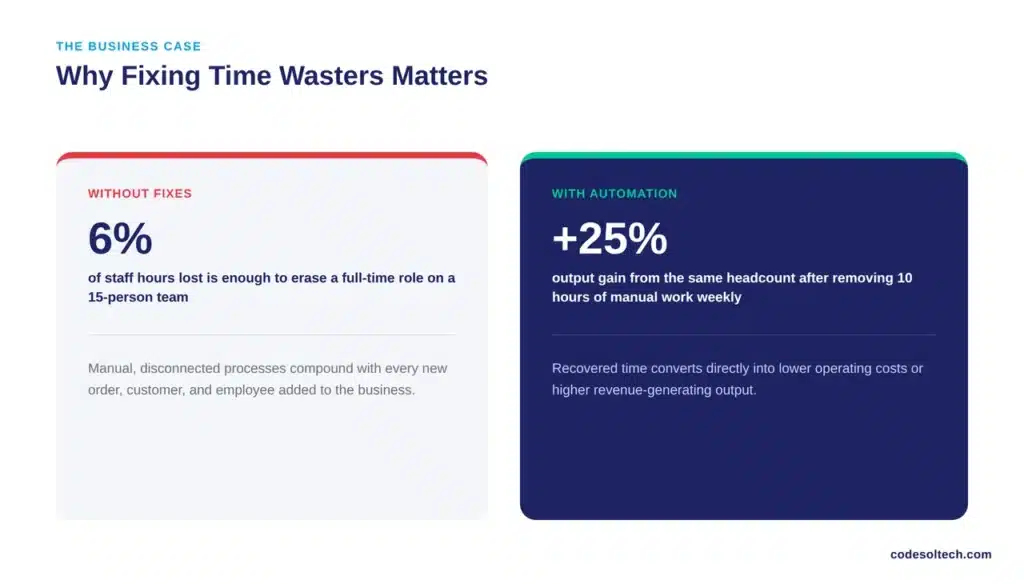
Recovered time converts directly into either lower operating costs or higher output from the same headcount.
A business that eliminates 10 hours of manual work per employee per week gains the equivalent of a 25% productivity increase without hiring a single additional person.
The 10 Biggest Time Wasters in Small Businesses
1. Manual Data Entry Across Disconnected Systems
Employees copy customer, order, and inventory data between spreadsheets, email, and standalone software because the systems lack integration. Each re-entry introduces a chance for human error and adds 5 to 10 minutes per record. A business processing 200 orders a week loses 16 to 33 hours weekly to this single task alone.
Custom software development connects these systems into a single data source and removes manual re-entry entirely. Integration also eliminates the version-control errors that occur when two employees update the same record in separate files.
2. Repetitive Administrative Tasks
Invoicing, appointment scheduling, and status reporting follow the same steps every time, yet most small businesses execute them manually. These tasks fit a fixed, rule-based pattern that software automates without ongoing human input.
- Manual invoice generation
- Manual appointment confirmations
- Manual status and progress reports
- Manual approval routing
Workflow automation converts these repetitive tasks into automated sequences that run without daily supervision.
3. Excessive and Unstructured Meetings
Unnecessary meetings cost U.S. knowledge workers 187 hours per year, according to Asana’s Anatomy of Work Index.1 A meeting without a written agenda, a defined decision, and a fixed end time functions as unstructured time, not productive work.
Small businesses reduce this cost by replacing status-update meetings with asynchronous written updates and by capping meetings at 25 or 50 minutes instead of the default 30 or 60.
A required agenda field before scheduling a meeting also cuts unnecessary invites, since organizers must define the decision the meeting exists to make.
4. Constant Task-Switching and Interruptions
Every interruption costs 23 minutes and 15 seconds of full focus recovery time, based on Gloria Mark’s research at UC Irvine. Chat notifications, unscheduled phone calls, and walk-up questions each trigger this recovery cost, regardless of how brief the interruption itself feels.
Employees who batch communication into two or three fixed windows per day protect deep-focus time and reduce total daily interruptions.
5. Searching for Scattered Information
Employees spend nearly 20% of the workweek searching for internal information, according to McKinsey Global Institute. Files stored across email threads, shared drives, and individual laptops force employees to hunt for the same document repeatedly.
A centralized, searchable system removes this search cost and returns that time directly to billable or revenue-generating work.
6. Manual Customer Support and Repetitive Queries
Small business support teams answer the same 10 to 15 questions daily: order status, business hours, pricing, and return policy. Each manual reply takes 2 to 5 minutes that a pre-built response resolves instantly.
Chatbot integration automates repetitive customer queries and routes only complex cases to a human agent. This shift lets support staff spend their time on issues that require judgment instead of repeating the same answer dozens of times per day.
7. Manual Order Processing and Fulfillment
Ecommerce businesses that manually check inventory, print labels, and update tracking numbers lose 10 to 20 minutes per order compared to automated fulfillment systems. This gap widens during peak sales periods and directly delays shipping times.
Fulfillment automation synchronizes inventory, shipping, and tracking across every sales channel in real time.
8. Disconnected CRM Records and Manual Lead Tracking
Sales teams that track leads in spreadsheets duplicate follow-ups, miss deadlines, and lose deal history when an employee leaves. Manual lead tracking also prevents accurate forecasting, since data lives in multiple, unsynced files.
CRM integration centralizes every customer interaction into one record, eliminating duplicate outreach and missed follow-ups.
9. Manual Payment Reconciliation
Finance staff who manually match invoices, bank deposits, and payment gateway reports spend 3 to 8 hours weekly on reconciliation for a typical small business. Manual reconciliation also delays month-end closing by an average of 3 to 5 business days.
Payment gateway integration automates transaction matching and produces reconciled records without manual review. Automated reconciliation also flags discrepancies immediately, instead of surfacing errors weeks later during a manual review cycle.
10. Undocumented Processes and Inconsistent Onboarding
Businesses without written standard operating procedures re-train every new employee from scratch and rely on informal, tribal knowledge that leaves with departing staff. This gap also causes inconsistent output, since two employees may complete the same task differently.
Documenting core workflows once and pairing that documentation with ERP integration creates a repeatable, auditable system that scales beyond any single employee’s memory.
Time Wasters Ranked by Annual Hours Lost
| Time Waster | Estimated Annual Hours Lost (Per Employee) | Primary Fix |
|---|---|---|
| Manual data entry | 400+ | Custom software integration |
| Duplicated / irrelevant work | 308 | Workflow automation |
| Unnecessary meetings | 187 | Structured, async updates |
| Searching for information | ~400 (20% of workweek) | Centralized systems |
| Email management | ~580 (28% of workweek) | Automated notifications and filters |
| Task-switching recovery | Varies by interruption count | Batched communication windows |
The table above uses per-employee annual estimates drawn from the primary sources cited in this article. Businesses with 10 or more employees should multiply each figure by headcount to calculate total organizational hours lost, since these costs compound across every person performing the same manual task.
Final Words
Ten time wasters account for the majority of lost productivity in small businesses, and each one has a documented, measurable fix.
Manual, disconnected processes cost hundreds of hours per employee every year. Automation and integrated systems recover that time directly, without adding headcount.
Recover Lost Hours With Automated Systems
We build custom software, automation, and integration systems that eliminate manual work at its source. Contact Codesoltech to audit your current workflows and identify which of these ten time wasters is costing your business the most.